

WebTrickz
TRENDING
  • Complete list of 1337x Proxy and Mirror Sites
No Result
View All Result
  • Reviews
  • Editorials
  • Social Media
    • Facebook
    • Twitter
    • YouTube
    • Messenger
    • Instagram
    • Snapchat
    • WhatsApp
    • TikTok
  • Apps
  • How To’s
  • Apple
  • iPhone
  • Google
  • Android
  • Mac
  • Security
  • About Us
    • About Us
    • Contact Us
    • Privacy Policy
  • Reviews
  • Editorials
  • Social Media
    • Facebook
    • Twitter
    • YouTube
    • Messenger
    • Instagram
    • Snapchat
    • WhatsApp
    • TikTok
  • Apps
  • How To’s
  • Apple
  • iPhone
  • Google
  • Android
  • Mac
  • Security
  • About Us
    • About Us
    • Contact Us
    • Privacy Policy
No Result
View All Result
WebTrickz
No Result
View All Result
Home Tips & Tricks

Download & Save All Images from web page in Chrome & Firefox

Mayur by Mayur
February 16, 2024
in Tips & Tricks

We can always use the ‘Save image as’ option to save an image, but it becomes difficult when there are a lot of Images/Photos/Pictures which we want to download quickly.

Here is an easy way that lets you extract all the images from a web page, in Chrome and Firefox browser, without using any add-on or extension. Follow the steps below:

1. Open the desired webpage and let it load completely.

2. Right-click on the web page and select Save As (in chrome) or Save Page as (in Firefox).
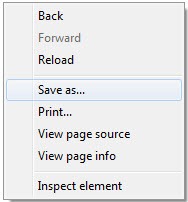
Save as..

3. Save the page to your desktop. Make sure to select “Web Page, Complete” in Save as type column.

saving web page images

4. Browser will now download and save, all the images from that web page to a folder on your desktop. Just open that folder to see the images.

You can also use the ‘Save Images’ add-on but it is available for Firefox only.

I used this method to save all the Holi 2010 images compiled by The Big Picture.

Tags: BrowserChromeFirefoxTipsTricksTutorials
ShareTweetSend
Previous Post

How to transfer Chrome bookmarks to Opera?

Next Post

Street Fighter IV now available for iPhone & iPod Touch

Mayur

Mayur

Mayur Agarwal, the founder and editor of WebTrickz, is a tech enthusiast with a Bachelor's degree in Computer Applications and over 15 years of experience in tech writing. His passion for technology and gadgets drives him to create insightful how-to articles and troubleshooting guides.

Next Post

Street Fighter IV now available for iPhone & iPod Touch

Comments 13

  1. Marcel says:
    16 years ago

    This will not save any background images attached to a page via CSS.

    Reply
  2. Thomas says:
    16 years ago

    Chrome has some nice things going on, in the right click menu, just today i noticed that if you right click on a — video you are shown the option to grab the embed code or watch video at –.

    Reply
  3. Eric says:
    16 years ago

    If your page is showing thumbnails with links to the full-size images, this won’t work. With Firefox, you have DownThemAll that works great for those kinds of needs. On Chrome…

    Reply
  4. Nabil says:
    16 years ago

    If possible, could you publish a blog post about how to save images quickly from Chrome? Haven’t seen one yet…

    Reply
    • Mayur says:
      16 years ago

      This post is about that only which works both in Chrome and Firefox.

      Reply
  5. Eric K says:
    15 years ago

    I’d also recommend Firefox CacheViewer. You can reach into your cache and recover files that you have downloaded. It is really nice for images or files that are loaded via Ajax.

    Reply
    • mr. karate says:
      14 years ago

      firefox is not the only browser that has cache viewer.
      besides, it doesn’t save pictures in bulk

      Reply
  6. zzllrr says:
    15 years ago

    You may try zzllrr imager ( http://goo.gl/n8SMk ) to save all Chrome images at once just by several clicks of mouse. This extension supports crawling all images including CSS background images and even images hidden in text. It is an image bulk download tool. The new version integrates many engines and rules for crawling images instantly.

    Reply
  7. dee says:
    15 years ago

    all the unnecessary things are kept along with this method.
    I was expecting bulk downloader that actually work for Chrome,
    or Picasa script or so.

    Reply
  8. Dafuq says:
    14 years ago

    FACEPALM….

    Reply
  9. Amitesh says:
    13 years ago

    thanks for your useful information…

    Reply
  10. mehran says:
    11 years ago

    Thank you!

    Reply
  11. liam says:
    4 years ago

    did NOT work for Chrome

    Reply

Leave a Reply Cancel reply

Your email address will not be published. Required fields are marked *

Latest Stories

microsoft edge new logo

How to Turn Off Notifications in Microsoft Edge (2026 Guide)

June 8, 2026
chatgpt logo

How to Clear or Delete ChatGPT Memory on PC and Mobile

June 5, 2026
1337x logo

1337x Proxy List 2026: Working Proxy & Mirror Sites

June 2, 2026

How to Find Saved Reels on Facebook App & Desktop (2026)

June 8, 2026
microsoft edge browser

How to Restore or Reopen Closed Tabs in Microsoft Edge

March 26, 2026
Facebook app on iPhone

How to See Recently Watched Reels on Facebook (2026 Guide)

June 5, 2026
microsoft edge new logo

Download Microsoft Edge Offline Installer [Latest Version]

March 16, 2026

Trending Stories

  • microsoft family safety settings

    How to Turn Off Microsoft Family Safety on Windows 11 & 10

  • 1337x Proxy List 2026: Working Proxy & Mirror Sites

  • How to Turn Off Microsoft Edge Game Assist in Windows 11

  • How to Turn Off Fn Lock or Fn Key on Windows 11/10 Laptop

  • How to See Recently Watched Reels on Facebook (2026 Guide)

  • About Us
  • Contact Us
  • Privacy Policy
  • Advertise

© 2026 WebTrickz. All Rights Reserved.

No Result
View All Result
  • Reviews
  • Apps
  • How To’s
  • Android
  • Google
  • iPhone
  • Mac
  • About Us
  • Contact Us
  • Privacy Policy

© 2026 WebTrickz. All Rights Reserved.






