Below are 3 Free Benchmarking Softwares for your PC which can tell you detailed information about your hardware devices like CPU, Mainboard, Memory, Graphics, etc.
CPU-Z
CPU-Z is a freeware that gathers information on some of the main devices of your system. CPU-Z does not need to be installed. Just unzip the files in a directory and run the .exe.
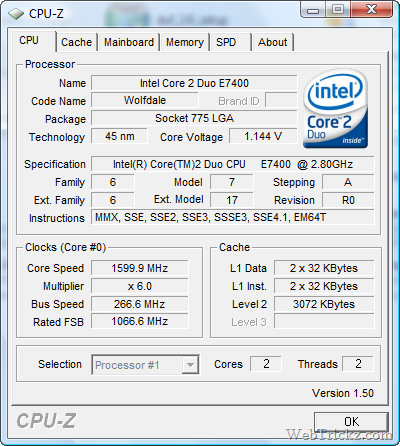
CPU
- Name and number.
- Core stepping and process.
- Package.
- Core voltage.
- Internal and external clocks, clock multiplier.
- Supported instructions sets.
- Cache information.
Mainboard
- Vendor, model and revision.
- BIOS model and date.
- Chipset (Northbridge and Southbridge) and sensor.
- Graphic interface.
Memory
- Frequency and timings.
- Module(s) specification using SPD (Serial Presence Detect) : vendor, serial number, timings table.
System
- Windows and DirectX version.
EVEREST Home Edition
EVEREST Home Edition is a freeware hardware diagnostics and memory benchmarking solution for home PC users, based on the award-winning EVEREST Technology. It offers the world’s most accurate hardware information and diagnostics capabilities, including online features, memory benchmarks, hardware monitoring, and low-level hardware information.
Fresh Diagnose
Fresh Diagnose is a utility designed to analyze and benchmark your computer system. It can analyze and benchmark many kinds of hardware, such as CPU performance, hard disk performance, video system information, mainboards information, and more!