


 I am a fan of e-books and that is one of the many reasons why I prefer Mac over Windows. One of the best features in Mac OS X is their universal dictionary. Just select a word anywhere and press command-control-D to get its meaning. In search of similar software for Windows, I found WordWeb.
WordWeb is a powerful, lightweight (takes around 2MB RAM) and must-have tool for an (e)book-worm. The many of it’s best features are:
- Shortcut – Just press control and right-click on any word to get the meaning and thesaurus (this can be customized too).
- Universal Dictionary – You can use it with anything including Adobe Reader, web-pages, Media Player (for lyrics) etc.
- Offline – It works offline also, just in case you require it on your office computer which does not have a net connection, or in classes during lectures.
- Web Reference – It also provides the web-reference in case you prefer Wiki-Dictionary over others.
- FREE – and above all, WordWeb is FREE :D.
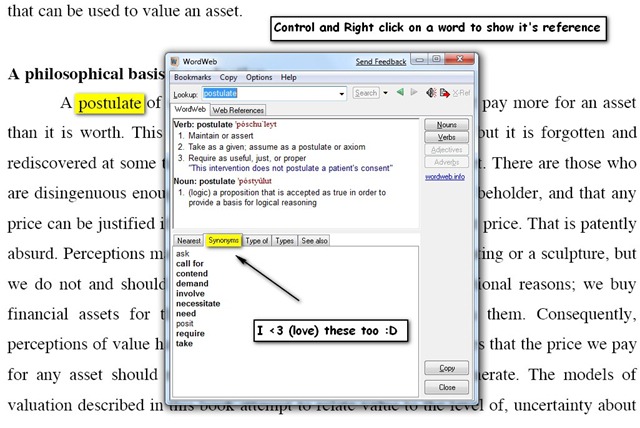
So next time you are reading an e-book, don’t look for the handbook dictionary, just press Ctrl and Right Click on the word :D.
This article is written by our co-author Pratyush Mittal, who writes @ FuLLy-FaLtOo.com









I really like it, thanks Mayur and Pratyush for sharing this.
Thanks Sabhu, we like to share the new tricks with our readers and you keep us going :D.
Hey… Thanxs buddy for such a wonderful post !!!
Never ever thought that such a software exists.
Now the fun reading E-Books would just multiply.
Gr8 post. Thanx…
Thanks to you, I installed a lot of useful programs today.
I have to say…. YOUR BLOG IS REALLY COOOOL!!!!
Thanks 🙂
Hi pratyush,
really nice link… thanks… 😀
Great post, I was looking for just this 🙂
Too bad this cannot preserve the same good looks the apple dictionary has.. This one is very… windows like looking ^^’ I guess one of the major differences bewteen mac and windows users, windows users only need practicality not good looking stuff (generalisation, I know)