


Google Instant is just announced by Google, which shows search results as users type their search term in the search bar. This is definitely a useful feature and saves time too, but there may be some users like me who wish to disable Google Instant.
Google Instant can be easily turned off, following 2 ways below:
1. You can turn off Google Instant by clicking the Instant is on link next to the search box on any search results page, and selecting the Off option.
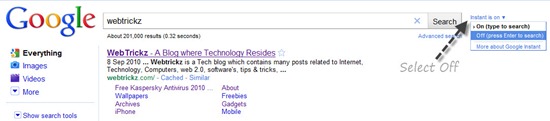
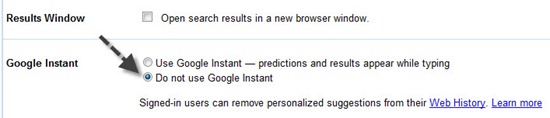
2. To permanently disable Google instant, visit your Preferences page. Scroll down to Google Instant and select the “Do not use Google Instant” radio button. Then, click the ‘Save Preferences’ button.








For the moment I disabled the instant search may be coz of my typing speed and the way I search..but it could be really useful for people whose typing speed is low…
For those that (sensibly) do not keep cookies, each time FF is restarted, Instant is back on. Here is a solution that will turn it off permenantly in FF. IE users, change browsers or get used to it!
FF users don’t need any add-ons or scripts to disable this.
Nor do they need to change their homepage.
In FF you can disable instant search and instant previews by modifying the about:config file.
Instructions here-
Simple and it worked for me with no (as yet) apparent problems.
Thanks, E-How!