


One cool feature I liked in Windows 7 was the introduction of the new Superbar in place of the old taskbar. The Superbar is a very cool and useful feature because it makes your taskbar clutter-free. It does this by showing only the icons and not the application labels on the taskbar. This makes you open multiple windows simultaneously as the space is taken very less.
Old taskbar in Vista

New Windows 7 like superbar in Vista

You can also try and use this amazing feature on Windows Vista to give it a clean look as similar to the Windows 7 Superbar or icon-only taskbar.
Follow the registry hack below to get it done:
1. Click the Start button, type in regedit, and hit Enter.
2. Navigate through HKEY_CURRENT_USER\ControlPanel\Desktop\WindowMetrics.
3. Create a new string value (REG_SZ value) and rename it as MinWidth
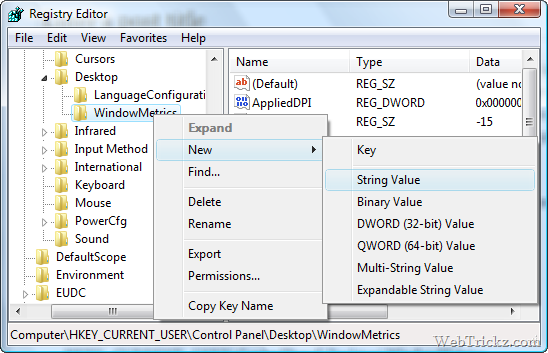
4. Set the value of MinWidth to –255
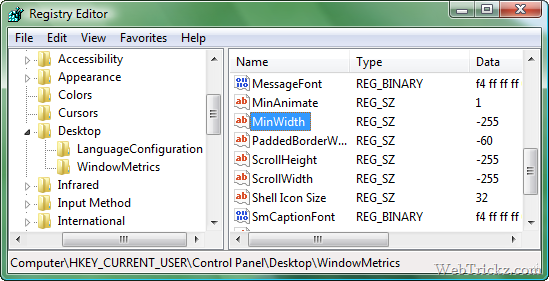
5. Restart Windows and experience the difference.
I have tried out this feature on my Windows Vista and I’m delighted to use it.
Hope you like this post. Thanks [Tweaks.com]









WOW that gr8!!
But will it give some error later on when the Windows is undated online later on?
Do you have any other windows tricks?
Nice trick!