


 Airtel DTH or Satellite TV is like any prepaid service in which no monthly bills are generated and users need to recharge their Airtel DTH account in order to continue using the DTH service. Below is an easy way to recharge your account online using Net Banking, Credit, or Debit Card.
Note – The customer ID provided by Airtel is required to recharge your DTH account.
To Recharge Airtel DTH account online:
1. Visit the Airtel Pay Bills section.
2. Choose the ‘Net Banking’ or ‘Credit or Debit Card – Processing through Bank Gateways’ option by clicking the ‘click here’ button.
3. Select service as “DTH Services”.
- Enter your customer ID, recharge amount (from Rs. 100 – 9999) and select the bank. Now follow the onscreen steps to make the payment. (For Net banking)
- Enter your customer ID, registered mobile number and valid date of birth. A password will be sent via SMS to your registered telephone no. Enter the password on the webpage and recharge amount. (VISA/Master credit card supported). Now follow the onscreen steps to make the payment. (For Credit or Debit Card)
Upon successful recharge, you will get a unique transaction ID for reference.
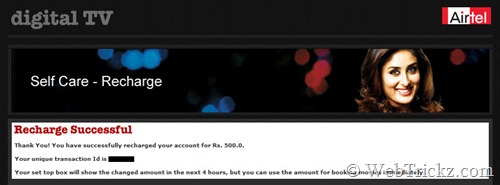
The amount will be credited to your account immediately and will reflect on your TV within 4 working hours. You’ll also receive an SMS about the recharge and new balance.
To check the DTH balance, SMS BAL to 54325 from your registered mobile number.








I want to sms or call free all india and roaming two year. I am deaf. Inform u.
sir,
Please send me Airtel disital TV recharge by hdfc netbanking link.
ezRecharge.in offers three mode of Recharge methods
1. Online Web based Recharge
2. SMS Recharge
3. Dial a Recharge (Launched First time in india on 10/10/10 10:10:10)
How to Recharge:
Visit http://www.ezrecharge.in and create an account with your valid mobile
number and valid email ID.
Three clicks to get instant Recharge. Click the link to know how
SMS Recharge:
Inorder to use SMS Recharge, you need to topup your ezWallet.
Click the link to know, how to topup your ezWallet
Once you have sufficient balance in your ezWallet, send following
SMS format to 0-99625 39767(Remember as 99625 EZSMS)
SMS Format: EZ
Code - Airtel - AT, Vodafone-VF, Uninor-UN, Docomo-TD,Videocon-VI

eg. EZ VF 9962539767 10
DIAL A RECHARGE:
Inorder to use Dial a Recharge, you need to topup your ezWallet.
Click the link to know, how to topup your ezWallet
Once you have sufficient balance in your ezWallet,
dial 93 46 392255(Remember as WE-GO-EZCALL). Interactive voice response will help you to do a instant recharge.
SIR
Please sand me information how to airtel degital tv recharge by hdfc debit & cradit card.
how to check my monthly rental of my airtel digital tv please reply