


If you tried the Betas of Kaspersky Anti-Virus 2011 or Kaspersky Internet Security 2011 and want to remove/uninstall them from your Windows, then here is a handy tool.
Kaspersky Lab Products Remover is an updated tool from Kaspersky that allows users to easily remove Kaspersky 2011 products completely from their system. The tool is specially designed to remove the new Kaspersky Antivirus & Internet Security 2011.
It is a small and portable tool, which comes in handy when you encounter errors or issues while deleting/uninstalling Kaspersky 2011 from Add/Remove Programs.
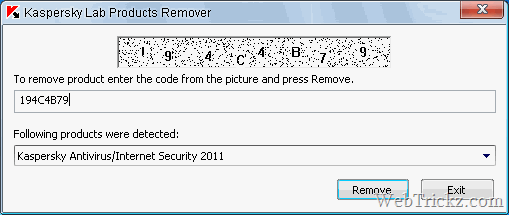
To completely Uninstall Kaspersky 2011/2012 –
Download the latest version of Kavremvr from here and run the .exe file. Enter the code as displayed in the image and Click the Remove button.

- Wait until a dialog window informs you of successful product removal.
- Click OK
- Reboot your computer
To uninstall Kaspersky 2010 products, use the Kaspersky 2010 Removal tool.










very good tool. i didn’t know that kaspersky security doesn’t uninstall completely if you want to remove it!
I already bought kis 2011, I don’t like it. I want to use kis 2009 version
which was the best. But the 2011 activation code can’t be used in 2009.
how do i rectify this. so I can use 2009 again.
Very good tool.
I will trying for uninstalling my kaspersky, before i wasn’t able to uninstall it. Btw, thanks a lot!