


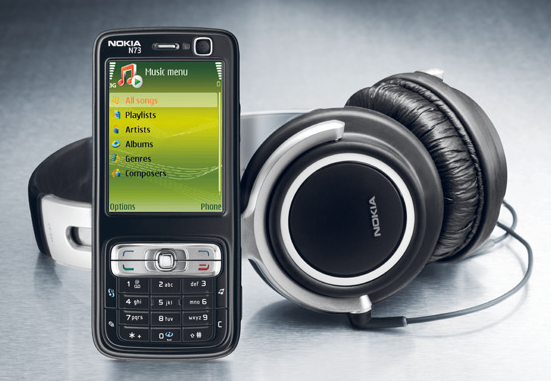
Today, I am sharing with you a great hack which can be very useful for all the Nokia N73 mobile users. This hack will help you to convert your old and simple N73 phone to the new and exiting N73 Music Edition by a simple update of your mobile phone firmware.
Note: If you decide to update your Nokia N73 to the Music Edition, know that this may void your warranty and you risk damaging your phone.
Find out first what to expect in the new Nokia N73 Music Edition (screenshots by mukushu):
Read the steps below on how to update the firmware:
Download and install: Nemesis Service Suite and the latest Nokia Software Update.
- Connect your phone and wait for Windows to install the drivers.
- Open Nemesis Service Suite and click “Scan for new device” on the right-upper part of the window
- Click on the icon “Phone info”
- Click on “Scan”
- Change the product code to 0539343 and mark the case “Enable”.
- Press “Write”, and your phone’s product code will be changed (you might think that nothing happened, because the phone is still in normal mode, and the changing of the product code only takes a couple of seconds, but don’t worry, the product code changed !).
- Close Nemesis Service Suite and run the Nokia Software Update.
- Make sure not to touch the cable or the phone while your phone is updating or else you will break it!
- That’s it! When you restart your phone, it should now be the Nokia N73 Music Edition!
PS: Share your views with us or subscribe to our RSS Feed.







Thanks for this. I will try this trick tonight
i changed code but nokia updater showing same massge no update auaible tell me what i do right now
nice tutorial
thks man
Cool great a case of Mugli,if you know what I mean, nice one for this post.
wow;ryt nw im gona try it,dat stl impossible in my mind
Is this real?
it is showing reading error…. what to do?????
my mobile phone software is corrupt in my phone. so plz can you send nokia N73 software.
hi is anybody tell me how to udtade a software of n73 in pc i try but i think it is not working in my pc WINDOW XP when i click on software update it say STARTING APPLICATION and it is stuck not updating my phone n73 so plz can anybody help me.ok i will tell you properly.When i click on "Nokia Software Updater"it will open and there is written "Starting Application" ok then i wait for 2:30 O clock ok and it still say starting application not going forward so plz if you have any idea to fix this problem then plz contact me ok. [email protected] [email protected] plz contact me on this ID ok BYEEEEEEEEE
dude u need latest nokia pc suite for updates first dwnld nokia phone software updater ……………
byeeeeeeeeeee
go to this link u get wht u want
http://europe.nokia.com/support/download-software/device-software-update?N73=
woooooooooooooow you guys are awesome i just upgraded my ordery N73 to Music eddition and it works so fine…its amezing thanks so so so much for the trick.
when i click on phone info and scan,i got an error.
some ppl says we need OLDER versions,not LATEST.. is that right?
older version of pc suite and connectivity cable driver*
hi,
i have tried to update the os with same procedure
my code is changed 0539343 . but Nokia soft updater gives same massage
no soft updates available for your mobile
help me plz
THANKS SO MUCH
I FINALLY GOT THE MUSIC EDITION !!!!!!
Working 100%
Just fllw the steps to get it work
Thnx Dear, Its working. coooooooooooooooooooooooooooooool.
plz advise the nokia n73 upgred
my mobile phone software is corrupt in my phone. so plz can you send nokia N73 software.
hi,
Am using nokia N73 mobile. When i switched on the my mobile it automattically come to off or not any key’s not working. And lot of time my mobile goes to switch off. this ill be happen lot of times…
Ple do the needful
Thanks & Regard’s
S. Arun Kumar
99947 87740
I am facing the slow working of my n73 i am searching for device software update
plzzzzzzzzz help me i have try dis instructions….
ut nokia updater is telling ua software already is update…..
how can i get update a music edition firmware….
plzzzzzzzzzzz help……………….
[email protected]
My nokia n73 music adition mobile has otomaticaly switch of and fungsing is very slow.so we have update my mobile swaftware
i used a n73 music edition.how i upgred my phone software without using p.c.
it shows that: scanning the product error!!
wat to do man? i wanna change my N73 to music edition.. plz reply on dis!!
or snd me a correct procedure at [email protected]