


This review is contributed by Aditya Shenoy, an editor at Pricebaba.com.
The Samsung Note series is well known for its huge displays and useful stylus, a feature still exclusive to this series. The Note 5 is the successor to the Galaxy Note 4 and it gets a bump in the hardware and now uses premium materials in its construction. It clearly takes design inspiration from the Samsung Galaxy S6 and that is a departure from the plasticky phones Samsung used to make in the past.
Design
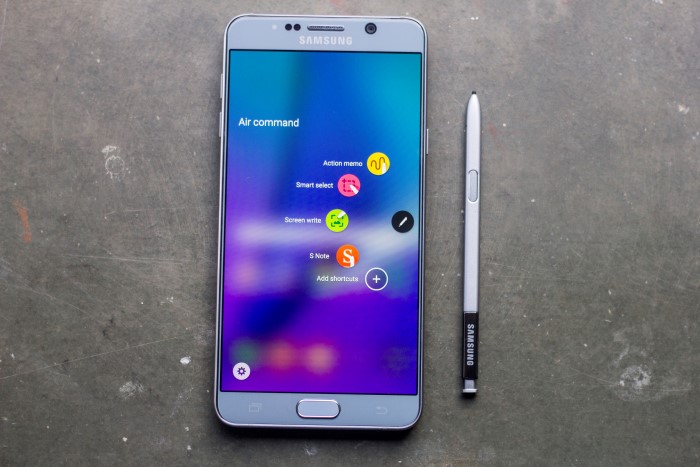
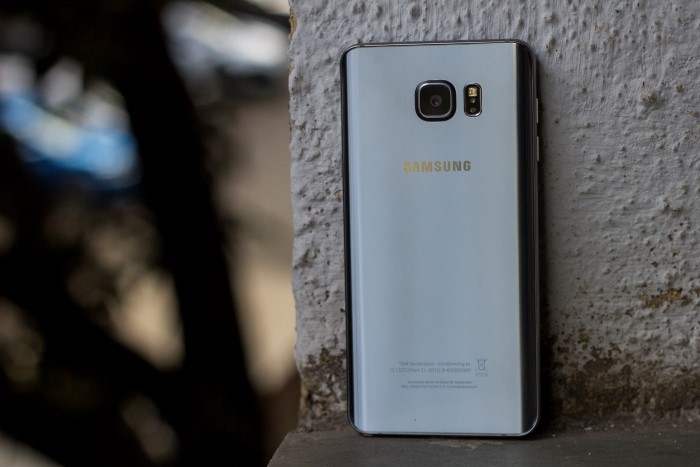
There is no way of mistaking it for any other phone, it distinctly looks like one from the Note Series. Samsung has tweaked the design a little, it gets a beautiful aluminum trim and the plastic back has been dumped in favor of a glass back. The phone is smaller than the Note 4 and is more comfortable to hold in one hand thanks to the curved sides. The stylus has got an update as well, it is neatly tucked inside the phone and now has a push-to-release mechanism to get it out of its place. The front is dominated by the huge screen with back and recent apps soft key on either side of the physical home button. The physical button now also houses a fingerprint scanner, a new addition to this series. While the sides are curved Samsung has kept the camera sticking out just like it did on the Galaxy S6 and as a result, there is an annoying rattle when the phone rings on a table. The device has aluminum buttons that offer a solid click! The speaker has been moved and is now positioned at the bottom on Note 5, the speaker is loud but the chances of muting the speaker accidentally are high. Overall the phone is solidly built and weighs in at 171 grams which is just about right for the phone this size.
Display
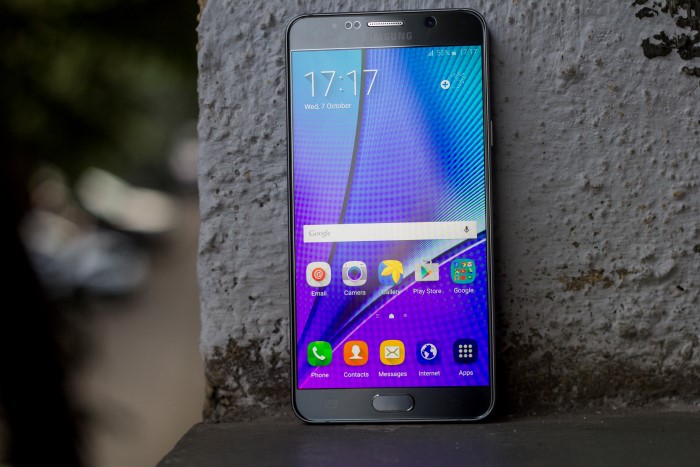
Note 5 has a big 5.7-inch AMOLED display which offers a lot of area to view content on. That’s not all, the screen sports QHD resolution which ensures the images on the display appear crisp. The 2560×1440 resolution on a 5.7-inch display translates to a pixel density of 515PPI which is the same as last year’s device. The dense display is only outperformed by the Samsung Galaxy S6 which has the same resolution on a smaller 5.1-inch display. The screen is oversaturated like every other Super AMOLED panel out there but Samsung has given different modes in the Display settings to help you select the one you are comfortable with.
The huge display is bound to reflect in direct sunlight but the display brightness is good enough to keep content on the screen visible. The software on the phone is well optimized to make the most of the AMOLED display in the form of Off-Screen Memos. This allows you to take notes by simply clicking the stylus out, jotting stuff down, and popping the stylus back in. This is quite useful if you have a habit of taking notes and you can do so without waking the phone up.
Software and Performance
The phone runs Samsung’s very own TouchWiz UI on top of Android 5.1 Lollipop. The UI has evolved over the years and is now closer to stock Android than ever before. The amount of bloatware has gone down and Samsung has only given essential apps with the device. The big screen is put to use with the Multi Window mode where two apps can be used simultaneously. The same can be accessed quickly by pressing and holding down the recent apps soft key. Similarly, the back soft key can be used to trigger menus in apps. While the software is good the hardware is nothing short of amazing. The processing is handled by an Exynos 7420 chip which is an Octa-Core processor and has 4GB of RAM. It is the same processor as the Galaxy S6 and is proven to be a good performer. Even with the additional stylus overhead, the processor works quite well, however, we saw occasional freezes here and there.
The fingerprint scanner is a boon to use and the device unlocks quickly after a successful scan. As of now, the fingerprint scanner can only be used to unlock the device and for Samsung Pay. But once Samsung updates the device to Android Marshmallow there will be more uses of the scanner.
Storage
Samsung has made a major change here, the phone comes in 32GB and 64GB variants but has non-expandable memory. So if you are among the ones who want to expand storage via the MicroSD card, you’ll have to look elsewhere. Expandability was one of the highlights of the Galaxy S and Galaxy Note series but it seems Samsung has moved on to internal storage only. Note 5’s internal storage features UFS 2.0 which is capable of bringing SSD-like read/write speeds to the smartphone and is faster than older technologies like eMMC 5.0.
Camera
The camera on the Galaxy Note 5 is the same unit as on the Galaxy S6. If we were to sum up the camera in one word it would be spectacular. At the back sits a 16-megapixel sensor with f/1.9 aperture which clicks some beautiful shots. The camera protrudes out of the body but thanks to the Sapphire glass coating is safe from those accidental scratches. The phone does 4K video recording at 30FPS, while it can shoot Full HD footage at 60FPS. The camera is so good it encourages you to click pictures and that says a lot about the hardware Samsung has put in it. The camera software is typical Samsung and they have cleaned up the interface significantly, making it easier to use than before. They’ve provided the basics but you’ll need to download additional modes from the Galaxy Apps store if you choose to use them.
Battery Life
Battery life has been one of the strong points of the Note series. The big display on the phone allows packing in a high-capacity battery which generally lasts longer than the others. Note 5 is, however, an exception here when it comes to size. To make the phone slim Samsung has got the battery size down to 3100mAh from the 3220mAh on Note 4. While the slightly smaller battery has dropped the standby a little, the software makes up for it. Note 5 would last me one full day on a single charge. My usage did include a couple of calls, Social networks, and instant messengers. Times when it fell short the bundled fast charger ensured it was up for some more work in no time. From 0% the charger would get the device to 60% in around 30 minutes. The phone also supports both Qi and PMA wireless charging and also supports fast charging wirelessly with their charger.
Verdict
The Galaxy Note 5 can be considered as a worthy successor to the Note 4. If you don’t consider 5.7-inch as bulky then the phone checks all the boxes. The phone feels like a well-rounded package and is available for around Rs. 53,000. For consumers who want a big-screen phone and aren’t interested in a stylus, there is the Galaxy S6 Edge+ for the same price. The newly launched Huawei Nexus 6P also looks like a good buy considering it is available for Rs. 39,990 for the 32GB variant. The Note 5 may seem a little expensive but there are not a lot of phones that offer the same set of experiences.










Comments 1