WebTrickz
TRENDING
  • Claude vs ChatGPT: Which Is Better in 2026?
No Result
View All Result
  • Reviews
  • Editorials
  • Social Media
    • Facebook
    • Twitter
    • YouTube
    • Messenger
    • Instagram
    • Snapchat
    • WhatsApp
    • TikTok
  • Apps
  • How To’s
  • Apple
  • iPhone
  • Google
  • Android
  • Mac
  • Security
  • About Us
    • About Us
    • Contact Us
    • Privacy Policy
  • Reviews
  • Editorials
  • Social Media
    • Facebook
    • Twitter
    • YouTube
    • Messenger
    • Instagram
    • Snapchat
    • WhatsApp
    • TikTok
  • Apps
  • How To’s
  • Apple
  • iPhone
  • Google
  • Android
  • Mac
  • Security
  • About Us
    • About Us
    • Contact Us
    • Privacy Policy
No Result
View All Result
WebTrickz
No Result
View All Result
Home How To's

How to Find Your Broadcast Lists in WhatsApp on iPhone

Mayur Agarwal by Mayur Agarwal
April 21, 2024
in How To's

Many WhatsApp users use Broadcast Lists to send a message to multiple contacts at once, without starting a group chat. This feature is useful for making announcements or sending event invites to a large number of recipients. It’s worth noting that only people who’ve added you as a contact can receive your broadcast messages.

Where is the WhatsApp broadcast list on iPhone?

Is the Broadcast list not showing after updating WhatsApp on iPhone? Well, you aren’t alone who cannot see the broadcast list.

Until now, the Broadcast Lists option on WhatsApp used to appear at the top left of the Chats tab. However, the placement of broadcast lists has entirely changed in the new version of WhatsApp for iPhone.

In the new WhatsApp, both the “Broadcast Lists” and “New Group” no longer appear on the chat list screen. This change has been made to ensure a clearer interface.
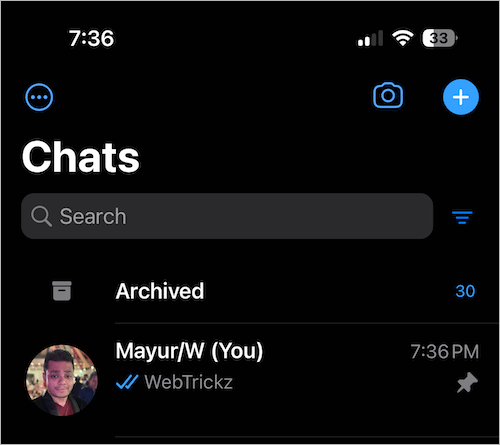
broadcast lists disappeared from whatsapp after update
Broadcast Lists removed from the Chats tab

So, how do I find my old or existing broadcast lists in WhatsApp? Worry not, you can still access and view your broadcast list.

Strangely, WhatsApp has moved this option to a different location where most users wouldn’t expect it to be. Hence, people looking to broadcast a message, edit recipients in a list, or create a new broadcast group may be unable to find it.

Without further ado, here’s how you can find your broadcast list in WhatsApp on iPhone.

How to find Broadcast List in WhatsApp on iPhone (2024)

  1. Firstly, update the WhatsApp app to the latest version.
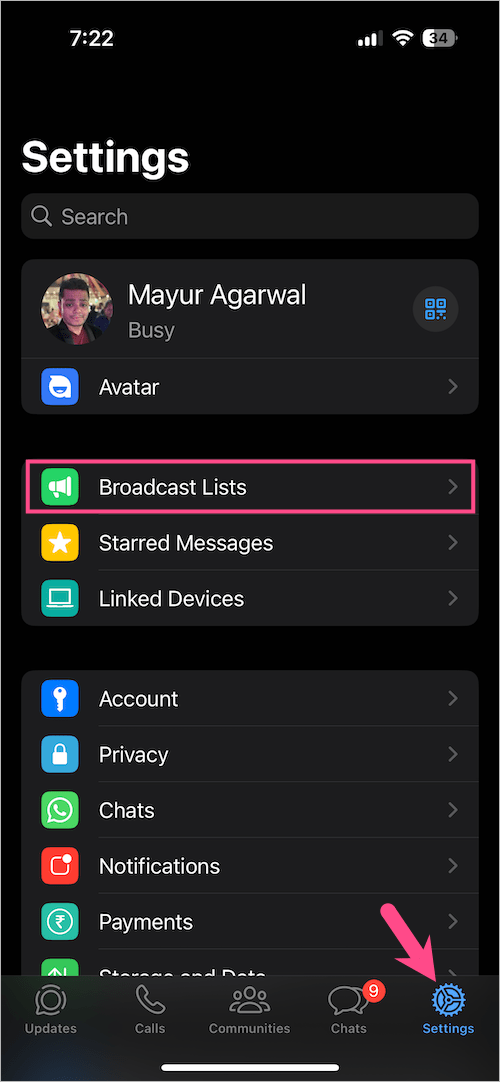
  2. Open WhatsApp and tap the ‘Settings‘ tab at the bottom right corner.
  3. Under Settings, look for ‘Broadcast Lists‘ and open it. how to find broadcast list in WhatsApp on iPhone
Voila! Here you can see all your WhatsApp broadcast lists. You can then create a new list, delete an existing one, or edit the list to add or remove recipients.
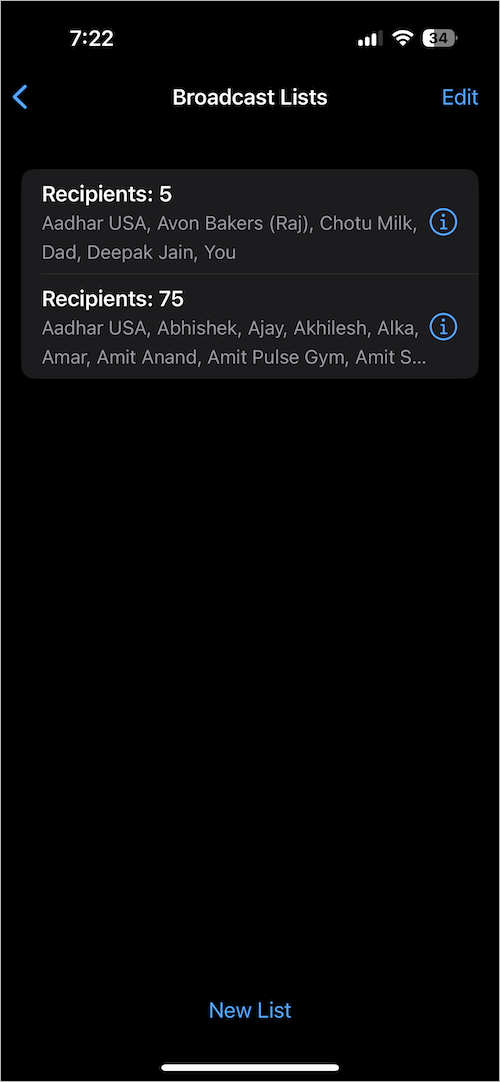
Where are broadcast lists on WhatsApp for iphone

Meanwhile, iPhone users running earlier versions of WhatsApp can find Broadcast Lists at the top of the Chats screen.
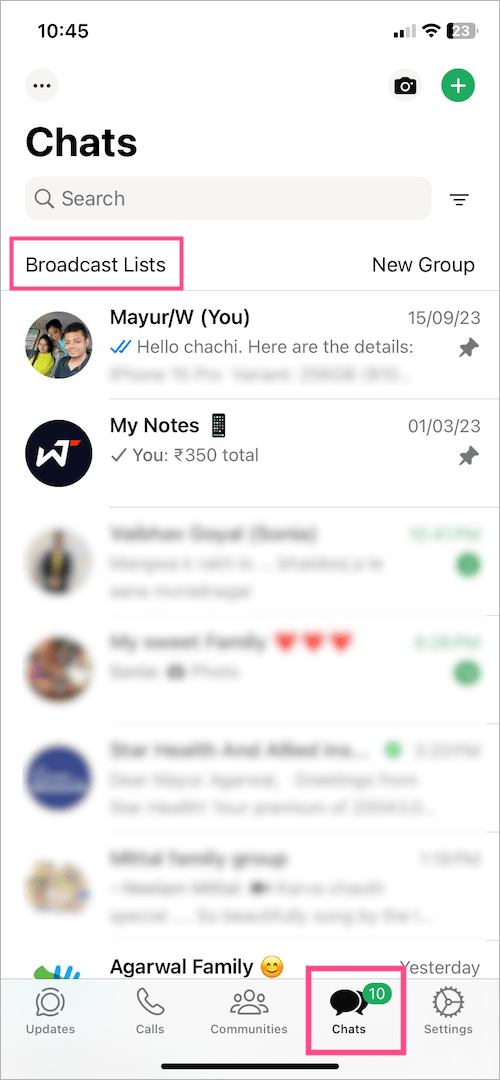
how to access your broadcast list on whatsapp

ALSO READ:

  • How to find your Locked Chats on WhatsApp
  • Where are WhatsApp Voice Notes stored on iPhone?
Add WebTrickz as a preferred source on Google
Tags: iPhoneSocial MediaTipsWhatsApp
ShareTweetSend
Previous Post

How to Turn Off Time Sensitive Notifications on Instagram

Next Post

How to Find All Your Saved Posts on Threads

Mayur Agarwal

Mayur Agarwal

Mayur Agarwal, the founder and editor of WebTrickz, is a tech enthusiast with a Bachelor's degree in Computer Applications and over 15 years of experience in tech writing. His passion for technology and gadgets drives him to create insightful how-to articles and troubleshooting guides.

Next Post
Instagram threads logo

How to Find All Your Saved Posts on Threads

Comments 3

  1. David says:
    2 years ago

    They seemed to have moved it again and I can’t find it! Any ideas where it is now?

    Reply
  2. kiran says:
    2 years ago

    The broadcast lists have dispapeared

    Reply
    • Mayur Agarwal says:
      2 years ago

      Are you on iPhone? Can you share a screenshot of your WhatsApp settings screen?

      Reply

Leave a Reply Cancel reply

Your email address will not be published. Required fields are marked *

Latest Stories

Closing Apps on iPhone 18 Pro and 18 Pro Max

How to Close Apps on iPhone 18 Pro and 18 Pro Max

September 19, 2026

How to Screen Record on iPhone 18 Pro and 18 Pro Max

September 19, 2026
iPhone 18 Pro and 18 Pro Max

How to Take a Screenshot on iPhone 18 Pro or 18 Pro Max

September 23, 2026
silent mode popup in dynamic island

How to Put iPhone 18 Pro on Silent or Vibrate Mode

September 18, 2026
Closing Apps on iPhone 18 Pro and 18 Pro Max

How to Restart or Force Restart iPhone 18 Pro and 18 Pro Max

September 23, 2026
iPhone 18 Pro and 18 Pro Max

How to Turn Off iPhone 18 Pro or 18 Pro Max

September 23, 2026
instagram logo

How to Find Scheduled Posts on Instagram

July 29, 2026

Trending Stories

  • Photo by Jeff Hardi on Unsplash

    How to Turn Off Fn Lock on a Windows Laptop

  • Easiest Way to Change Galaxy Nexus from Yakjuxw (Non-Yakju) to Android 4.2 Yakju/Takju and Get future Updates from Google

  • How to Turn Off Microsoft Family Safety on Windows 11 & 10

  • Guide to Update Galaxy Nexus (YAKJUXW) to Android 4.0.4 YAKJU and Get future Updates from Google

  • How to Turn Off Microsoft Edge Game Assist in Windows 11

  • About Us
  • Contact Us
  • Privacy Policy
  • Advertise

© 2026 WebTrickz. All Rights Reserved.

No Result
View All Result
  • Reviews
  • Apps
  • How To’s
  • Android
  • Google
  • iPhone
  • Mac
  • About Us
  • Contact Us
  • Privacy Policy

© 2026 WebTrickz. All Rights Reserved.