


 Microsoft has just released an official tool, which allows you to create a bootable DVD or USB flash drive to Install Windows 7 on Netbooks easily. The Windows 7 USB/DVD Download tool just requires Windows 7 ISO to let you install Windows 7 directly from the USB flash drive or DVD.
How to create a Bootable USB drive or DVD to Install Windows 7
1. Make sure that you have downloaded Windows 7 ISO and it is located on your PC.
2. Download and Install the Windows 7 USB/DVD Download tool.
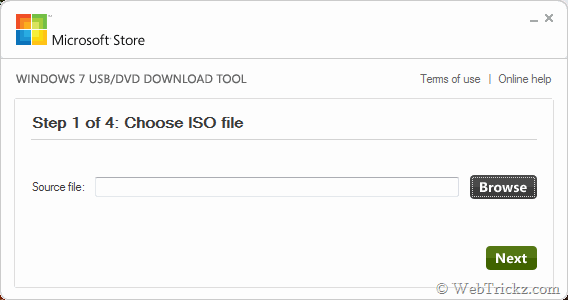
3. Run the USB/DVD tool and click Browse to select the file source file (Windows 7 ISO).
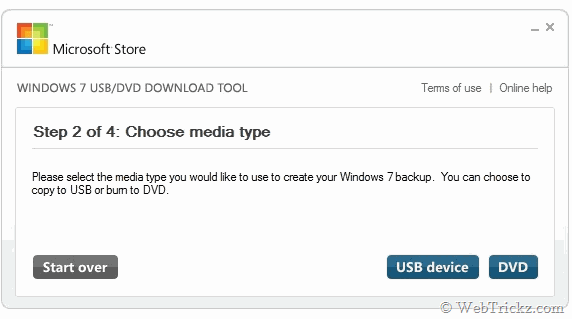
4. Now choose whether to create a copy on a USB flash drive or DVD, then click Next.
5. If you are copying the file to a USB flash drive, select your USB device in the dropdown list and click Begin copying or Begin burning in case of DVD.
6. After completion, you can install Windows 7 either by double-clicking Setup.exe from the root of your DVD/USB flash drive or by booting it.
To install Windows 7 using a USB drive, make sure your motherboard supports booting from USB and your computer is set to boot from USB in BIOS.
System Requirements:
- Windows XP SP2, Windows Vista, or Windows 7 (32-bit or 64-bit)
- DVD-R drive or 4GB removable USB flash drive
Get Windows 7 USB/DVD Download tool (947KB)





The trick make me feel so easy to install the magic Windows, its newest version of Microsoft throught an usb. My computer does not have dvd drive. Thanks for your introduction!
Only for Win7?
did u copy that from askvg[dot]com?
How can you say that? Askvg made this post after me i.e on Oct 23 😀
Plz look twice before making false remarks.
Yes, it’s only intended to be used for Windows 7. Hope you guys enjoy our tool!
It exists a similar tool but for WinXP?
Nice tool. I was previously using 3rd party tools.
merci Mayur, c est très utile, surtout lorsque on a un lecteur cd/DVD qui déconne !