

WebTrickz
TRENDING
  • Complete list of 1337x Proxy and Mirror Sites
No Result
View All Result
  • Reviews
  • Editorials
  • Social Media
    • Facebook
    • Twitter
    • YouTube
    • Messenger
    • Instagram
    • Snapchat
    • WhatsApp
    • TikTok
  • Apps
  • How To’s
  • Apple
  • iPhone
  • Google
  • Android
  • Mac
  • Security
  • About Us
    • About Us
    • Contact Us
    • Privacy Policy
  • Reviews
  • Editorials
  • Social Media
    • Facebook
    • Twitter
    • YouTube
    • Messenger
    • Instagram
    • Snapchat
    • WhatsApp
    • TikTok
  • Apps
  • How To’s
  • Apple
  • iPhone
  • Google
  • Android
  • Mac
  • Security
  • About Us
    • About Us
    • Contact Us
    • Privacy Policy
No Result
View All Result
WebTrickz
No Result
View All Result
Home Android

Now Use WhatsApp on Desktop with WhatsApp Web App for Chrome

Mayur by Mayur
January 22, 2015
in Android, Internet, News

WhatsApp, one of the most popular messaging client has finally introduced the much awaited feature that allows users the ability to access WhatsApp directly from web browser on laptop or desktop platform. Users will now be able to start conversations and view WhatsApp notifications in browser by connecting WhatsApp app with Google Chrome browser. The web client support is currently available for the following mobile platforms: Android, Windows Phone, BlackBerry and BB10. WhatsApp Web works only in Chrome, with support for more browsers coming soon.
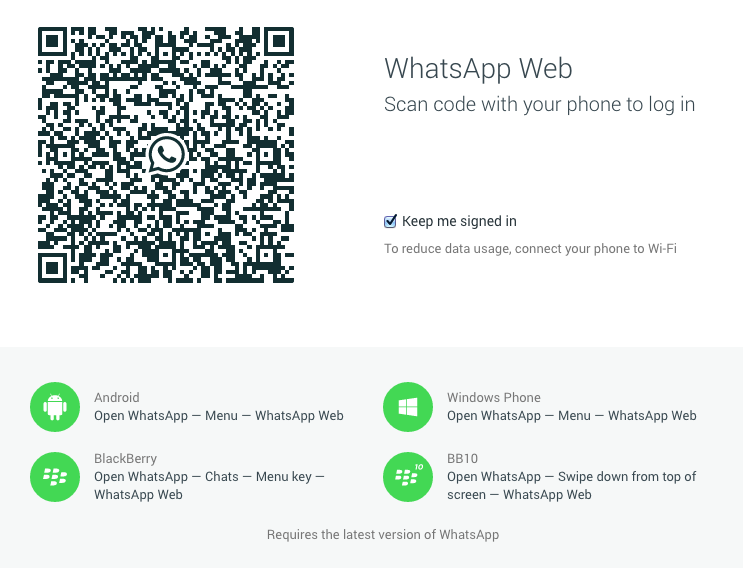
Screen Shot 2015-01-22 at 1.12.24 AM

To use WhatsApp from Chrome browser, simply open web.whatsapp.com in Google Chrome on any OS. There you’ll see a QR code that you need to scan using the WhatsApp app on your phone. Make sure you’ve the latest version of WhatsApp installed on your phone. Then open WhatsApp app, tap menu, select the ‘WhatsApp Web” option and scan the code shown on WhatsApp Web webpage. This will pair WhatsApp app on your phone with the WhatsApp web client. That’s it!
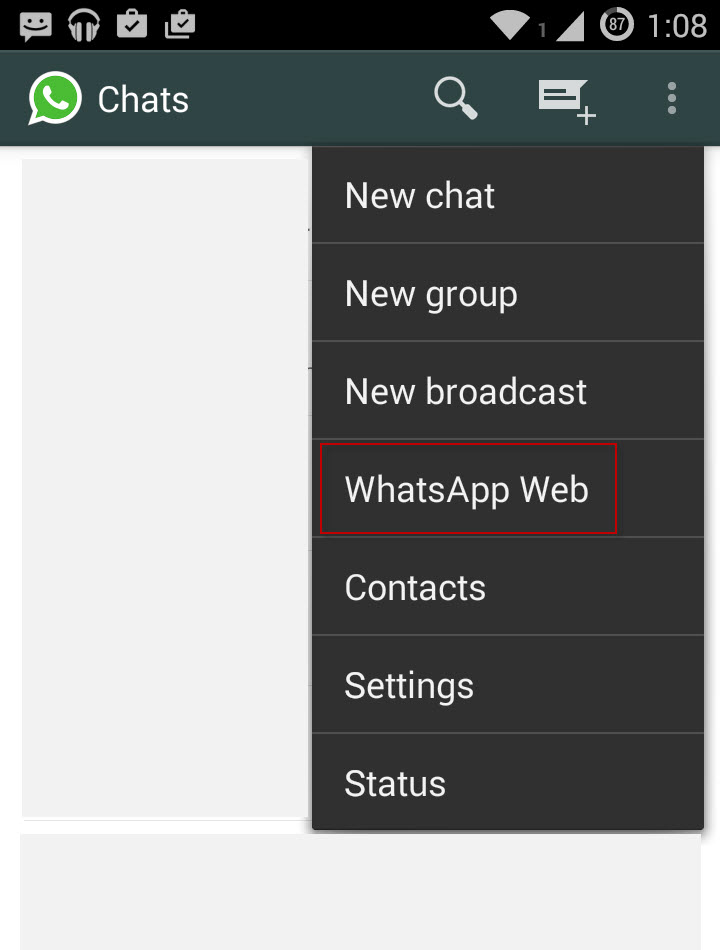
Screenshot_2015-01-22-01-08-53

You can now send & receive messages, view conversations, check notifications, send photos , view WhatsApp contacts directly from the WhatsApp web client itself. This should come really handy as you no more need to frequently move to your phone for checking WhatsApp messages, while working on desktop. Users have the option to turn notifications on or off, and turning them off won’t distract you from work. However, it should be noted that “Your phone needs to stay connected to the Internet for WhatsApp web client to work.”

WhatsApp Web features a UI similar to that of its mobile app. One can’t change the status and profile picture from web client as of now but can use tons of WhatsApp emojis white chatting from Chrome browser. Users can logout from WhatsApp either from the browser or from the WhatsApp mobile app that shows list of computers that you’re logged into.
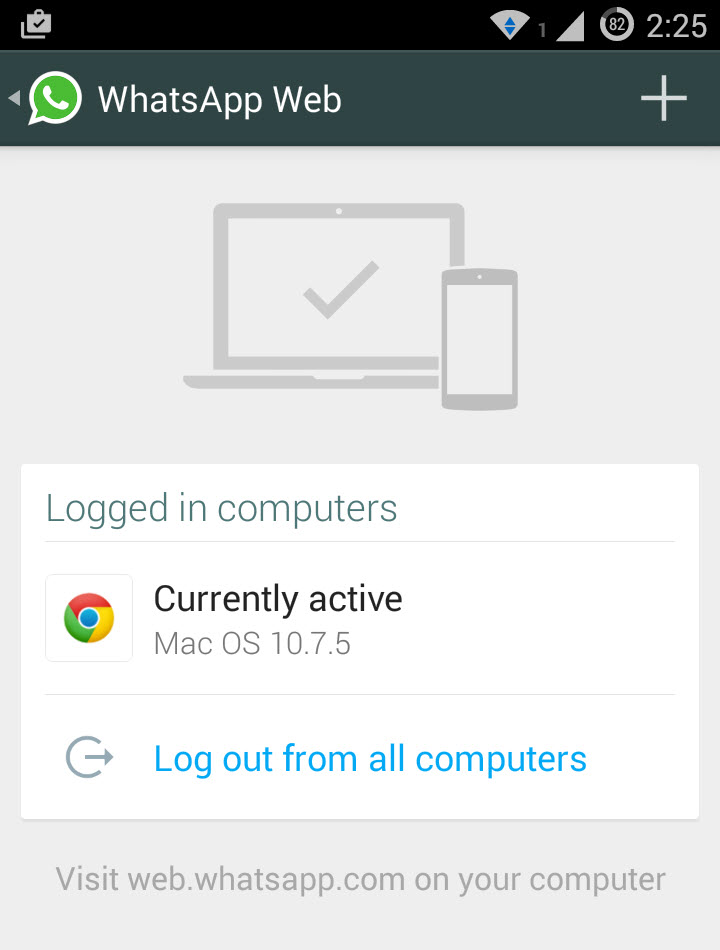
Screenshot_2015-01-22-02-25-41

Meanwhile, a lot of users are angry over WhatsApp team (or say Facebook) as they’ve forced “WhatsApp+ to shutdown”, a popular WhatsApp app alternative.

Tags: AndroidBrowserChromeGoogle ChromeMessengerNewsWhatsApp
ShareTweetSend
Previous Post

Guide to Root YU Yureka & Install Official TWRP 2.8 Recovery

Next Post

YU Yureka Review – Best Combo of Performance & Software YU can get for Rs. 8,999

Mayur

Mayur

Mayur Agarwal, the founder and editor of WebTrickz, is a tech enthusiast with a Bachelor's degree in Computer Applications and over 15 years of experience in tech writing. His passion for technology and gadgets drives him to create insightful how-to articles and troubleshooting guides.

Next Post

YU Yureka Review - Best Combo of Performance & Software YU can get for Rs. 8,999

Comments 2

  1. Soni says:
    11 years ago

    Its look nice, I’ll try it later Mayur 🙂

    Reply
  2. sumaya says:
    10 years ago

    i downloaded and installed but its not working…

    Reply

Leave a Reply Cancel reply

Your email address will not be published. Required fields are marked *

Latest Stories

microsoft edge new logo

How to Turn Off Notifications in Microsoft Edge (2026 Guide)

June 8, 2026
chatgpt logo

How to Clear or Delete ChatGPT Memory on PC and Mobile

June 5, 2026
1337x logo

1337x Proxy List 2026: Working Proxy & Mirror Sites

June 2, 2026

How to Find Saved Reels on Facebook App & Desktop (2026)

June 8, 2026
microsoft edge browser

How to Restore or Reopen Closed Tabs in Microsoft Edge

March 26, 2026
Facebook app on iPhone

How to See Recently Watched Reels on Facebook (2026 Guide)

June 5, 2026
microsoft edge new logo

Download Microsoft Edge Offline Installer [Latest Version]

March 16, 2026

Trending Stories

  • microsoft family safety settings

    How to Turn Off Microsoft Family Safety on Windows 11 & 10

  • 1337x Proxy List 2026: Working Proxy & Mirror Sites

  • How to Turn Off Microsoft Edge Game Assist in Windows 11

  • How to Turn Off Fn Lock or Fn Key on Windows 11/10 Laptop

  • How to See Recently Watched Reels on Facebook (2026 Guide)

  • About Us
  • Contact Us
  • Privacy Policy
  • Advertise

© 2026 WebTrickz. All Rights Reserved.

No Result
View All Result
  • Reviews
  • Apps
  • How To’s
  • Android
  • Google
  • iPhone
  • Mac
  • About Us
  • Contact Us
  • Privacy Policy

© 2026 WebTrickz. All Rights Reserved.





