


We often skip a certain segment while watching videos to view only the necessary clip. Likewise, when sharing YouTube video links with your friends, you might want to set YouTube video to start/play from a specified time interval so that the viewer only sees the desired portion and doesn’t need to buffer the unneeded initial part of the video.
Luckily, YouTube has now made it very easy to do this by adding an extra option to the right-click context menu of its videos. To set a specific start time for YouTube videos, just pause the video at the desired time, right-click on the video, and select the ‘Copy video URL at current time’ option. Now use or share this video URL to let the video automatically play from the defined starting time.
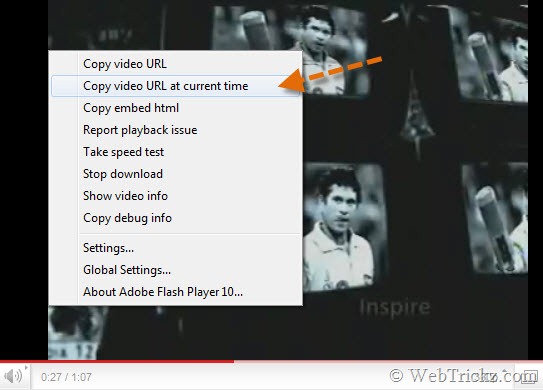
Alternate way – You can manually add the string #t=27s (replace 27s with the required starting time like 40s or 1.04m) to the end of any Youtube video URL.
Example: http://www.youtube.com/watch?v=9Kyb7U_djUk#t=27s
Hope they also implement this feature when embedding YouTube videos. 🙂
Update – Our friend Amit Banerjee has shared an easy way that allows you to set a specified start/play time when embedding Youtube videos on a site or blog.
Embed Youtube video to start at a specific time – Get the HTML code of the video from Youtube and paste it in the HTML section or Source (in Windows Live Writer). Now add the parameter &start=27 right after the video ID in the YouTube video embed code.
“Remember to replace 27 with the desired starting time and paste the same parameter twice, right after 2 video IDs present in the video embed code.”
An illustration is shown below:
<object width=”560″ height=”340″><param name=”movie” value=”http://www.youtube.com/v/TNMpa5yBf5o&start=27?fs=1&hl=en_US”></param><param name=”allowFullScreen” value=”true”></param><param name=”allowscriptaccess” value=”always”></param><embed src=”http://www.youtube.com/v/TNMpa5yBf5o&start=27?fs=1&hl=en_US” type=”application/x-shockwave-flash” allowscriptaccess=”always” allowfullscreen=”true” width=”560″ height=”340″></embed></object>
Thanks, Amit for the hat tip!








In fact this concept is true if you want to embed the video at a current time. Use this code (not sure whether it would show up in the comment form)
Of course you have to replace the ID in the above code and the time at “&start=15” where 15 is the number of seconds.
When users, click the play button the video will start after 15th second.
Just as I thought, the code was not allowed.
Anyway, you have to add this parameter “&start=15” (without quotes), right after the video ID in the YouTube video embed code. Remember to use it twice.
Thanks Amit for sharing, I’ve updated the post. 🙂
Good info mayur
Thanks
Thank you Webtrickz,
I really say thanks to webtrickz by heart. But I’ve an objection. Actually, most of the tricks have problem, i.e., not working on others’ computers. I request the website to arrange the testing of every trick properly, before it is posted.
Any ideas on how to get this working on posted youtube clips on facebook? I’ve tried the “#t=27s” option and it works well until I post a clip on facebook.
I didn’t know you could right click and copy like that. I use the YouTube parameters to set the start time.
http://socialeers.com/youtube-content-marketing-tips/
Is there a way to have it also STOP/Pause after it plays the section I want to show?
Mak,
for embedded videos you can set stop time, for example
where start and end time are seconds
more info:
http://www.digitalette.com/web/set-youtube-video-start-end-times-2014-style/
I found this simple tool for customising the start & end time of any youtube videos..
Simply go to the below link http://www.youtubestartend.com
& the generated link can also be shared with your friends or embedded in your website.
Absolutely no need for calculations & all that. Simple as 1,2,3.
Worked like a charm!
Would like to see many more features in that too..like setting playback quality as well. thnx anyways