WebTrickz
TRENDING
  • Claude vs ChatGPT: Which Is Better in 2026?
No Result
View All Result
  • Reviews
  • Editorials
  • Social Media
    • Facebook
    • Twitter
    • YouTube
    • Messenger
    • Instagram
    • Snapchat
    • WhatsApp
    • TikTok
  • Apps
  • How To’s
  • Apple
  • iPhone
  • Google
  • Android
  • Mac
  • Security
  • About Us
    • About Us
    • Contact Us
    • Privacy Policy
  • Reviews
  • Editorials
  • Social Media
    • Facebook
    • Twitter
    • YouTube
    • Messenger
    • Instagram
    • Snapchat
    • WhatsApp
    • TikTok
  • Apps
  • How To’s
  • Apple
  • iPhone
  • Google
  • Android
  • Mac
  • Security
  • About Us
    • About Us
    • Contact Us
    • Privacy Policy
No Result
View All Result
WebTrickz
No Result
View All Result
Home HD Wallpapers

How to convert a low resolution wallpaper into a HD Wallpaper

Mayur Agarwal by Mayur Agarwal
February 19, 2024
in HD Wallpapers, Tips & Tricks

[Editor Note: This post is written by Pratyush. He likes to discover the web and share ideas. He also has a Tumblog with some nice shares at Fully-Faltoo.com.]

I love to see the HQ images on my desktop. However, there are still some sites that don’t provide the HQ Wallpapers for widescreens, sticking to the orthodox 1024 X 768 resolution. So the journey began by resizing them using some smart tools to get smart results.
061130_HDDVD_drive_install

Here I share some ways to zoom the images without letting them get pixilated.

1) Download Liquid Resize: Liquid resize is a software to “re-target [image size] without losing quality”.

2) Get some cool wallpapers or images: So while the download completes (not large in size though), get some good wallpapers. We began with the ones at IndiaFM which has a good low-quality gallery.

Here is the one we took up:

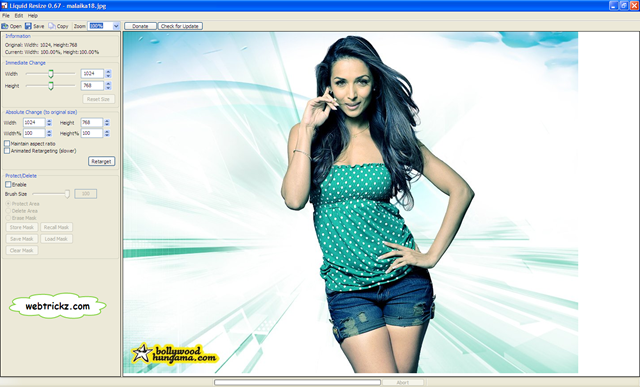
3) Open the image with Liquid Resize: So hopefully the download has completed and we have a nice wallpaper (though low in resolution) to begin with.
9-23-2008 8-59-04 PM

4) Put in the attributes (target size): On the left sidebar there is the option for “Absolute Change”. Put in the figures for “Width” and “Height” (preferably your screen resolution). Unmark “Maintain Aspect Ratio” if needed.

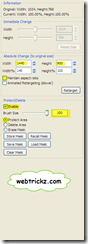
Enable Mask: Under Protect/Delete mark enable and select “Protect Area”. Also, set the appropriate brush size to paint the picture as required (in the next step).

We put in 1440 X 900 | 100 Brush Size
9-23-2008 8-20-11 PM

5) Paint/Mask the main object: Now comes the most important part. Paint the main object in the picture to protect it from disproportionate resizing.
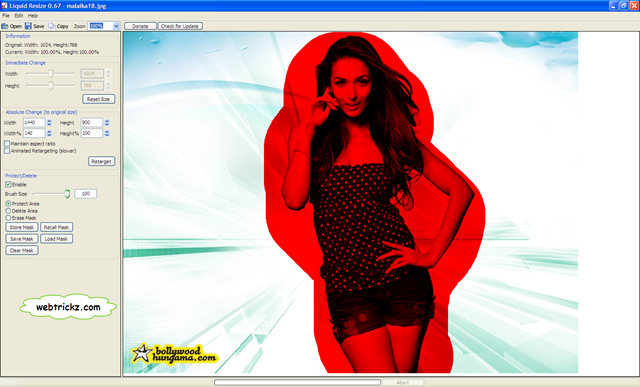
9-23-2008 9-02-56 PM

6) Hit “Retarget”: Yeah, this is the final step to the mission. Click the “Retarget” button under the “Absolute Change”. It will take some time to process and soon you will have a good HD Wallpaper.
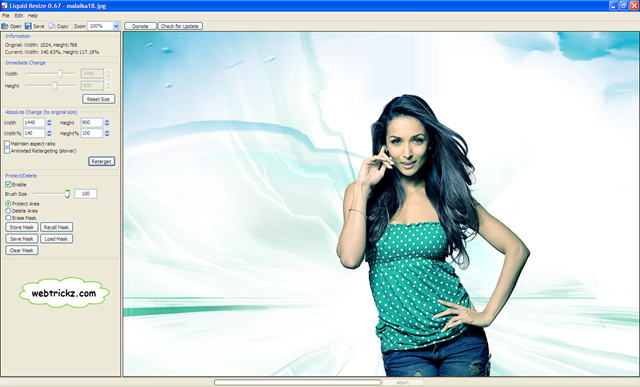
9-23-2008 9-04-28 PM

Final result:

malaika18_retarget

So it was a simple and “no-techno” trick without requiring expertise in Photoshop. The whole process takes less than 5 minutes and also less than 5 Mouse Clicks.

Hope you enjoyed this short tutorial trick, do share your results.

Also, look at the HD Wallpapers section for more posts related to HD Wallpapers and Images.

Tags: noadsWallpaper
ShareTweetSend
Previous Post

How to Remove Mozilla Firefox Completely from PC

Next Post

Update your Nokia N73 Firmware to New ‘Music Edition’

Mayur Agarwal

Mayur Agarwal

Mayur Agarwal, the founder and editor of WebTrickz, is a tech enthusiast with a Bachelor's degree in Computer Applications and over 15 years of experience in tech writing. His passion for technology and gadgets drives him to create insightful how-to articles and troubleshooting guides.

Next Post

Update your Nokia N73 Firmware to New ‘Music Edition’

Comments 6

  1. beaulife says:
    18 years ago

    It’s a good tool to be used for any web design, graphic design etc. I have been looking high and low for this type of application without the hassle and knowledge in Photoshop. Cheers!

    beaulifes last blog post..Recycle A Mobile Phone, and Plant A Tree

    Reply
  2. Wallpapers says:
    17 years ago

    This tutorial is very useful for wallpaper sites owners

    Reply
  3. kangtp says:
    16 years ago

    this tools didn’t even make my photos HD !!!! when i protect them and press retarget .. it still stretch my picture and ruin the whole background !!!! worst !!!!

    Reply
  4. Dheeraj says:
    15 years ago

    This totally sucks .. fake fucking tool all it did was stretched the photos … :/

    Reply
  5. AV says:
    15 years ago

    V.Nice

    Reply
  6. Androidena says:
    6 years ago

    The first step to turning a picture into a wallpaper image is to determine the screen resolution that your monitor is running. This way, you can easily make the picture fit the screen properly.

    Reply

Leave a Reply Cancel reply

Your email address will not be published. Required fields are marked *

Latest Stories

Google Gemini

How to Cancel Your Gemini Subscription (2026 Guide)

June 21, 2026
difference between chatgpt and claude

Claude vs ChatGPT: Which AI Should You Use in 2026?

June 21, 2026
google chrome logo

Google Chrome Offline Installer: Direct Download Links

June 17, 2026
X logo

How to Remove All Bookmarks on X (Twitter) At Once in 2026

June 15, 2026
X logo

How to Find Bookmarks on X (Twitter) in 2026

June 15, 2026
copilot logo

How to Turn Off Copilot Search in Bing on Edge & Chrome

June 10, 2026
microsoft edge new logo

How to Turn Off Notifications in Microsoft Edge (2026 Guide)

June 8, 2026

Trending Stories

  • 1337x logo

    1337x Proxy List 2026: Working Proxy & Mirror Sites

  • How to Turn Off Microsoft Family Safety on Windows 11 & 10

  • How to See Recently Watched Reels on Facebook (2026 Guide)

  • How to Turn Off Microsoft Edge Game Assist in Windows 11

  • How to Turn Off Fn Lock or Fn Key on Windows 11/10 Laptop

  • About Us
  • Contact Us
  • Privacy Policy
  • Advertise

© 2026 WebTrickz. All Rights Reserved.

No Result
View All Result
  • Reviews
  • Apps
  • How To’s
  • Android
  • Google
  • iPhone
  • Mac
  • About Us
  • Contact Us
  • Privacy Policy

© 2026 WebTrickz. All Rights Reserved.