


 PDFill package contains the complete PDFill applications including the FREE PDF Tools – the FREE PDF and Image Writer, and an evaluation copy of PDFill PDF Editor. Check below about these 3 programs:
1) PDFill PDF Tools –
PDFill PDF Tools is a free suite without any Watermarks, which provides the world’s most powerful and useful PDF tools for FREE. It offers many tools for PDFs like Split, Merge, Rotate, Encrypt PDF, Watermark PDF files, add or edit PDF information, etc. All 15 tools are accessible from one program, making it easy to use.
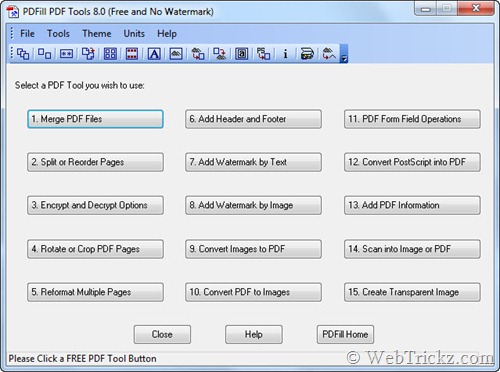
Following is the list of 15 Tools included in PDFill PDF Tools along with their function:
1. Merge – Merge two or more PDF files into a single PDF file.
2. Split or Reorder – Extract pages from a PDF file into a new file. Reorder the page sequence into a new file.
3. Encrypt and Decrypt with Security Options – Protect PDF files with passwords and prevent PDF files from being printed, copied, changed, filled, extracted, signed, assembled or merged. Supports Adobe Standard 40-bit Encryption and Adobe Advanced 128-bit Encryption.
4. Rotate and Crop – Rotate a PDF page by 0, 90, 180 and 270 degree. Crop a page to modify its layout of Print or View by specifying its margins.
5. Reformat – Put multiple pages into one page to save paper and ink when printing hard copies. Add note lines for the handout.
6. Header and Footer – Add Headers and Footers to present information, such as date, time, page numbers, or the title of the document, in the top or bottom margins of a document.
7. Watermark by Stylized Text – Add Stylized Text Stamp.
8. Watermark by Image – Add Stamp using image file (bmp, jpg, gif, png, tiff, and wmf).
9. Convert Images to PDF – Convert images (bmp, jpg, gif, png, tiff, and wmf) into a PDF file with layout options.
10. Convert PDF into images – Save PDF pages into images (png, jpg, bmp, gif, wmf, and tiff) with DPI options.
11. PDF Form Fields: Delete, Flatten, List – Delete, Flatten, or List the PDF Form Fields inside a PDF file.
12. Convert PostScript (PS) File into PDF – Covert PS files into PDF files so Adobe Reader can read them.
13. Add Information – Add information (title, author, subject, keywords, created, creator, producer, version) to PDF documents.
14. Free Scanner – Scan your paper form or photo as an image file (PNG, JPG, BMP, TIF, GIF) or a PDF file.
15. Create Transparent Image – Create a transparent image with options to adjust transparency options
2) PDFill PDF Writer and Image Writer (FREE) –
PDF Writer allows you to create the highest quality PDF from ANY printable Windows application including Microsoft Word, PowerPoint, Excel, CAD, and more. A PDF Button can be added to Microsoft Word, PowerPoint, and Excel using the ‘Advanced’ button to save PDF in one click. It also offers numerous PDF-saving options.
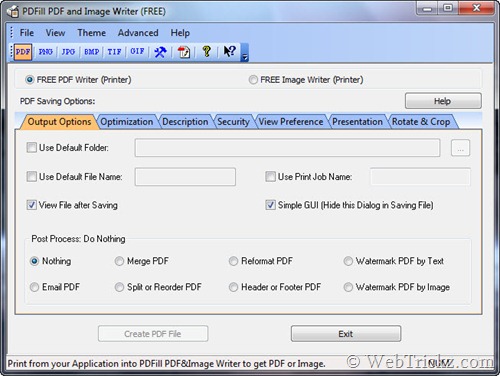
Image Writer is installed as a virtual printer driver which allows you to Print your document as an image file (PNG, JPG, BMP, TIF, GIF) with options for resolution, alpha bits, rotation, flip, output, and registry control.
3) PDFill PDF Editor
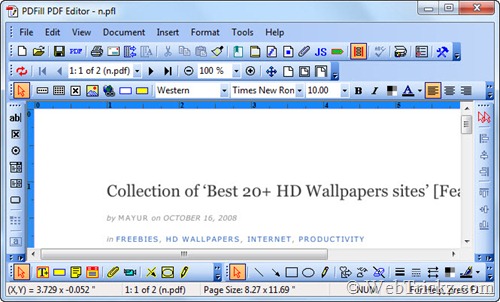
The evaluation copy of PDFill PDF Editor is also included which offers rich and powerful tools to edit a PDF file without requiring Adobe Acrobat. The free evaluation version produces watermark-edited PDF files.
Download PDFill Package [9.1 MB]
Requires: Free Adobe Reader, GhostScript 8.63, and Sun Java.
Supports: Windows 2000/XP/2003/2008/Vista/Windows 7 (32 & 64 Bit)
via [MegaLab.it]









