


If you have Kaspersky Antivirus or Internet Security installed on your PC, then you will notice a loss of disk space. This space is mostly acquired by the temporary files that are stored by Kaspersky. I freed about 1.3 GB of space from my PC by removing these temporary files, which were around 200+ each having a size of 5MB (Approx).
Here’s how you can free up your disk space by following the simple steps below.
1. Open Kaspersky Settings > Options and disable the Self-Defense option.
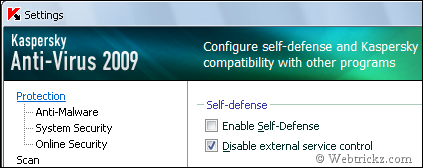
2. Now Exit your Kaspersky product ( KAV or KIS ).
3. Enable the “Show Hidden files and folders” option from the folder options.
4. Go to C:\Documents and Settings\All Users\Application Data\Kaspersky Lab\AVP8
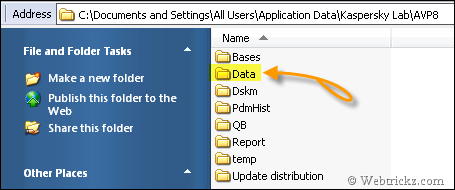
5. Open the “Data” folder where you will find many files named as av1A.tmp, av2A.tmp, etc., and other files and folders.
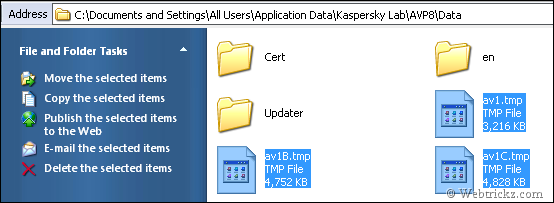
Properly select all the files having a .tmp extension and leave all other folders and files. Then delete all the temporary files i.e. .tmp files. Make sure you don’t delete any other files. You will now notice a high reduction in your disk space.
6. Now Start Kaspersky and turn on Self-Defense.
It is completely safe to remove these files as they are temporary files that have been used earlier by Kaspersky. I have tried it myself on my PC, so don’t worry.
Update – Windows 7 & Vista users need to open this path: C:\ProgramData\Kaspersky Lab\AVP9\Bases\Cache to find the .tmp files and delete them.








thnx for this very useful info…..
u have helped me recover around 6.5gb of space…..
god!!! i didnt think it wud occupy this much space….
kaspersky is gud but i hate these temp files….
anyway, thnx again….
In Vista the DATA folder would be at
C:\ProgramData\Kaspersky Lab\AVP8.
by the way thnx for he tip 🙂
recovered 2.5 Gbs of space after doing this. Every kaspersky user not using the email feature should do this. Those tmp files are actually email files which have been scanned by kaspersky. Also disable the anti spam feature before this otherwise those files will reappear.( only if you dont use outlook, the bat! and thunderbird)
Thanks for this; hate trash kicking about my system.
When I delete, it says, “Make sure disk is not write/ full protected” something… WTF!
For, every file, there’s an error when I delete. ACCESS DENIED… “Make sure the disk is not full or right-protected”… How do I deal with this?
@Mave Make sure you have firstly disabled Kaspersky using the above described method. Then try to delete the files.
@Mayur Thanks man… I was actually disabling “Enable Protection” instead of “Enable Self-Defense”… Problem Solved.
I have recovered 3.5GB of free space
You have inspired me. Thank you very much. Good luck with your site
thanks buddy , such a nice trick ,
4.44GB freed up via 228 files. This is heavenly!
I thought they could be removed but good to get confirmation, better info then Kaspersky support site, thank you!
Thanks a ton.I was really bothered with this issue and you really did a great job.The Kaspersky site is quite a misery and to even register is a pain if you are not an American resident.
Thanks once again
Sk
really awesome
Freed 6.55 GB . Awesome !
thanks a million – was trying to work out why i couldn’t delete all that trash on my daughter’s pc. you just helped me free up a lot of space.
recovered 1.5 Gbs of space after doing this. Every kaspersky user not using the email feature should do this.
Bravo! I have recovered 5.76 gb.I had been looking for a solution long time. MANY MANY THANKS DEAR.
hi guys i have tried this method but didn’t work for me
there is an other method
simply start your pc in safe mode and get rid of those temp files 🙂
Thanks a lot.It was a great help….really appriciates your efforts. I recovered 21 gb from 10 office PC.
where will this enable self defense option be in internet security 09
Excellent. Truly wonderful.
I had to once re-install the C drive since I was running out of space.
These files have took about 10 GB and I couldn’t delete them.
Again after that these files are building up . Your trick worked and I was saved from re-installing again
thanks man,
i had recovered 3.5gb from c:/
my probs get solved from this huge memory loss.
thank you once again
Thank you! You save my day!
Thx! You saved me a Gig!
THANKS A LOT! I WAS TRYIN FOR LONG TIME BUT…FINALLI FREED 6.5 GB! ONCE AGAIN THANKS A LOT.
thanks buddy…i can save space more then 1G 😀
I figured this out and just deleted all starting with AVP8 (except the initial briefcase). Seems to be fine now and has freed up an incredible 15 gigs …thats just after 7 weeks ! ….Why doesn’t Kapersky dump these automatically from time to time? Lol I thought my comp was slowing down. Come on Kapersky ..this is a bit whatever eh!
P.S. Just do it as outlined above and don’t worry, it still works without all this damned data. (Bitdefender doesn’t do this, but it ain’t good ….so slooow)
thank u.. it ws very use ful… i freed about 6.10 GB 0f my disk space…
but still the kaspersky lab folder is of 3.3GB.. is it possible to delete any other files..
plz let me know
kaspersky Internet security 2010 doesn’t have temporary files…. maybe all 2010 products…. I think they fixed this issue already
No Kaspersky 2010 products also include this issue. Just checked my KAV 2010 in Windows 7. See Here C:\ProgramData\Kaspersky Lab\AVP9\Bases\Cache http://i38.tinypic.com/5l75n9.gif
Thanx a lot. Its really very helpful.
THanks alot man … just saved 4 GB of memory
i think it’s one disadvantage Kaspersky should fix in upcoming versions
Thanks a lot !!!!!!!!
I HAVE RECOVERED 3 GB ,,, THANK U..
thanks a lot.worked fine .recovered 4.3 gb
Thanks yaar.
man u r a genius.love u so much. i vas really struggling wit my c drive
hi mayur
i follow that C:\ProgramData\Kaspersky Lab\AVP9\Bases\Cache
just i found 2 files so just recovered 60 mg
i have very low disk space
how can i deal with that
plz Email me [email protected]
nice man, you save my day!
thanx dude .i freed 4 .95 gb space 🙂
@wael
its
C:\Documents and Settings\All Users\Application Data\Kaspersky Lab\AVP8\data
not
C:\ProgramData\Kaspersky Lab\AVP9\Bases\Cache
so try once again u will get some free space
thanks 4 the help buddy it really helps……..
Thanks a lot. Really useful post
regards
g.s.rao
thanks a lot for this.i recovered 1.5 gb.I was out of disk space!
Thanks! Jusy saved 400mb. Holy cow… temp files!
Loadz of thanks bro. I recovered 3gb.. i was in hell trouble.. Thank you once again.. 🙂
Thanks a bunch for the info, great help here.
Hi – What about Kasp 2010 what should I switch on/off it appears different to 2009.
Charles
dude, you rule..
i never thought that i could find a solution to this…!! 🙂
dude….where should i click if i am having kaspersky internet security 2009….i could not find tat option!!!…any one knows…plz plz plz mail me!!…
i m also using kaspersky 2009 and unable to locate “enable self defence” option please help me
hi! i just found it and was a great help in get rid of tmp files….for those who r using Kaspersky 2009 click settings>click on options (on left side)>uncheck “enable self defence” > apply then exit from kaspersky and follow the above instructions to remove tmp files..
Great tips .. I freed up 2 gb space 🙂
Thanks bro u saved ma 4 GB space
also thnks for puuting up pictured tutorial
thumbs upppppppp 4 u
Thanks dude 4GB removed! That is nuts to keep 4gb space for temp files, its weird that the antivirus doesn’t clean itself. You are the man!!!!
I freed 7.85GB from my drive. Amazing…!
Free about 2GB for C driver, thank for share
thanks for your useful post i have removed 2.3GB of my disk space
Thanks a ton!
thanxxxxxxx to the advice.i have recovered 7.5gb space.i have been fedup to the low disk space warningsssss
Thanks, this helped me clear 12,6 Gb 🙂
thanks, i got 2.13gb free space after doing like this. 🙂
Thanks Dude!! The key is Disabling Enable self defense and NOT Enable protection!! Just Freed 2.5 gb on my c drive !!!! Thanks A Ton!!!!
thankxxx u sooo muchhh …its helps a lot man!!!!!…. just cleared 9.7gb of tmp trash…..
Tnx a ton. It really helped me a lot. :o)
hey, thanxxxxxxxxxxxxx!!!! this helped a lot. my girlfriend complained about characters not showing on her computer and i found soon out that the hard disc space was completely used up. as her windows is in chinese and my chinese is not that good, the pictures helped a lot to find these bad, bad temp files haha
thanks a lot
Thanks Buddy for this cool information
Thanks alot.. i was able to clear 6.9GB worth of crap from my HDD..
OMG thanks a lot, i get 6.79 GB back… yay
Heyyyy….A Bundle of Thanks Man….Great information…i was so worried of that bitchy thing…haha i got rid of it..yayyy 😀
Really cooool guy u r…
Thanks !!!!!!!!!
Good trick! i recovered 6.5GB by deleting .tmp temporary files and now my system works great.
Thank you Mayur and Ajay Mathur. You both rendered a valuable service to the PC users. Kudos! It is this evangelism that makes the Net such a possible substitute to God
Hey man, thx a lot!
Maaaaaaaaaan thank you soo much I saved 4.2 G there was just 200M on the C drive
thanks ,it works well
Thanks a lot. This freed up over 2 GB on my vaio. :>)
hey thanks a lot man i freed up 2.55 mb of disk on c drive
it used to show just 1 mb before
do we need to enable the self defense again ?
i enabled it again bcoz it was showing “YOUR COMPUTER IS BE ON RISK”
thanks man…. i just got 2.91gb back. this trick is sure a life saver.
Many thanks man, It was a headache and gone.
Thanks a lot! I get 14GB space on my C disc 😀
It didn’t work with my computer, “Cannot delete av**: Access is denied”. How can I make sure the disk is not full or write-protected and that the file is not currently in use?
I’m using Kaspersky Internet Security since 2008, the temp files accumulated are now close to 30G.
Pls help. thanks in advance.
i think that you have to disable self-defense
Even after Disabling self defense. The Error is still persistent, even with my Desktop.
thanx because kaspersky lab files occupied 5.58 gb memory my hard drive. I have no idea how to delete the files? your information is very useful to me thanks once again
Very useful tip Mayur, just freed up around 12 GB of space on my home drive. Thanks a lot!
Thanx a lot. I have recover about 6.5 Gb of my Space. thanku so much.
Thanx alot my teacher
🙁 Self Defence turned off. Still couldnt delete the .tmp files 🙁
Solid protection I must admit. Any help?
TIA
Dear
I am facing some problem about Kesper sky 2012. I am using kesper sky 2012. C:\ProgramData\Kaspersky Lab\AVP11 its become 4.68 gb . Can you help me ?
I ended up uninstalling Kaspersky and getting rid of it for good. Noting but issues over and over. It eat up a little over 1TB of disk space in under 29 days. No thanks I was locked out of my computer for a couple of days due to no more space on C drive and it trying to protect its self from damage. I took 9 days to run a full scan and would crash all of the time. The only thing that worked part of the time was the root kit scan that was because it ran constantly all the other scans would start and stop after a couple of minutes. It would run updates constantly over and over to the point that I could not use my internet connection. And talk about a pain in the backside the Money, and Adult Account setting for every user being forced to instal the cap into my browser slowed it and Outlook down too. Overall have to rate it total Crap ware and stay as far away from as possible lots of bells, whistles, to make you think its doing something that its not. Not to mention the fact that once installed if you can’t find the help you need online or need to ask be ready to pay through the nose to troubleshoot a product not ready for market. In other words be ready to debug their product you paid for at twice the price once to buy and again to fix. Have heard stories of at least $69-99.99 per half hour for “Tech” support. To again fix issues that should of been fixed before being released for market. Anyone want to argue with me from the Company happy to take it up with you, have had it take mine and others Systems hostage refuse to let me on my own Computer.
thanks… i just save 104GB… thanks a million…
was confuse why after i clear off my other doc 52GB, suddenly within 2 days gone…
thanks 104GB to MAYUR