

WebTrickz
TRENDING
  • Complete list of 1337x Proxy and Mirror Sites
No Result
View All Result
  • Reviews
  • Editorials
  • Social Media
    • Facebook
    • Twitter
    • YouTube
    • Messenger
    • Instagram
    • Snapchat
    • WhatsApp
    • TikTok
  • Apps
  • How To’s
  • Apple
  • iPhone
  • Google
  • Android
  • Mac
  • Security
  • About Us
    • About Us
    • Contact Us
    • Privacy Policy
  • Reviews
  • Editorials
  • Social Media
    • Facebook
    • Twitter
    • YouTube
    • Messenger
    • Instagram
    • Snapchat
    • WhatsApp
    • TikTok
  • Apps
  • How To’s
  • Apple
  • iPhone
  • Google
  • Android
  • Mac
  • Security
  • About Us
    • About Us
    • Contact Us
    • Privacy Policy
No Result
View All Result
WebTrickz
No Result
View All Result
Home Google

Google Analytics Real-Time shows Live Visitors on a Site

Taigun by Taigun
February 23, 2024
in Google, Internet

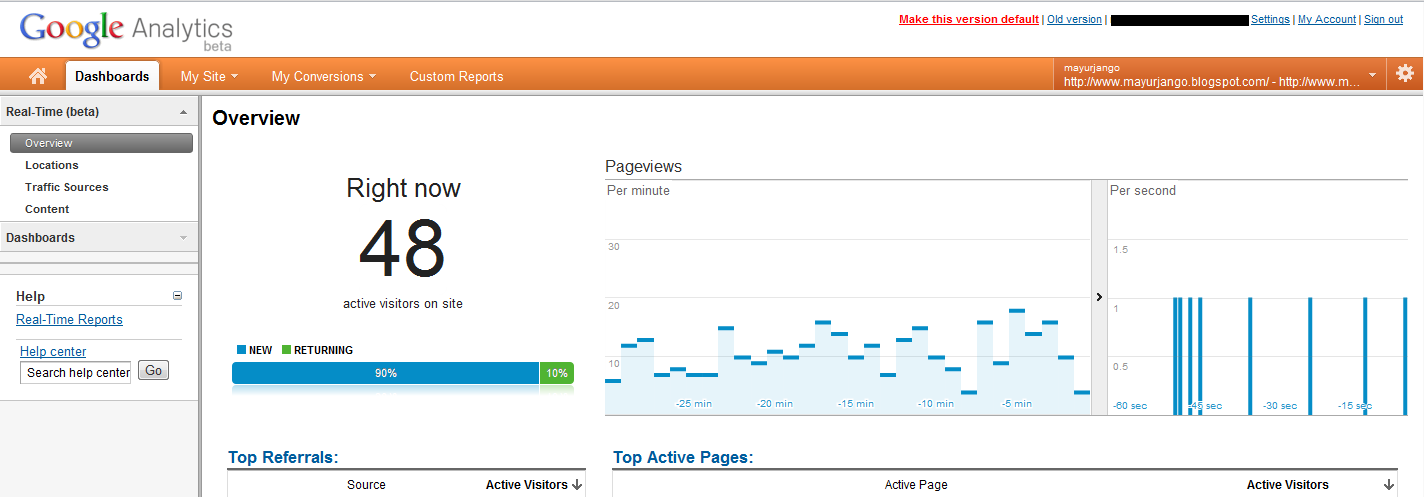
Google Analytics is a great and efficient service to analyze website traffic stats and lets webmaster improve their site or blog performance by studying various results and thereby improving them. Analytics can now show real-time data – a set of new reports that shows what’s happening on your site as it happens.

This simply means you can now see Active aka Online visitors on your site. There are free Real-Time Web Analytics services like whos.amung.us and Trend Counter to track live traffic but they show bloated stats. On comparing whos.amung.us live stats with Analytics Realtime, we found that whos.amung.us shows double live visitors than what’s shown by Analytics. Certainly, the figures shown by Google Analytics are much more precise.

Real-time traffic reports are a good way to measure the immediate impact of social media. With Real-Time, you can see the immediate impact on your site traffic whenever you publish a new blog post and share it on social sites like Twitter, Facebook, and Google+.

How to Access Real-Time Stats in Google Analytics –

Firstly, switch to the New Version of Google Analytics. (Click the “New Version” link at the top right corner of the Analytics webpage). Then tap the Dashboards tab and select the Overview option listed under Real-Time (beta). The Real-time reports will be moved to the Home tab in the updated interface next week.

You will have access to Real-Time reports if you are an Administrator on your Analytics account, or if you have access to a profile without profile filters. Real-Time does not support profile filters.

Realtime reports are being enabled for several accounts and everyone will be able to access them in the coming weeks. However, if you can’t wait then you can get it now by applying for early access here: https://services.google.com/fb/forms/realtimeanalytics/
Google-analytics_realtime-stats

It was enabled for us just a few minutes after applying. To see real-time data reports, visit https://www.google.com/analytics/web/#realtime. The webpage shows page views per minute/sec along with the Top Active Pages, top referrals, top keywords, etc.

Source: [Google Analytics Blog]

Tags: Google
ShareTweetSend
Previous Post

Google+ Now lets you Download Photos in High Resolution

Next Post

How to Install CyanogenMod 7.1 on Samsung Galaxy S II

Taigun

Taigun

Mayur Agarwal, the founder and editor of WebTrickz, is a tech enthusiast with a Bachelor's degree in Computer Applications and over 15 years of experience in tech writing. His passion for technology and gadgets drives him to create insightful how-to articles and troubleshooting guides.

Next Post

How to Install CyanogenMod 7.1 on Samsung Galaxy S II

Leave a Reply Cancel reply

Your email address will not be published. Required fields are marked *

Latest Stories

1337x logo

1337x Proxy List 2026: Working Proxy & Mirror Sites

June 2, 2026

How to Find Saved Reels on Facebook App & Desktop (2026)

April 1, 2026
microsoft edge browser

How to Restore or Reopen Closed Tabs in Microsoft Edge

March 26, 2026
Facebook app on iPhone

How to See Recently Watched Reels on Facebook (2026 Guide)

April 3, 2026
microsoft edge new logo

Download Microsoft Edge Offline Installer [Latest Version]

March 16, 2026

How to Turn Off Bing SafeSearch in Microsoft Edge

March 12, 2026
google chrome logo

Download Google Chrome Offline Installer [Latest Version]

June 3, 2026

Trending Stories

  • microsoft family safety settings

    How to Turn Off Microsoft Family Safety on Windows 11 & 10

  • How to Turn Off Microsoft Edge Game Assist in Windows 11

  • How to Turn Off Fn Lock or Fn Key on Windows 11/10 Laptop

  • How to See Recently Watched Reels on Facebook (2026 Guide)

  • How to Restore or Reopen Closed Tabs in Microsoft Edge

  • About Us
  • Contact Us
  • Privacy Policy
  • Advertise

© 2026 WebTrickz. All Rights Reserved.

No Result
View All Result
  • Reviews
  • Apps
  • How To’s
  • Android
  • Google
  • iPhone
  • Mac
  • About Us
  • Contact Us
  • Privacy Policy

© 2026 WebTrickz. All Rights Reserved.







