WebTrickz
TRENDING
  • Complete list of 1337x Proxy and Mirror Sites
No Result
View All Result
  • Reviews
  • Editorials
  • Social Media
    • Facebook
    • Twitter
    • YouTube
    • Messenger
    • Instagram
    • Snapchat
    • WhatsApp
    • TikTok
  • Apps
  • How To’s
  • Apple
  • iPhone
  • Google
  • Android
  • Mac
  • Security
  • About Us
    • About Us
    • Contact Us
    • Privacy Policy
  • Reviews
  • Editorials
  • Social Media
    • Facebook
    • Twitter
    • YouTube
    • Messenger
    • Instagram
    • Snapchat
    • WhatsApp
    • TikTok
  • Apps
  • How To’s
  • Apple
  • iPhone
  • Google
  • Android
  • Mac
  • Security
  • About Us
    • About Us
    • Contact Us
    • Privacy Policy
No Result
View All Result
WebTrickz
No Result
View All Result
Home Google

How to Get the New Google Bar Right Now

Mayur by Mayur
June 15, 2019
in Google, How To's

Just a day back, Google introduced another cool change to its design by redesigning the substantially used Google bar. The new Google bar replaces the horizontal black bar at the top of the page, allowing you to navigate quickly between Google services, as well as offers the ability to check your Google+ notifications and quickly share stuff with desired people on Google Plus. The latest new Google bar is not launched publicly yet but has been rolled out randomly for some users at the moment.
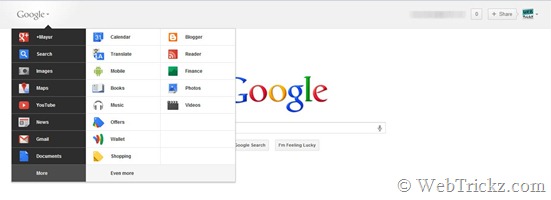
new google bar

Fortunately, a Google+ user ‘Maximilian Majewski’ has discovered a 100% working hack to enable the new Google bar right now. The hack can easily be applied on Google Chrome browser to edit a certain value and thus access the awesome new Google menu bar. Switching to the New Google bar is real easy, just follow the steps below:

1. Install the ‘Edit This Cookie’ extension to change cookies on Chrome.

2. Load Google.com, right-click on webpage and select ‘Edit cookies’.

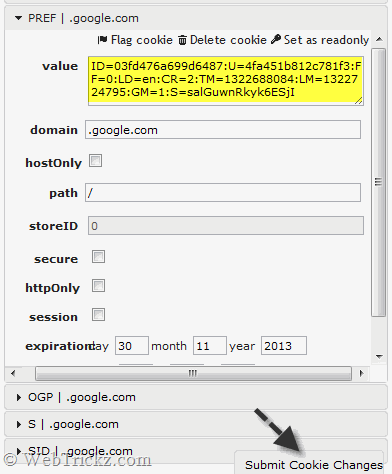
3. Move to the "PREF" section and change its value to this: (exact code)

ID=03fd476a699d6487:U=88e8716486ff1e5d:FF=0:LD=en:CR=2:TM=1322688084:
LM=13226880­85:S=McEsyvcXKMiVfGds

edit cookies_PREF

4. Click on ‘Submit cookie changes’ at the bottom.

5. Reload Google and you have the new Google bar.

You will now find links to the most accessed services in a new drop-down Google menu nested under the Google logo. You can access additional services by hovering over the “More” link at the bottom of the list. Just click on your choice and you’re over to it!

Hope you liked this trick. Don’t forget to share it with your friends. 🙂
Tags: BrowserChromeGoogleGoogle PlusTipsTricks
ShareTweetSend
Previous Post

Retain High Speed Bandwidth on Airtel Broadband after crossing FUP limit with Smartbytes

Next Post

Backup & Restore Firefox easily using Firefox Backup Tool

Mayur

Mayur

Mayur Agarwal, the founder and editor of WebTrickz, is a tech enthusiast with a Bachelor's degree in Computer Applications and over 15 years of experience in tech writing. His passion for technology and gadgets drives him to create insightful how-to articles and troubleshooting guides.

Next Post

Backup & Restore Firefox easily using Firefox Backup Tool

Comments 4

  1. SIDDU says:
    15 years ago

    No I didn’t get the new Google Bar

    Reply
  2. Dhawal D says:
    15 years ago

    Hey,

    It doesn’t seem to work for me 🙁

    Reply
    • Mayur says:
      15 years ago

      It works. Make sure there is no space between the code. Copy the value from the pastebin page (exact code link).

      Reply
  3. Mohammad Ali Taheri says:
    15 years ago

    Hi,
    Is it for chrome (Only)????
    Can I have google bar in firefox???

    Reply

Leave a Reply Cancel reply

Your email address will not be published. Required fields are marked *

Latest Stories

microsoft edge new logo

How to Turn Off Notifications in Microsoft Edge (2026 Guide)

June 8, 2026
chatgpt logo

How to Clear or Delete ChatGPT Memory on PC and Mobile

June 5, 2026
1337x logo

1337x Proxy List 2026: Working Proxy & Mirror Sites

June 2, 2026

How to Find Saved Reels on Facebook App & Desktop (2026)

June 8, 2026
microsoft edge browser

How to Restore or Reopen Closed Tabs in Microsoft Edge

March 26, 2026
Facebook app on iPhone

How to See Recently Watched Reels on Facebook (2026 Guide)

June 5, 2026
microsoft edge new logo

Download Microsoft Edge Offline Installer [Latest Version]

March 16, 2026

Trending Stories

  • microsoft family safety settings

    How to Turn Off Microsoft Family Safety on Windows 11 & 10

  • 1337x Proxy List 2026: Working Proxy & Mirror Sites

  • How to Turn Off Microsoft Edge Game Assist in Windows 11

  • How to Turn Off Fn Lock or Fn Key on Windows 11/10 Laptop

  • How to See Recently Watched Reels on Facebook (2026 Guide)

  • About Us
  • Contact Us
  • Privacy Policy
  • Advertise

© 2026 WebTrickz. All Rights Reserved.

No Result
View All Result
  • Reviews
  • Apps
  • How To’s
  • Android
  • Google
  • iPhone
  • Mac
  • About Us
  • Contact Us
  • Privacy Policy

© 2026 WebTrickz. All Rights Reserved.