

WebTrickz
TRENDING
  • Complete list of 1337x Proxy and Mirror Sites
No Result
View All Result
  • Reviews
  • Editorials
  • Social Media
    • Facebook
    • Twitter
    • YouTube
    • Messenger
    • Instagram
    • Snapchat
    • WhatsApp
    • TikTok
  • Apps
  • How To’s
  • Apple
  • iPhone
  • Google
  • Android
  • Mac
  • Security
  • About Us
    • About Us
    • Contact Us
    • Privacy Policy
  • Reviews
  • Editorials
  • Social Media
    • Facebook
    • Twitter
    • YouTube
    • Messenger
    • Instagram
    • Snapchat
    • WhatsApp
    • TikTok
  • Apps
  • How To’s
  • Apple
  • iPhone
  • Google
  • Android
  • Mac
  • Security
  • About Us
    • About Us
    • Contact Us
    • Privacy Policy
No Result
View All Result
WebTrickz
No Result
View All Result
Home How To's

Download Windows 8 ISO using your Genuine Product Key

Taigun by Taigun
February 26, 2024
in How To's, Windows 8

Users who’ve recently upgraded their PC to Windows 8 using the Windows Upgrade Assistant and perhaps selected the Install now option or canceled the download, might be looking for a way to download Windows 8 setup as an ISO.

That’s because if you choose Install now, then the upgrade assistant program no longer saves the ISO file and straight away continues with the installation process. Certainly, having Windows ISO has its benefits like you can burn the ISO to a DVD or create a bootable drive to install Windows 8 later on multiple PCs or just in case you perform a system format.

Thankfully, Microsoft offers a simple way to download your Windows 8 copy at a later time, provided you purchased a genuine license of Windows. Go through the steps below:

How to download genuine Windows 8 PRO ISO from Microsoft

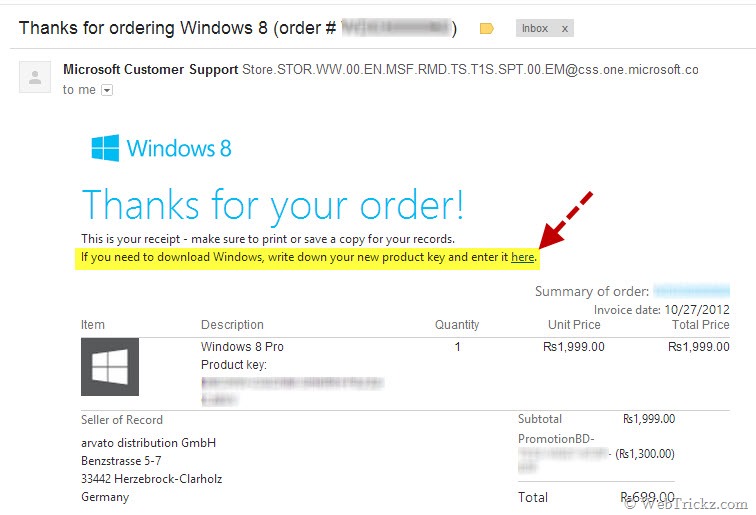
1. Open the email inbox that you used to buy your Windows 8 copy. Look for the Order receipt email, open it, and click the ‘here’ link as shown in the image below.
28-10-2012 21-12-21

2. Save the ‘Windows 8 Setup’ file and run it.

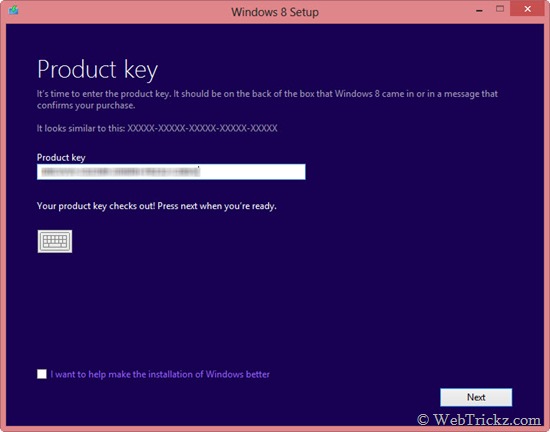
3. Enter the genuine Windows 8 product key received from Microsoft. Click Next.
29-10-2012 14-17-53

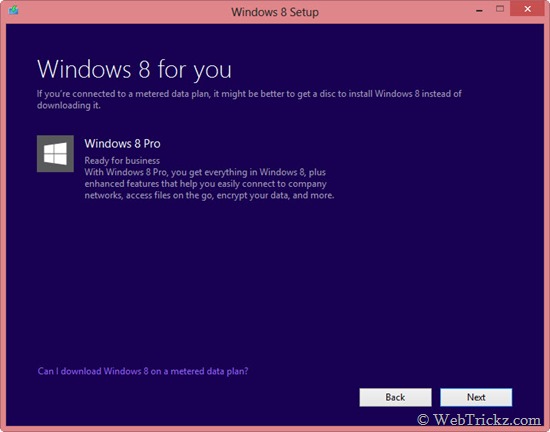
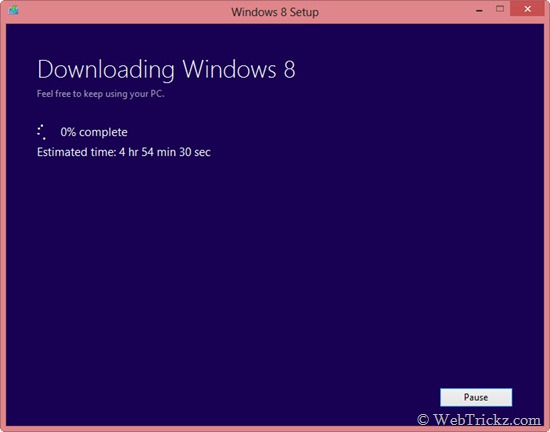
4. Click Next when you see the below window. Downloading will begin now and might take some time depending on your Internet connection (setup is over 2GB in size).
29-10-2012 14-18-25

29-10-2012 20-47-37

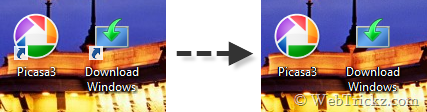
Note – You can Pause the downloading anytime and close the Windows 8 setup. To resume it again, just run the ‘Download Windows’ shortcut created on your desktop.

5. Once the download is complete, you’ll be presented with 3 Installation options as shown. Select the middle option ‘Install by creating media’ and click Next.
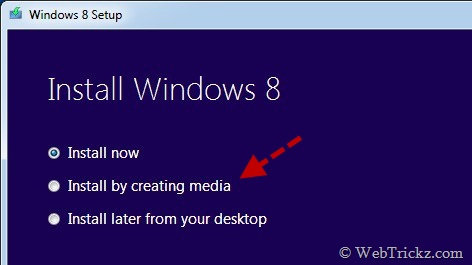
Win8

6. Next, choose the ISO file option, click Save, and specify a location on your computer. Wait until the Windows 8 ISO is saved. Finish!
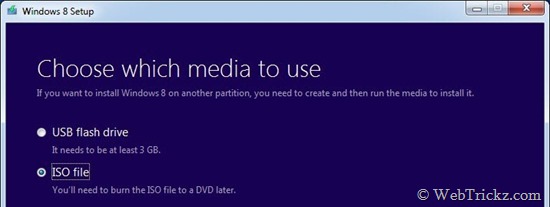
win9

Tags: MicrosoftTipsTutorialsWindows 8
ShareTweetSend
Previous Post

Buy Windows 8 PRO License for just Rs. 699 ($14.99) using Upgrade Assistant even on Windows 8

Next Post

Remove or Change Shortcut Arrow in Windows 8 and 7

Taigun

Taigun

Mayur Agarwal, the founder and editor of WebTrickz, is a tech enthusiast with a Bachelor's degree in Computer Applications and over 15 years of experience in tech writing. His passion for technology and gadgets drives him to create insightful how-to articles and troubleshooting guides.

Next Post

Remove or Change Shortcut Arrow in Windows 8 and 7

Comments 1

  1. Amit Choudhary says:
    13 years ago

    I have genuine key but I am not getting any “Install by creating media” Option in this process, what should I do, Please suggest me,

    or please provide me official download link of windows 8 pro

    Thanks in advacne

    Reply

Leave a Reply Cancel reply

Your email address will not be published. Required fields are marked *

Latest Stories

1337x logo

1337x Proxy List 2026: Working Proxy & Mirror Sites

June 2, 2026

How to Find Saved Reels on Facebook App & Desktop (2026)

April 1, 2026
microsoft edge browser

How to Restore or Reopen Closed Tabs in Microsoft Edge

March 26, 2026
Facebook app on iPhone

How to See Recently Watched Reels on Facebook (2026 Guide)

April 3, 2026
microsoft edge new logo

Download Microsoft Edge Offline Installer [Latest Version]

March 16, 2026

How to Turn Off Bing SafeSearch in Microsoft Edge

March 12, 2026
google chrome logo

Download Google Chrome Offline Installer [Latest Version]

June 3, 2026

Trending Stories

  • microsoft family safety settings

    How to Turn Off Microsoft Family Safety on Windows 11 & 10

  • How to Turn Off Fn Lock or Fn Key on Windows 11/10 Laptop

  • How to Turn Off Microsoft Edge Game Assist in Windows 11

  • How to See Recently Watched Reels on Facebook (2026 Guide)

  • How to Restore or Reopen Closed Tabs in Microsoft Edge

  • About Us
  • Contact Us
  • Privacy Policy
  • Advertise

© 2026 WebTrickz. All Rights Reserved.

No Result
View All Result
  • Reviews
  • Apps
  • How To’s
  • Android
  • Google
  • iPhone
  • Mac
  • About Us
  • Contact Us
  • Privacy Policy

© 2026 WebTrickz. All Rights Reserved.







