

WebTrickz
TRENDING
  • Complete list of 1337x Proxy and Mirror Sites
No Result
View All Result
  • Reviews
  • Editorials
  • Social Media
    • Facebook
    • Twitter
    • YouTube
    • Messenger
    • Instagram
    • Snapchat
    • WhatsApp
    • TikTok
  • Apps
  • How To’s
  • Apple
  • iPhone
  • Google
  • Android
  • Mac
  • Security
  • About Us
    • About Us
    • Contact Us
    • Privacy Policy
  • Reviews
  • Editorials
  • Social Media
    • Facebook
    • Twitter
    • YouTube
    • Messenger
    • Instagram
    • Snapchat
    • WhatsApp
    • TikTok
  • Apps
  • How To’s
  • Apple
  • iPhone
  • Google
  • Android
  • Mac
  • Security
  • About Us
    • About Us
    • Contact Us
    • Privacy Policy
No Result
View All Result
WebTrickz
No Result
View All Result
Home Tips 'n' Tricks

IObit StartMenu8 – Brings Start Menu Back to Windows 8 [Best Free Start Menu Replacement]

Taigun by Taigun
July 2, 2024
in Tips 'n' Tricks, Windows 8

In the past, we’ve covered a couple of programs to get back Windows 7 like old start menu in Windows 8. Here is another similar new program ‘StartMenu8’ released by IObit that brings back the old start menu and start button to Windows 8. It’s totally free, offers a variety of customization options, and apparently is the best free start menu replacement for Windows 8. The tool is really handy for users accustomed to working with the old start menu and who don’t find the new Metro start screen comfortable to use.

StartMenu8 is specially designed for Windows 8 that provides a quick and efficient way to get back the traditional Windows Start Menu and Start button in Windows 8. It integrates perfectly, offers faster access to programs and files, seamless search and power options are included too. StartMenu8 also offers four easy-to-use and fully configurable menus, thus allowing users the ability to customize the menu as desired.
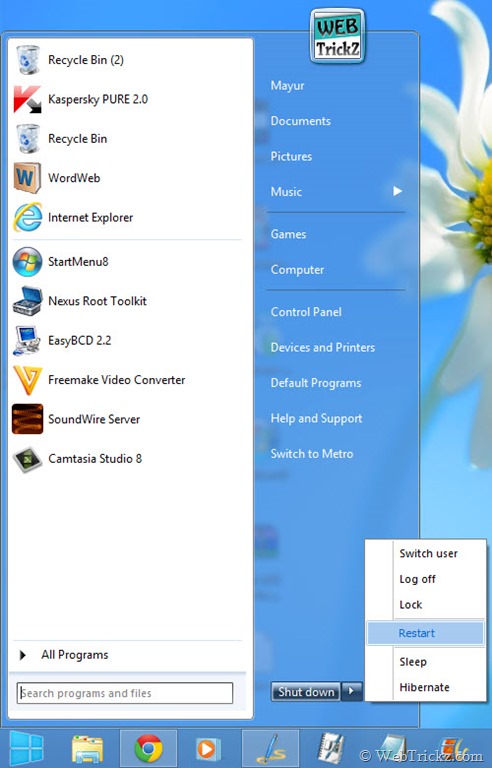
29-01-2013 14-59-29

It has the option to Skip Metro screen which automatically skips the Metro UI and boots Windows 8 directly into the desktop interface. There are options to disable certain Metro features like Windows 8 Hot Corners, the Metro Sidebar, and hotkeys. One can quickly switch to the Modern start screen using the hotkey (Alt + X) or a custom-defined shortcut.
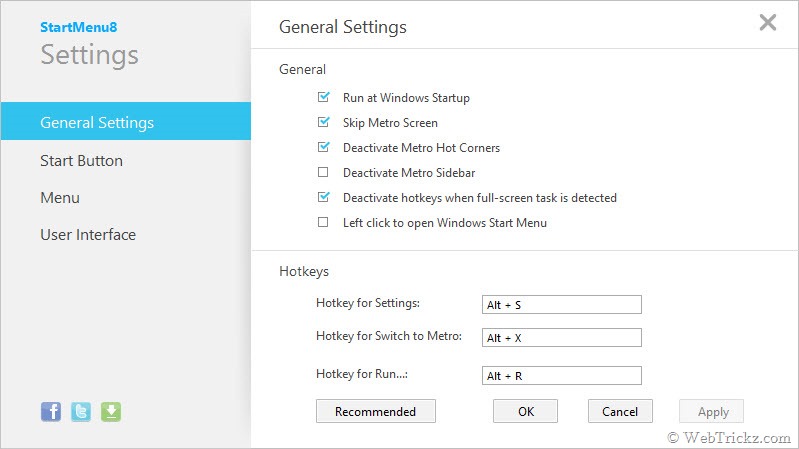
29-01-2013 14-34-59

From Settings, you can change the start button icon and customize User Interface options such as font size, current skin, power button action, and modify user image.

29-01-2013 14-57-56

Moreover, with StartMenu8 users can customize the function of start menu items such as Documents, Pictures, Music, etc. to not show or show as a link or show as a menu. You can also create quick access links to your favorite and most-used applications by right-clicking to “Pin to Start Menu” or “Pin to Taskbar”.

Download IObit’s StartMenu8 Free [Size: 4.4 MB]

Tags: TipsWindows 8
ShareTweetSend
Previous Post

Free 90 Days OEM Trial of Norton Internet Security 2013

Next Post

WinZip for Windows 8 Available for Free in Windows Store

Taigun

Taigun

Mayur Agarwal, the founder and editor of WebTrickz, is a tech enthusiast with a Bachelor's degree in Computer Applications and over 15 years of experience in tech writing. His passion for technology and gadgets drives him to create insightful how-to articles and troubleshooting guides.

Next Post

WinZip for Windows 8 Available for Free in Windows Store

Comments 3

  1. Norbert (Bob) Gostischa says:
    13 years ago

    This is fine but I think that ClassicShell beats the IOBit product by a mile.
    It’s also been around a lot longer and has more features than Start Menu8.
    http://www.classicshell.net/

    Reply
  2. Dave says:
    13 years ago

    Well Microsoft I think you just might have sold more copies had you included something like this. Best include this in you first SP1 for Windows 8 if Possible.

    Reply
  3. Plaban Manna says:
    13 years ago

    I’m happy with Stardock Start8. But it a paid software. I’m going to try this one.

    Reply

Leave a Reply Cancel reply

Your email address will not be published. Required fields are marked *

Latest Stories

1337x logo

1337x Proxy List 2026: Working Proxy & Mirror Sites

June 2, 2026

How to Find Saved Reels on Facebook App & Desktop (2026)

April 1, 2026
microsoft edge browser

How to Restore or Reopen Closed Tabs in Microsoft Edge

March 26, 2026
Facebook app on iPhone

How to See Recently Watched Reels on Facebook (2026 Guide)

April 3, 2026
microsoft edge new logo

Download Microsoft Edge Offline Installer [Latest Version]

March 16, 2026

How to Turn Off Bing SafeSearch in Microsoft Edge

March 12, 2026
google chrome logo

Download Google Chrome Offline Installer [Latest Version]

June 3, 2026

Trending Stories

  • microsoft family safety settings

    How to Turn Off Microsoft Family Safety on Windows 11 & 10

  • How to Turn Off Microsoft Edge Game Assist in Windows 11

  • How to Turn Off Fn Lock or Fn Key on Windows 11/10 Laptop

  • How to See Recently Watched Reels on Facebook (2026 Guide)

  • How to Restore or Reopen Closed Tabs in Microsoft Edge

  • About Us
  • Contact Us
  • Privacy Policy
  • Advertise

© 2026 WebTrickz. All Rights Reserved.

No Result
View All Result
  • Reviews
  • Apps
  • How To’s
  • Android
  • Google
  • iPhone
  • Mac
  • About Us
  • Contact Us
  • Privacy Policy

© 2026 WebTrickz. All Rights Reserved.







