

WebTrickz
TRENDING
  • Complete list of 1337x Proxy and Mirror Sites
No Result
View All Result
  • Reviews
  • Editorials
  • Social Media
    • Facebook
    • Twitter
    • YouTube
    • Messenger
    • Instagram
    • Snapchat
    • WhatsApp
    • TikTok
  • Apps
  • How To’s
  • Apple
  • iPhone
  • Google
  • Android
  • Mac
  • Security
  • About Us
    • About Us
    • Contact Us
    • Privacy Policy
  • Reviews
  • Editorials
  • Social Media
    • Facebook
    • Twitter
    • YouTube
    • Messenger
    • Instagram
    • Snapchat
    • WhatsApp
    • TikTok
  • Apps
  • How To’s
  • Apple
  • iPhone
  • Google
  • Android
  • Mac
  • Security
  • About Us
    • About Us
    • Contact Us
    • Privacy Policy
No Result
View All Result
WebTrickz
No Result
View All Result
Home Android

How to Install Official TWRP 2.8 Touch Recovery on Redmi 1S

Taigun by Taigun
December 30, 2021
in Android, How To's

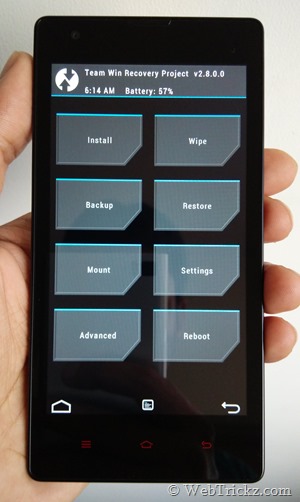
Xiaomi Redmi 1S comes pre-loaded with MIUI that itself is a great ROM, packed with impressive features and customization options. However, if your experience with MIUI on Redmi 1S isn’t satisfactory then you might be looking to install a custom ROM for enhanced performance. In order to flash a custom ROM on Android phones, you need to first install a custom recovery such as ClockworkMod Recovery (CWM) or Team Win Recovery Project (TWRP). Though both these recoveries are very popular, currently CWM for Redmi 1S isn’t complete and lacks many features, such as you can’t select .zip files to install from internal storage. Luckily, the amazing TWRP recovery is officially available for Redmi 1S, which is certainly the most stable and full-featured recovery for Redmi 1S with support for the Touch interactive menu.
IMG_20141002_164408

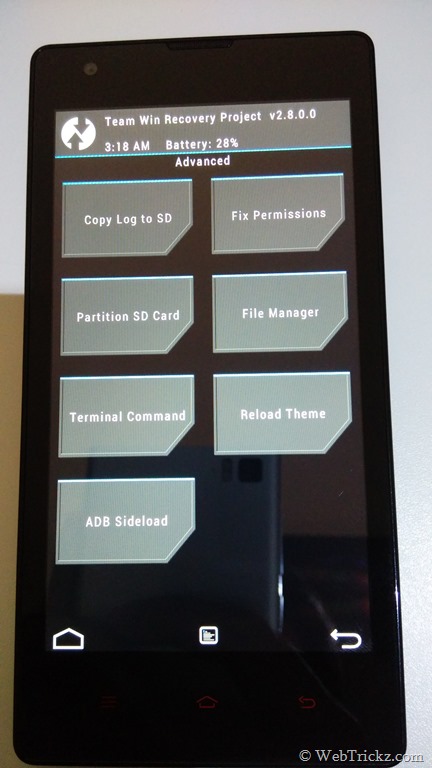
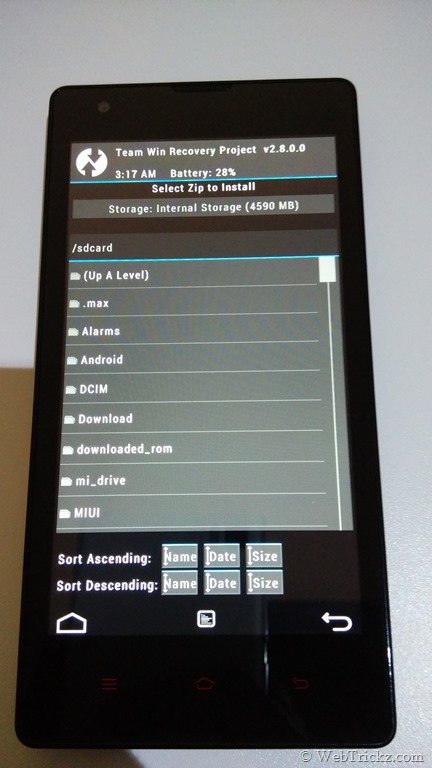
TWRP 2.8.0.0 for Redmi 1S includes touch interface, full SELinux (4.3+) support, Backup encrypt function, fully functional USB On-The-Go (OTG), and MTP support since 2.8.0.X. It’s advisable to install TWRP over CWM if you’re interested in several additional options it offers.
IMG_20141002_134758      IMG_20141002_134716

Installing TWRP Touch Recovery on Redmi 1S –

1. Download TWRP Recovery 2.8.4.0 for Redmi 1S WCDMA. [Forum Thread]

2. Rename the file “TWRP_2.8.4.0.zip” to “update.zip”.

3. Transfer the update.zip file to the root directory of your phone’s internal storage.

4. Go to the Updater app, press the menu button, and then click “Reboot to Recovery mode”. Alternatively, power off the phone and then press the “Power + volume up” button simultaneously to boot into recovery mode.

5. When the phone boots into Mi recovery, select English and choose ‘Install update.zip to System’. Select Yes to confirm.

6. When the update is installed, go back and select Reboot. That’s it!

Next time you reboot into recovery, you will find TWRP recovery v2.8. 🙂

~ We’ve tried this on Redmi 1S WCDMA running MIUI v5 (build JHCMIBH45.0).
Tags: AndroidGuideMIUIRecoveryROMTipsXiaomi
ShareTweetSend
Previous Post

How to Install Stock Mi-Recovery 2.0.1 on Redmi 1S

Next Post

Guide to Install Official MIUI ROM on OnePlus One

Taigun

Taigun

Mayur Agarwal, the founder and editor of WebTrickz, is a tech enthusiast with a Bachelor's degree in Computer Applications and over 15 years of experience in tech writing. His passion for technology and gadgets drives him to create insightful how-to articles and troubleshooting guides.

Next Post

Guide to Install Official MIUI ROM on OnePlus One

Comments 5

  1. dinesh says:
    11 years ago

    To run recovery mode by power+volume are not working on my cm11 version help me

    Reply
  2. andreana r says:
    11 years ago

    thank you very much, very nice share 😉

    Reply
  3. lalit says:
    11 years ago

    it worked when i installed it in miui 5 but afterinstalling developer version of miui6 i got mi recovery and now when i try the same method to install twrp by update.zip method it does not work.

    Reply
  4. Nikhil says:
    11 years ago

    @Lalit
    Use Flashboot method to Install TWRP in MIUI 6 beta !!

    Reply
  5. Rajeev says:
    11 years ago

    it stuck in Twrp mode and after its showing successful in updating miui 6 , its still taking me to the TWRP mode what should i do ?

    Reply

Leave a Reply Cancel reply

Your email address will not be published. Required fields are marked *

Latest Stories

1337x logo

1337x Proxy List 2026: Working Proxy & Mirror Sites

June 2, 2026

How to Find Saved Reels on Facebook App & Desktop (2026)

April 1, 2026
microsoft edge browser

How to Restore or Reopen Closed Tabs in Microsoft Edge

March 26, 2026
Facebook app on iPhone

How to See Recently Watched Reels on Facebook (2026 Guide)

April 3, 2026
microsoft edge new logo

Download Microsoft Edge Offline Installer [Latest Version]

March 16, 2026

How to Turn Off Bing SafeSearch in Microsoft Edge

March 12, 2026
google chrome logo

Download Google Chrome Offline Installer [Latest Version]

June 3, 2026

Trending Stories

  • microsoft family safety settings

    How to Turn Off Microsoft Family Safety on Windows 11 & 10

  • How to Turn Off Microsoft Edge Game Assist in Windows 11

  • How to Turn Off Fn Lock or Fn Key on Windows 11/10 Laptop

  • How to See Recently Watched Reels on Facebook (2026 Guide)

  • How to Restore or Reopen Closed Tabs in Microsoft Edge

  • About Us
  • Contact Us
  • Privacy Policy
  • Advertise

© 2026 WebTrickz. All Rights Reserved.

No Result
View All Result
  • Reviews
  • Apps
  • How To’s
  • Android
  • Google
  • iPhone
  • Mac
  • About Us
  • Contact Us
  • Privacy Policy

© 2026 WebTrickz. All Rights Reserved.







