

WebTrickz
TRENDING
  • Complete list of 1337x Proxy and Mirror Sites
No Result
View All Result
  • Reviews
  • Editorials
  • Social Media
    • Facebook
    • Twitter
    • YouTube
    • Messenger
    • Instagram
    • Snapchat
    • WhatsApp
    • TikTok
  • Apps
  • How To’s
  • Apple
  • iPhone
  • Google
  • Android
  • Mac
  • Security
  • About Us
    • About Us
    • Contact Us
    • Privacy Policy
  • Reviews
  • Editorials
  • Social Media
    • Facebook
    • Twitter
    • YouTube
    • Messenger
    • Instagram
    • Snapchat
    • WhatsApp
    • TikTok
  • Apps
  • How To’s
  • Apple
  • iPhone
  • Google
  • Android
  • Mac
  • Security
  • About Us
    • About Us
    • Contact Us
    • Privacy Policy
No Result
View All Result
WebTrickz
No Result
View All Result
Home Android

How to Disable Internal browser in Facebook App for Android

Taigun by Taigun
March 18, 2024
in Android, Facebook, How To's

Of late, Facebook for Android has started opening website links in its own internal browser rather than loading them in the device default browser. This seems a beta feature that Facebook is currently testing randomly with some users as there isn’t any related update regarding it in the app’s changelog on the Play store. We got to try out this new feature and it looks impressive as the webpages seem to open faster, directly within the Facebook app. But there are some glitches like link to YouTube videos also open up within Facebook’s internal browser, without giving a quick option to open them using a specific app.

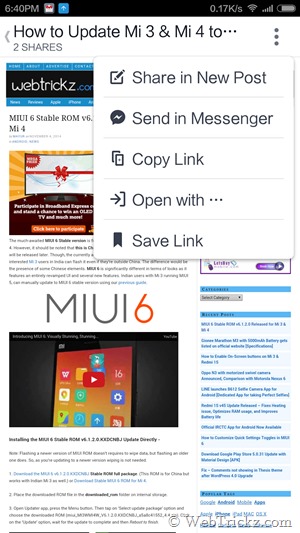
The internal browser in the Facebook Android app is certainly handy and offers quicker access to web pages without opening them in a 3rd party browser. The browser includes several options like you can share the page link in a new post, share the link with messenger contacts, copy link, save link, and lastly open it with a different web browser or application.
Screenshot_2014-11-04-18-40-33

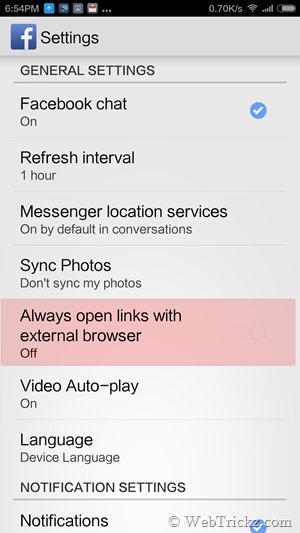
Just in case, you’ve got this new feature and aren’t impressed with it. Then you can easily switch back to the default browser of your Android device like Google Chrome. To turn off Facebook for Android internal web browser, open the Facebook app and go to the app menu. Now scroll down, open the ‘App Settings’ option, and tick mark the option named “Always open links with external browser” to enable it.
Screenshot_2014-11-04-18-54-44

That’s it! Now your website URLs will load in the phone’s default browser like before.

Tags: AndroidBrowserFacebookGoogle ChromeTips
ShareTweetSend
Previous Post

How to Enable On-Screen buttons on Mi 3, Redmi 1S and Redmi Note

Next Post

How to Manually Install Android 5.0 Lollipop on Nexus 7 (2012/2013), Nexus 5 and Nexus 10

Taigun

Taigun

Mayur Agarwal, the founder and editor of WebTrickz, is a tech enthusiast with a Bachelor's degree in Computer Applications and over 15 years of experience in tech writing. His passion for technology and gadgets drives him to create insightful how-to articles and troubleshooting guides.

Next Post

How to Manually Install Android 5.0 Lollipop on Nexus 7 (2012/2013), Nexus 5 and Nexus 10

Comments 2

  1. Steve says:
    11 years ago

    Not to mention privacy issues. I mean of course Facebook isn’t tracking you when you start surfing, login to make a purchase or anything like that. And they definitely can’t be logging cookies and other previously awkward to access stuff can they. Turn it off !

    Reply
  2. Juan says:
    11 years ago

    What about if my mobilephone or my facebook app doesnt has this option. I want to links the internal browser but Icant .

    Reply

Leave a Reply Cancel reply

Your email address will not be published. Required fields are marked *

Latest Stories

1337x logo

1337x Proxy List 2026: Working Proxy & Mirror Sites

June 2, 2026

How to Find Saved Reels on Facebook App & Desktop (2026)

April 1, 2026
microsoft edge browser

How to Restore or Reopen Closed Tabs in Microsoft Edge

March 26, 2026
Facebook app on iPhone

How to See Recently Watched Reels on Facebook (2026 Guide)

April 3, 2026
microsoft edge new logo

Download Microsoft Edge Offline Installer [Latest Version]

March 16, 2026

How to Turn Off Bing SafeSearch in Microsoft Edge

March 12, 2026
google chrome logo

Download Google Chrome Offline Installer [Latest Version]

June 3, 2026

Trending Stories

  • microsoft family safety settings

    How to Turn Off Microsoft Family Safety on Windows 11 & 10

  • How to Turn Off Fn Lock or Fn Key on Windows 11/10 Laptop

  • How to Turn Off Microsoft Edge Game Assist in Windows 11

  • How to See Recently Watched Reels on Facebook (2026 Guide)

  • How to Restore or Reopen Closed Tabs in Microsoft Edge

  • About Us
  • Contact Us
  • Privacy Policy
  • Advertise

© 2026 WebTrickz. All Rights Reserved.

No Result
View All Result
  • Reviews
  • Apps
  • How To’s
  • Android
  • Google
  • iPhone
  • Mac
  • About Us
  • Contact Us
  • Privacy Policy

© 2026 WebTrickz. All Rights Reserved.







