WebTrickz
TRENDING
  • Claude vs ChatGPT: Which Is Better in 2026?
No Result
View All Result
  • Reviews
  • Editorials
  • Social Media
    • Facebook
    • Twitter
    • YouTube
    • Messenger
    • Instagram
    • Snapchat
    • WhatsApp
    • TikTok
  • Apps
  • How To’s
  • Apple
  • iPhone
  • Google
  • Android
  • Mac
  • Security
  • About Us
    • About Us
    • Contact Us
    • Privacy Policy
  • Reviews
  • Editorials
  • Social Media
    • Facebook
    • Twitter
    • YouTube
    • Messenger
    • Instagram
    • Snapchat
    • WhatsApp
    • TikTok
  • Apps
  • How To’s
  • Apple
  • iPhone
  • Google
  • Android
  • Mac
  • Security
  • About Us
    • About Us
    • Contact Us
    • Privacy Policy
No Result
View All Result
WebTrickz
No Result
View All Result
Home Android

Powerful Control – Enhanced Power Control Android Widget [Brings Notification Widgets to Ice Cream Sandwich]

Mayur Agarwal by Mayur Agarwal
July 2, 2024
in Android, Tips & Tricks

Android offers an easy way to toggle various system settings directly from the notifications bar at the top or using the stock ‘Power Control’ widget. However, one big limitation is that only a couple of options are integrated for quick access which can’t be altered in any way unless you’re using a custom ROM on your device. We’ve discovered a great app that overcomes this hassle and doesn’t involve rooting.

Powerful Control is a free and nifty app/widget that serves as a perfect replacement for the default power control widget on Android. It offers a set of multi-in-one widgets that make it easier to toggle system settings. You can place desired individual widgets on your home screen for Wi-Fi, mobile data, Bluetooth, screen rotation, screen brightness, silent mode, vibrate mode, airplane mode, GPS, and sync.
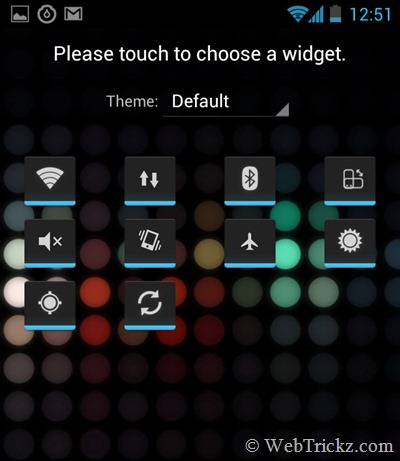
individual-widgets_android

The app also includes an enhanced version of the power control widget, with an elegant interface and additional options that aren’t found in the default Android widget. Additional system options that you can quickly toggle on/off with a powerful control widget include Mobile data, screen rotation, silent mode, vibrate mode, and Airplane mode.
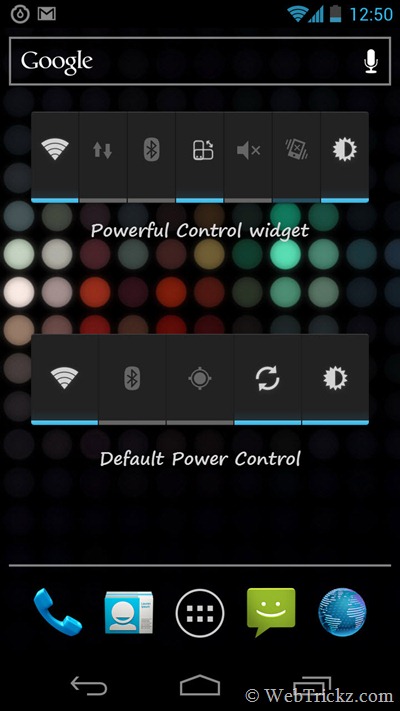
Powerful control widget vs Power control widget

You can change the widget panel options and their placement easily via drag and drop. The powerful control widget possibly shows up to 7 system options which is more than enough. If you wish to add the rest of them then simply add their specific widgets. This tool enables you to toggle mobile data with one click, without messing up your APNs.
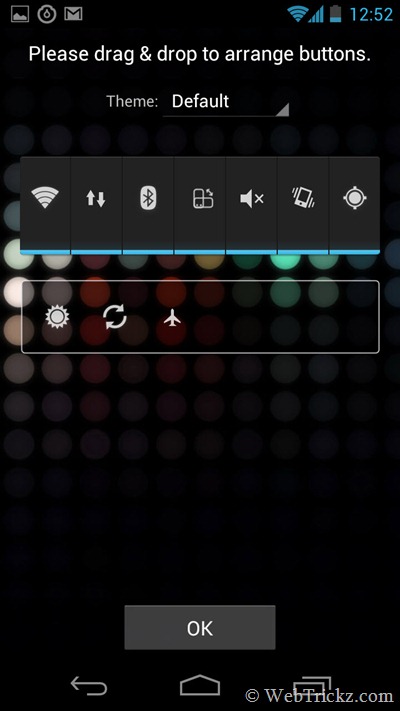
Powerful control_change-options-placement

ICS Ready – Powerful Control works perfectly with Android 4.0 Ice Cream Sandwich. It offers the ability to add the system settings in the notification bar on devices like Galaxy Nexus. You can simultaneously use all of the 3 widgets provided you’ve ICS loaded on your phone. To get the traditional notification bar on ICS devices, open the powerful control app, click on the tools icon, and enable the notification widgets option. You can also customize the notification widgets as desired. It should be noted that a small icon shows up at the top bar when this feature is enabled.
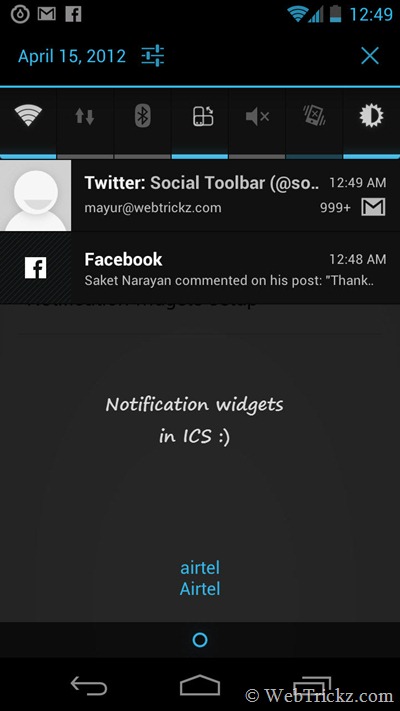
notification widgets_galaxy-nexus

One downside is that the app shows Leadbolt adware which is said to appear once a week as stated. But that’s not an issue considering it’s a free and good application.

Try it now! Download Powerful Control [Google Play]

~ This app is quite new, so don’t forget to spread the word if you like it.

Tags: AndroidGalaxy Nexus
ShareTweetSend
Previous Post

Guide to Unlock Samsung Galaxy Nexus Bootloader

Next Post

Guide to Update Galaxy Nexus (YAKJUXW) to Android 4.0.4 YAKJU and Get future Updates from Google

Mayur Agarwal

Mayur Agarwal

Mayur Agarwal, the founder and editor of WebTrickz, is a tech enthusiast with a Bachelor's degree in Computer Applications and over 15 years of experience in tech writing. His passion for technology and gadgets drives him to create insightful how-to articles and troubleshooting guides.

Next Post

Guide to Update Galaxy Nexus (YAKJUXW) to Android 4.0.4 YAKJU and Get future Updates from Google

Comments 4

  1. Rahman says:
    14 years ago

    One thing I always like about Android is its customization feature out of the box. This notification widget is looking pretty on ICS.

    Reply
  2. Ashutosh says:
    14 years ago

    A $0.99 version of the app minus the adware would be nice.

    Reply
    • Mayur says:
      14 years ago

      Yeah but the developer has valid reasons for not making it paid. Though, I noticed the adware once only after installing it.

      Reply
  3. farproc says:
    13 years ago

    The latest version in Google Play has removed the leadbolt ad. Please update this information in your great post. Many thanks.

    Reply

Leave a Reply Cancel reply

Your email address will not be published. Required fields are marked *

Latest Stories

Google Gemini

How to Cancel Your Gemini Subscription (2026 Guide)

June 21, 2026
difference between chatgpt and claude

Claude vs ChatGPT: Which AI Should You Use in 2026?

June 18, 2026
google chrome logo

Google Chrome Offline Installer: Direct Download Links

June 17, 2026
X logo

How to Remove All Bookmarks on X (Twitter) At Once in 2026

June 15, 2026
X logo

How to Find Bookmarks on X (Twitter) in 2026

June 15, 2026
copilot logo

How to Turn Off Copilot Search in Bing on Edge & Chrome

June 10, 2026
microsoft edge new logo

How to Turn Off Notifications in Microsoft Edge (2026 Guide)

June 8, 2026

Trending Stories

  • 1337x logo

    1337x Proxy List 2026: Working Proxy & Mirror Sites

  • How to Turn Off Microsoft Family Safety on Windows 11 & 10

  • How to See Recently Watched Reels on Facebook (2026 Guide)

  • How to Turn Off Microsoft Edge Game Assist in Windows 11

  • How to Turn Off Fn Lock or Fn Key on Windows 11/10 Laptop

  • About Us
  • Contact Us
  • Privacy Policy
  • Advertise

© 2026 WebTrickz. All Rights Reserved.

No Result
View All Result
  • Reviews
  • Apps
  • How To’s
  • Android
  • Google
  • iPhone
  • Mac
  • About Us
  • Contact Us
  • Privacy Policy

© 2026 WebTrickz. All Rights Reserved.