WebTrickz
TRENDING
  • Claude vs ChatGPT: Which Is Better in 2026?
No Result
View All Result
  • Reviews
  • Editorials
  • Social Media
    • Facebook
    • Twitter
    • YouTube
    • Messenger
    • Instagram
    • Snapchat
    • WhatsApp
    • TikTok
  • Apps
  • How To’s
  • Apple
  • iPhone
  • Google
  • Android
  • Mac
  • Security
  • About Us
    • About Us
    • Contact Us
    • Privacy Policy
  • Reviews
  • Editorials
  • Social Media
    • Facebook
    • Twitter
    • YouTube
    • Messenger
    • Instagram
    • Snapchat
    • WhatsApp
    • TikTok
  • Apps
  • How To’s
  • Apple
  • iPhone
  • Google
  • Android
  • Mac
  • Security
  • About Us
    • About Us
    • Contact Us
    • Privacy Policy
No Result
View All Result
WebTrickz
No Result
View All Result
Home Android

WiFi Shoot – Transfer Files between Android devices using Wi-Fi Direct

Mayur Agarwal by Mayur Agarwal
December 26, 2021
in Android, How To's

The Wi-Fi Direct functionality was implemented in Android with the introduction of Ice Cream Sandwich (Android 4.0). Wi-Fi Direct allows Android 4.0 or later devices with the appropriate hardware to connect directly to each other via Wi-Fi, thus letting you share data between two Android devices in a much speedier way. Unfortunately, Wi-Fi direct has been integrated so badly on compatible devices that an average user finds it completely useless. That’s because even after pairing aka connecting two devices through Wi-Fi direct, there is no option for sharing files over Wi-Fi, unlike Bluetooth. Luckily, the WiFi Shoot app is the first of its kind on the Google Play Store that takes advantage of Wi-Fi Direct technology and lets you seamlessly use this great feature!

WiFi Shoot is a free app that offers an easy and efficient way to wirelessly transmit photos, videos, and any file directly between two Android devices at a very high speed. The app reportedly works with a pair of ICS+ devices with Wi-Fi Direct support, but it may not work on every device due to the bad implementation of Wi-Fi Direct on some devices. The free version of WiFi Shoot allows sharing photos and videos only, this limitation can be removed by upgrading to the premium version for $2 approx.

The app is said to be working successfully on the following devices: Galaxy Nexus (GSM), Nexus 7, Galaxy S2 (International), Galaxy S3 International (both on Ice Cream Sandwich and Jelly Bean), HTC One S, Galaxy S, HTC One V, Nexus 4.

~ We’ve personally tested it between Galaxy Nexus (GSM) and Nexus 7 (Wi-Fi only). It worked like a charm, you just need to properly follow the steps below:

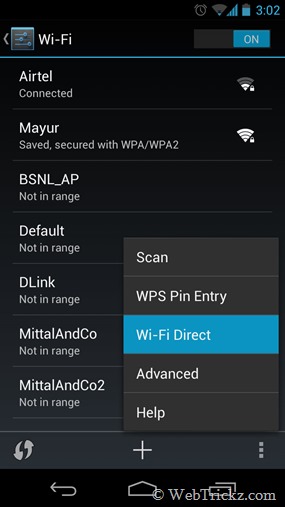
Firstly, make sure both your Android phones have Wi-Fi Direct option. Check it by going to Settings > Wi-Fi, and then tap on the menu. Also, see that both the devices are connected to the same Wi-Fi network and Wi-Fi is turned ON on both of them.
2012-12-31 15.02.21

Using WiFi Shoot to share files wirelessly via Wi-Fi Direct –

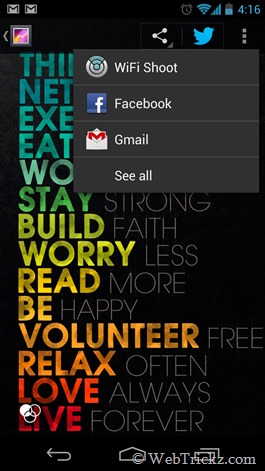
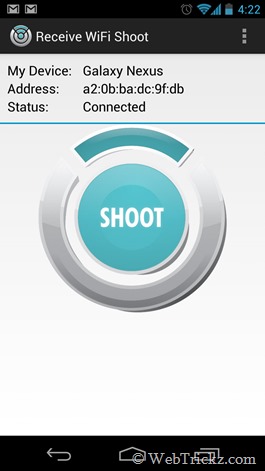
Install the ‘WiFi Shoot’ app on both devices. A new sharing option WiFi Shoot will now appear in the Share menu. Run the app on the receiving device. Then share a file (from sending device) by selecting WiFi shoot, choose the appropriate device to invite, and establish a connection. Tap Shoot on the receiving device to receive the file.
2012-12-31 16.16.26     2012-12-31 16.22.05

Demo Video –


Wishing all our dear readers a Very Happy New Year. 🙂

Tags: AndroidTips
ShareTweetSend
Previous Post

Use your Android phone as a Wireless Mouse or Keyboard

Next Post

Top 5 Free Photo Collage Apps for Android

Mayur Agarwal

Mayur Agarwal

Mayur Agarwal, the founder and editor of WebTrickz, is a tech enthusiast with a Bachelor's degree in Computer Applications and over 15 years of experience in tech writing. His passion for technology and gadgets drives him to create insightful how-to articles and troubleshooting guides.

Next Post

Top 5 Free Photo Collage Apps for Android

Comments 3

  1. gusat says:
    13 years ago

    what about working in google nexus s??

    Any application which can be for wifi direct ??

    Reply
  2. Plaban says:
    13 years ago

    Will this app work without Wi-Fi Direct? I’ve one Wi-Fi direct enabled device but another device doesn’t support it.

    Reply
    • Mayur says:
      13 years ago

      Nope

      Reply

Leave a Reply Cancel reply

Your email address will not be published. Required fields are marked *

Latest Stories

Google Gemini

How to Cancel Your Gemini Subscription (2026 Guide)

June 21, 2026
difference between chatgpt and claude

Claude vs ChatGPT: Which AI Should You Use in 2026?

June 18, 2026
google chrome logo

Google Chrome Offline Installer: Direct Download Links

June 17, 2026
X logo

How to Remove All Bookmarks on X (Twitter) At Once in 2026

June 15, 2026
X logo

How to Find Bookmarks on X (Twitter) in 2026

June 15, 2026
copilot logo

How to Turn Off Copilot Search in Bing on Edge & Chrome

June 10, 2026
microsoft edge new logo

How to Turn Off Notifications in Microsoft Edge (2026 Guide)

June 8, 2026

Trending Stories

  • 1337x logo

    1337x Proxy List 2026: Working Proxy & Mirror Sites

  • How to Turn Off Microsoft Family Safety on Windows 11 & 10

  • How to See Recently Watched Reels on Facebook (2026 Guide)

  • How to Turn Off Microsoft Edge Game Assist in Windows 11

  • How to Turn Off Fn Lock or Fn Key on Windows 11/10 Laptop

  • About Us
  • Contact Us
  • Privacy Policy
  • Advertise

© 2026 WebTrickz. All Rights Reserved.

No Result
View All Result
  • Reviews
  • Apps
  • How To’s
  • Android
  • Google
  • iPhone
  • Mac
  • About Us
  • Contact Us
  • Privacy Policy

© 2026 WebTrickz. All Rights Reserved.