


In Windows, many programs include their entry in startup programs, which slows down your Windows startup. To prevent this issue we must manage our startup programs. This can be easily done by disabling all the unneeded programs from being loaded at the startup of Windows.
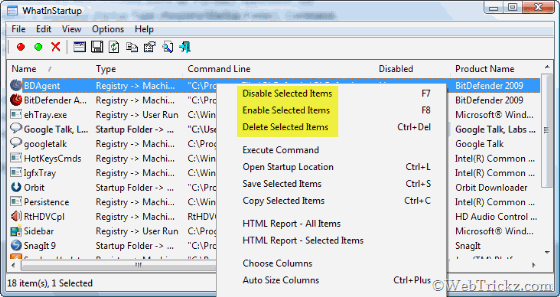
WhatInStartup is one free and portable utility, which displays the list of all applications that are loaded automatically when Windows starts up. For each application, the following information is displayed: Startup Type (Registry/Startup Folder), Command-Line String, Product Name, File Version, Company Name, Location in the Registry or file system, and more.
It allows you to easily disable, enable, or delete unwanted programs that run in your Windows startup. You can select and disable multiple programs at one time. WhatInStartup also supports a special “Permanent Disabling” feature.
This tool is easy to use, portable, small, and 100% FREE.
Supports all Windows starting from Windows 2000 and up to Windows 7.
Download WhatInStartup (45 KB)






By managing of startup programs can it be possible that speed and effeiciency of PC will enhance too. Looks a grat remakable features to me Thanx for the sharing such a nice software. Keep it up such a nice work.
Regards
Telestagary
hi, nice tricks, but as of my experience, tweaking startup things results in temporary improvement of windows working, but results in error after some time, hope this one is good,thanks
you are right. Speacially when u want to run a specific program and it requires a file which should be executed at startup
I find my pc very slow on startup, this will hopefully clean some ‘rubbish’ and speed my pc up. Thanks