


Recently, I bought new Creative 4.1 speakers (Inspire M4500). After connecting them, I noticed that only 2 speakers were working while the rest were silent.
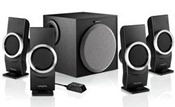 That’s because the creative sound system for PC needs an onboard 7.1 audio card or a creative soundcard to work.
So, I’ll tell you how to connect your creative 4.1 speaker system to your PC. There are 2 ways to make all your speakers work:
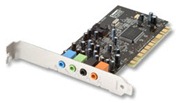 1. You can buy a Creative Sound Blaster 5.1 Sound Card and enjoy your music at the best experience. The sound card itself will cost you around Rs.1000 ($25) which is another extra expense over speakers.
2. This is the simplest and cheapest way to make all your 4 speakers work. You only need to get a 3.5mm Stereo Y 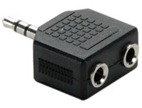 Adapter 1 Plug To 2 Jacks which splits one 3.5 mm jack into two.
Connect the two pins (black & green) of your speaker to the female point of the connector and the male pin of the connector to the Line Out port (green) of your motherboard.
Now you’ll notice all your speakers producing the same sound. This small connector will cost Rs.15 or $1 only. Buy it here
Also, remember to check the audio settings in your control panel. This trick will work with almost all 4.1 speakers which require a dedicated sound card to function.
Hope you found this trick helpful and easy.







Fantastic!!
thanks man …u rock….i really thought 2 speakers had some manufacturing defect or something…..these babies work @ 4.1 with sound cards only….else u need the adapter as u said…thnks bro..!
Thanz man!!!
I have planned to buy Creative Inspire M4500 4.1 Speaker. Please let me know whether it will work with 5.1 channel DVD player ?
Thank you so much!..
Hi..I want to buy one 4.1 or 5.1 creative speaker to build a conference or training room….
1. I know to connect speakers with my PC i need this adapter.
2. But for phone conferencing how can i connect my all 4 speakers with the phone.
Recently, I bought new Creative 4.1 speakers (Inspire M4500) and a Philips HDMI DVD (5.1 support) player, but I’m unable to connect these two for audio output. I bought an additonal female pin for connecting these two, but sound output is only from 1 speaker, there is no sound from the other three speakers, please suggest what pin i should buy to play all the 4 speakers.
hi zak i have also same problem what u told Recently, I bought new Creative 4.1 speakers (Inspire M4500) and a Philips HDMI DVD (5.1 support) player, but I’m unable to connect these two for audio output if there is any solution tell me also
Dear Sir
I have purchased Nokia 5800 “XpressMusic” phone. But Whenever I connect mobile with M4500 4.1 Speaker with 3.5mm Stereo Y Adapter 1 Plug To 2 Jacks, Still 2 speakers silent. Kindly you help me.
Arun
buy one y connector and connect two speakers to them and try dude.it may cast around 50 rupees…………………
thankq man u really rock !!! that looks very cool to buy a 3.5 mm adapter now my speakers work
Thankz man……
I didn’t got any solution from any one, but u gave it…..
Thank u very much
thanks bro,i am confuse my two speakers are not working.but now i know we need sound card
hi
i have buy a ATI Redeon graphic card and it came with HDMI conector, i wanna conect my speakers to hdmi how shd i do it? plz help…………
Sure, this will produce sound but it will be stereo instead of surround. So why bother buying a 4 speaker system in the fist place? My advice would be to buy the soundcard that supports the speaker system you already bought.
Hi i have connected my nokia 5800 to my LG music system’s speaker but the sound is very low even when the volume is full on ma mobile. how can i increase the sound. Please help. Thanks
i want to use creative inspire 4.1 m4500 model in car with car player plz any idea ……. send to my mail id
hi,srikanth,i m going to tell u a very simple way to connect your creative model m4500 with ur car.first of all u need a 3.5mm stereo y adapter 1 plug to 2 jacks and a cassette adapter which u may find in d market very easily .r u may look for adapter in a car accessories shop and 3.5mm stereo y adapter 1 plug to 2 jacks in a speaker shop.
if you have a cassette player in ur car then u have to enter the cassette adapter in it then you have to plug the wire into the 3.5mm stereo y adapter 1 plug to 2 jacks and connect the wire of the speaker with the other end of the 3.5mm stereo y adapter 1 plug to 2 jacks and it is done.
hi i have creativ 4.1 speaker and it not work only one spk is work .
i try one by one spk in one plug in mother bord the plays but the four speaker is not work in group.so plz help me………..idrish
thanks mayur bhai……..
i have no sound card but i have creative 4.1 speaker how i connect in to my computer pls help me send rpy to my e mail id
Hi,
I tried this “3.5mm Stereo Y Adapter 1 Plug To 2 Jacks”.
Now 4 speakers are working well but center WOOFER is not working.
Do you have any idea to work all the 4.1 set?
Thanks….
this 2nd way works for me perfectly
im speechless to thank you really u save my a*s 🙂
loving u man <3
Great help…
Thanks
thank you
god bless u
i have creative m4500 sound system and i have attach it with my IBM THINK CENTER pc and its specification is (processor 1)=3.40GHz and (processor 2)=3.40GHz but no sound card have been installed in it.
problem is that only tow speaker work and i want all my 4 speaker to be work so
plz tell me its solution ?
Thanq man………. You rock………. thanx again
hey guys i’m just going to buy a inspire m4500 set.but just before that i got screamed by this shocking news that some peoples 2speakers r not working out of 4.and also got the solution hare.but steal in confusion will this trick work well.u people plzz tell me does this trick worked well for u perfectly for sure.?? and how is the sound quality now??
Hey there guys I got a prob all my speakers work but sum how my subwoofer doesn’t wana work cud u plz help
Thnx
i dnt knw that how to use this adapter..!cn anyone pls help me..
Thank u Very Much its working
Boss, I have purchased the 1->2 splitter twice but the sound quality goes inferior with my laptop. When I just put one jack of woofer in my laptop, even only two speakers works, but sound quality is far better. I think one-to-two splitter is not an option at all. Sound effect will go away.
good advice,..thanks
Agar mujhe koi pls ye bata de ki mujhe wo audio jack kaha se milega to badi meherbani hogi apki….or use lagane ke bad awaj fategi to nahi…
You are completely wrong when you are using that Y-connector,because by doing that,same signal fed in to the four channels of MT4500.And you don’t need to buy separate sound Blaster too.Most on board audio support at least 5.1 audio.So just plug your mt4500’s two jacks to the appropriate audio ports in your MB.See motherboard manual for help.This way,you will get the true surround effect.And Mayur,please update your post because people are getting wrong information.
@sanjeewa I’ve myself tried it and then shared the trick here. I agree with you that four speakers will produce same sound when using the Y-connector. But that’s the only solution coz there’s no black color port on a 5.1 or 6 channel MB (at least on mine Asus P5KPL-AM/PS). Thus, if you connect green jack to green port and black one to blue port (Line-In), then you’ll barely notice any sound from the 2 speakers that are connected via Blue port on the Motherboard.
I have intex subwoofer having same problem.what do you mean by “Connect the two pins (black & green) of your speaker to the female point of connector and the male pin of connector to Line Out port (green) of your motherboard.” ?
Can it be used for TV as well….
I have just bought 4.1creative sound5400 to connect pc.but i dont bought sound adaptor.so only three speaker are working.please give a idea to work all speakers.
Am using Creative Speakers so many years .but in 4.1 am not hearing perfect sepration of sonuds.
Need a Creative M4500 Volume Controller Wire
broke mine 🙁
cant find it anywhwre
my one speaker is still not working please help
Dear all
I have Creative m4500 speaker. I lost wired remote volume controller. I could not get it anywhere. pls help me.
or Let me know the Pin diagram of Volume controller circute.
I have Creative m4500 speaker. I lost wired remote volume controller. I could not get it anywhere. pls help me.
or Let me know the Pin diagram of Volume controller circute.
Thank q man u really gave me real help all my 4 speakers are working previously only 2 speakers are working after ur help,my pc 4 creative speakers are working thanks man u really rock !!!!
It really worked bro but will it give the real digital sound ? please let me know
i also bought the new inspire m4500 4.1 channel speakers. i also thought only 2 speakers were working out of 4 but then came to know that it was problem with media player classic.in all players all 4 speakers work but in media player classic only 2 front speakers work but 2 rear speakers wont work. there is no problem with the speakers at all.
if still the problem persists means try updating your BIOS.
tnx a lot man!…
wen u plug the two jacks in a dialog box pops up askin which set of speakers u plugged in nd it ll work likewise…
if u jst normally set them then only 2 front speakrs ll wrk….wen the dialog box pops up jst select front after pluggin one in nd then select rear aftr pluggin the second….no need to wrry abt d subwoofer coz it ll wrk no matter wat arrangement u select…u ll ve 4 speakers runnin a marathon…..
By using the ” 3.5mm Stereo Y Adapter 1 Plug To 2 Jacks ” we are able to connect to the speakers, but how to connect the sub-woofer to PC ??
Disable the audio driver which comes with the installation of windows 7.
Download the RealtekHD Audio manager for windows 7 and install it,
Configure your 4.1 Chanel speakers.That’s all,the 4 speakers including sub-woofer will work.
sir i have creative m4500 speaker but its volume controller cable is lost for the same no indication can be seen in the speaker that it is on or off and no sound is there any way to start the speaker without the volume controller kindly help
i am using m4500 4.1 speakers but in my mother board there is only green and blue jacks.now if i buy a 5.1 sound card will it work good with my 4.1 speakers or should i get only 4.1 sound card.and please tel which is best Usb or pci sound card
Better buy a 5.1 Creative sound card.
hi,im using M4500 4.1 Speakers im using this for sony laptop,im worried abt the volume controller..if i raise the volume its volume will reduce,if i reduce the volume it automatically raise..it become reverse connection,dont knw wat to do,plz help me with diz
maine creative ka M 4500, 4.1 SPEAKER, khareeda lekin essme kewal 2 speaker work kar raha hai, 2 nahi, plz. 4 speaker kaise work karega . plz, solution bata do, my pc is window 7, plz, tell me solution,,,,
Hi ,
I have purchased Philips DVD Player (DVP3826/94), and Creative Inpire 5.1 Channel speaker, Help me to connect , Because DVD has all RCA female output & Speaker Has only 3.5mm male 3 Pins ( Green, Balck & yellow)
Thanks ashish
Thanks for ur information .. my four speakers rocks … let us know more and more info to my inbox or comment here …
You can connect to the tv as well
i have purchased 4.1 creative speakers in this 2 speakers are working and another 2 speakers and subwoofer is not working how can i get the music 4.1 speaker give me the solution
2 speakar not working .
hello friends,
i have creative speaker 4.1 with volume controller, but i lost the controller. anyone have the spare volume controller or any suggestion to power on the speaker set. please help me out.