


Since the release of Windows 7, I’ve been a big fan of its awesome collection of wallpapers. I installed Windows 7 RC yesterday but was surprised to see only some wallpapers in it. This is because Windows installs all, but enables only those wallpapers and themes belonging to the region or country we chose.
Fortunately, I’ve found a way to use all those wallpapers and themes that we can’t see under Personalization as they do not belong to our region.
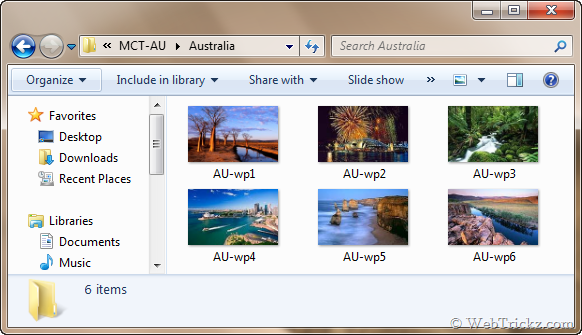
A total of 42 High-resolution wallpapers can be found inside Windows 7. Don’t worry, you don’t need to download them. They’re hidden inside Windows 7 only.
Follow the simple steps below to find the cool collection for you:
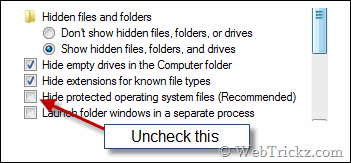
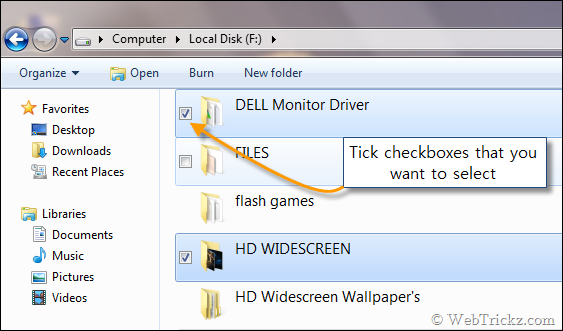
1) Go to Organize > Folder and search options > View tab. Select show hidden files… Also, uncheck the option “Hide protected operating system files”.
2) Now open C:\ Windows\ Globalization\ MCT. Here you’ll find a collection of folders.
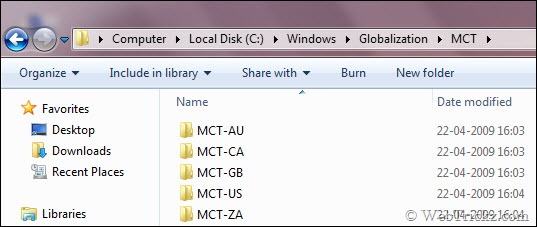
These are the official wallpapers and themes hidden inside the Windows 7 directory. They include all regions namely Australia, Canada, UK, US, and South Africa.
3) After opening these folders you’ll find some more folders inside them. These folders contain themes and wallpapers. See the example below:
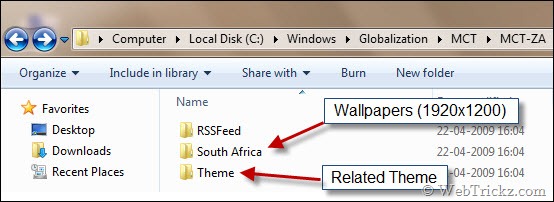
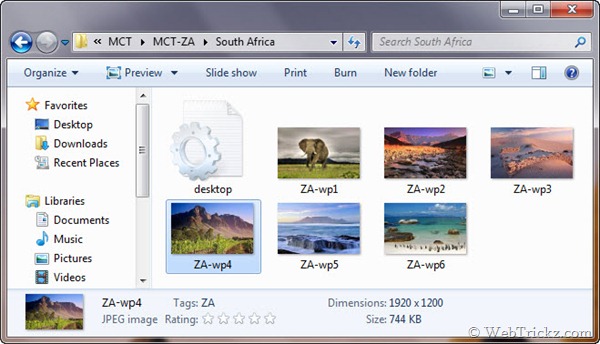
All the wallpapers included are high-resolution. i.e. of 1920×1200 sizes.
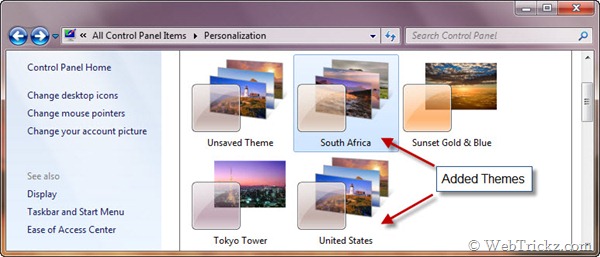
4) They also contain the related themes which you can use. Just double-click the theme and it will be added to Personalization under the Control Panel.
If you want to locate the path of wallpapers that are included by default in Windows 7. Then, just go to C:\Windows\Web\Wallpaper and you will see all the wallpapers there.
Note: I have found these collections in the recently released Windows 7 RC (32-bit).
I hope you found this article useful. It’s helpful as you can save these amazing wallpapers for later use or share them with your friends.




Was looking for this! Thanks for sharing 🙂
Very helpful, was getting tired of boring themes on my desktop. Thanks, once again
super cool!! deserves a bookmark!
Nice heck, it seems SEVEN has hell lot of things to offer.
HI~!!!!
Update Windows 7 MCT Theme 13 countries.
MCT-AU, CA, CN, DE, ES, FR, GB, JP, KR, MX, RU, US, ZA
download – http://www.mediafire.com/?q3zxzmr2nn3
7zip SFX – Windows 7 MCT Theme 13 countries.exe (49.7MB)
ps. Korean LP for Windows 7 RC ??
I am looking for Korean LP for windows 7 rc edition
thanks!!!
Kewl stuff man! Keep sharing more things about windows 7 RC.
Mayur, I would personally like if you post something about windows xp.
Ya, I would like too. But currently Windows 7 is the hot topic on Internet. Also I’m no longer using XP after being shifted to my new PC.
Certainly a new information. Thanks for sharing this.
These are way cool mayur I was actually thinking of getting some of these because they will make your computer come alive.
thanks for this. is there any way i can get the windows 7 startup wallpaper/poster? i searched high and dry in the windows 7 rc which i had installed a few weeks back to try, but couldn’t’ find it. hope you can help me out with this..
Thanks for the tricks, awesome!
I was wondering for the windows 7 wallpapers on the internet but didn’t know that they are already with me. Thanks for the post.
This site has all the files available. Just click the link for the one you want and then click open. Click the them and it will automatically add it to your personalization menu.
thanks…nice work!