WebTrickz
TRENDING
  • Complete list of 1337x Proxy and Mirror Sites
No Result
View All Result
  • Reviews
  • Editorials
  • Social Media
    • Facebook
    • Twitter
    • YouTube
    • Messenger
    • Instagram
    • Snapchat
    • WhatsApp
    • TikTok
  • Apps
  • How To’s
  • Apple
  • iPhone
  • Google
  • Android
  • Mac
  • Security
  • About Us
    • About Us
    • Contact Us
    • Privacy Policy
  • Reviews
  • Editorials
  • Social Media
    • Facebook
    • Twitter
    • YouTube
    • Messenger
    • Instagram
    • Snapchat
    • WhatsApp
    • TikTok
  • Apps
  • How To’s
  • Apple
  • iPhone
  • Google
  • Android
  • Mac
  • Security
  • About Us
    • About Us
    • Contact Us
    • Privacy Policy
No Result
View All Result
WebTrickz
No Result
View All Result
Home Android

Facebook is removing “Save Photo” option from its Android app

Taigun by Taigun
May 28, 2024
in Android, Facebook, How To's

We recently reported that Facebook is rolling out a new update to the latest stable version 160.0.0.30.94 of its Android app. The update is a server-side test that introduces a redesigned Settings tab with colourful icons and expandable menus. While the revamped control menu looks interesting, the update apparently removes the much useful “Save Photo” option from its Android app. While accessing the latest test version of Facebook, we found the option to save photos to be missing, thus preventing us from downloading a certain picture to our Android device. The option appears in the Facebook app with an older interface though.
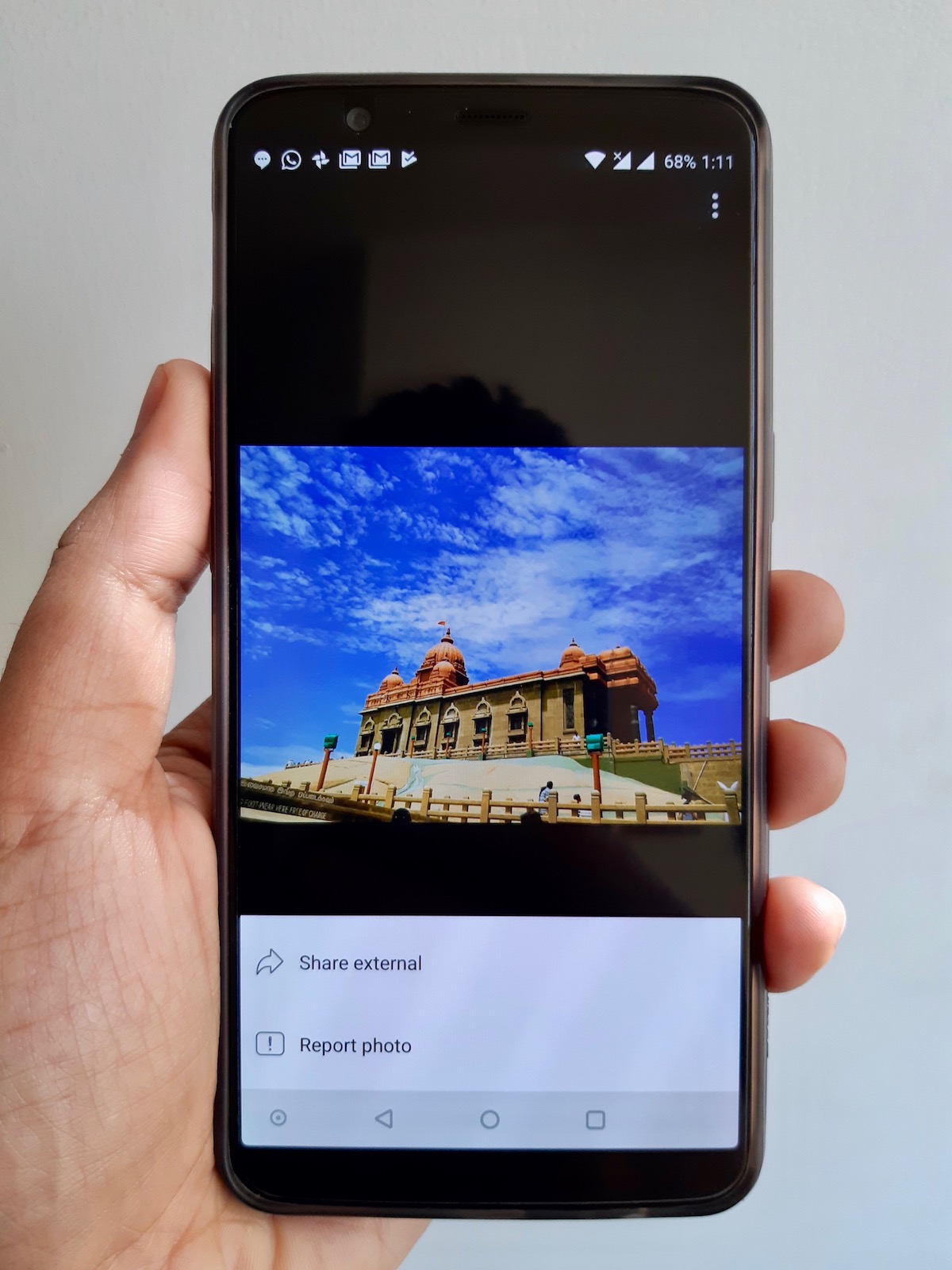
facebook app save photo option missing

It’s worth noting that the Save Photo feature is missing from most photos but not all of them. What’s surprising is the fact that the option doesn’t appear even for photos that are made public and are posted by someone who is added as a friend. Smart folks would be surprised to know that Facebook doesn’t even allow taking a screenshot of such photos. Capturing a screenshot would pop up a message saying “Taking screenshots isn’t allowed by the app or your organisation” or “Can’t take screenshot due to security policy”.
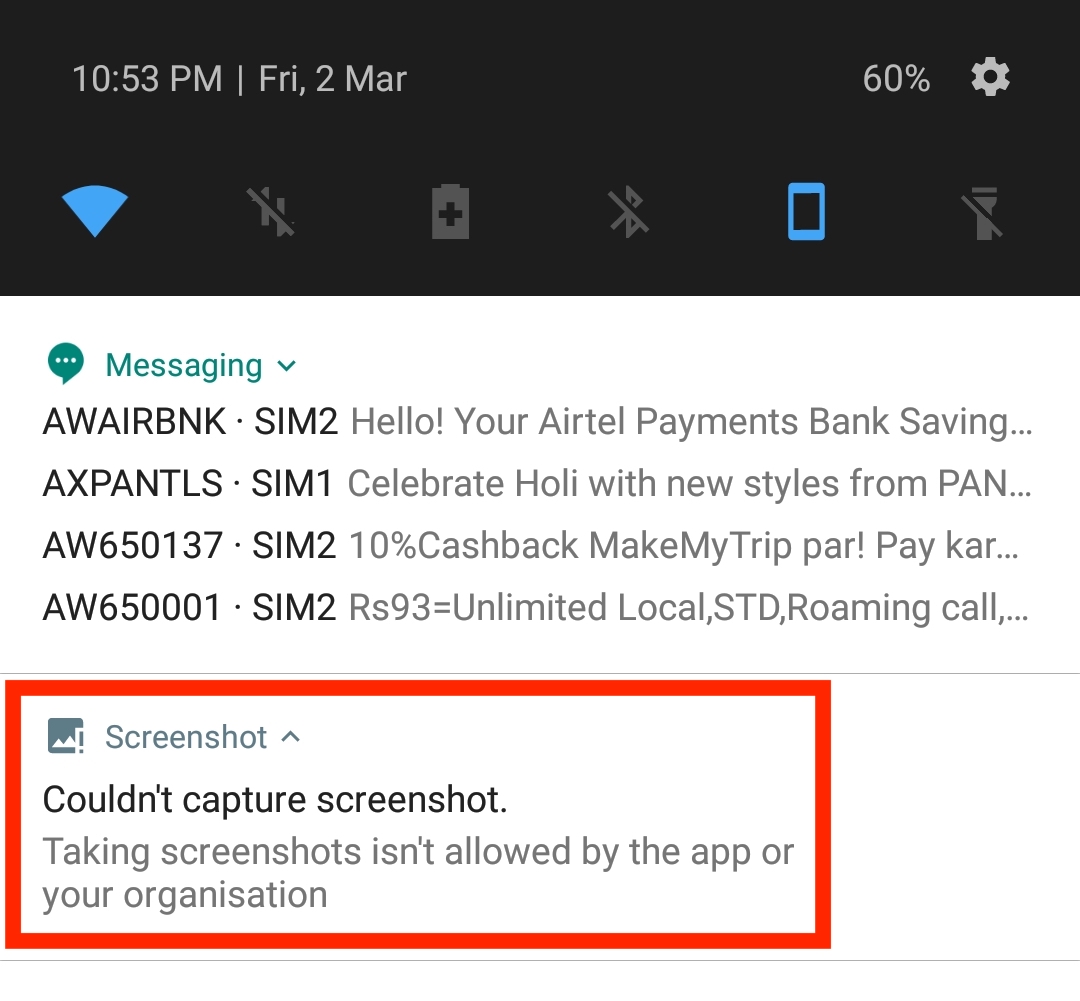
Taking screenshots isn't allowed by the app or your organisation

Those wondering to save a photo on a smartphone by visiting the desktop version of Facebook through Google Chrome won’t be able to do it either. The inability to save photos from Facebook on Android is certainly disappointing as most users prefer to save that crazy meme or a memorable picture.

Fortunately, we’ve figured out an easy workaround that allows users to save or download photos from Facebook on mobile without logging in to a third-party application. To do so, follow the steps below.

How to Save Photos from Facebook for Android to your phone –
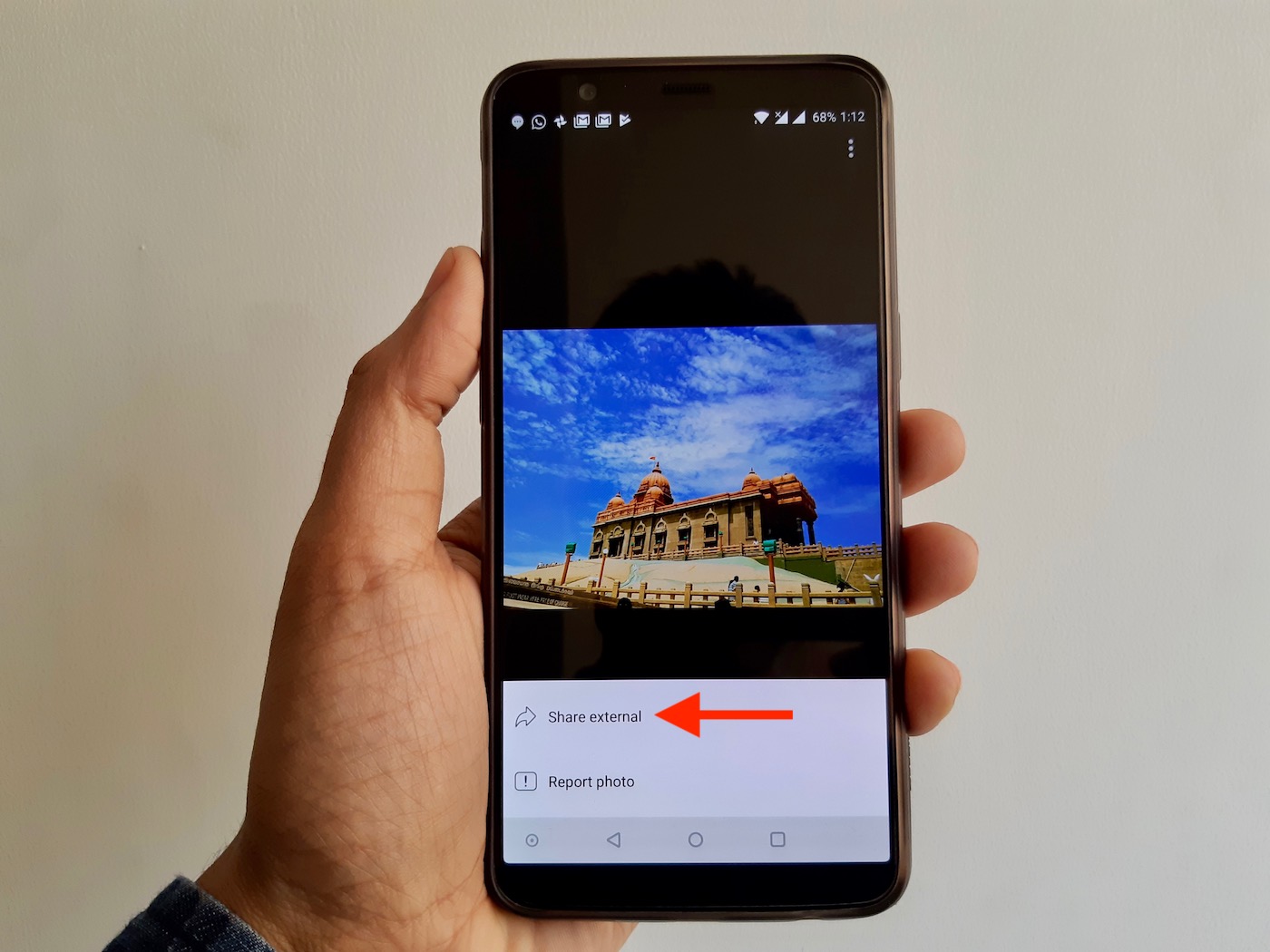
save photos in facebook app for android
Share external
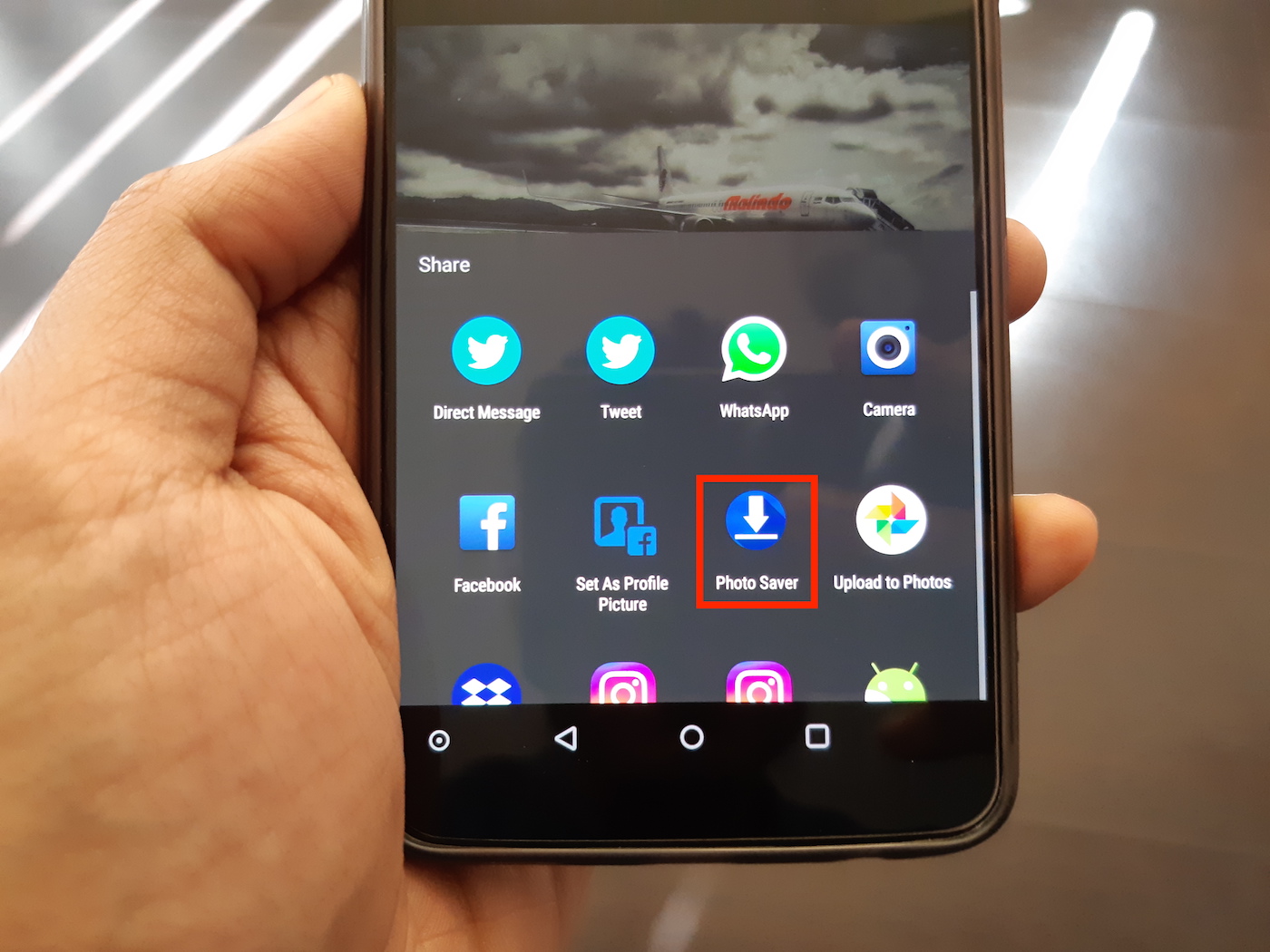
Photo Saver
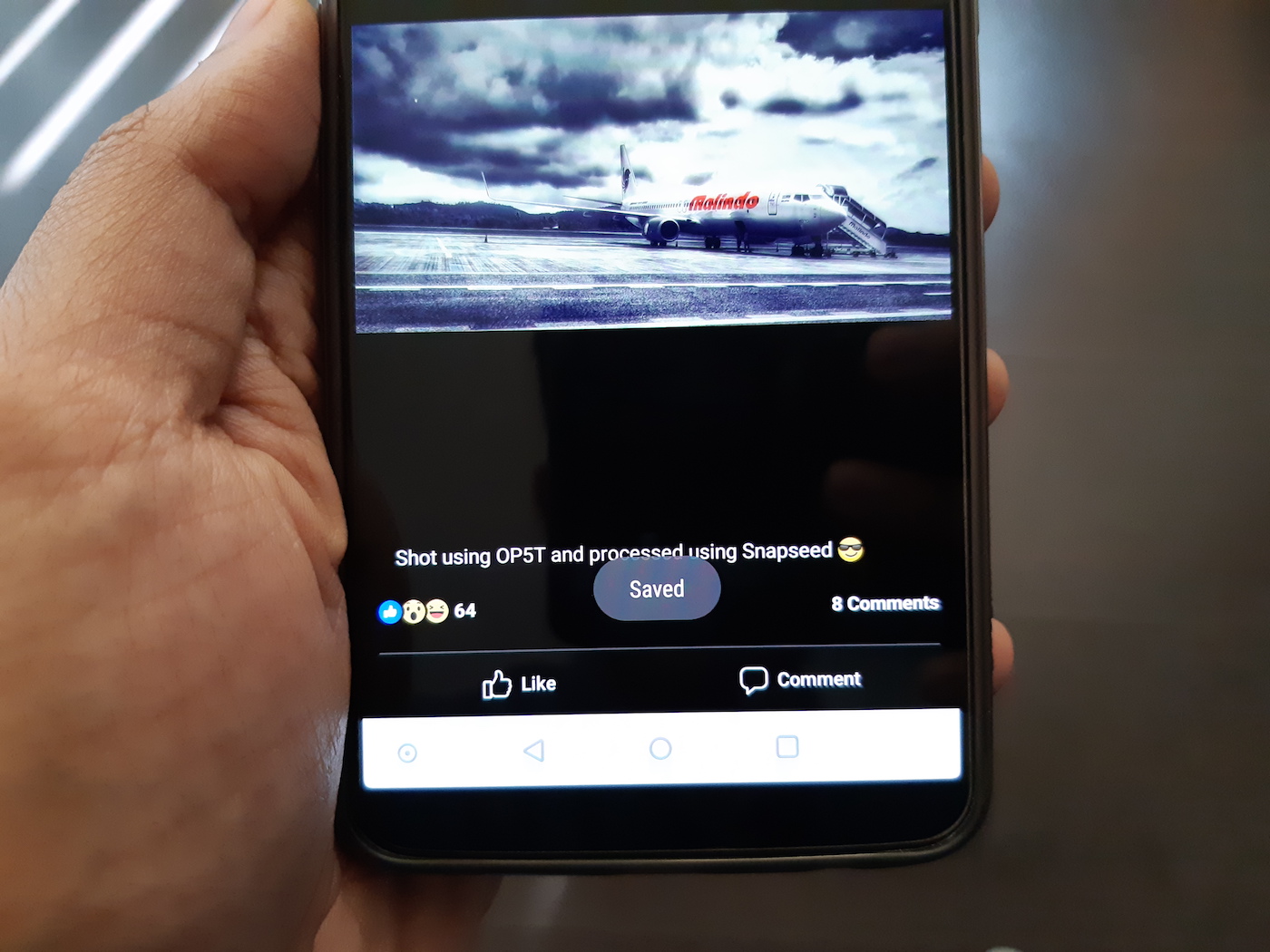
Saved
  1. Install the “Image Saver” app from Google Play.
  2. Open the Facebook app for Android and view any desired image. Now tap the 3 dots from the top-right corner and select the “Share external” option.
  3. Then tap on “Photo Saver” which should now appear in the Share menu. On tapping, a Saved message will appear on your screen.
  4. That’s it! Open the “Saved” folder in the gallery to view all the saved photos.

Alternatively, you can find the saved images under Pictures > Saved on your internal storage.

Though one can also email or upload a photo to Google Photos, however, that doesn’t save the picture directly to the phone gallery and isn’t feasible for users who frequently save photos from Facebook.

P.S. Tried on Facebook for Android version 161.0.0.35.93
Tags: AndroidAppsFacebookMobilePhotosTips
Share17TweetSend
Previous Post

How to Hide Your IP Address

Next Post

Samsung Galaxy A8+ vs OnePlus 5T – Benchmark Comparison

Taigun

Taigun

Mayur Agarwal, the founder and editor of WebTrickz, is a tech enthusiast with a Bachelor's degree in Computer Applications and over 15 years of experience in tech writing. His passion for technology and gadgets drives him to create insightful how-to articles and troubleshooting guides.

Next Post

Samsung Galaxy A8+ vs OnePlus 5T - Benchmark Comparison

Comments 3

  1. Suraj Padmasali says:
    8 years ago

    It seems like Facebook making its app more secured. But still, we still have lots third-party apps, and screenshots option get any photo from the Facebook Android app.

    Reply
  2. Joan Robertson says:
    6 years ago

    I have the same problem, in being unable to save both videos and photos on Messenger. I have an apple ipad2. Could you please advise on how to rectify this problem.
    Regards,
    Joan

    Reply
  3. J says:
    4 years ago

    This was very helpful, thank you!

    Reply

Leave a Reply Cancel reply

Your email address will not be published. Required fields are marked *

Latest Stories

1337x logo

1337x Proxy List 2026: Working Proxy & Mirror Sites

June 2, 2026

How to Find Saved Reels on Facebook App & Desktop (2026)

April 1, 2026
microsoft edge browser

How to Restore or Reopen Closed Tabs in Microsoft Edge

March 26, 2026
Facebook app on iPhone

How to See Recently Watched Reels on Facebook (2026 Guide)

April 3, 2026
microsoft edge new logo

Download Microsoft Edge Offline Installer [Latest Version]

March 16, 2026

How to Turn Off Bing SafeSearch in Microsoft Edge

March 12, 2026
google chrome logo

Download Google Chrome Offline Installer [Latest Version]

June 3, 2026

Trending Stories

  • microsoft family safety settings

    How to Turn Off Microsoft Family Safety on Windows 11 & 10

  • How to Turn Off Fn Lock or Fn Key on Windows 11/10 Laptop

  • How to Turn Off Microsoft Edge Game Assist in Windows 11

  • How to See Recently Watched Reels on Facebook (2026 Guide)

  • How to Restore or Reopen Closed Tabs in Microsoft Edge

  • About Us
  • Contact Us
  • Privacy Policy
  • Advertise

© 2026 WebTrickz. All Rights Reserved.

No Result
View All Result
  • Reviews
  • Apps
  • How To’s
  • Android
  • Google
  • iPhone
  • Mac
  • About Us
  • Contact Us
  • Privacy Policy

© 2026 WebTrickz. All Rights Reserved.