

WebTrickz
TRENDING
  • Turn Off Copilot Search in Bing (Official Extension)
No Result
View All Result
  • Reviews
  • Editorials
  • Social Media
    • Facebook
    • Twitter
    • YouTube
    • Messenger
    • Instagram
    • Snapchat
    • WhatsApp
    • TikTok
  • Apps
  • How To’s
  • Apple
  • iPhone
  • Google
  • Android
  • Mac
  • Security
  • About Us
    • About Us
    • Contact Us
    • Privacy Policy
  • Reviews
  • Editorials
  • Social Media
    • Facebook
    • Twitter
    • YouTube
    • Messenger
    • Instagram
    • Snapchat
    • WhatsApp
    • TikTok
  • Apps
  • How To’s
  • Apple
  • iPhone
  • Google
  • Android
  • Mac
  • Security
  • About Us
    • About Us
    • Contact Us
    • Privacy Policy
No Result
View All Result
WebTrickz
No Result
View All Result
Home Software

FILEminimizer Pictures 3.0 goes FREE & gets Facebook integration [Image compression tool]

Mayur Agarwal by Mayur Agarwal
August 3, 2021
in Software, Windows 7

I just got an email from balesio AG that FILEminimizer Pictures 3.0 has been released. The new version is completely Free and now offers integrated uploading of optimized images directly to Facebook. It is a great tool that helps in saving your time and bandwidth.

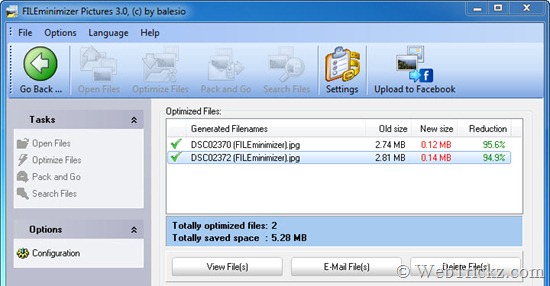
FILEminimizer Pictures 3.0 optimizes digital photos and images and achieves file size reductions by up to 98% without zipping. For example, a JPEG photo with a size of 5MB can be reduced to only 0.1MB. After compression, the images are still in their native file format and look beautiful considering the vast deduction in their file size.
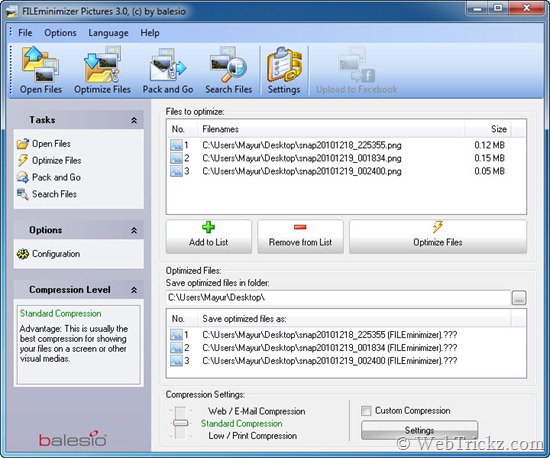
FILEminimizer Pictures 3.0

FILEminimizer Pictures_optimized files

It is very easy to use with a simple interface and is a boon for users who frequently upload their Digicam pictures on social networking sites like Facebook, Twitter. For them, the Web/E-mail compression option serves the best purpose. Optimizing images saves your bandwidth and time as well as of the person who is seeing your uploads.

Features:

  • Fast Image compression by up to 98%
  • Supports JPEG, GIF, TIFF, BMP, PNG and EMF image formats
  • Pack & Go: optimize your images and pictures and directly send them via email
  • Facebook Integration: compress your photos and upload them directly to Facebook
  • Search Wizard: find and compress pictures, images and photos on PCs and networks
  • Choose the most adequate compression from 4 different compression levels
  • Batch Process: compress whole digital photo albums at once
  • Advanced settings for lossless compression, handling of EXIF information, etc.
  • “Drag & Drop” files directly into the program
  • Multilingual interface – offered in English, German, French, Italian and Spanish.
  • Fully compatible with Windows 7
  • Free full version – No registration required, no strings attached.

Our Results on basis of different Compression settings:

  • Web/E-mail compression – 2.80 MB sized Digital camera JPG photo (Dimensions: 3264×2448) was reduced to JPG image sized 144 KB with a dimension of 640×480.
  • Standard compression – 2.73 MB sized Digital camera JPG photo (Dimensions: 3264×2448) was reduced to JPG image sized 291 KB with a dimension of 1024×768.
  • Low/Print compression – 2.59 MB sized Digital camera JPG photo (Dimensions: 3264×2448) was reduced to JPG image sized 612 KB with the dimension of 1600×1200.

The results were good for all the 3 compressed images, their image quality was good and hardly any difference in quality was noticeable. However, the ‘Upload to Facebook’ feature didn’t work for me and also the ‘View files’ button wasn’t doing anything.

Download FILEminimizer Pictures 3.0  (4.7 MB)

Tags: PhotosSoftware
ShareTweetSend
Previous Post

Download LG PC Suite IV with LG Air Sync

Next Post

How to Transfer files between PC & Android phone via Wi-Fi

Mayur Agarwal

Mayur Agarwal

Mayur Agarwal, the founder and editor of WebTrickz, is a tech enthusiast with a Bachelor's degree in Computer Applications and over 15 years of experience in tech writing. His passion for technology and gadgets drives him to create insightful how-to articles and troubleshooting guides.

Next Post

How to Transfer files between PC & Android phone via Wi-Fi

Comments 5

  1. Abhishek says:
    15 years ago

    Hey thanks Mayur for the tool.
    Will give it a shot for sure.
    I was looking for something like this.

    Reply
  2. Pingback: Reduce el peso de las imágenes y súbelas a Facebook
  3. Pingback: Comprime imágenes fácilmente con FILEminimizer Pictures 3.0 | Incubaweb
  4. Shankar says:
    15 years ago

    Badly needed.
    Thank you

    Reply
  5. Bobbo says:
    15 years ago

    I love reading these artcelis because they?re short but informative.

    Reply

Leave a Reply Cancel reply

Your email address will not be published. Required fields are marked *

Latest Stories

copilot logo

How to Turn Off Copilot Search in Bing on Edge & Chrome

June 10, 2026
microsoft edge new logo

How to Turn Off Notifications in Microsoft Edge (2026 Guide)

June 8, 2026
chatgpt logo

How to Clear or Delete ChatGPT Memory on PC and Mobile

June 5, 2026
1337x logo

1337x Proxy List 2026: Working Proxy & Mirror Sites

June 2, 2026

How to Find Saved Reels on Facebook App & Desktop (2026)

June 8, 2026
microsoft edge browser

How to Restore or Reopen Closed Tabs in Microsoft Edge

June 9, 2026
Facebook app on iPhone

How to See Recently Watched Reels on Facebook (2026 Guide)

June 5, 2026

Trending Stories

  • microsoft family safety settings

    How to Turn Off Microsoft Family Safety on Windows 11 & 10

  • 1337x Proxy List 2026: Working Proxy & Mirror Sites

  • How to See Recently Watched Reels on Facebook (2026 Guide)

  • How to Turn Off Microsoft Edge Game Assist in Windows 11

  • How to Turn Off Fn Lock or Fn Key on Windows 11/10 Laptop

  • About Us
  • Contact Us
  • Privacy Policy
  • Advertise

© 2026 WebTrickz. All Rights Reserved.

No Result
View All Result
  • Reviews
  • Apps
  • How To’s
  • Android
  • Google
  • iPhone
  • Mac
  • About Us
  • Contact Us
  • Privacy Policy

© 2026 WebTrickz. All Rights Reserved.







