You might already know how widely used and renowned Macs and Apple devices are all over the world for their heightened security, especially when compared to other systems.
With a strong check on everything going through the official App Store and laser-sharp firewalls, it only stands to reason that you make sure there’s nothing on your end that compromises your identity, privacy, and anonymity either.
Choosing a VPN for Apple computer works just like how you’d choose one for any other computer or device.
A VPN (Virtual Private Network) works by making sure nobody can get access to your actual IP address. This gives you virtual anonymity and privacy. Between the varieties of options at your disposal, there is a trade-off present between what features you want and what you pay for your subscription.
The importance of using a VPN at all is paramount and can be understood by seeing how a VPN works at its very fundamental level. If you are unaware, let’s look at it in the simplest way.
What does a VPN do, and how?
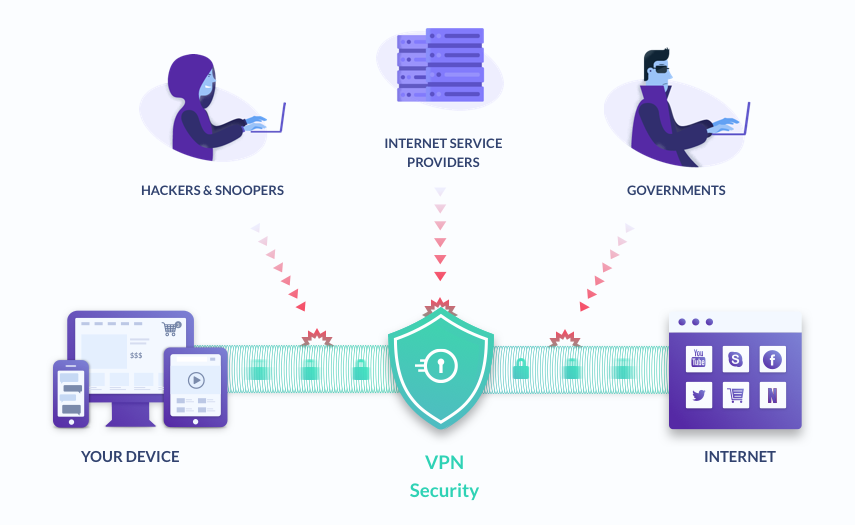
Your IP address, of course, is the unique identifier given to your connection or device by your Internet Service Provider. Websites and services that either send or receive data to and from your computer recognize you by this IP address.
It’s also through this IP address that your ISP can monitor all your activity, information that a government or other legal authority can demand from them. Your IP address is the label under which the entirety of your online activity exists.
It’s not just governments that hold an interest in your data, of course. Everyone is familiar with targeted advertising and data harvesting. Your web browser history is being collected and sold to marketing agencies regularly and openly.
Thus, a VPN both encrypts your data and obfuscates your location and identity. The location part is important as identifying your IP address’s location is what allows sites to block certain regions in your content (determining what you get on YouTube or Netflix, for example, or censorship and blacklisting of certain sites).
Which VPN is the one for me?
A VPN gives you digital freedom and protection.
This guide can help you decide on which one you want: some VPNs come with premium features such as double layers of encryption, kill-switches in case the connection drops and your identity is suddenly at risk of being exposed, and different channels/protocols for different sites, ensuring you don’t compromise your speeds.
It is important to mention why a “free” VPN is a red flag.
It might be a common saying, but it’s usually true that if your product doesn’t need you to pay for the product, you are the product. This simply means your VPN might be doing the same thing your ISP is but under false pretenses.
There are also a number of other factors, depending on where you are and what you use the Internet for. Being on a Mac or a Windows desktop does not make the largest of differences. A good VPN is good on all devices.
Is your country part of the “5/9/14 Eyes” alliance (explained a little later on in this very article), does it have a strict no-logging policy, is it good for torrents, and so on?
Read on, and we will help you figure this out together.
The Five/Nine/Fourteen Eyes alliances
 Photo by Alan J. Hendry
Signal intelligence is the gathering of information through intercepting signals, such as telephone, text, and Internet communication.
The Five Eyes (Australia, Canada, New Zealand, the United Kingdom, and the United States) are an alliance that accesses and monitors communication to and from other countries.
The Nine and Fourteen Eyes include the countries mentioned above and add Denmark, France, Norway, and the Netherlands for the Nine Eyes, completing it with Germany, Belgium, Italy, Sweden, and Spain.
There are also reports of Japan, Singapore, Israel, and South Korea being involved with these powers.
Established in the wake of the Second World War, Edward Snowden’s whistleblowing brought the Five Eyes back into public discourse in 2013, exposing their continued mass surveillance activities.
What does this mean for us? Simply put, if your VPN is based in one of these countries, it doesn’t bode well. Jurisdiction is a big component of privacy: a VPN based offshore or in places like the British Virgin Islands or Panama or Switzerland is ideal and a better bet than one from the USA. This means your VPN would have no obligation to log your data or hand it over if pressed.
No-logging policy
A VPN can be based in a country with no legal jurisdiction but still, sell your data or present it in court if needed.
Without taking any names, it has happened to a popular VPN service based out of Hong Kong, breaching the security of its clients and users in an ironic twist.
Ensuring that your VPN has a no-logging policy is important.
A no-logging policy means that your Virtual Private Network service is simply keeping no record of what you do and where and when and how. The best VPNs out there with a proven track record of this would have no data to submit or sell even if they were supposed to.
Conclusion
While you’d select your VPN based on what you need and what your average volume of data usage is, the first steps you’d take would be what is mentioned above.
User comments and threads on forums and Reddit can help you gauge public opinion. Paying for a good VPN is a low-cost, long-term solution to increasing frustrations and problems. On a system as dedicated to security as an Apple computer, selecting a good VPN can go a long way.