Looking for a Facebook Reel you liked earlier? You don’t have to scroll through your feed or search for the creator again.
The Facebook app has a dedicated Liked reels section that lets you quickly view only the Reels you’ve liked. If you can’t find a Reel there, you can also check your Activity Log.
In this guide, we’ll show you the fastest ways to see your liked Facebook Reels on Android, iPhone, and desktop.
How to Find Liked Reels on the Facebook App
This is the easiest way to find the Reels you’ve liked on Facebook.
- Open the Facebook app.
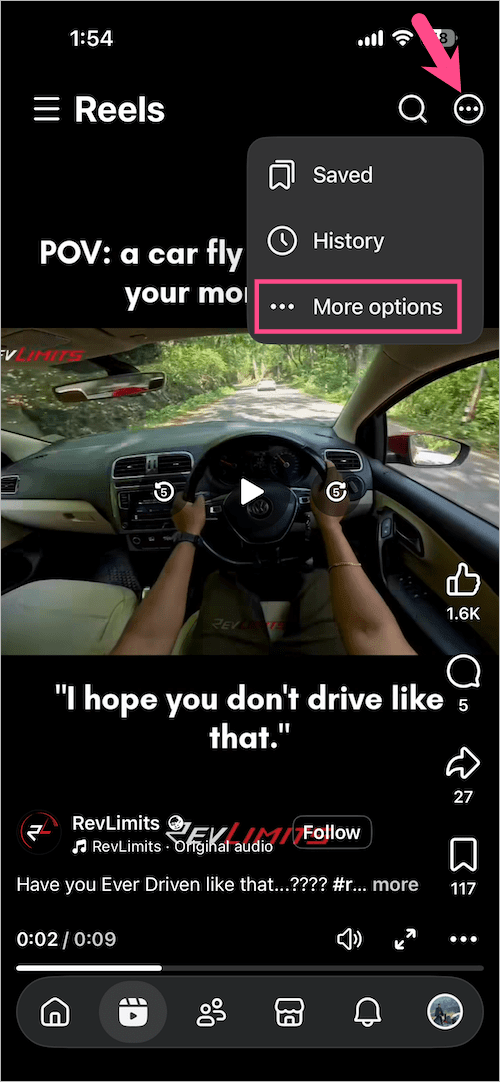
- Tap the Reels tab at the bottom (iPhone) or top (Android).
- Go to Your library:
- iPhone: Tap the three-dot icon in the upper-right corner and select More options.
- Android: Tap the profile icon in the upper-right corner.
- Select Liked reels.
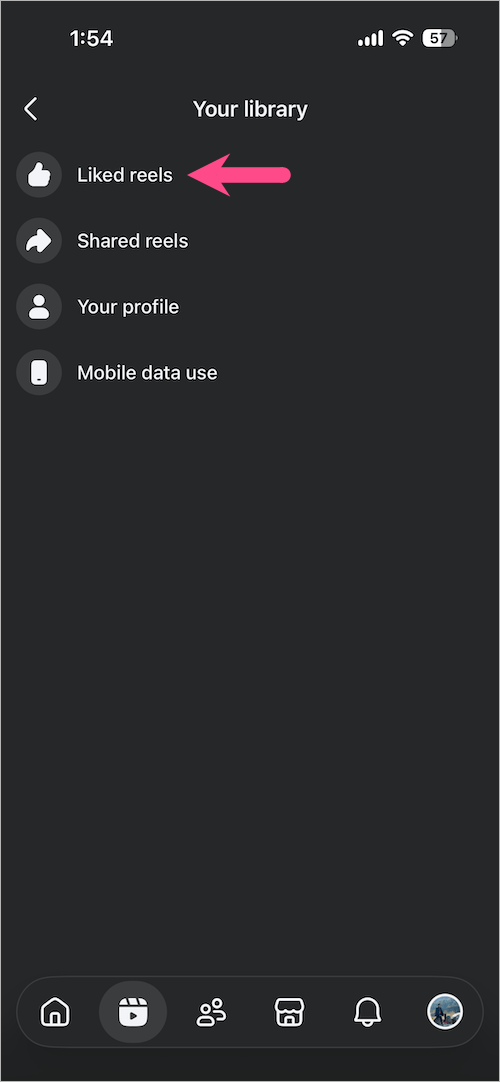
You’ll now see all the Reels you’ve liked in one place. These liked Reels are private and visible only to you.

Note: During my testing, I found that some Reels liked from the Facebook desktop website didn’t appear in the Liked reels section on the mobile app. If you can’t find a particular Reel here, check the Activity Log method below instead.
Another Way to Find Your Liked Reels
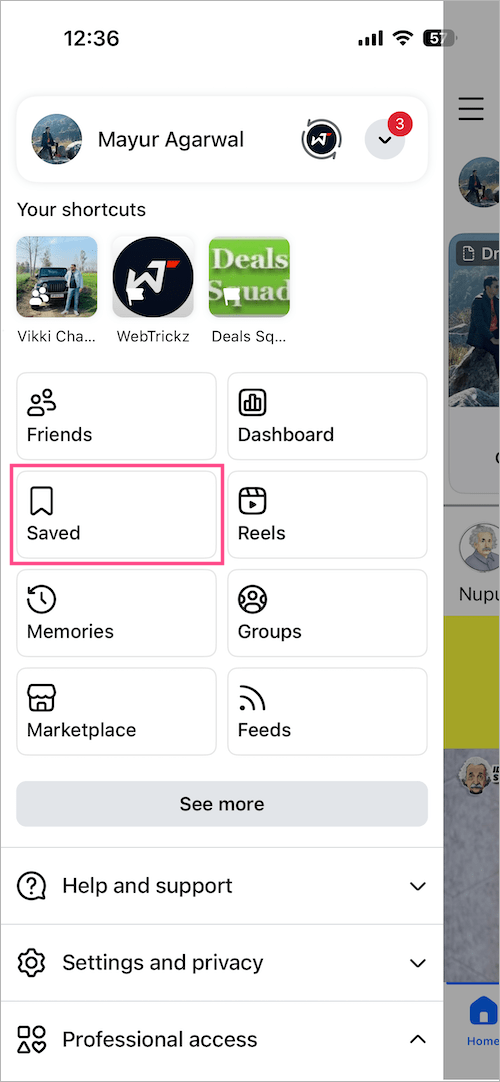
You can also access the same Liked section from your Saved library.
- Open the Facebook app.
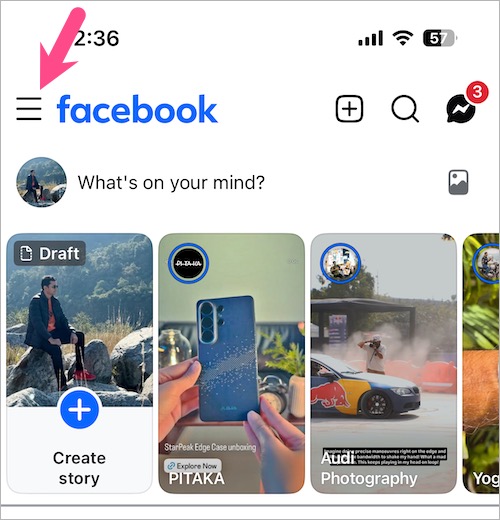
- Tap the Menu button in the upper-left corner.
- Select Saved. (Tap See more if you don’t see the Saved option.)
- Tap the Reels tab and select Liked.
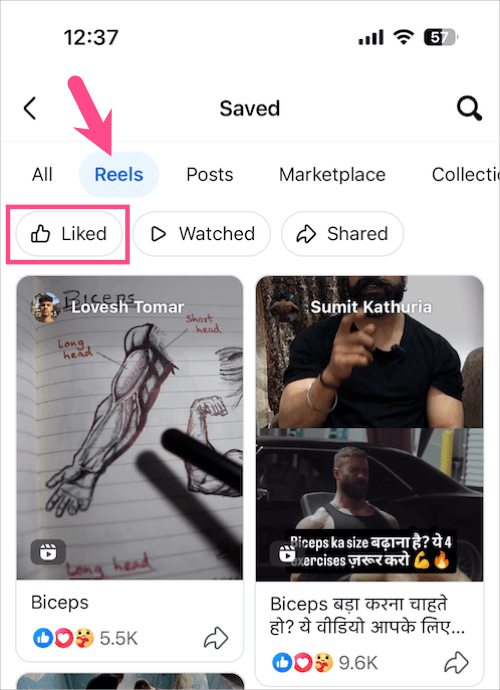
Your liked Reels will appear in chronological order.
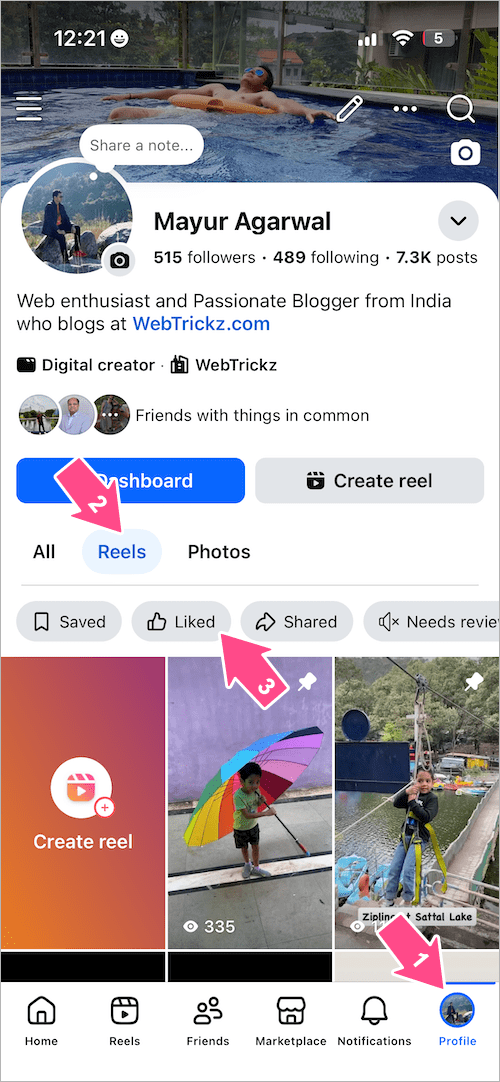
Tip: You can also open the Profile tab, tap Reels, and switch to the Liked tab to quickly view your liked Reels.
Looking for a Reel you watched but didn’t like? Learn how to see your recently watched Reels on Facebook.
How to Find Liked Facebook Reels Using Activity Log
If a Reel doesn’t appear under Liked reels, check Activity Log instead. It keeps a record of all your likes and reactions on Facebook.
- Open the Facebook app.
- Tap the Profile tab.
- Tap the three-dot menu at the top-right and select Activity log.
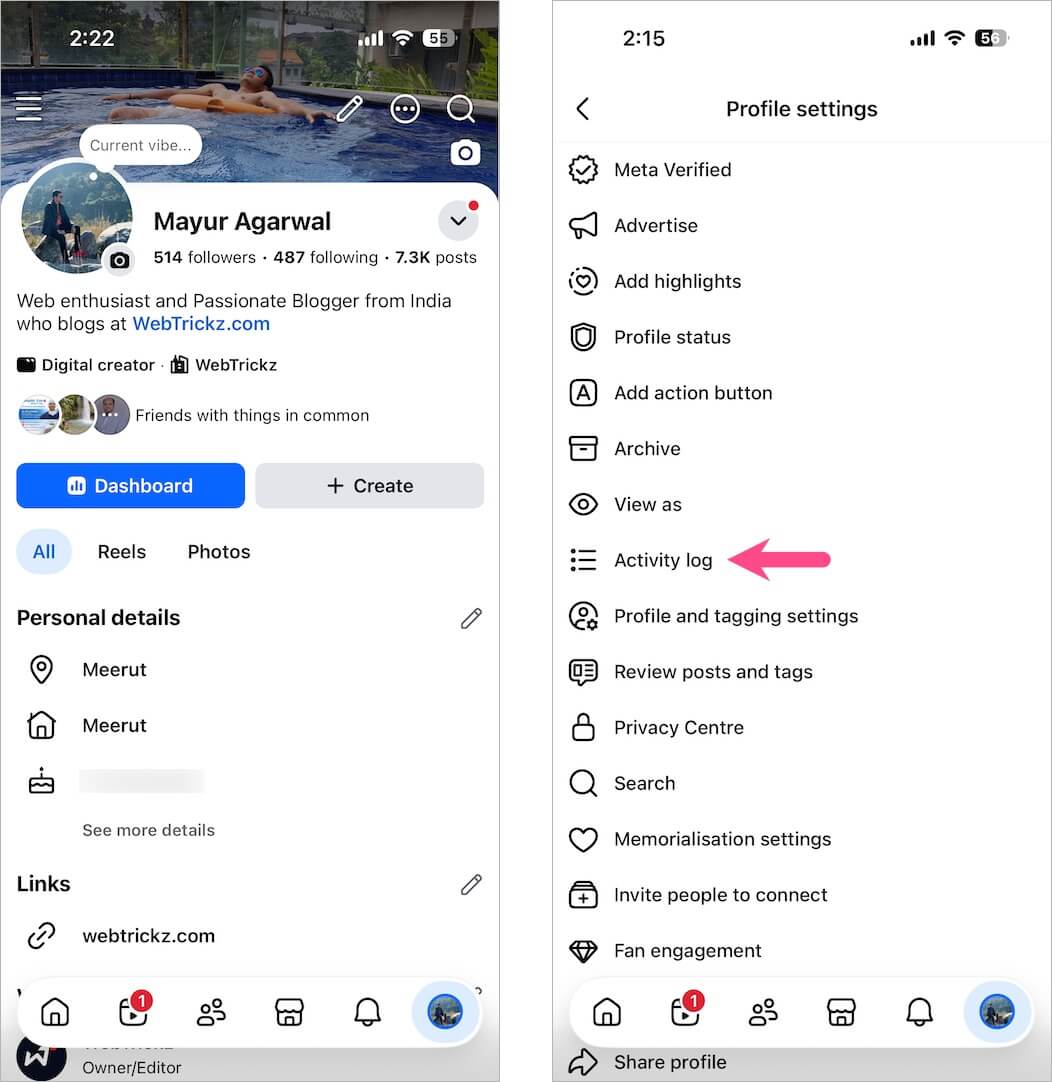
- Tap Your Facebook activity dropdown menu.
- Expand Comments and reactions and tap Likes and reactions.
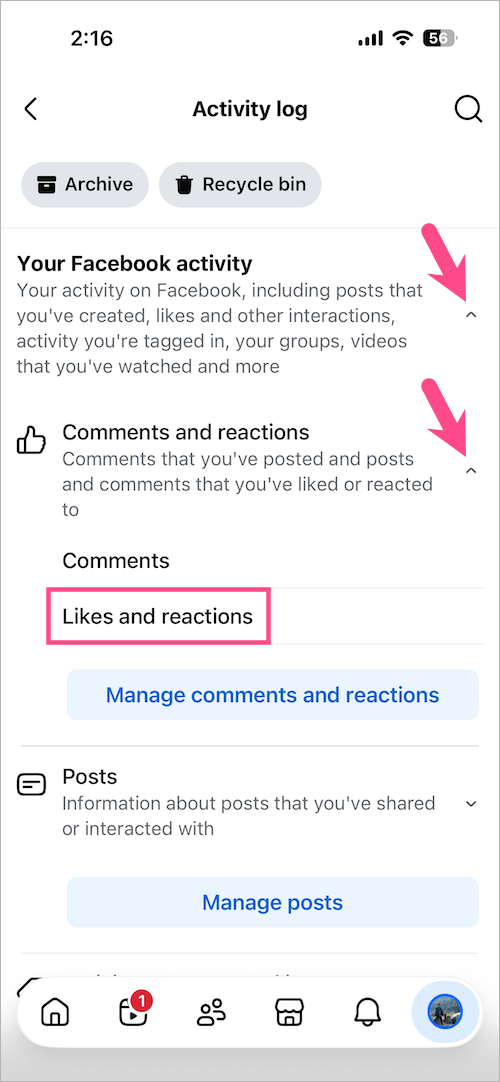
You’ll now see every post, photo, video, and Reel you’ve liked, along with the exact date.
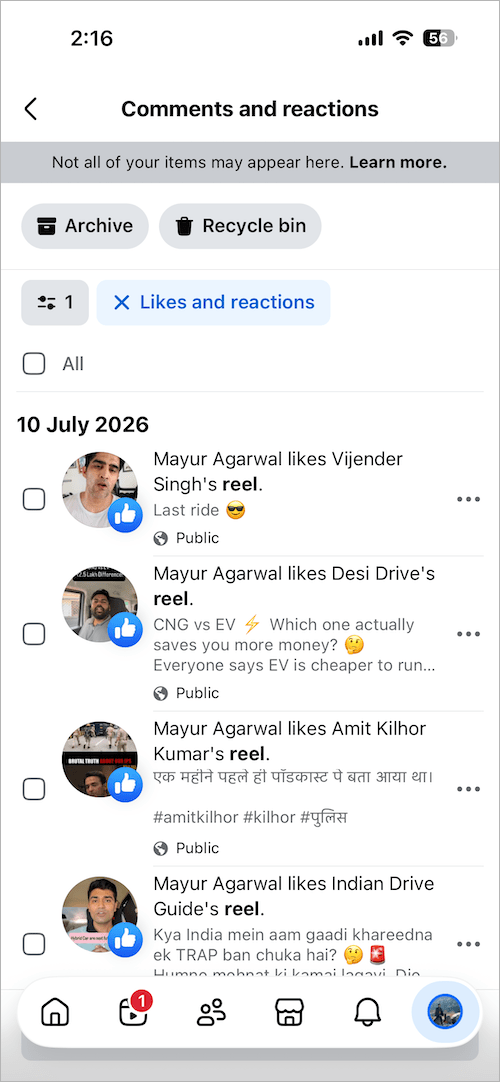
Keep in mind: Activity Log shows all your likes in one place, so Reels appear alongside other liked content. If you’ve liked a lot of posts, you’ll need to scroll through the list to find a specific Reel.
How to See Liked Facebook Reels on Desktop
Facebook doesn’t currently offer a dedicated Liked reels page on its desktop website. Instead, you’ll need to use the Activity Log.
- Visit facebook.com and log in to your account.
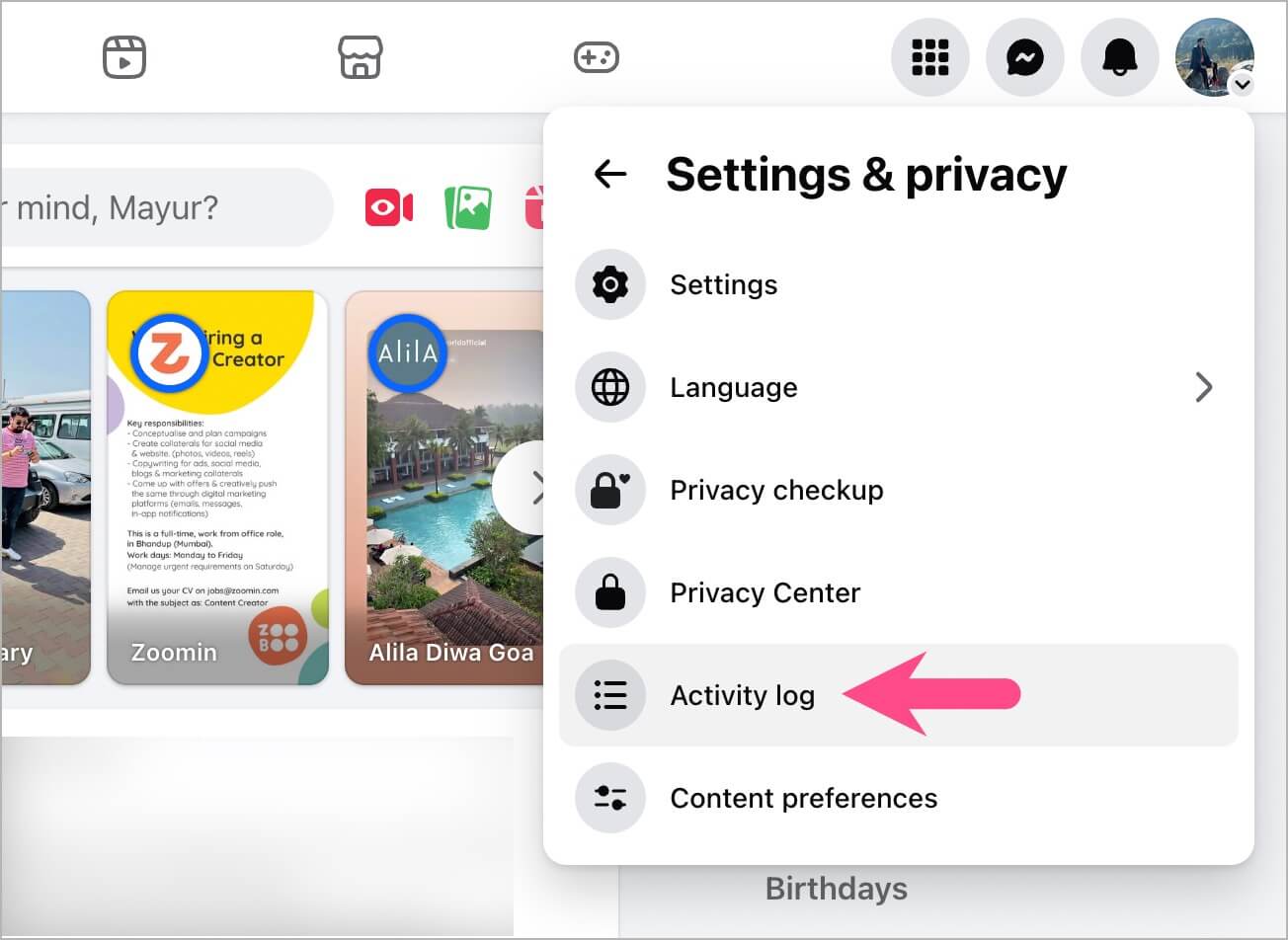
- Click your profile picture in the upper-right corner.
- Select Settings & privacy > Activity log.
- From the right pane, click Your Facebook activity.
- Expand Comments and reactions and select Likes and reactions.
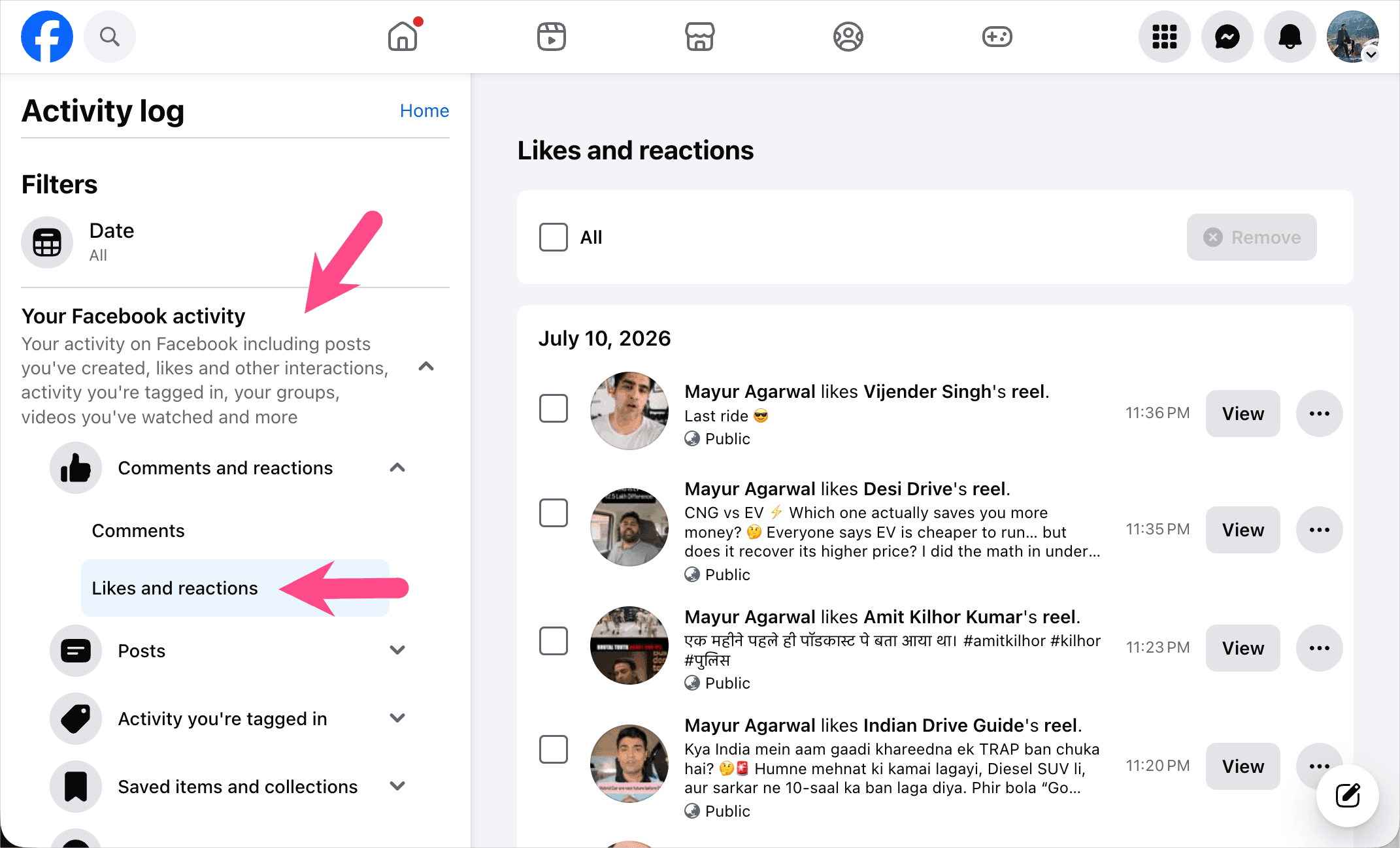
You’ll see all your Facebook likes, including Reels and videos, along with the exact date and time each item was liked.
If you’re trying to remove a Reel you’ve watched instead of just unliking it, see our guide on how to delete viewed Reels on Facebook.
How to Delete or Unlike Liked Reels on Facebook
If you no longer want a Reel to appear in your liked activity, you can remove your like at any time. There are two ways to unlike a Reel on Facebook:
Unlike a Reel from Liked reels
- Open Liked reels.
- Open the Reel you want to unlike.
- Tap the Like button again.
The Reel will immediately be removed from your liked Reels.
Unlike a Reel from Activity Log
- Open Activity Log.
- Go to Likes and reactions.
- Find the Reel.
- Tap the three-dot menu next to it and select Unlike.
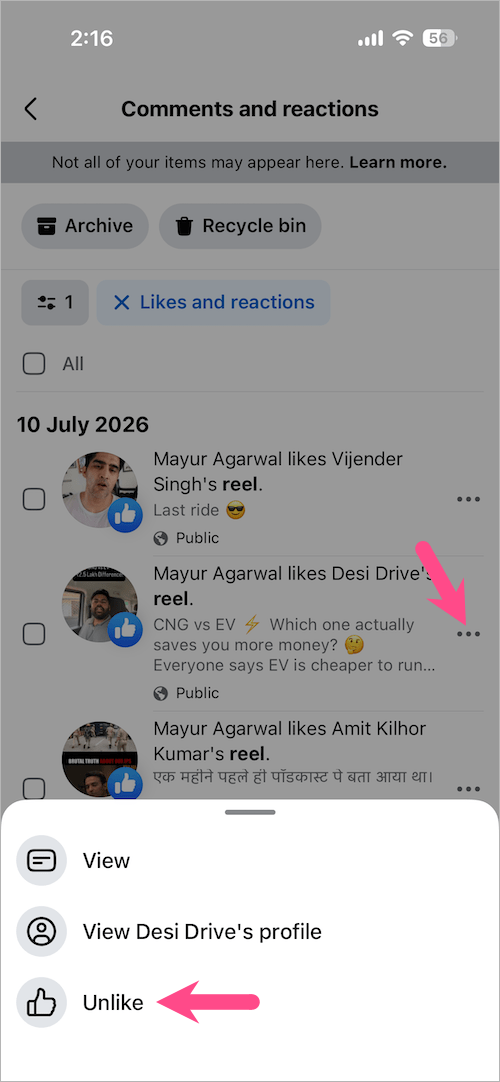
Once removed, the Reel will no longer appear in your liked activity.
Can’t Find Your Liked Reels on Facebook?
If your liked Reels aren’t showing, try these checks before assuming they’re gone.
- Check under Liked reels first.
- Use Activity Log if the Reel isn’t listed there.
- Make sure you’re signed in to the correct Facebook account.
- Update the Facebook app if you don’t see the Liked reels option.
- The Reel may have been deleted or made private by its creator.
If you saved the Reel instead of liking it, see our guide on finding saved Reels on Facebook.
Frequently Asked Questions
How do I find all the Reels I’ve liked on Facebook?
Open the Facebook app, go to Reels > More options > Liked reels to view only the Reels you’ve liked. If a Reel isn’t listed there, check Activity Log > Your Facebook activity > Comments and reactions > Likes and reactions.
How do I see my liked Reels on Facebook?
On Android and iPhone, open Reels and go to the dedicated Liked reels section. On desktop, you’ll need to use Activity Log.
Why can’t I find a Reel I liked?
If a liked Reel isn’t visible under Liked reels, it may have been liked from another device, removed by its creator, or excluded from that view. In such cases, the Activity Log is the most reliable place to check.
Does Facebook notify someone when I unlike their Reel?
No. Facebook doesn’t notify someone when you remove your like from their Reel.
Can other people see my liked Reels?
No. The Liked reels section is private and visible only to you.