


Learn how to cancel your Gemini subscription on Android, iPhone, Google Play, the App Store, or directly through your Google account.
If you’ve subscribed to Google AI Plus, Google AI Pro, Google AI Ultra, Gemini Advanced, or another paid Google Gemini plan and no longer want to continue, you can cancel your subscription at any time. Canceling stops future billing while allowing you to keep premium features until the end of your current billing period.
The exact cancellation steps depend on where you purchased the subscription. Some users are billed directly through Google, while others subscribed through the Google Play Store, Apple App Store, or a Google Workspace account.
This step-by-step guide explains how to cancel Gemini subscription on every platform.
Before You Cancel, Check Your Billing Method
The cancellation method depends on how you originally subscribed.
| Billing Source | Where to Cancel |
|---|---|
| Google AI Plus, Google AI Pro, Google AI Ultra, Gemini Advanced purchased directly from Google | Google One or Google Account |
| Subscription purchased through Google Play | Google Play Store or Google One |
| Subscription purchased through Apple App Store | Apple Subscriptions |
| Gemini for Google Workspace | Google Admin Console |
How to Cancel Gemini Subscription on the App & Website
For most users, this is the easiest way to cancel Google Gemini subscription using the website or app.
On Web (Desktop)
Follow these steps to cancel your Gemini app subscription on a computer:
- Visit gemini.google.com/app
- Sign in with the Google account linked to your subscription.
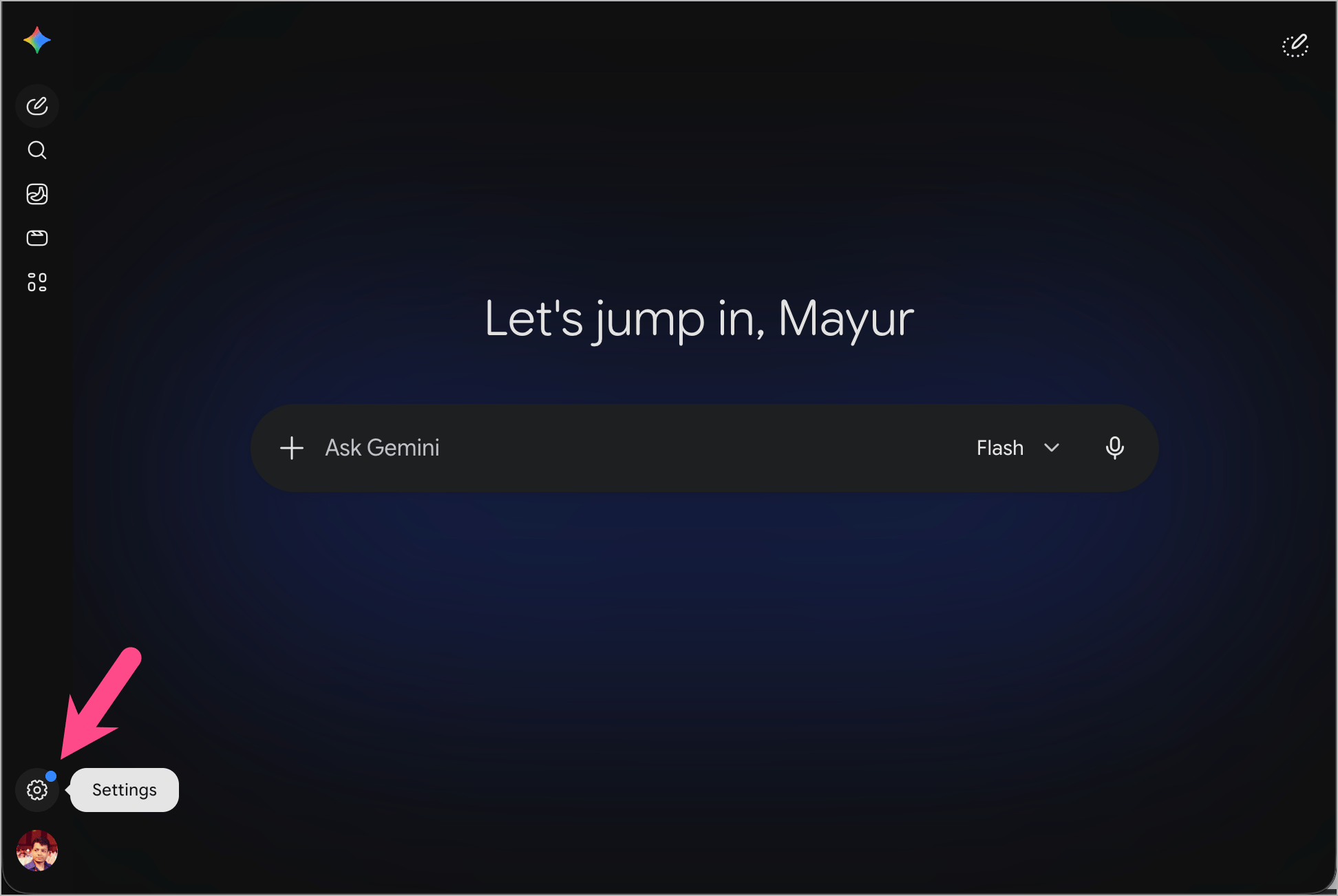
- Click the Settings menu in the bottom-left corner.
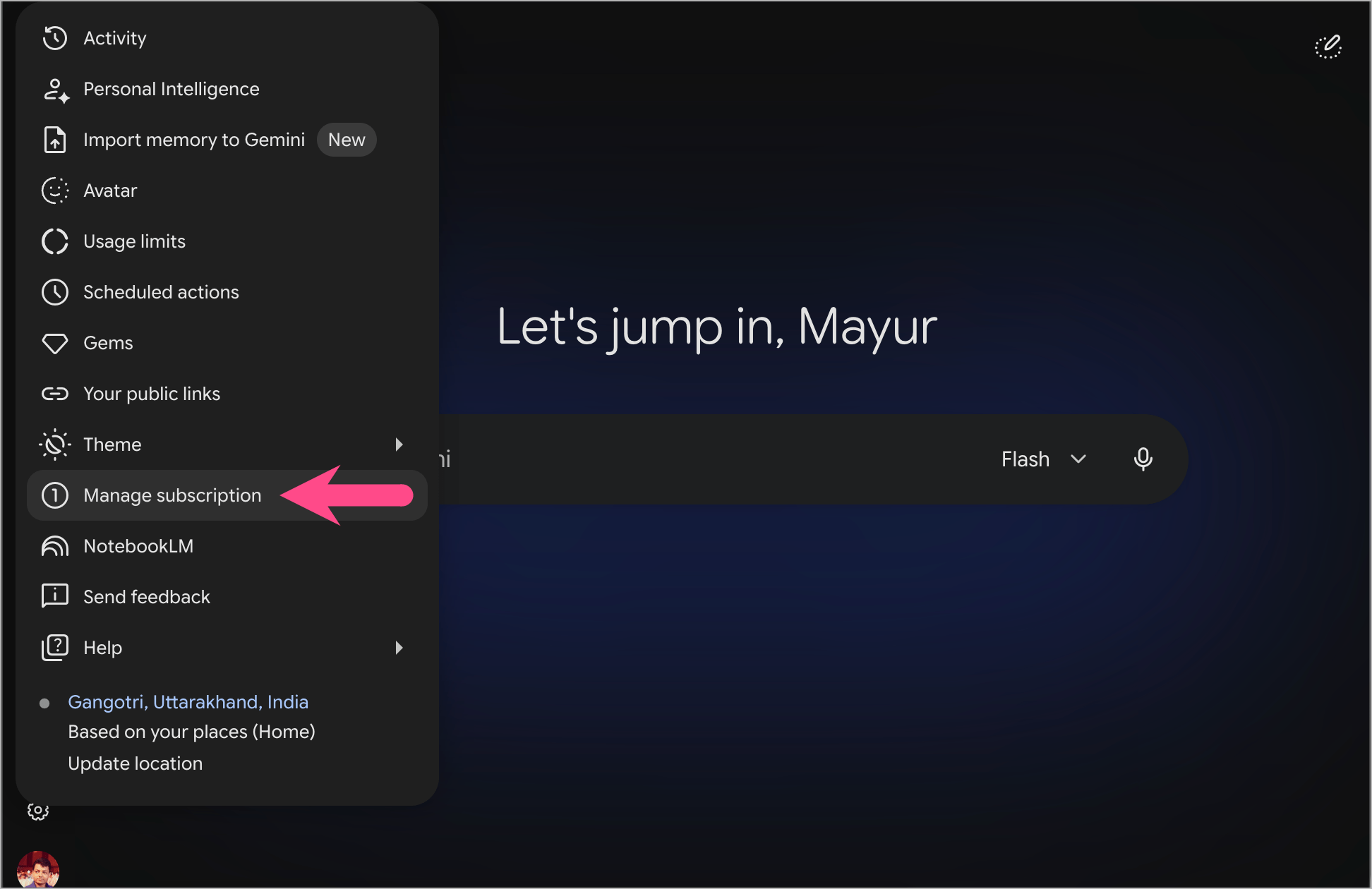
- Select Manage subscription.
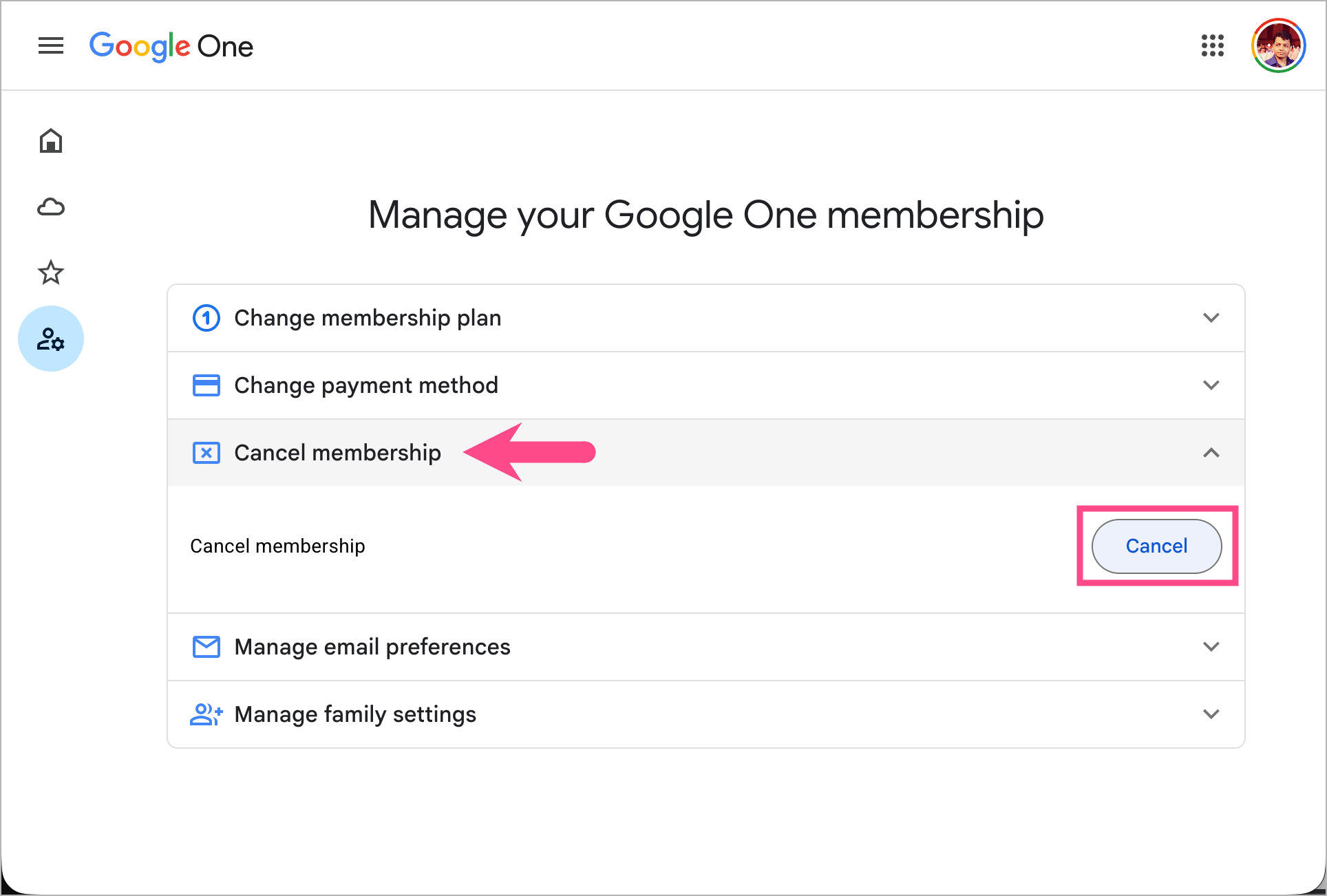
- On the Manage your Google One membership page, click the Cancel membership dropdown and select Cancel.
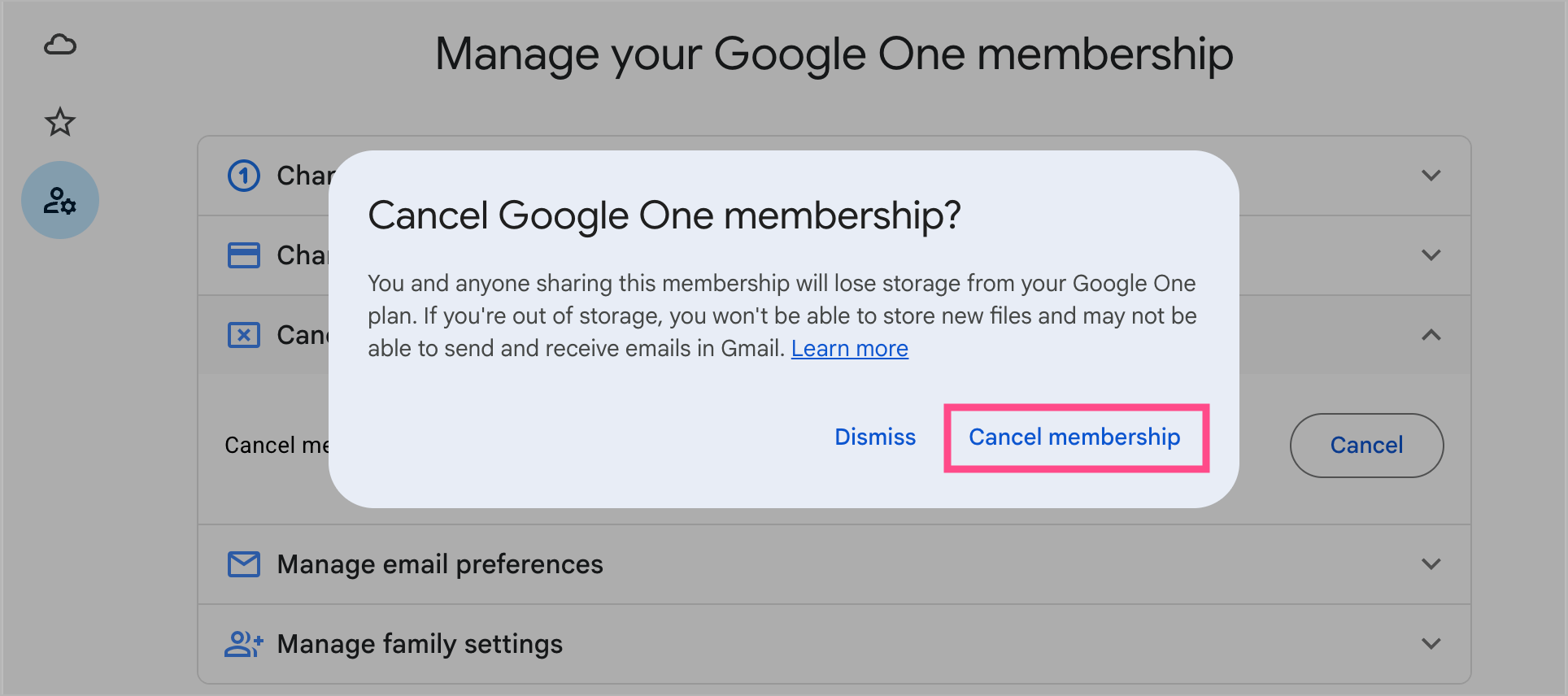
- Click Cancel membership to confirm and cancel your Gemini membership.
On Mobile (Gemini App)
Here’s how to cancel your Google Gemini subscription on Android or iPhone.
- Open the Gemini app.
- Tap the Menu icon in the top-left corner.
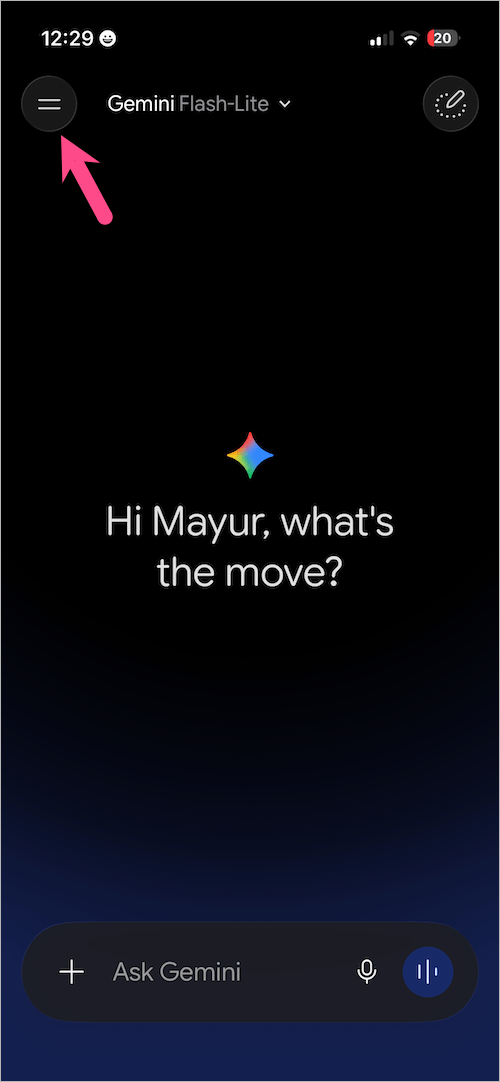
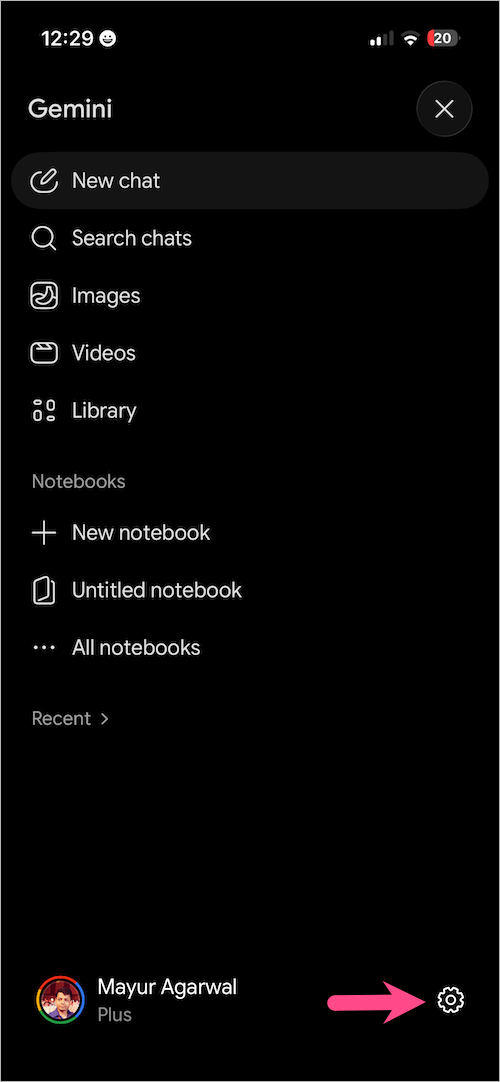
- Tap your profile picture or the gear icon to open Settings.
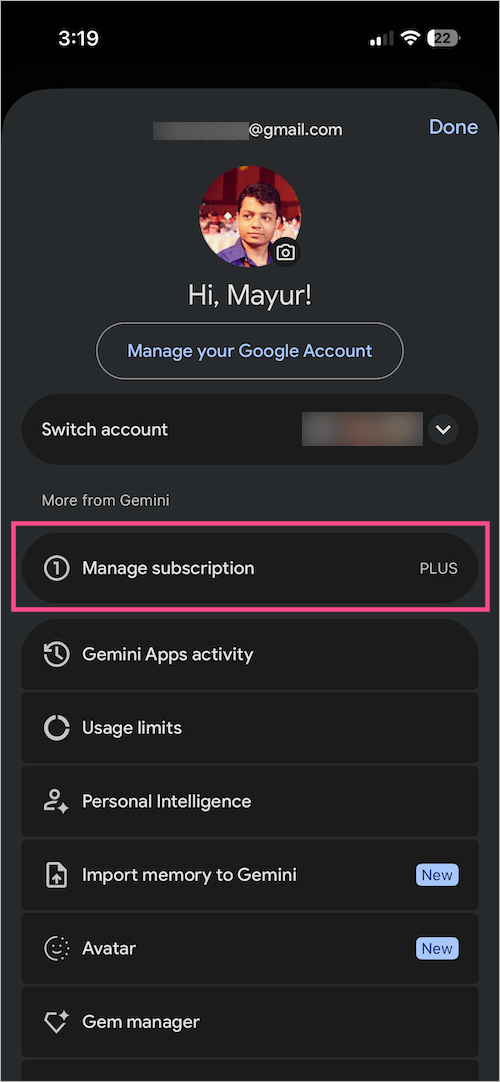
- From the Settings menu, tap Manage subscription.
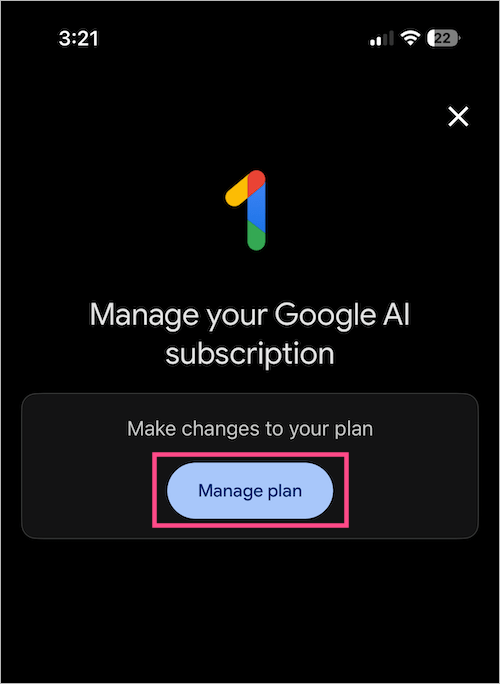
- To manage your Google AI subscription, tap Manage plan. You’ll be redirected to your Google One membership settings.
- Select Cancel membership and tap Cancel.
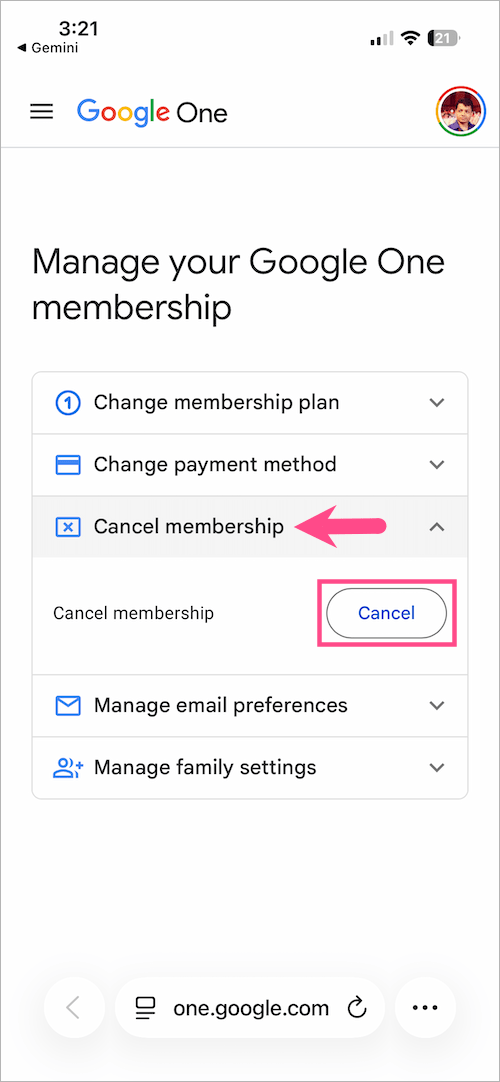
- Tap Cancel membership again to confirm your decision.
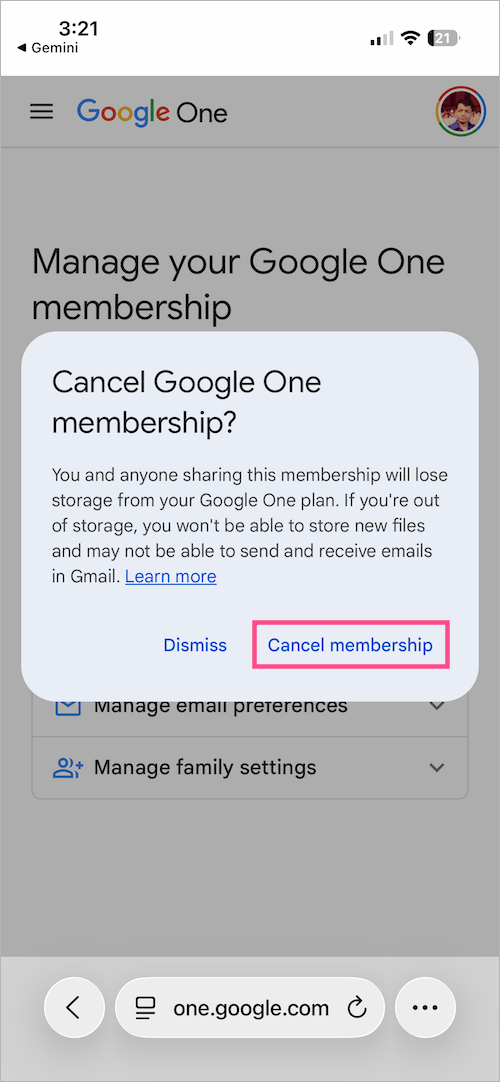
That’s it. Your subscription will be canceled at the end of your billing period, and you won’t be charged anymore.
How to Cancel Gemini AI Subscription through Google One
Most paid Gemini plans, including Google AI Plus, Google AI Pro, Google AI Ultra, and Gemini Advanced, are managed through Google One.
To cancel your Gemini AI subscription directly through Google One:
- Visit myaccount.google.com.
- Sign in with the account used to purchase the subscription.
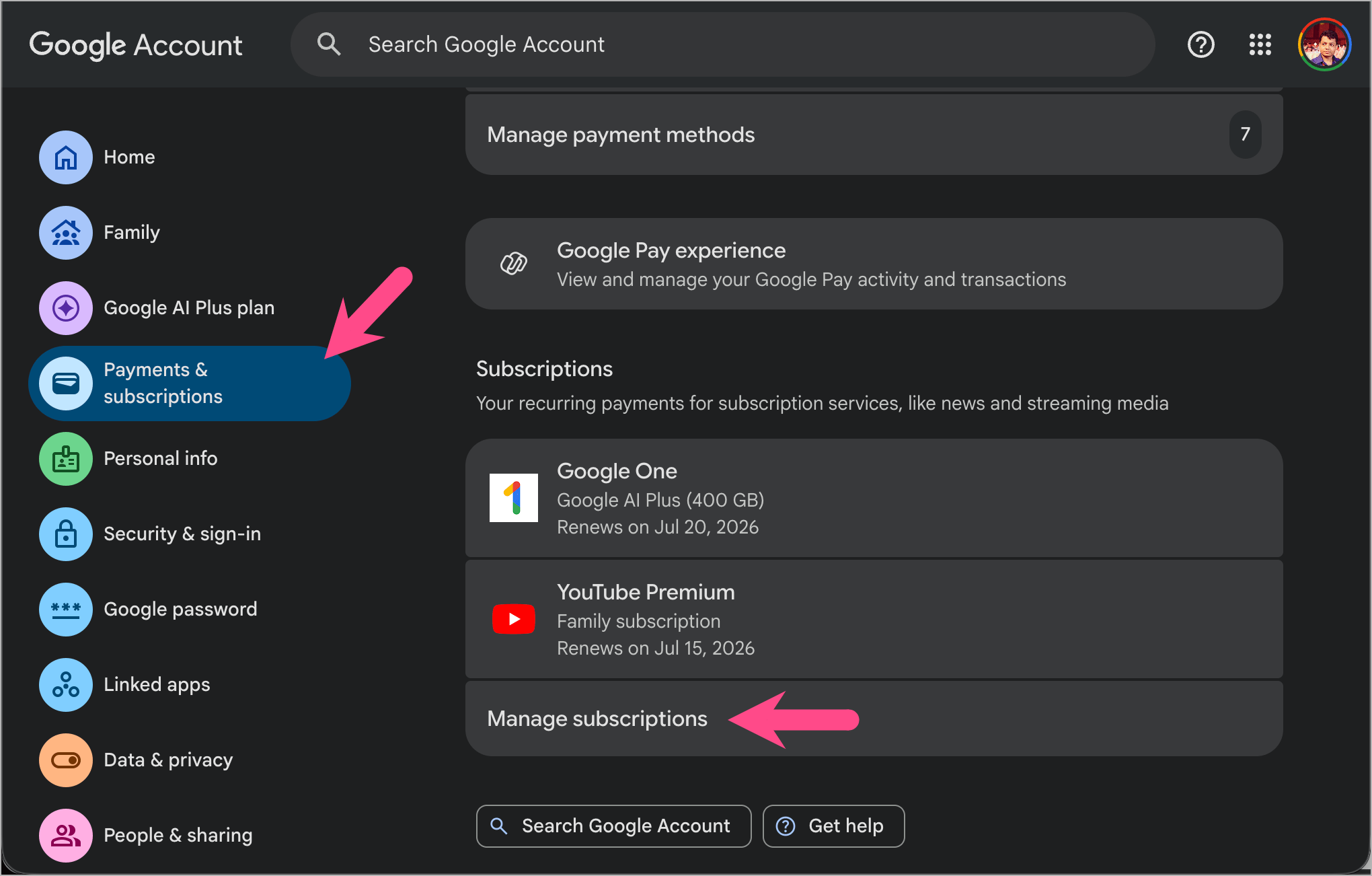
- Click Payments & subscriptions.
- Find your Gemini or Google One AI plan (AI Plus/AI Pro/AI Ultra) in the Subscriptions list.
- Click Manage subscriptions.
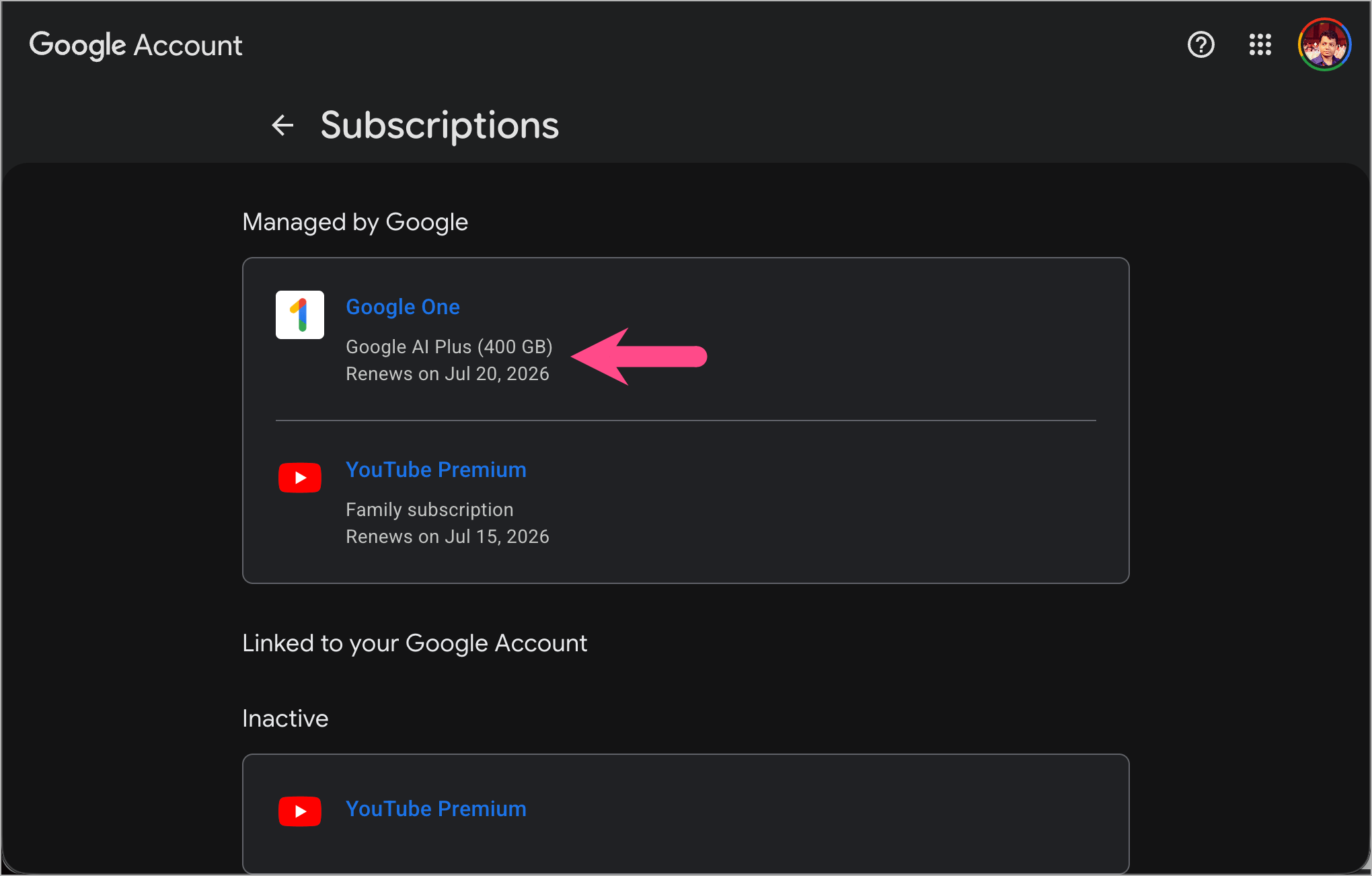
- To manage, select the Google One subscription linked to your Gemini plan.
- On the plan info page, click Cancel subscription.
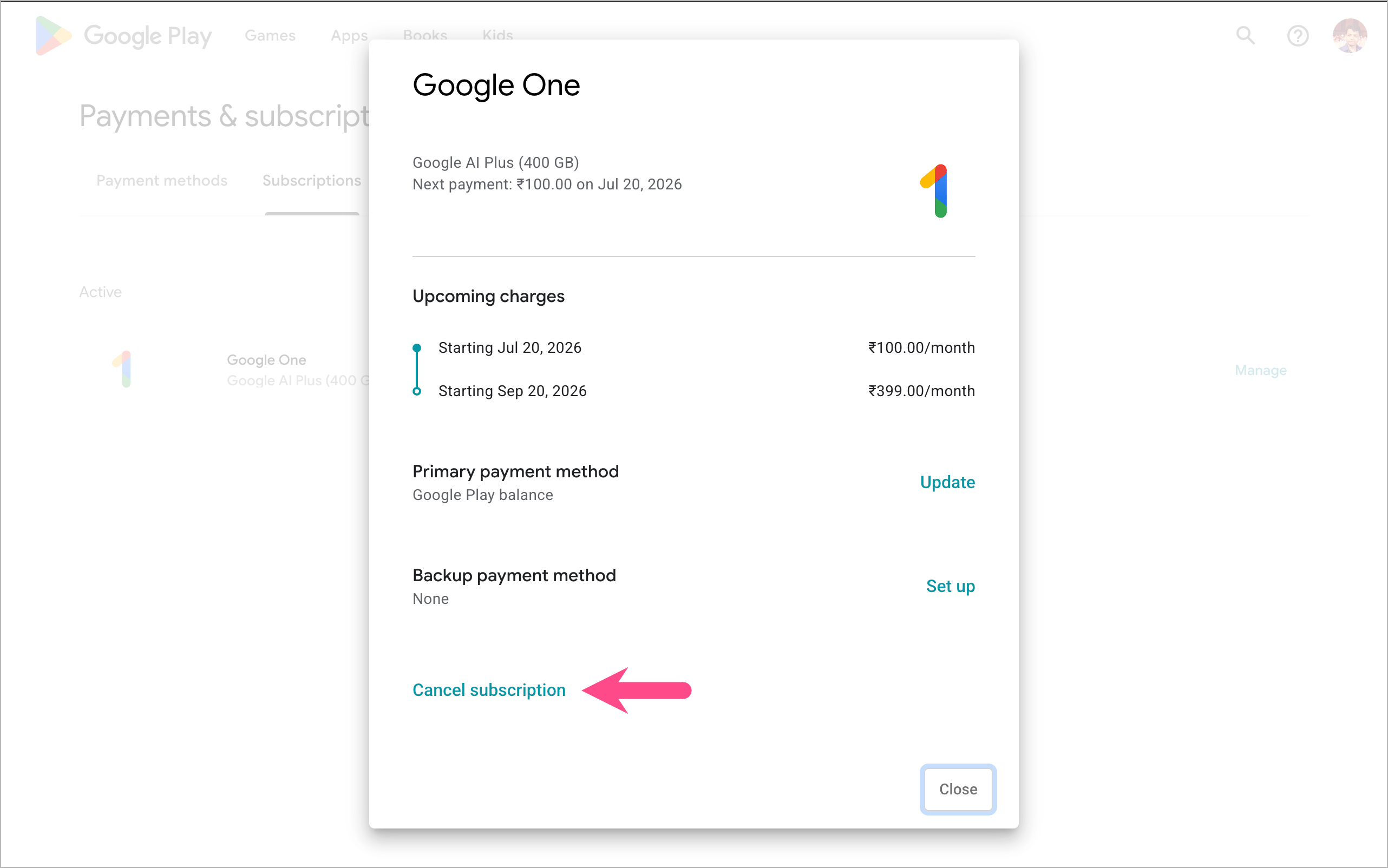
- Choose a reason and click Continue.
- Select Cancel subscription to confirm the cancellation.
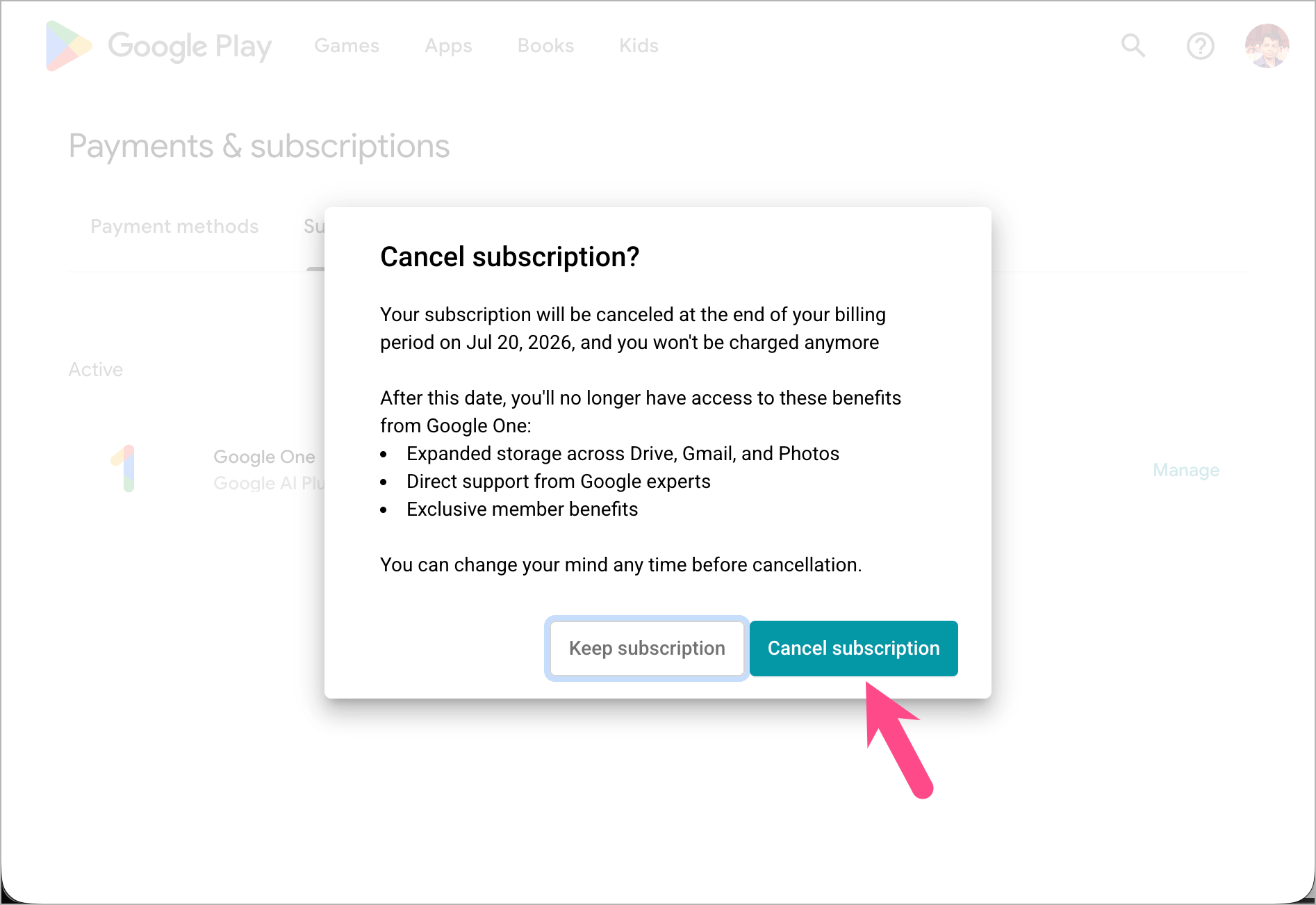
Google will display the exact date your premium access ends.
How to Cancel Gemini Subscription on iPhone (App Store)
If you subscribed through the Apple App Store, you’ll need to cancel the subscription through Apple. Canceling it from Google won’t stop future billing.
To cancel the Google Gemini subscription on your iPhone or iPad:
- Open the Settings app on your iPhone.
- Tap your name/Apple ID at the top.
- Go to Subscriptions.
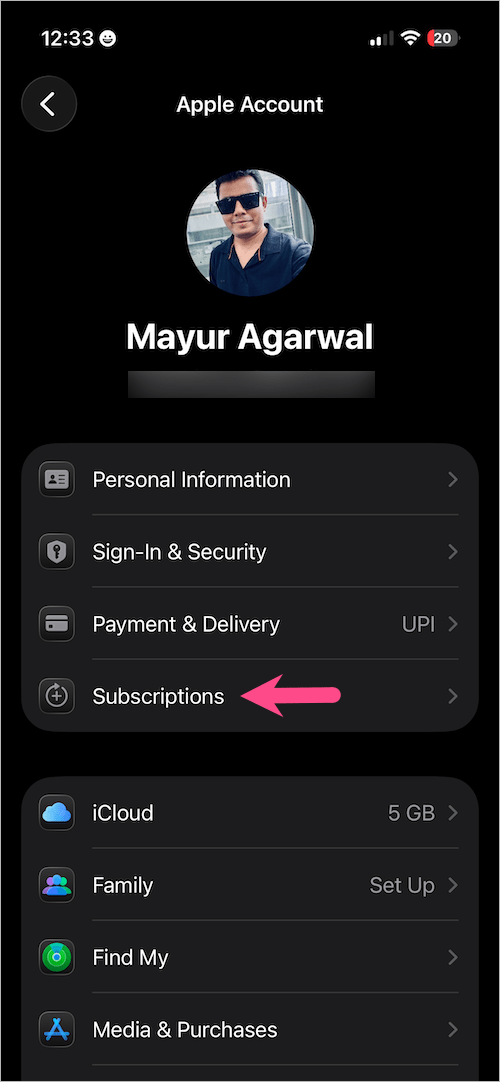
- Find Google One or Gemini in the list.
- Tap the subscription.
- Select Cancel Subscription.
- Tap Cancel Subscription again to proceed.
How to Cancel Gemini Subscription on Android (Google Play)
If your subscription was purchased through Google Play, follow these steps:
- Open the Google Play Store app on your Android phone.
- Tap your profile icon.
- Go to Payments & subscriptions > Subscriptions.
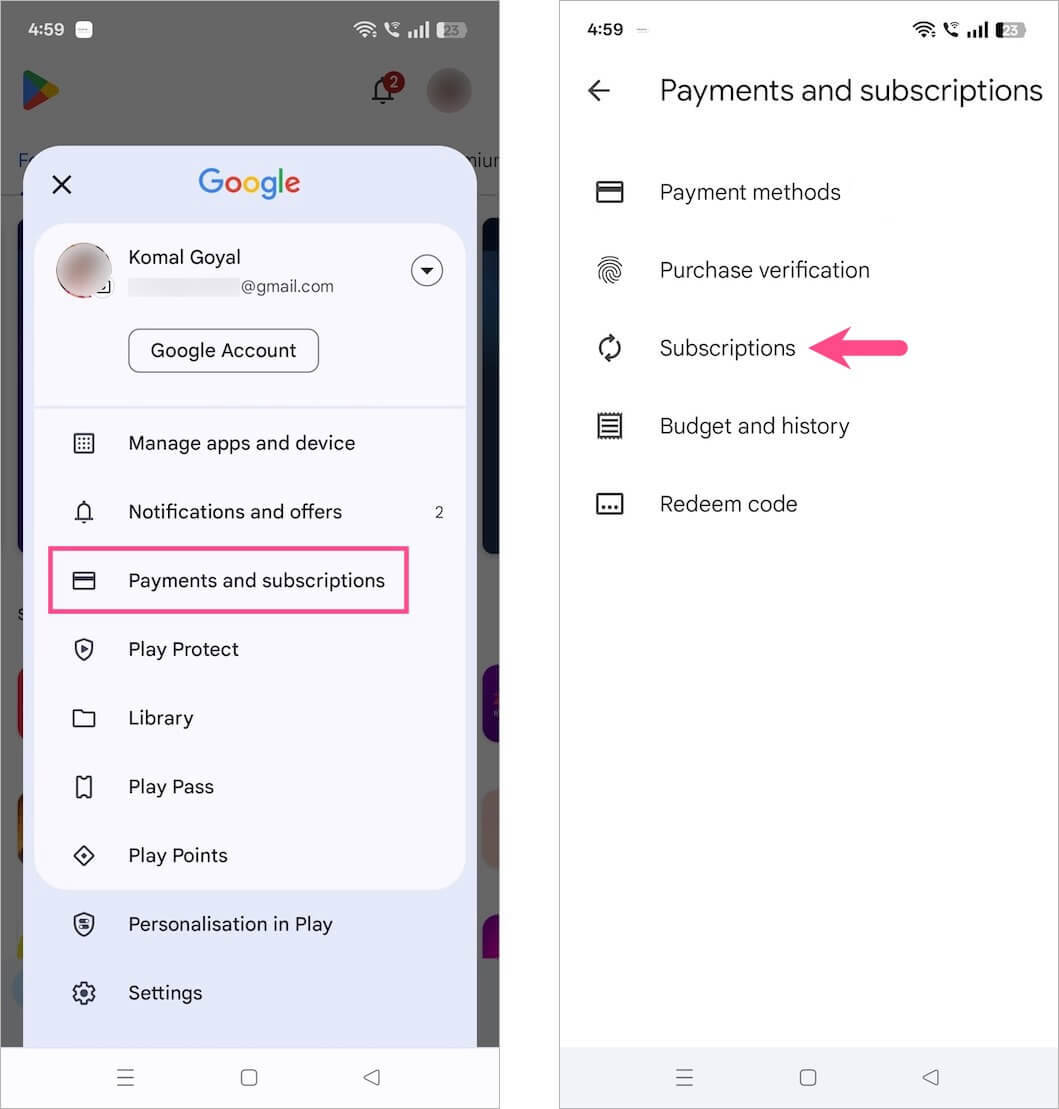
- Choose your Google One or Gemini plan.
- Tap Cancel subscription.
- Follow the instructions to confirm.
Tip: If you’re canceling Gemini because you no longer want Google to charge your saved card, you may also want to remove your payment method from Google Play after canceling the subscription.
Cancel Gemini Free Trial Subscription
If you’re currently using a free trial, cancel it before the trial expiration date to avoid being charged.
To cancel your free trial of Gemini, you can use the same cancellation steps listed above (through the Gemini web app or Google One).
As long as you cancel before the trial end date shown on your subscription page, you won’t be charged at all. After cancellation, the trial remains active until its scheduled expiration date.
Important: If you’re using a Gemini free trial through Google Workspace, make sure to cancel the associated Workspace subscription or Gemini add-on before the trial ends. Otherwise, your organization may be charged automatically when the trial period expires.
How to Cancel Gemini for Google Workspace
For organizations using Gemini with Google Workspace, only a Super Admin can cancel the subscription.
To remove Gemini from Google Workspace, follow these steps:
- Sign in to the Google Admin console as a super admin.
- Navigate to Menu > Billing > Subscriptions.
- Select the Gemini-related subscription.
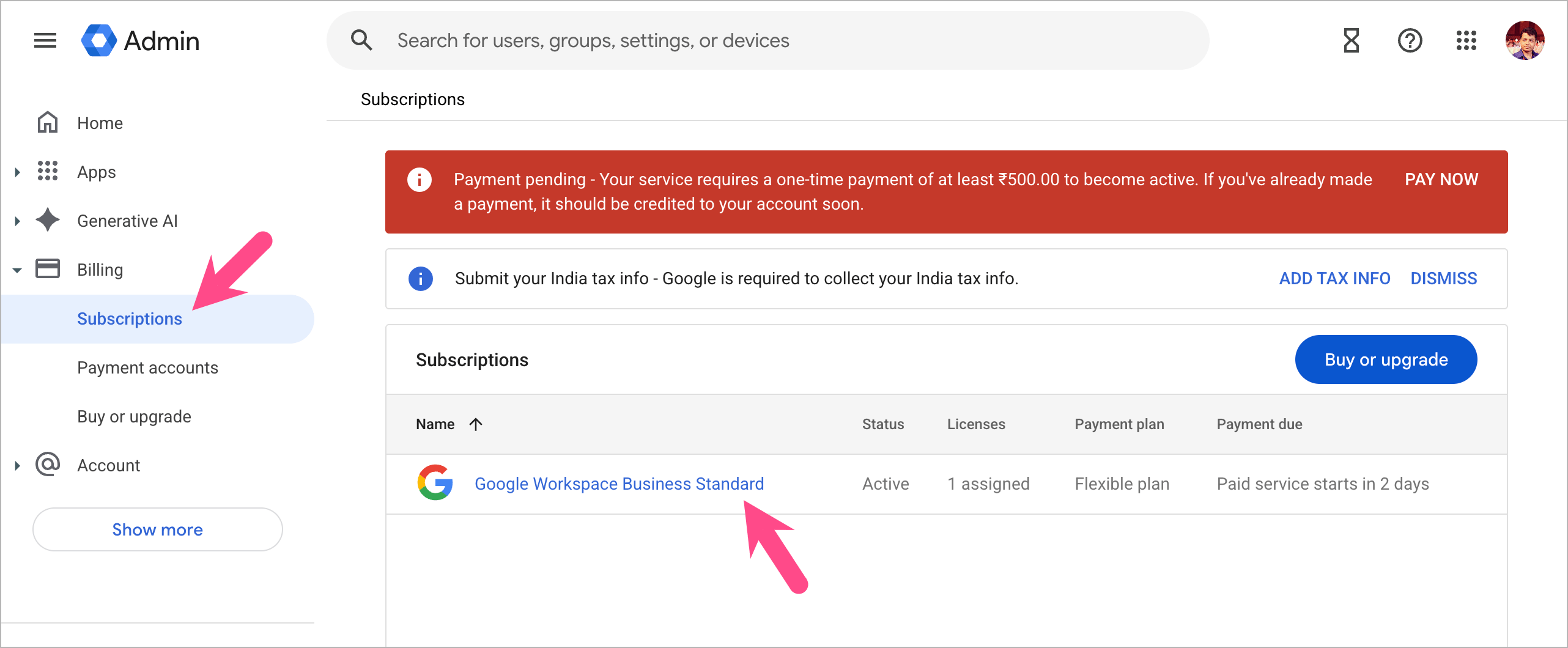
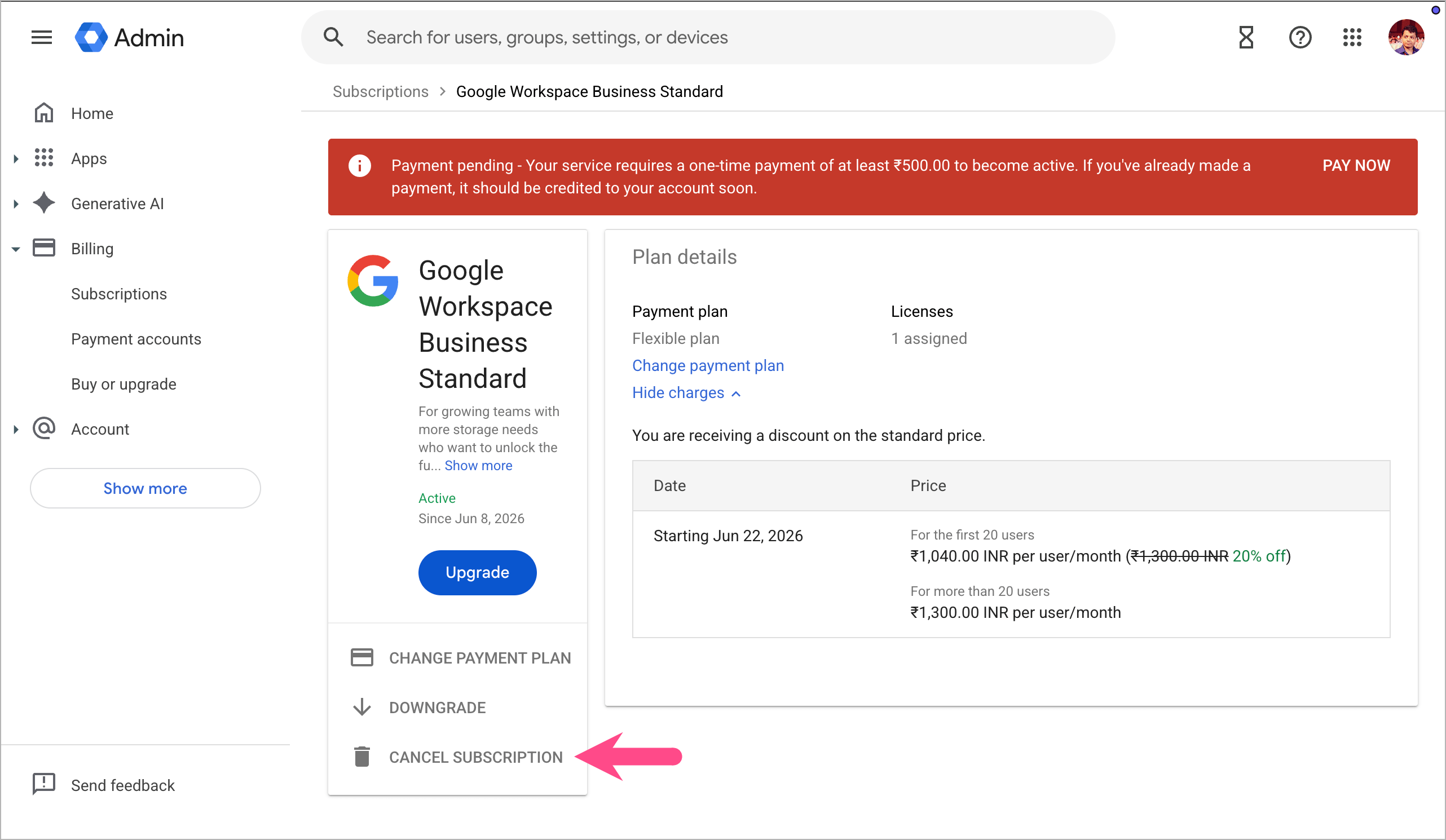
- Click Cancel Subscription.
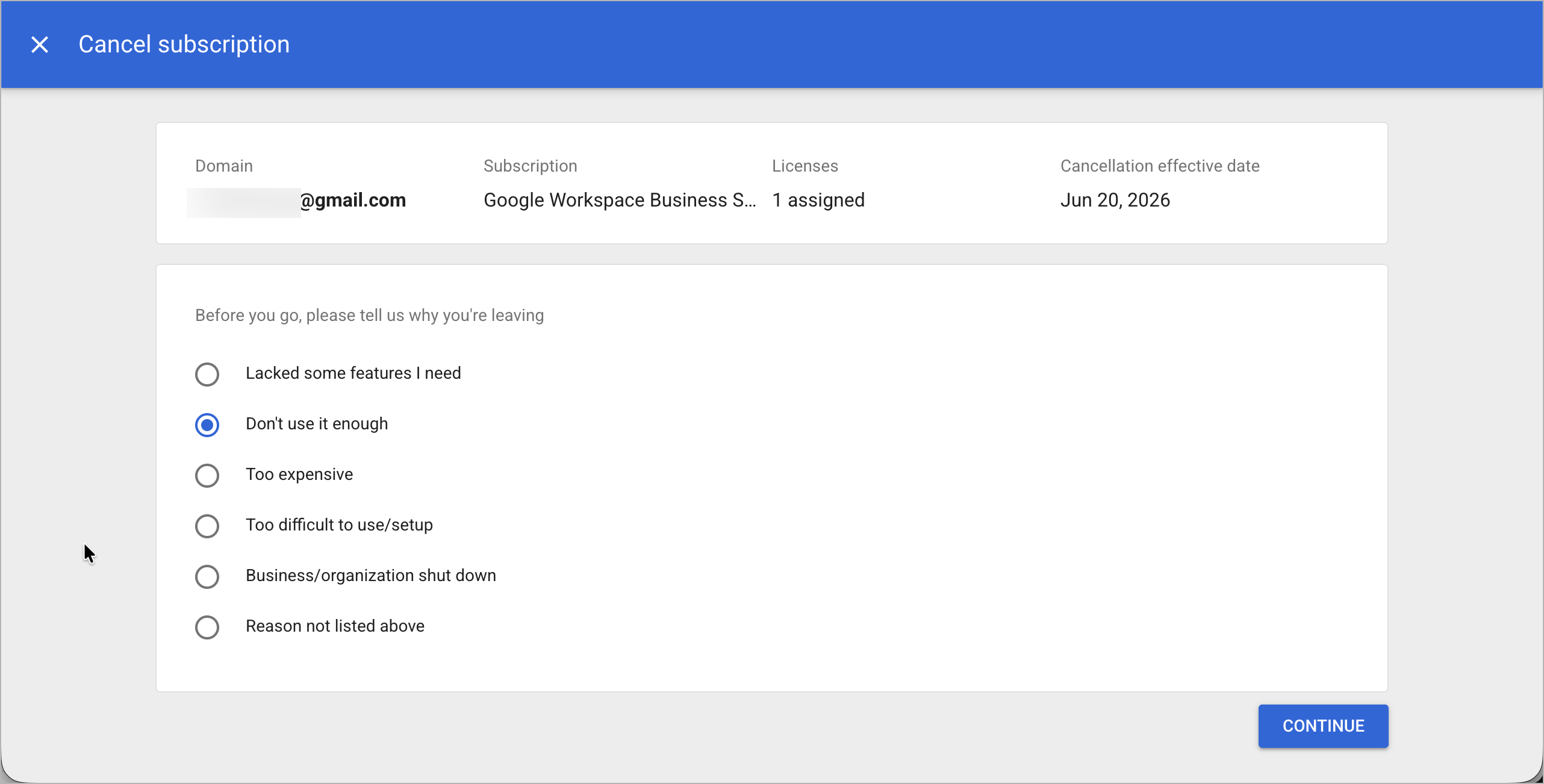
- Select a reason for leaving and click Continue.
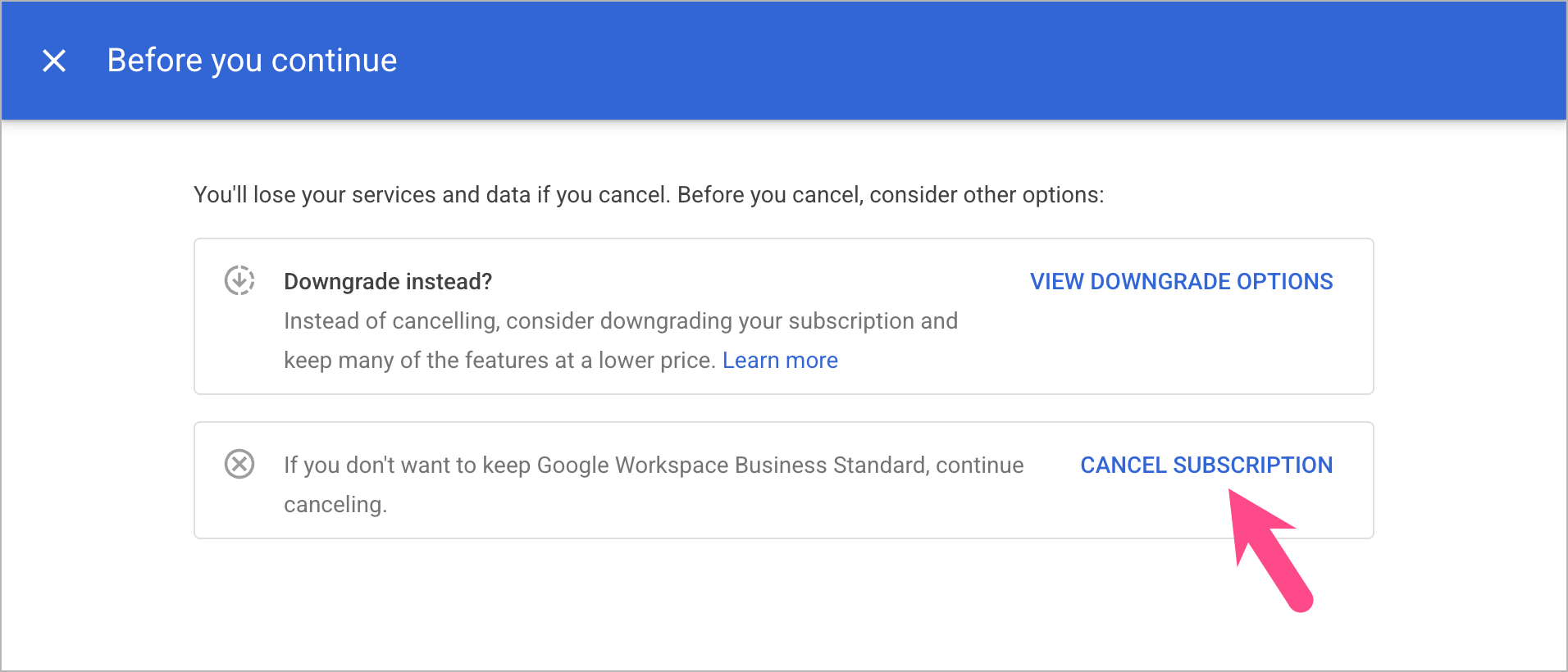
- Click Cancel Subscription to proceed.
- Review the cancellation details, check the confirmation box, enter your admin email address, and click Cancel My Subscription.
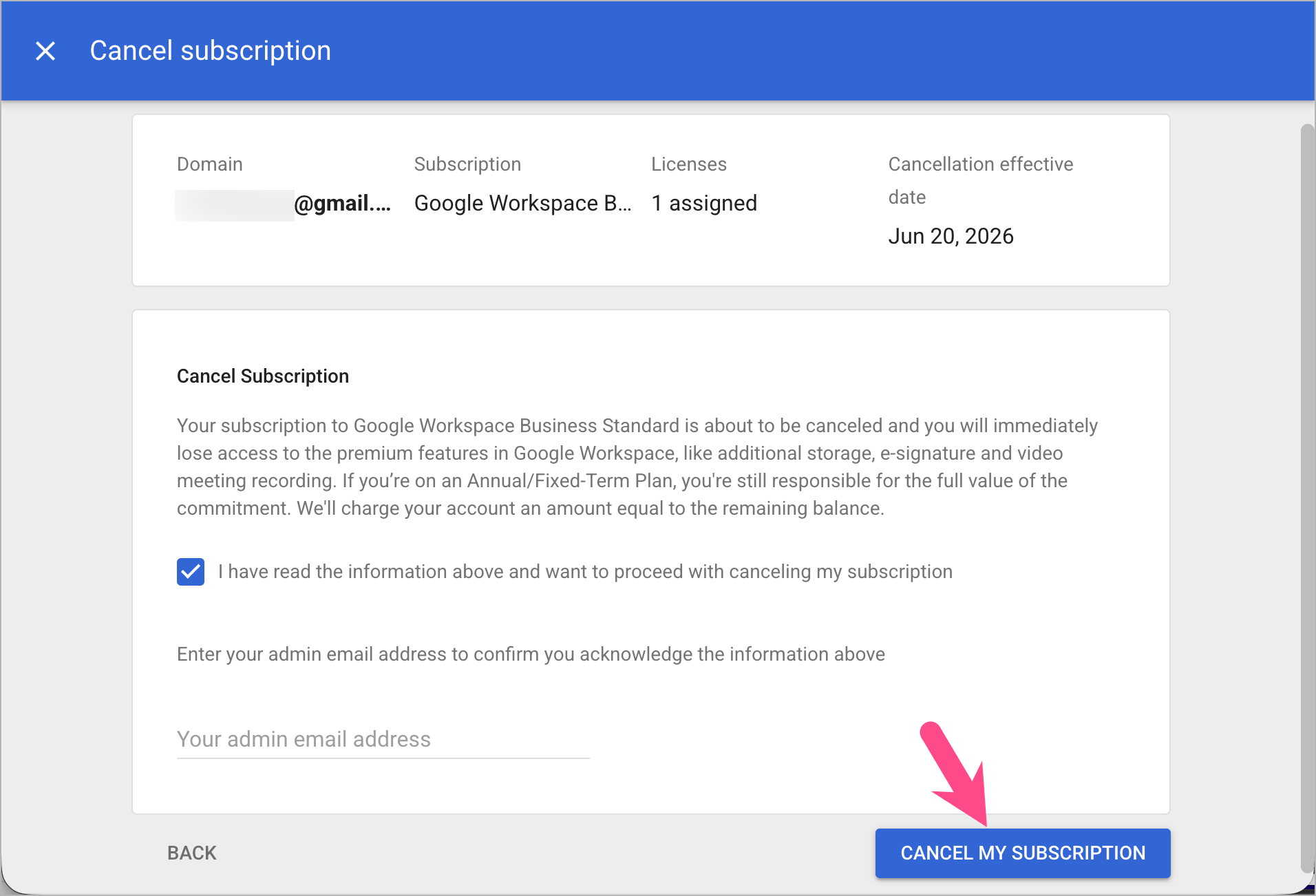
Note: Canceling Gemini for Workspace removes Gemini licenses but does not cancel the core Google Workspace subscription.
What Happens When You Cancel Your Gemini Subscription?
Here’s what you can expect after cancellation:
- You’ll continue to enjoy premium features until your subscription expires. Benefits included with Google AI Plus, Google AI Pro, Google AI Ultra, and Gemini Advanced remain available until the end of your current billing cycle or free trial period.
- Your plan will revert to the free version of Gemini. Once your subscription expires, you’ll lose access to premium AI models, higher usage limits, and other paid features included with your plan.
- Gemini features in Google apps may no longer be available. AI-powered tools in Gmail, Docs, Sheets, Slides, and other supported Google Workspace apps will stop working if they’re part of your paid plan.
- Custom Gems and advanced AI features may become unavailable. This can include features such as custom Gems, Deep Research, higher usage limits, and other premium capabilities.
- Google One storage benefits may be affected. If your subscription includes additional Google One cloud storage, those benefits may end when your plan expires.
- Your Gemini chats and Google Account won’t be deleted. Canceling your subscription only stops future billing and removes access to premium features.
Will I Get a Refund If I Cancel Gemini?
Whether you’re eligible for a refund depends on your plan, billing platform, and local consumer protection laws. In most cases, canceling a Gemini subscription stops future renewals but doesn’t automatically refund the current billing period. You’ll usually retain access to premium features until your subscription expires.
- Monthly plans: Refunds are generally not provided for the remaining portion of the current billing cycle.
- Annual plans: Depending on your region and the timing of the cancellation, you may qualify for a partial or prorated refund.
- Google Play purchases: Refund requests are subject to Google Play’s refund policies.
- App Store purchases: Refunds are handled by Apple and are subject to Apple’s refund policy.
If you believe you were charged by mistake or forgot to cancel before renewal, you can contact Google support, Google Play support, or Apple support, depending on where you purchased the subscription.
Troubleshooting
- Can’t find the Cancel Subscription button? Make sure you’re signed in with the same Google account that was used to purchase the subscription. If you’re using a different account, the subscription may not appear in your billing settings.
- Canceled your subscription but are still being charged? Check whether the subscription was purchased through the App Store or Google Play. Canceling through the wrong platform won’t stop future billing.
- Can’t find your Gemini subscription? Some paid Gemini plans are billed through Google One. Try checking your Google One membership settings or the Payments & subscriptions section of your Google Account.
- Want to keep Google One but remove Gemini features? Depending on your region and available plans, you may be able to downgrade or switch to a different Google One plan instead of canceling your membership entirely.
Frequently Asked Questions
How do I cancel my Google Gemini AI subscription?
You can cancel a Gemini subscription through the Gemini app, Google One membership settings, Google Play Store, or Apple App Store, depending on where you originally subscribed.
Can I cancel my Gemini subscription during the free trial?
Yes. If you cancel before the free trial ends, you won’t be charged for the subscription. Your access to premium features will continue until the trial expiration date.
What happens if I cancel my Gemini subscription?
When you cancel your Gemini subscription, it remains active until the end of the current billing cycle or free trial period. After that, you’ll be downgraded to the free version of Gemini and lose access to premium features. Your Google Account, Gemini chats, and other Google services won’t be affected.
Does canceling Gemini delete my Google Account?
No. Canceling Gemini only stops future billing and removes access to premium features after your subscription expires. Your Google Account, Gmail, Drive files, and other Google services remain unaffected.
How do I remove Gemini from Google Workspace?
A Google Workspace Super Admin can remove Gemini by canceling the associated Gemini add-on or subscription from the Google Admin console.
RELATED ARTICLES:










