WebTrickz
TRENDING
  • Claude vs ChatGPT: Which Is Better in 2026?
No Result
View All Result
  • Reviews
  • Editorials
  • Social Media
    • Facebook
    • Twitter
    • YouTube
    • Messenger
    • Instagram
    • Snapchat
    • WhatsApp
    • TikTok
  • Apps
  • How To’s
  • Apple
  • iPhone
  • Google
  • Android
  • Mac
  • Security
  • About Us
    • About Us
    • Contact Us
    • Privacy Policy
  • Reviews
  • Editorials
  • Social Media
    • Facebook
    • Twitter
    • YouTube
    • Messenger
    • Instagram
    • Snapchat
    • WhatsApp
    • TikTok
  • Apps
  • How To’s
  • Apple
  • iPhone
  • Google
  • Android
  • Mac
  • Security
  • About Us
    • About Us
    • Contact Us
    • Privacy Policy
No Result
View All Result
WebTrickz
No Result
View All Result
Home How To's

How to Turn Off iPhone Duo

Mayur Agarwal by Mayur Agarwal
October 19, 2026
in How To's, iPhone

The iPhone Duo runs iOS 27 and offers several ways to turn it off. You can shut it down using the physical buttons, Settings, Control Center, or Siri.

Quick answerTo turn off iPhone Duo, press and hold the Side button and either Volume button simultaneously until the power-off slider appears. Release the buttons, then drag the slider to the right.

How to Power Off iPhone Duo

The quickest way to turn off iPhone Duo is to use its physical buttons.

  1. Press and hold the Side button and either the Volume Up or Volume Down button at the same time. Turn off iPhone Duo
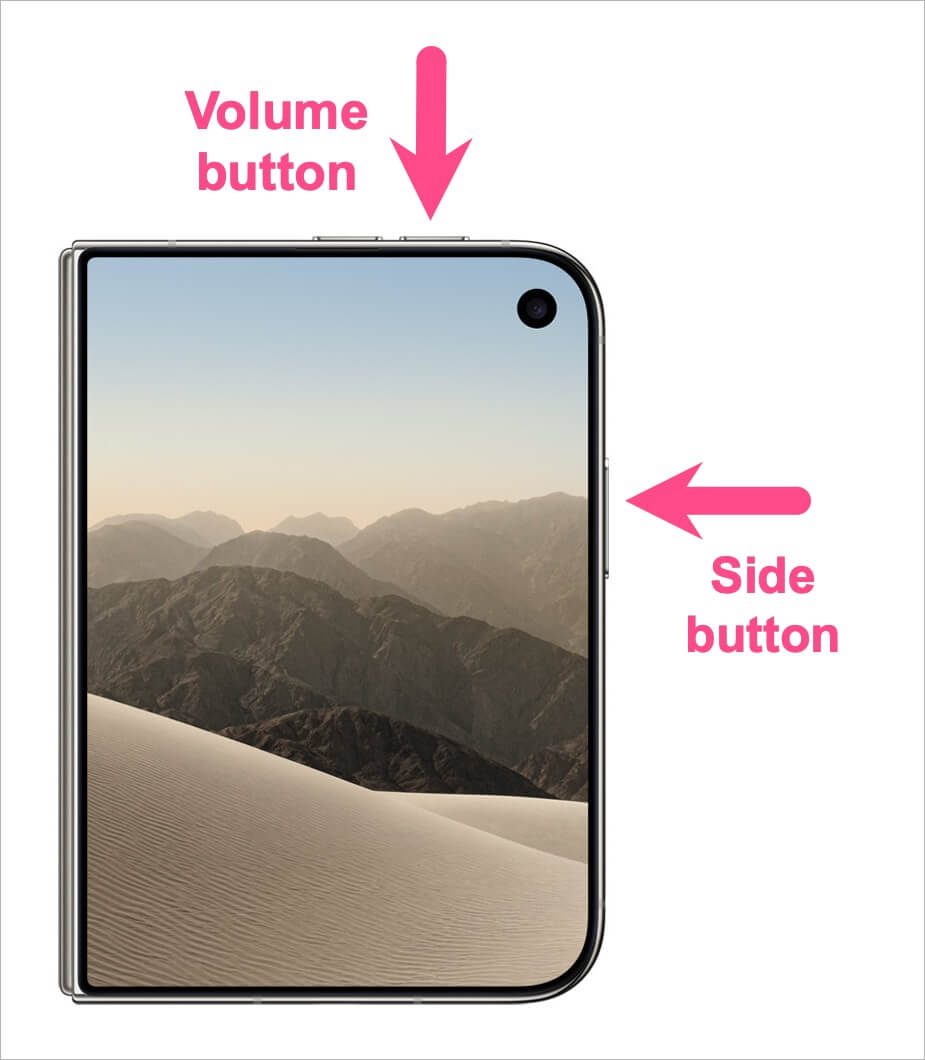
  2. Release both buttons when the power-off screen appears.
  3. Drag the slide to power off slider to the right.
  4. Wait for your iPhone to shut down completely.

Your iPhone Duo is now turned off.

To turn it back on, press and hold the Side button until the Apple logo appears.

Note: Briefly pressing the Side button locks your iPhone and turns off the display. It doesn’t shut down the device.

Turn Off iPhone Duo Without Using Buttons

You can also turn off iPhone Duo without using the physical button combination. Here’s how to do it using Settings, Control Center, or Siri.

Using Settings

You can shut down your iPhone directly from the Settings app.

  1. Open Settings on your iPhone Duo.
  2. Tap General.
  3. Scroll to the bottom and tap Shut Down. Shut down an iPhone Duo without buttons
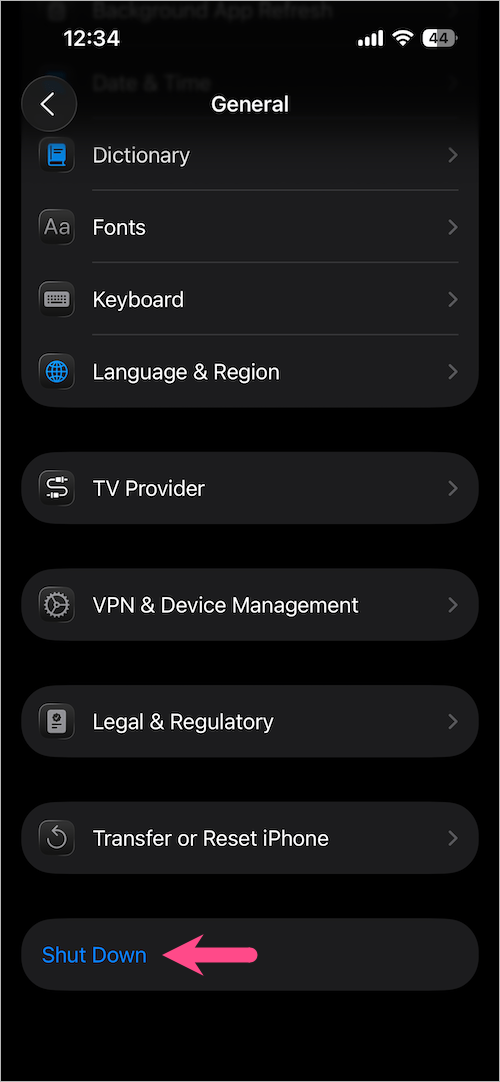
  4. Drag the power-off slider to the right. Power off iPhone Duo from Settings
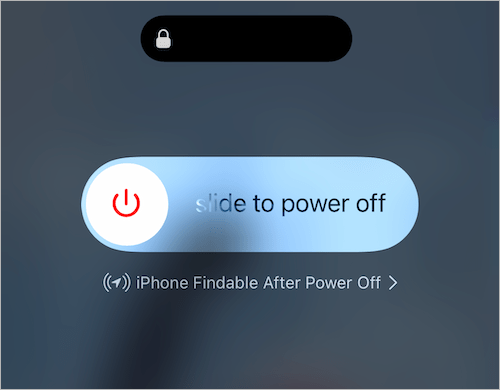
Your iPhone Duo will shut down without using its physical buttons.

Using Control Center

You can also power off your iPhone Duo through Control Center, whether the phone is folded or unfolded.

  1. Swipe down from the top-right corner of the screen to open Control Center.
  2. Touch and hold the Power button in the top-right corner. Power off iPhone Duo from Control Center
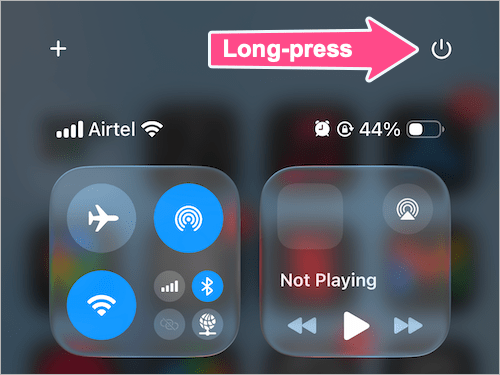
  3. When the power-off slider appears, drag it to the right.

Your iPhone Duo will then shut down.

Using Siri

You can ask Siri to turn off your iPhone Duo without manually opening Settings or pressing the button combination.

  1. Activate Siri by saying “Hey Siri” or long-pressing the Side button.
  2. Say “Turn off my iPhone” or “Shut down my iPhone.”
  3. When Siri asks you to confirm, say “Yes” or follow the on-screen prompt. Turn off iPhone Duo using Siri
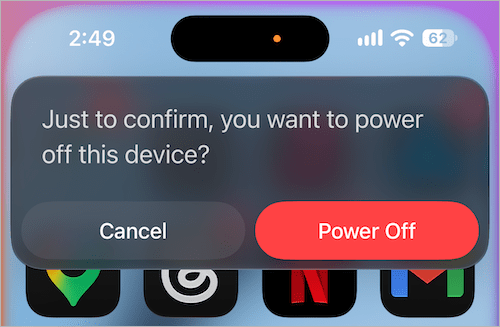
Your iPhone Duo will shut down once the request is confirmed.

How to Turn On iPhone Duo

After turning off your iPhone Duo, you can turn it back on using the Side button.

  1. Press and hold the Side button.
  2. Keep holding it until the Apple logo appears.
  3. Release the button and wait for your iPhone to start up.

What If Your iPhone Duo Is Frozen or Not Responding?

If your iPhone Duo is frozen, the normal shutdown methods may not work. In that case, you may need to force restart it.

A force restart is different from a normal shutdown because it makes your iPhone reboot without requiring you to use the on-screen power-off slider.

See our guide on how to restart or force restart iPhone Duo for the steps to follow.

Add WebTrickz as a preferred source on Google
Tags: iOS 27iPhone DuoTips
ShareTweetSend
Previous Post

How to Close Apps on iPhone 18 Pro and 18 Pro Max

Next Post

How to Restart or Force Restart iPhone Duo

Mayur Agarwal

Mayur Agarwal

Mayur Agarwal, the founder and editor of WebTrickz, is a tech enthusiast with a Bachelor's degree in Computer Applications and over 15 years of experience in tech writing. His passion for technology and gadgets drives him to create insightful how-to articles and troubleshooting guides.

Next Post
Apple iPhone Duo

How to Restart or Force Restart iPhone Duo

Leave a Reply Cancel reply

Your email address will not be published. Required fields are marked *

Latest Stories

Apple iPhone Duo

How to Restart or Force Restart iPhone Duo

October 19, 2026
iPhone Duo

How to Turn Off iPhone Duo

October 19, 2026
Closing Apps on iPhone 18 Pro and 18 Pro Max

How to Close Apps on iPhone 18 Pro and 18 Pro Max

September 19, 2026

How to Screen Record on iPhone 18 Pro and 18 Pro Max

September 19, 2026
iPhone 18 Pro and 18 Pro Max

How to Take a Screenshot on iPhone 18 Pro or 18 Pro Max

September 23, 2026
silent mode popup in dynamic island

How to Put iPhone 18 Pro on Silent or Vibrate Mode

September 18, 2026
Closing Apps on iPhone 18 Pro and 18 Pro Max

How to Restart or Force Restart iPhone 18 Pro and 18 Pro Max

September 23, 2026

Trending Stories

  • Photo by Jeff Hardi on Unsplash

    How to Turn Off Fn Lock on a Windows Laptop

  • How to Turn Off Microsoft Edge Game Assist in Windows 11

  • How to Turn Off Microsoft Family Safety on Windows 11 & 10

  • How to Delete All Saved Posts and Reels on Instagram at Once

  • How to Find and Change Safari Settings on iPhone (2026)

  • About Us
  • Contact Us
  • Privacy Policy
  • Advertise

© 2026 WebTrickz. All Rights Reserved.

No Result
View All Result
  • Reviews
  • Apps
  • How To’s
  • Android
  • Google
  • iPhone
  • Mac
  • About Us
  • Contact Us
  • Privacy Policy

© 2026 WebTrickz. All Rights Reserved.