


WebTrickz
TRENDING
  • Complete list of 1337x Proxy and Mirror Sites
No Result
View All Result
  • Reviews
  • Editorials
  • Social Media
    • Facebook
    • Twitter
    • YouTube
    • Messenger
    • Instagram
    • Snapchat
    • WhatsApp
    • TikTok
  • Apps
  • How To’s
  • Apple
  • iPhone
  • Google
  • Android
  • Mac
  • Security
  • About Us
    • About Us
    • Contact Us
    • Privacy Policy
  • Reviews
  • Editorials
  • Social Media
    • Facebook
    • Twitter
    • YouTube
    • Messenger
    • Instagram
    • Snapchat
    • WhatsApp
    • TikTok
  • Apps
  • How To’s
  • Apple
  • iPhone
  • Google
  • Android
  • Mac
  • Security
  • About Us
    • About Us
    • Contact Us
    • Privacy Policy
No Result
View All Result
WebTrickz
No Result
View All Result
Home How To's

How to Download/Save Flash Games to Play Offline without Internet

Mayur by Mayur
February 27, 2024
in How To's, Tips & Tricks

mario These days most kids and people love to play games online because they are available free in numerous categories and are easily accessible online without downloading or installing anything.

If you frequently play games online but don’t want to visit their websites just to play them, then here is a solution. You can easily Save Online Flash games to your computer which aren’t downloadable and share or play them offline without running the Internet.

Note: You must have Adobe Flash player and Adobe Shockwave player installed on your system in order to play games online.

To Download/Save and Run Flash games on your computer, follow the below guide:

1. Open the game in Firefox browser and LET THE GAME LOAD COMPLETELY.

2. Right-click on the web page > Select View Page Info > Switch to the “Media” tab >  Select the Flash file having .swf extension and Type as ‘Embed’ > Click Save As.
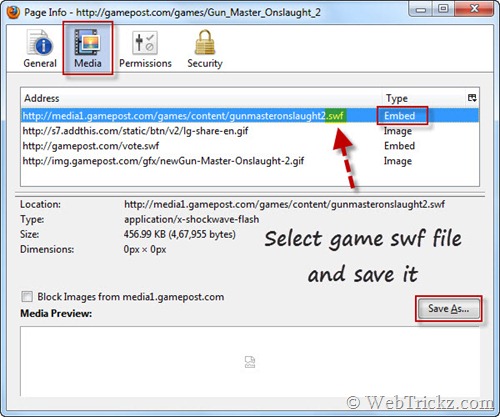
saving flash games in firefox

Save the flash game (SWF file) to your desktop. Now Download SWF Opener and install it. Just double-click on any flash game or .swf file on your hard drive to play it.
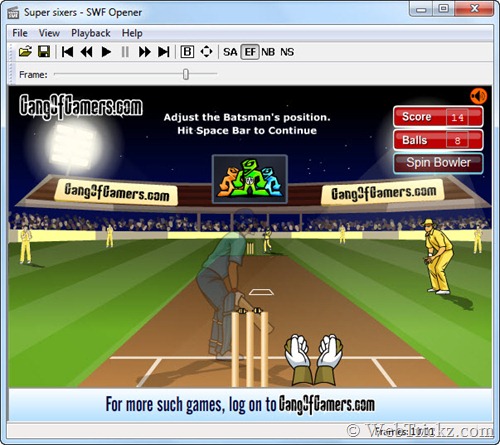
open & play games with SWF Opener

Saved Flash files/games can also be played with Internet Explorer, but SWF Opener will be the best choice because it offers several useful functions and is Free.

>> This method doesn’t work with every website to download games because some sites don’t save games data to cache.

You can also use this method to save e-cards, animations, flash ads, and videos, etc. 😀

Alternate Way – Firefox and Internet Explorer users can use Sothink SWF Catcher add-on/extension to save online games and flash files easily.


Tags: Adobe FlashBrowserGamesTipsTricksTutorials
ShareTweetSend
Previous Post

Snow Leopard Transformation Pack for Windows 7 & Vista

Next Post

How to Insert SIM card in iPad 3G

Mayur

Mayur

Mayur Agarwal, the founder and editor of WebTrickz, is a tech enthusiast with a Bachelor's degree in Computer Applications and over 15 years of experience in tech writing. His passion for technology and gadgets drives him to create insightful how-to articles and troubleshooting guides.

Next Post

How to Insert SIM card in iPad 3G

Comments 1

  1. Justin says:
    16 years ago

    With firefox you cannot download games from popular sites like kongregate,miniclip,addictinggames etc. because they protect the files by loading it not from the source but from another flash object on the page.

    I recommend this tool http://www.flashgamedownloader.com which can download from anywhere, and you can simply double click to play the games even when you have no internet connection!

    Reply

Leave a Reply Cancel reply

Your email address will not be published. Required fields are marked *

Latest Stories

copilot logo

How to Turn Off Copilot Search in Bing on Edge & Chrome

June 10, 2026
microsoft edge new logo

How to Turn Off Notifications in Microsoft Edge (2026 Guide)

June 8, 2026
chatgpt logo

How to Clear or Delete ChatGPT Memory on PC and Mobile

June 5, 2026
1337x logo

1337x Proxy List 2026: Working Proxy & Mirror Sites

June 2, 2026

How to Find Saved Reels on Facebook App & Desktop (2026)

June 8, 2026
microsoft edge browser

How to Restore or Reopen Closed Tabs in Microsoft Edge

June 9, 2026
Facebook app on iPhone

How to See Recently Watched Reels on Facebook (2026 Guide)

June 5, 2026

Trending Stories

  • microsoft family safety settings

    How to Turn Off Microsoft Family Safety on Windows 11 & 10

  • How to Turn Off Microsoft Edge Game Assist in Windows 11

  • 1337x Proxy List 2026: Working Proxy & Mirror Sites

  • How to See Recently Watched Reels on Facebook (2026 Guide)

  • How to Turn Off Fn Lock or Fn Key on Windows 11/10 Laptop

  • About Us
  • Contact Us
  • Privacy Policy
  • Advertise

© 2026 WebTrickz. All Rights Reserved.

No Result
View All Result
  • Reviews
  • Apps
  • How To’s
  • Android
  • Google
  • iPhone
  • Mac
  • About Us
  • Contact Us
  • Privacy Policy

© 2026 WebTrickz. All Rights Reserved.






