WebTrickz
TRENDING
  • Claude vs ChatGPT: Which Is Better in 2026?
No Result
View All Result
  • Reviews
  • Editorials
  • Social Media
    • Facebook
    • Twitter
    • YouTube
    • Messenger
    • Instagram
    • Snapchat
    • WhatsApp
    • TikTok
  • Apps
  • How To’s
  • Apple
  • iPhone
  • Google
  • Android
  • Mac
  • Security
  • About Us
    • About Us
    • Contact Us
    • Privacy Policy
  • Reviews
  • Editorials
  • Social Media
    • Facebook
    • Twitter
    • YouTube
    • Messenger
    • Instagram
    • Snapchat
    • WhatsApp
    • TikTok
  • Apps
  • How To’s
  • Apple
  • iPhone
  • Google
  • Android
  • Mac
  • Security
  • About Us
    • About Us
    • Contact Us
    • Privacy Policy
No Result
View All Result
WebTrickz
No Result
View All Result
Home Windows 8

Download & Try Windows 8 Developer Preview for Free

Mayur Agarwal by Mayur Agarwal
February 26, 2024
in Windows 8

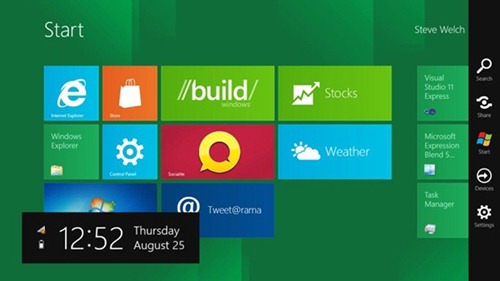
Today, Microsoft demonstrated a detailed preview of the next major release of Windows, code-named “Windows 8” at the BUILD conference in LA. Windows 8 is certainly very impressive, modern, and incredibly fast, introduces Metro UI, a lot of exciting features, and is specially targeted towards Touch PCs and modern tablet devices.

event_build

“We reimagined Windows,” said Steven Sinofsky, president of the Windows and Windows Live Division at Microsoft, in his keynote address to the thousands of developers in attendance. “From the chipset to the user experience, Windows 8 brings a new range of capabilities without compromise.”

windows8_lockScreen_page

MS has decided to offer Windows 8 in 4 milestones just like they did with Windows 7, i.e. Developer Preview, Beta, RC, and RTM. Soon, Windows 8 Developer Preview will be officially available for download both for 32-bit and 64-bit systems. It is a Free download that developers and testers can get to have first impressions of Windows 8 early build. Anyone can download the Windows 8 Developer build without requiring an MSDN or TechNet account. Moreover, you also don’t need to have a Live ID to get it.
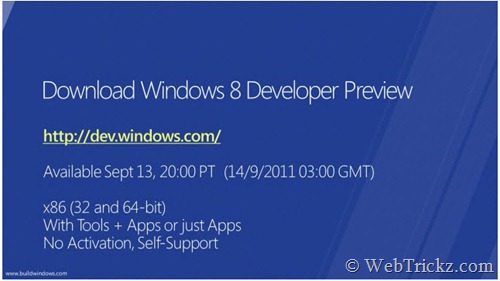
Windows 8 Developer preview

Just visit ‘Windows Dev Center’ (http://dev.windows.com/) at 8 PM PT (8:30 AM IST). From there, you can download the Windows 8 Developer Preview and developer tools. You’ll also get the Windows Developer Preview guide, samples, forums, docs, and other resources to build on Windows 8.

Windows 8 Test version doesn’t require an activation and offers no support. Also, Windows 8 preview build requires a clean installation, you cannot upgrade or install it on your current Windows 7 installation.

Note: This is a developer release that is not meant to be used for daily usage as it may encounter bugs and won’t be completely stable.

Update: The preview build does not include every feature shown in the Build Keynote.  The Developer Preview release DOES NOT include the Windows Store, Windows Live Metro style apps, and some of the user interface features. The focus of the preview is the API and development tools for building Metro-style apps.

Windows 8 Developer Preview English ISO [Direct Download Links]

  • 32-bit (x86) [Size: 2.8 GB]
  • 64-bit (x64) [Size: 3.6 GB]

Download Windows Developer Preview with developer tools English, 64-bit (x64) (4.8 GB)

System Requirements: Works great on the same hardware that powers Windows Vista and Windows 7:

  • 1 gigahertz (GHz) or faster 32-bit (x86) or 64-bit (x64) processor
  • 1 gigabyte (GB) RAM (32-bit) or 2 GB RAM (64-bit)
  • 16 GB available hard disk space (32-bit) or 20 GB (64-bit)
  • DirectX 9 graphics device with WDDM 1.0 or higher driver
  • Taking advantage of touch input requires a screen that supports multi-touch

Download Windows 8 Developer Preview Fact Sheet, Sep 2011

References:

  • Welcome to Windows 8 – The Developer Preview
  • Microsoft Reimagines Windows, Presents Windows 8 Developer Preview

Tags: MicrosoftNewsWindows 8
ShareTweetSend
Previous Post

Happy 3rd Birthday, WebTrickz

Next Post

Windows 8 Developer Preview Keyboard Shortcuts

Mayur Agarwal

Mayur Agarwal

Mayur Agarwal, the founder and editor of WebTrickz, is a tech enthusiast with a Bachelor's degree in Computer Applications and over 15 years of experience in tech writing. His passion for technology and gadgets drives him to create insightful how-to articles and troubleshooting guides.

Next Post

Windows 8 Developer Preview Keyboard Shortcuts

Comments 3

  1. roze-of-love says:
    15 years ago

    thanks man for the info…..

    Reply
  2. Shailesh Tripathi says:
    15 years ago

    Window 8 is my favorite operating system. Thanks

    Reply
  3. Pingback: Windows 8 Consumer Preview Released [Download Now]

Leave a Reply Cancel reply

Your email address will not be published. Required fields are marked *

Latest Stories

Google Gemini

How to Cancel Your Gemini Subscription (2026 Guide)

June 21, 2026
difference between chatgpt and claude

Claude vs ChatGPT: Which AI Should You Use in 2026?

June 18, 2026
google chrome logo

Google Chrome Offline Installer: Direct Download Links

June 17, 2026
X logo

How to Remove All Bookmarks on X (Twitter) At Once in 2026

June 15, 2026
X logo

How to Find Bookmarks on X (Twitter) in 2026

June 15, 2026
copilot logo

How to Turn Off Copilot Search in Bing on Edge & Chrome

June 10, 2026
microsoft edge new logo

How to Turn Off Notifications in Microsoft Edge (2026 Guide)

June 8, 2026

Trending Stories

  • 1337x logo

    1337x Proxy List 2026: Working Proxy & Mirror Sites

  • How to Turn Off Microsoft Family Safety on Windows 11 & 10

  • How to See Recently Watched Reels on Facebook (2026 Guide)

  • How to Turn Off Microsoft Edge Game Assist in Windows 11

  • How to Turn Off Fn Lock or Fn Key on Windows 11/10 Laptop

  • About Us
  • Contact Us
  • Privacy Policy
  • Advertise

© 2026 WebTrickz. All Rights Reserved.

No Result
View All Result
  • Reviews
  • Apps
  • How To’s
  • Android
  • Google
  • iPhone
  • Mac
  • About Us
  • Contact Us
  • Privacy Policy

© 2026 WebTrickz. All Rights Reserved.