


Like Internet Explorer, Chrome (Beta), Opera and Safari browser; Firefox 4 Beta 1 has added the feature to show tab previews in Windows 7 taskbar. We’ve already discussed as: How to disable Taskbar tab preview in Chrome, Opera and IE on Windows 7 and now it’s time to turn this feature off in Firefox 4 because you may find it pretty annoying.
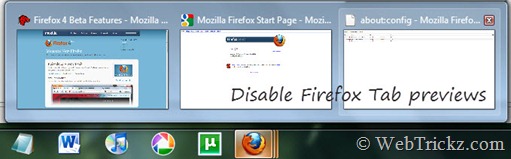
Turn off Firefox tab previews in Windows 7 taskbar –
1. Open Firefox, type about:config in the address bar and open it.
2. Enter browser.taskbar.previews in the Filter tab.
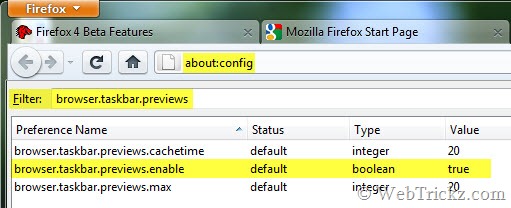
3. Double-click the entry named browser.taskbar.previews.enable so that its value is set as False. That’s it!
Now the tab previews will be disabled and you’ll see only a single preview of the active tab running in Firefox.







Good tips Mayur
Thanks that was driving me crazy!
That saved my life 😀
I hate multiple tab preview!
So it’s not such a shitty browser after all
Thank you oh so very much, when you have 20 pages of documentation all from the same site this “Feature” is the last thing you need when switching from IDE to documentation.
Thank you. It was annoying as hell.
Tanks man, this should in the setting menu, it’s something a lot of users would like to turn off
Thanks for the tip. This was starting to get really annoying. I hope Firefox 4 stops trying to change things just for the heck of changing it and leaves things functional.
Also, as someone else already stated, this should definitely be in the regular options menu.