 One of the most marking features in Windows 7 is its taskbar aka Superbar. The Windows 7 taskbar shows open programs in Iconize form, which can also be pinned (attached) to the taskbar.
If you want to stop anyone from pinning any items or shortcuts to your Windows 7 taskbar, then there’s a solution for you. You can easily disable the pinning of programs to the Windows 7 taskbar and pin (fix) only the useful ones.
To do this, open Run or Search and type “gpedit.msc”. Go to User configuration > Administrative Templates > Start Menu and Taskbar. Now open the entry “Do not allow pinning programs to the Taskbar”, Enable it and click Ok.
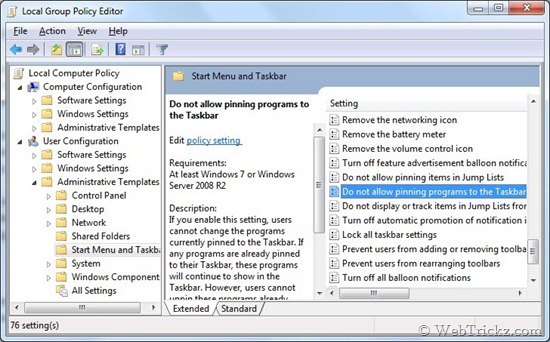
When you enable it, users cannot unpin the programs already pinned to the Taskbar, and they cannot pin new programs to the Taskbar.
Disable this setting or do not configure it, to revert back to the previous settings.