


There is a bug detected in Microsoft Internet Explorer 8, which creates problem to open links in a new tab or a new window. This issue occurs when a user right-clicks a web link/address on a web page, and then click [Open in New Window] or [Open in New Tab]. This bug makes the web page cannot be opened in a new window/tab.
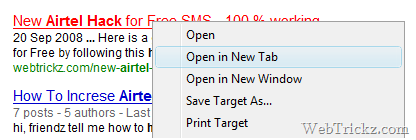
This is caused due to some registry problems occurred, when the program doesn’t get installed properly. To resolve this issue, follow the below steps:
1. Go to Start > Run, type cmd and click ok.
2. In cmd window, type regsvr32 actxprxy.dll and enter it.
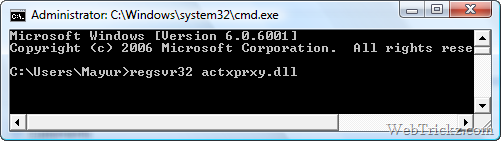
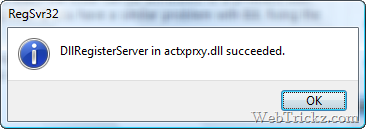
3. Now you will receive the following message: DllRegisterServer in actxprxy.dll succeeded. Click Ok
4. Restart your computer.
UPDATE – (New Method)
To resolve this issue, re-register the DLL files that are related to Internet Explorer. To do this, follow these steps:
1. Click Start, and then click Run
2. Type regsvr32 urlmon.dll in the Open box, and then click OK.
3. Click OK when you receive the following message:
- DllRegisterServer in urlmon.dll succeeded
4. Repeat steps 1 through 3 for the rest of the DLL files by replacing the regsvr32 urlmon.dll command in the Open box with the following commands:
- regsvr32 actxprxy.dll
- regsvr32 shdocvw.dll
- regsvr32 mshtml.dll
- regsvr32 browseui.dll
- regsvr32 jscript.dll
- regsvr32 vbscript.dll
- regsvr32 oleaut32.dll
Now your IE8 Open in New Window/Tab feature, should work simply fine.
Source: Microsoft
Update – New Working Method
Download this registry file and run it. Click ‘Yes’ when dialog box appears to add it to Windows registry. Hope it works! Thanks lasiek & neil for the tip.








Hi. This did not fix my problem.
The problem is just stupid.. 4Example , if i find something in google and then i try to open it in new tab or window, it simply wont open. I mean. It opens new window or tab ,but nothing ever appears. It is not even trying to get data (wireshark).
But if I press ESC to cancell the navigation and then F5, the page will load.
It worked untill yesterday. I remember installing iTunes???? I dont know. It a pity that my restore is only 800MB so I cannot go back.
There must be something in registers or so. Some small stupid thing. God this pisses me off 🙂
At last I have discovered where the crime has been committed. This fixes the problem. Its a corrupt user account.
Secondary problem, view your devices in control panel – nothing showing
Recreate a new user, permission level as required and login bingo, not only does the IE8 now open new windows etc but the devices have come back. Think its time to remove the UAC again.
For this IE issue, if its 64 bit OS, use IE 64 bit version.. that works perfect.. No need to do all these work around…
Best of luck
By the way. I am using W7 RC1 with IE8.
I tried to run withou addons.
I tried Unistall feature ( IE8 ) and install again.
i tried to repair ( Tools –> Internet Options –> Advanced –> Reset )
Nothing helped yet.
Are you using AVG antivirus?
Try to disable LinkScanner.
No.
i am using NOD from ESET. But even if I stop av program, it won’t help.
I installed this W7 RC1 week ago, but IE stopped working just yesterday.
Well I use firefox now 🙂 I will wait couple days to fix this. Don’t want to reinstall again.
I’m having the same issue. Tried the regsvr32 actxprxy.dll fix and it doesn’t work. However, the fix does work on my wife’s machine! We are both running Win7 RC1. Only difference is, I’m running x64 and she’s running x32. Maybe that’s the difference? truhliq, are you using x64 or x32 Win7?
No, I am using x32bit. Do you have any ide what you installed when it stopped to work? Or it never worked?
T.
I have the same issue, running 7 RC1 x64. It’s really starting to get on my nerves. You can click on a favorite to open in a new tab, it just sits there with the little circle going around, if you click in the window anywhere it makes the ‘don’t touch me’ noise. If you then try opening the same link in another tab, it opens. You can open the same link in a number of tabs and it loads in some and not in others. The regsvr32 fix did not work for me either. I have also disabled all add-ons and third party browser extensions in IE. This problem seems so intermittent, some ppl get it a couple of times in a day and others get it constantly (like me).
Didn’t try it yet, as I don’t like to restart but i’ll do
Awesome, worked for me. Didn’t need to restart the computer or even IE.
great….it has worked for me….thanks buddy..i really appreciate it….:-)
I put all those regsvr32 commands in a BAT file and ran as admin, some were not found and I read the article you pulled thsoe from and that goes way back to IE 6 & 7. But what did work seems to have solved this for me. Was annoying the heck out of me and I though this was a Win7 bug until I installed IE 8 on my Vista laptop. Then I knew this was an IE problem.
I’m on Win7 RC build 7100 64 bit so the .dll’s might be a bit different.
One note: the problem is isolated to the 32 bit IE. The 64 bit one is flawless, can’t wait until flash makes their 64 bit build of flash player. I’ll never go back to 32 bit IE and the mess of the process they run on 64 bit Win7 (or 64 bit Vista for that matter).
BTW! Since Outlook uses IE to render webpages, it would also stall there and even crash Outlook sometimes. Will report back if this solved that issue too ..
Thanks, i had this problem, the third and subsequent tabs just sat there connecting. (Vista ultimate SP1, IE8). What a pile of the proverbial IE8 is, i would switch to FF at once, except my customers all use IE. Now i have to get my sites working in IE8. This is dreadful! we should send Microsoft a bill for all this wasted time, when a bunch of incompetents!
IE8 sucks but i guess it has higher security then our ff..Thanks for the fix!!good indeed
This is how I solved it,,.. I think it is caused by the InPrivate Browsing..
just delete the InPrivate Filtering Data…
-tools
-internet options
-on general tab (Browsing history.. click delete)
-uncheck all first .. . . then check the InPrivate Filtering Data. then .. delete.
THIS WORKED FOR ME!!!!
Worked instantly for me! Thanks!
How to Fix ‘Open in New Tab/Window’ problem in IE8
all your fixes do not work
regsvr32 mshtml.dll is not found on my computer,
I guess I will use Google browser, it works. Fire Fox works also
Microsoft you wrote the software how about one day fix it with an automatic update, it is not like I am the only one with this problem……….bing…… hint
I tried this fix and it didn’t work for me. I was able to fix the missing “Open In New Tab” in IE7, then I made the mistake of upgrading to IE8. This is such a useful item for those of us who do a lot of surfing that I just don’t understand why Microsoft doesn’t do something about fixing the problem. If you try search Microsoft.com for the problem you get no useful replies at all. Ah well it’s a good thing I kept Firefox as I’ve never had any issues with it.
If you are having this issue in IE7 or IE8 and have SAP installed, you could try this;
Type the following into a Command Prompt and press Enter.
“C:\Program Files\SAP\SapSetup\setup\sapregsv.exe” mshtml.tlb
Ander
THIS WORKED! Tried every other fix on here – company just installed SAP and I didn’t think of it until i read this
Thank you so much. SAP has been causing a ton of problems lately, I should have known!
You may face face the same problem after you uninstall SAP. IN my case after I uninstalled SAP I experienced the same problem in IE8. Instead of reinstalling SAP, I just copied the “C:\Program Files\SAP\SapSetup\setup” folder in my PC from some other PC at the same location and followed the above mentioned procedure of
“C:\Program Files\SAP\SapSetup\setup\sapregsv.exe” mshtml.tlb
Now IE8 is working fine.
great! It worked!
I had this problem where ie8 was slow to open and then would not open new tabs or windows from a link. I was using ie8 32bit and tried ie8 64bit this worked perfectly until I installed java 64bit. After installing java the new tab thing started with ie8 64bit aswell. I uninstalled java and ie8 worked again. I have now uninstalled java 32bit and now ie8 32bit works perfectly again. I hope this can be of help for more people.
Tried this on Windows 7 with IE8 but get the following errors:
The module “oleaut32.dll” was loaded but the call to DllRegisterServer failed with error code 0x80070005.
The module “actprxy.dll” was loaded but the call to DllRegisterServer failed with error code 0x80070005.
The module “jscript.dll” was loaded but the call to DllRegisterServer failed with error code 0x80040005.
The module “browserui.dll” was loaded but the entry-point DllRegisterServer was not found.
The module “mshtml.dll” was loaded but the entry-point DllRegisterServer was not found.
The module “shdocvw.dll” was loaded but the entry-point DllRegisterServer was not found.
Switched off Protected Mode in IE8 running W7.
So far, no further problems and moreover a much, much quicker loading of all pages, effectively instantaneous.
What a relief.
Too premature.
It worked just fine for a week, now we’re back to the usual tabs not opening. I wonder what has changed?
My screen driver went funny over the weekend and I rolled back to a system checkpoint – I wonder if that undid anything I did (IE8 still shows that Protected Mode is off though).
I also switched off IPv6 – perhaps that was the culprit after all?
I shall have to investigate further. In the meantime I’m using FF3.5 and that doesn’t have the issue but is noticeably slower than IE8 (when it doesn’t have the tab hanging problem!).
W7 32-bit, IE8 — disabling “Protected Mode” worked AND, as stated above, significantly improved web page loading, both in tabs and in new window. Ralph got it right — no wonder, MS doesn’t want to “fix” a problem with their “Protected Mode” abortion …..
Hello Firefox, goodby troubles — Seems I was wrong, either I get “new window” or “new tab” but not both — unfortunately IE 7 won’t load on W7 — says it’s not supported on W7 …. rats!
I tried everything above and nothing work for me. (Win 7, IE8)
This is what I got from HIHIKEN and it work!!!!
Link “Open in new window” work!
No more Tab saying Connecting!
————–
Hey Dean.
1) Open Regedit
Goto
2) HKEY_CURRENT_USER\Software\Microsoft\Internet Explorer
3) Right Click on “Internet Explorer”
4) Click on “Delete”
5) Restart Computer.
I am pretty sure this will fix your IE8. Good Luck
HIHIKEN
Guys check out this web site to fix the issue, has worked for many people
IE8 problem traced to corrupt user account. It also seems to stop the devices installed graphics being displayed as well.
Create new user account all fixed.
Make a .reg file and paste this text inside, the run it:
Windows Registry Editor Version 5.00
[HKEY_CLASSES_ROOT\Interface\{79EAC9C5-BAF9-11CE-8C82-00AA004BA90B}]
@=”IHlinkFrame”
[HKEY_CLASSES_ROOT\Interface\{79EAC9C5-BAF9-11CE-8C82-00AA004BA90B}\NumMethods]
@=”8″
[HKEY_CLASSES_ROOT\Interface\{79EAC9C5-BAF9-11CE-8C82-00AA004BA90B}\ProxyStubClsid32]
@=”{A4A1A128-768F-41E0-BF75-E4FDDD701CBA}”
This solution was found on:
http://community.spiceworks.com/how_to/show/1086
thanks alot lasiek!
I followed the steps for the new method and two files gave me this error message:
The module “mshtml.dll” was loaded but the entry-point DllRegisterServer was not found. Make sure that “mshtml.dll” is a valid DLL or OCX file and then try again.
The other file was “scdocvw.dll”
I’ve also disabled the link scanner in AVG. It seems to be better now, but I would like to know how these two missing files will affect my computer.
Thanks for the help!
after all the process… this works for me…http://community.spiceworks.com/how_to/show/1086 after downloading, just rename the filename from .MP3 into . reg restart and it works perfectly/// hope this helps
Thanks a lot lasiek & neil for the tip
Thanks a lot! it worked for me as well!
I have a different problem.
I have a web application with two frames. The top frame has a header and the bottom frame is where the content changes.
When I submit indicating the name of the bottom frame in the “target” property, in IE6 works fine but in IE8 opens a new window.
Is this a IE8 bug?.
Please I need help.
Thanks.
Thanks a lot, worked fine for me.
That registry fix did the job for me. Thanks!!!!
Hi,
I am using integrated in my application. I am also unable to open the webpage with newwindow/newtab. The webpage is not loading unless i hit enter in the url box.
I tired all the approaches you mentioned here but unforunately nothing is working for me.
Please help me out
Thanks.
I am using IE8 with winXP/Win 7
Same problem. Ran the first fix and got an error message. Ran the last fix and nothing seems to have changed.
I did discover that if I switch to the new tab, hit Esc (stop) and F5 (refresh) the tab will finally open the link.
Had already found first suggestion in this post, that didn’t work.
Importing the .REG did just the trick on my Win7 x64
So.. Thank you!! =)
Great!!! with your Fix_IE8Win7.reg I solved my problem.
Thank you very much!!
After almost a year with this “new tabs not loading problem” (with ie 7) as well as a printing problem with same ie7, this method finally worked and the IE is working just fine! THANK YOU VERY MUCH!
I found a new problem, and I dont know, how many people have encountered this, but this sucks big time, cause I cant install IE8 again or I get the same error.
Every time I install IE8 it corrupts my registry the Folder key to be exact, I can no longer open a folder in the same window it always opens in a different one, so as of now I’m stuck with IE7. But I think upgrading to Windows 7 might fix this, but it would be better to fix the problem now :S
Pryokinetic-
I can tell you that I am having the same problem in Win7 x86 with IE8 not opening in a new window or new tab, and some links will not open in the same window for security purposes.
So I don’t know if you had gone ahead and upgraded to Win 7 (it is a good OS IMO so far) but don’t be looking for Win7 to come along and save the day because it probably won’t.
Tnx!
*reg works
Well if any of you windows zombies had a brain you wouldn’t use IE.
I don’t. Not even a windows user (Linux) but i support management and they are scared of anything opensource.
Excellent job. Reg Mod worked perfectly after going out of my mind looking for a fix…
Great job.
Registry file worked successfully.
and finally problem has been fixed.
I was facing this problem since last 6 months.
Thanks buddy…
Fix for me, had to do it twice for some reason.
The FixWin7_IE8.reg script (available here in this post above) worked for me on my Acer-built machine.
That machine had a trial version of MacAfee pre-installed, I deleted that using add/remove programs and don’t know whether THAT was the cause of this or not; at any rate, MacAfee does offer a tool to completely remove the rest of their awful program, and I used that tool before running the FixWin7_IE8.reg.
As I understand it, (according to a post on another site anyway) the short “.reg” script here was a product of someone inside Microsoft Support Services. If that’s true it is a mystery to me why they don’t post it somewhere easily accessible so more people can get this IE8 problem fixed.
Go figure.
Seems that installation of some programs corrupts Windows in such manner, but the problem is that MS Internet Explorer is not capable of providing any meaningful error message, so user can only guess what’s happening.
One of programs known to corrupt Windows and Internet Explorer is Global360 Imaging for Windows version 2.8. If this program installed – Internet Explorer in Windows 7 cannot open URLs in new tab or new window.
Global360 can you please tell me where you found the information stating that Global360 Imaging for Windows corrupts Windows and IE? I am strugging with this very issue.
Ok its done by the FixWin7_IE8.reg … Iam using Ie8 in W7 no new tab opend nither new window but now its ok ok ok … thank you very very very much
IF IE developer tool bar was installed on your previous version and if you have upgraded the IE version, the toolbar conflicts with the built-in “developer tools” in IE 8. Un-Installing the developer tools bar fixed this problem for me
Removing Developer Tool from ‘Add/Remove Program’ fixed the new tab issue in IE 8 for me.
I tried step 1 and 2 (cmd + regsvr32…) but I get an error message for the dll registration: The module “actxprxy.dll” was loaded but the call to DllRegisterServer failed with error code 0x80070005.
I still cannot open browsers in a new tab. Guess this is an excude to stay with Mozilla 🙂
wooo, downloading the registry thingy worked.
titts.
The registry fix you provided worked like a charm! I was not able to open any new window via Shift+click or right-clicking and selecting ‘Open in New Window’, but now I can! Thank you 🙂
Was a little concerned about running a registry fix without knowing for sure what it was actually doing to my computer but, in my frustration with this Internet Explorer problem, I decided to risk it. To my surprize it actually worked. I have wondered if this problem had anything to do with what Kaspersky Antivirus did to my computer but maybe I’ll never know. Kaspersky was good software for the most part but a little hard to understand and hard to undo what it did to my internet & computer settings but that is another issue. The point is that the registry fix listed above actually fixed my problem.
Thanks!!
After i tried almost everything on the net this website solved my problem by running a script. i just want to share it coz i got tired of this problem. hope it helps some ppl
I have been searching for 2 solid days trying everything in this forum.
This last post above mine is the one that fixed tab issue with no fuss.
As above, this is the link that saved my sanity.
I dont get how to do any of the stuff that link said to do lol, unzip download.. that bit..
@Phoenix
Thanks so much for the above link. It works perfectly for me. I am currently using 32-bit IE8 in 64-bit Windows 7.
thanks.its work
it works!!!!
even if when i have been typing some dll files in the run command it gave me errors then i dowloaded the registry file and it has started to work!
many thanks
i repaired the problem directly on IE 9 beta
I have tried all the fixes listed on all internet problem solving sites on the net – nothing works to get a new tab to open the link. A new tab will open with a right click on “open in new tab” but it just hangs – no info is downloaded. If I right click on the link and choose “copy shortcut” then paste this into the address bar in the new tab, the info will download but this is time consuming. I am going crazy over wanting this new tab feature back – it stopped working for no reason. I am running Win7 Ultimate 32 bit and I have tried all ways to get it to work in IE8 and then I downloaded the IE9Beta and the option still doesn’t work. If I use Mozilla Firefox then the new tab feature works, but I don’t really like Firefox and want to use IE again. I have tried all the obvious settings things, please don’t suggest them as OF COURSE I have tried them. I have tried the .dll tweaks and fixes. I have tried re-installing IE, I have tried registry cleaners, I have tried disabling add-ons, one at a time and all together, I have tried EVERYTHING that so far has been suggested – NOTHING WORKS. Has anyone got any suggestions – MICROSOFT and all EXPERTS – anyone out there please read this and help me – its so frustrating not having this time-saving feature when researching.
Thanks
Test to see if I can reply.
Ang:
I too have tried all the fixes that you have listed to no avail. No patches or changes that I trusted enough to try worked and many suggested had limited success. I finally found this workaround that you may not have tried. I know this is too simple and should be well documented but it was not. Hope it helps
Try the following work. It works for me:
1 – To open in a new tab — Hold down CTRL key when selecting link with mouse.
2 – To open in a new Win — Hold down SHIFT key when selecting link with mouse.
I am also having this annoyance, have tried everything that I’ve read, all of the above including the very top which gave me a few error messages etc except for what Phoenix said cause I don’t get it.
links wont open when i click on them, no new tabs opening properly with links basically the same problem as Ang.
HELP ME PLEASE
After did all still i have the problem
I would like to thank you for the solution under “Update – New Working Method”. It did work for me and I finally have the Internet Explorer working correctly with tabs after months of frustration trying everything under the sun.
best method…..
!!!!!need to unistall and then reinstall all adobe applications – add ons
!!!!!need to clean certificates
!!!!! unclick enable third part browser extentions
!!!!!!!!sfc /scannow
third method worked for me thanks all
Easy peasy. To open a link in a new tab, just click with the middle button (mouse wheel).
Please do the download under Update – New Working Method, above. It works!!!!! At least it did for me and I’m jumping for joy.
Hello,
I having problems with open a new tab. Its Yahoo instead of bing. i tried(Tools, internet options) and this didnt work. Is there a program online that transform the second tab I assume thats what yahoo did. Any extra help I’ll be grateful.
Thank you,
Jose
[email protected]
The following method works for me:
1. Open IE 8
2. Open Tools => Internet options =>Advanced = > Reset Internet Explore settings
3. Select default configurations
Thank you
Thank you! After 5 hours trouble shooting, your reg patch fixed the problem.
Dave.
Excellent – Thankyou Thankyou so much
this didnt work for me ik tried all methods above
It worked for me too.
Worked, thanks!
After several attempts to try and get rid of this problem I found out this was an easy fix.
Solution:
Open IE
Go to Tool–>Manage Add-ons
Then disable “IE Developer Toolbar BHO” (if this doesn’t work then disable “IE Developer Toolbar” or anything similar to this name)
Close and Open IE as normal and you should now be able to add new tab
Hope this works for you
Hi
I did what Xue suggested, but chose Custom Settings, then unclicked all the optional stuff (like accelarators).
Restarted IE8 (32bit) and it’s back.
Btw, this is after I have reinstalled W7 from a recovery disk after KIS 2012 buggered my entire system – I did have the “open in new tab” fxn, it disappeared when I reinstalled W7, but now it’s back. Whoo-hoo!
Thank you
I’ve been trying everything to get open in new tab
and to open an aspx link to work
Your registry fix Fix_IE8Win7.reg worked brilliantly
You are a star 🙂
Fix_IE8Win7.reg worked brilliantly and restored new tab and new window functions … Thanks
This worked for me (Thanks Shamplerts)
shamplerts August 18, 2009 at 3:04 am
This is how I solved it,,.. I think it is caused by the InPrivate Browsing..
just delete the InPrivate Filtering Data…
-tools
-internet options
-on general tab (Browsing history.. click delete)
-uncheck all first .. . . then check the InPrivate Filtering Data. then .. delete.
Hi Mayur
The reg file worked like a charm
thanks!
Hi. This registry file only works for a single system. Anyone have an idea to fix this problem while loading a website using jquery or such other stuffs? I’m a web designer and all of our clients are complaining this. We really need a workaround for this…
I reset my IE 8 and removed the plugin Google toolbar and that solved my issue of not getting option ‘open in a new tab’ when right click on a link.
click on tools in windows IE*, then click on Option. on the how the webpages displayes in tab click on setting. make sure the following are CHECKED>>>
-Open link from other program
-Open pup -up in new tabs
– Enable tab browsing , check all of the them as you needed. for fine tuning you can go back .
good luck
The problem started when I installed a game onto my computer, after I uninstalled the game from my computer (windows 7, 62 bit) everything is back to normal!! I was trying to fix it for days, now new tabs are opening
I was dumb and downloaded FLV from another web site. I unknowingly recieved an add-on AdPeak. Disabled AdPeak,now it works fine. Thanks Guys.
I had the same problem, but I just figured it out. Go into IE and click the settings button and go into manage add-ons. under ‘Toolbar and Extensions’ scroll down until you see ‘DefaultTab Browser Helper’ make sure this is disabled. Close IE then reopen, and try to open something in a new tab or a new window and it should work. Hope this helps, it fixed mine.
Thanks, solved the issue that I had with 6 identical machines where only 2 had the issue with popups not working in IE. tried all other old IE8 fixes with registering alot of files and no other was working.