

WebTrickz
TRENDING
  • Complete list of 1337x Proxy and Mirror Sites
No Result
View All Result
  • Reviews
  • Editorials
  • Social Media
    • Facebook
    • Twitter
    • YouTube
    • Messenger
    • Instagram
    • Snapchat
    • WhatsApp
    • TikTok
  • Apps
  • How To’s
  • Apple
  • iPhone
  • Google
  • Android
  • Mac
  • Security
  • About Us
    • About Us
    • Contact Us
    • Privacy Policy
  • Reviews
  • Editorials
  • Social Media
    • Facebook
    • Twitter
    • YouTube
    • Messenger
    • Instagram
    • Snapchat
    • WhatsApp
    • TikTok
  • Apps
  • How To’s
  • Apple
  • iPhone
  • Google
  • Android
  • Mac
  • Security
  • About Us
    • About Us
    • Contact Us
    • Privacy Policy
No Result
View All Result
WebTrickz
No Result
View All Result
Home Google

Stop Adsense from showing Smaller Ads in Larger Ad Units [How To]

Taigun by Taigun
December 28, 2021
in Google, How To's

Google Adsense recently introduced two larger ad units, the 300×600 and the 970×90, and have also allowed larger ad units to serve similar-sized display ads. This means you may occasionally see a 160×600 ad in the 300×600 unit, or a 728×90 ad within a 970×90 unit, for units opted in to showing image ads. This new feature is targeted to improve publisher performance as well as help advertisers to reach a broader audience. Adsense has now extended this flexibility to their best and most employed 336×280 ad unit, allowing it to serve a 300×250 ad instead.

This change is certainly an effective way to maximize the earnings potential on your ads. Let’s say for instance, both 300×250 and 336×280 image ads will compete for your 336×280 ad unit with the most competitive ad served. When a smaller image ad is served it will be centered in the larger ad unit as shown below.

300x250 in 336x250 black border

However, if you wish to disable serving of smaller ads in larger ad units then that’s possible too. You can simply opt out of having similar-sized display ads served in your ad units but remember this may impact your earnings. Note: When you opt out, the change applies on an account level for all ads and not just for a specific ad unit.
18-06-2013 23-40-54

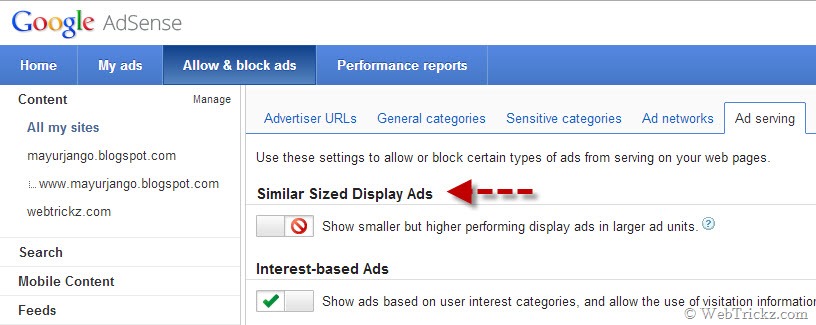
To opt out, go to the ‘Allow & block ads tab’ in your Adsense account, click on the ‘Ad serving’ tab in the top horizontal bar and enable block option for ‘Show smaller but higher performing display ads in larger ad units.’ under the ‘Similar Sized Display Ads’.

Tags: AdsenseBloggingGoogleTips
ShareTweetSend
Previous Post

Grab Free 1 Year License of AVG Internet Security 2013

Next Post

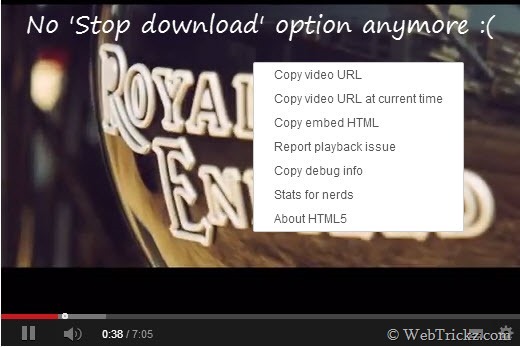
YouTube Removes ‘Stop Download’ option from Right-click menu of videos

Taigun

Taigun

Mayur Agarwal, the founder and editor of WebTrickz, is a tech enthusiast with a Bachelor's degree in Computer Applications and over 15 years of experience in tech writing. His passion for technology and gadgets drives him to create insightful how-to articles and troubleshooting guides.

Next Post

YouTube Removes ‘Stop Download’ option from Right-click menu of videos

Leave a Reply Cancel reply

Your email address will not be published. Required fields are marked *

Latest Stories

1337x logo

1337x Proxy List 2026: Working Proxy & Mirror Sites

June 2, 2026

How to Find Saved Reels on Facebook App & Desktop (2026)

April 1, 2026
microsoft edge browser

How to Restore or Reopen Closed Tabs in Microsoft Edge

March 26, 2026
Facebook app on iPhone

How to See Recently Watched Reels on Facebook (2026 Guide)

April 3, 2026
microsoft edge new logo

Download Microsoft Edge Offline Installer [Latest Version]

March 16, 2026

How to Turn Off Bing SafeSearch in Microsoft Edge

March 12, 2026
google chrome logo

Download Google Chrome Offline Installer [Latest Version]

June 3, 2026

Trending Stories

  • microsoft family safety settings

    How to Turn Off Microsoft Family Safety on Windows 11 & 10

  • How to Turn Off Fn Lock or Fn Key on Windows 11/10 Laptop

  • How to Turn Off Microsoft Edge Game Assist in Windows 11

  • How to See Recently Watched Reels on Facebook (2026 Guide)

  • How to Restore or Reopen Closed Tabs in Microsoft Edge

  • About Us
  • Contact Us
  • Privacy Policy
  • Advertise

© 2026 WebTrickz. All Rights Reserved.

No Result
View All Result
  • Reviews
  • Apps
  • How To’s
  • Android
  • Google
  • iPhone
  • Mac
  • About Us
  • Contact Us
  • Privacy Policy

© 2026 WebTrickz. All Rights Reserved.






