


Earlier, we shared ‘How to root Xiaomi Mi 3 Indian version’ easily by installing the necessary files through Updater, both for rooting and unrooting. Perhaps, if you’ve updated Mi 3 or Mi 4 to MIUI v6 Developer ROM (based on Android 4.4.4) then you might be looking to root your MIUI 6 device. Well, that’s not required as MIUI developer ROMs are rooted by default! But the root permissions aren’t provided to apps by default. Though one can grant root access to an app through the Permissions app, that’s pretty annoying in MIUI 6 as there are 5 pop-ups, each with a timer of 5 seconds. That means you need to wait for 25 seconds before you can grant root permissions to an application. Annoying and time-consuming, isn’t it?
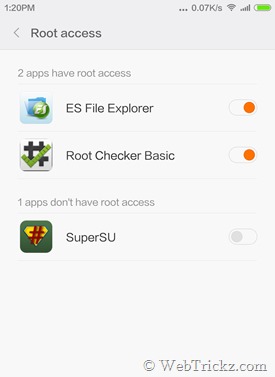
Method 1 – This is the basic and default way to manage and grant root permission in MIUI 6 developer ROM. Firstly, open the root app and it will not detect the root. Then go to Security > Permissions > Root access and then enable the toggle for that app. You will see 5 different pop-ups, each for 5 seconds. Wait and keep confirming to grant root access to it.

Method 2 – Install SuperSU on MIUI 6 Developer ROM (Recommended)
This is an easy way for users who use root apps frequently and are annoyed with the default procedure stated above. This will let you install the popular SuperSU app on MIUI 6 to grant root permissions to apps in just one click without any wait and manage your rooted apps.
1. Download and install the SuperSU app from Google Play.
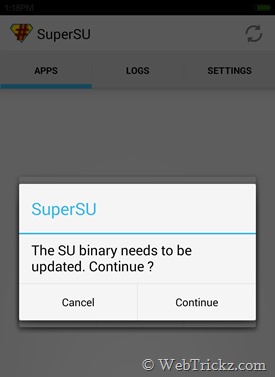
2. Open the SuperSU app. A pop-up saying ‘The SU binary needs to be updated. Continue?’ will appear. Click on Continue. Another pop-up will now appear, select the Normal option.
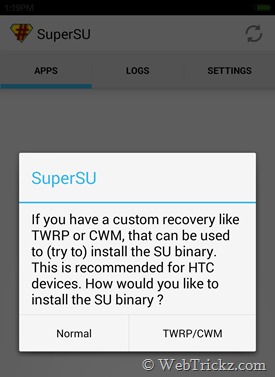
3. Now wait for a while until you see the pop-up saying ‘Installation failed!’. Just click OK.
4. Go to Security > Permissions > Root access. Enable root access for the SuperSU app.
5. Open the SuperSU app again, select Continue > Normal. The app will now get updated.
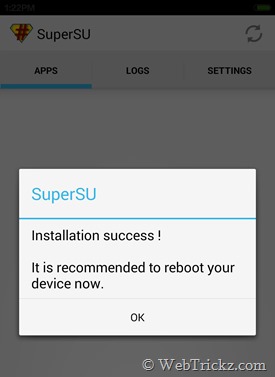
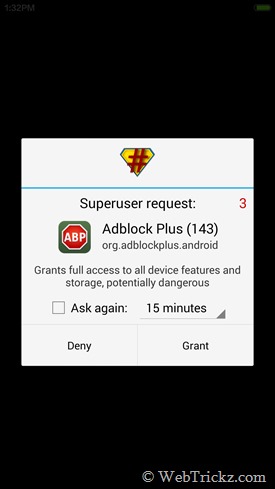
Next time you open a root app, it will open up Superuser request for root permission. This way you can bypass all those annoying timers and the default Permissions app for root access.
As you’re using a developer ROM, you’ll still be able to get weekly MIUI updates.
Source: MIUI Forum









I followed the above procedure of rooting through Superuser step by step but after the 5th step again Superuser shows ‘installation failed, reboot and try again’.
after step 2 my phone is restarting again and again.
i can see mi recovery 2.0.1 written on top but it cannot start.what to do?
its very urgent.
Mayur, I followed your previous tutorial to update miui5 to miui6 stable. Thanks it worked for me. But I want to know how to root & unroot this miui6 stable ROM. Please give me a solution. The above tutorial of yours explains how to root the miui6 developer ROM. Will it work for stable one??? If yes, then explain me the unrooting process too. Waiting for your help 🙁
MIUI 6 Dev ROM comes rooted by default. To root stable MIUI 6, you first need to install a custom recovery and then install the SuperSU.zip to root it.
I am using Xiaomi Redmi Note 4g. it came with MiUi 5 i updated to MiUi 6
and now i want to root my device just because i have a very little internal memory. please help. if there is another way to run apps from sd card without rooting,it would be better.
thanks in advance
Thanks a lot for the info. xD
I reached till 5th step but when I open security app and permissions in it, I can’ t find the way to grant permission to superuser or any other app. Please help.
Talking about which miui version
My Mi note 4g is rooted i check it by root chekr it shows it rooted successfully but still my apps not Working u ghanta thm root access permission but still not useble please suggest me wht to do
Hi. I have problem with me Mi4.
I have installed stable v7 from http://www.smiui.net/mi4_cancro.php with superSU root.
In application superSU root a choose update by TWRP /CWM .. like in this picture http://webtrickz.com/wp-content/uploads/2014/09/Screenshot_2014-08-31-13-19-36.jpg
After that MI mi4 has black display. I can only run fastboot.
When i try to run recovery mod, i see only black screen with blick on top of my mi4 text like My recover..
Could you help my? I need something like remote recovery from PC.