WebTrickz
TRENDING
  • Complete list of 1337x Proxy and Mirror Sites
No Result
View All Result
  • Reviews
  • Editorials
  • Social Media
    • Facebook
    • Twitter
    • YouTube
    • Messenger
    • Instagram
    • Snapchat
    • WhatsApp
    • TikTok
  • Apps
  • How To’s
  • Apple
  • iPhone
  • Google
  • Android
  • Mac
  • Security
  • About Us
    • About Us
    • Contact Us
    • Privacy Policy
  • Reviews
  • Editorials
  • Social Media
    • Facebook
    • Twitter
    • YouTube
    • Messenger
    • Instagram
    • Snapchat
    • WhatsApp
    • TikTok
  • Apps
  • How To’s
  • Apple
  • iPhone
  • Google
  • Android
  • Mac
  • Security
  • About Us
    • About Us
    • Contact Us
    • Privacy Policy
No Result
View All Result
WebTrickz
No Result
View All Result
Home Android

How to Root Xiaomi Mi 3 Indian version

Mayur by Mayur
February 27, 2024
in Android, How To's

The Xiaomi Mi 3 is comparatively a great smartphone considering its high-end specifications and aggressive pricing of Rs. 13,999. The Mi 3 has been selling like hot cakes in India since its availability and to date, most people aren’t able to buy it due to insufficient stock. Mi 3 packs MIUI ROM that offers a user-friendly interface and has many useful functionalities integrated which eliminates the need to use third-party apps. For more advanced capabilities, one can root their device to access some amazing apps that require root and can even install custom ROM or custom kernel of their choice. Perhaps, if you’re interested in rooting your Mi 3 then there is an easy way to do it, without the need to use a computer or run any commands.

NOTE: This method is for the Indian version of Mi 3 only. We’ve tried it on Indian Mi 3W running MIUI KXDMIBF23.0 (Stable build). You can use this guide to root build 15, 18, 19, 22, build 23, build 32, and build 34 of Mi 3. So, make sure to check your ROM version and download the root file accordingly. It’s also possible to unroot the Mi 3 with the same method.

Disclaimer: Rooting the device may void its warranty. Proceed at your own risk!

Guide to Root Mi 3 (Build v15, v18, v19, v22, v23, v32, and v34)

1. Check the MIUI version by going to Settings > About phone > MIUI version. Download the relevant root.zip file from the XDA thread. [v34 files attached below]

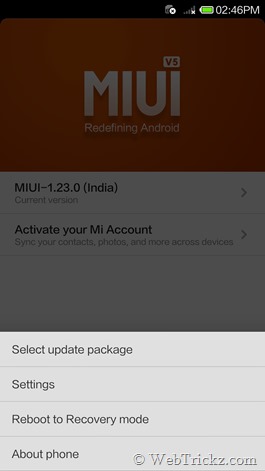
2. Go to Settings > General settings > About phone > select ‘System updates’ or directly open the ‘Updater’ app and tap on the Menu key.

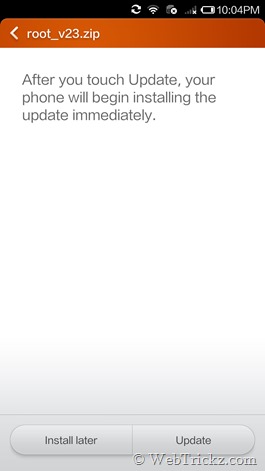
3. Then tap on the ‘Select update package’ option and choose the downloaded root file. Click on the ‘Update’ option, wait for the update to complete, and then reboot to finish.
Screenshot_2014-08-22-14-46-09      Screenshot_2014-08-21-22-04-18

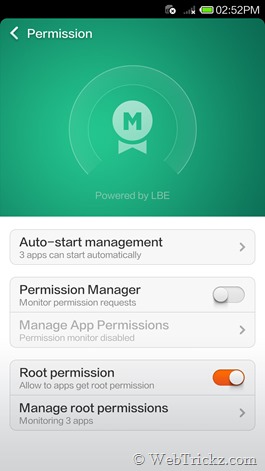
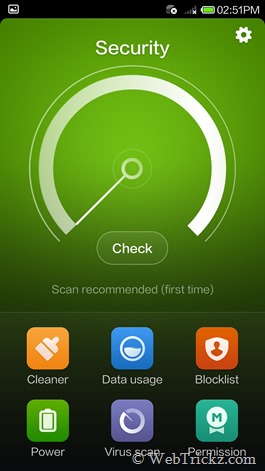
4. After reboot, open the ‘Security’ app. Select ‘Permission’ and enable Root permission.
Screenshot_2014-08-22-14-51-52      Screenshot_2014-08-22-14-52-05

Voila! Your Mi 3 is now rooted. You can use the ‘Manage root permissions’ option in Security > Permission to manage the rooted apps and allow/ deny their root permission request.

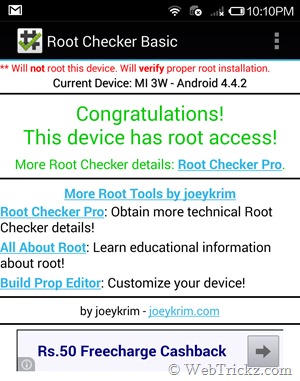
To confirm the root, install the Root Checker app and make sure to grant it root access.
Screenshot_2014-08-21-22-10-53

Note: After rooting, you won’t be able to update your Mi 3 using OTA updates but can simply install the OTA update file using the above-stated method. Alternatively, you can unroot the phone, update to the latest OTA update and then root it back.

How to Unroot Mi 3 –

To unroot your Mi 3, simply download the correct unroot.zip and apply the ‘unroot.zip’ file following the method stated above. After the update is complete, reboot the phone. Now your phone will be unrooted and able to receive and install OTA updates.

Update – To root and unroot the new version of Mi 3 (KXDMIBH34.0) WCDMA Global Indian variant, use the below-attached root and unroot zip files.

IN_Root_V34.0.zip (v34 Root) , IN_Unroot_V34.zip (v34 Unroot)

Tags: AndroidMIUIRootingTricksUpdateXiaomi
ShareTweetSend
Previous Post

Guide to Identify Fake Xiaomi Mi Power Banks

Next Post

How to Mirror Xiaomi Mi 3 to TV with Chromecast

Mayur

Mayur

Mayur Agarwal, the founder and editor of WebTrickz, is a tech enthusiast with a Bachelor's degree in Computer Applications and over 15 years of experience in tech writing. His passion for technology and gadgets drives him to create insightful how-to articles and troubleshooting guides.

Next Post

How to Mirror Xiaomi Mi 3 to TV with Chromecast

Comments 2

  1. Pingback: How to Record Screencast on Xiaomi Mi 3 (Record Mi3 Screen Video)
  2. Abhi says:
    11 years ago

    How to root miui v6?

    Reply

Leave a Reply Cancel reply

Your email address will not be published. Required fields are marked *

Latest Stories

chatgpt logo

How to Clear or Delete ChatGPT Memory on PC and Mobile

June 5, 2026
1337x logo

1337x Proxy List 2026: Working Proxy & Mirror Sites

June 2, 2026

How to Find Saved Reels on Facebook App & Desktop (2026)

April 1, 2026
microsoft edge browser

How to Restore or Reopen Closed Tabs in Microsoft Edge

March 26, 2026
Facebook app on iPhone

How to See Recently Watched Reels on Facebook (2026 Guide)

April 3, 2026
microsoft edge new logo

Download Microsoft Edge Offline Installer [Latest Version]

March 16, 2026

How to Turn Off Bing SafeSearch in Microsoft Edge

March 12, 2026

Trending Stories

  • microsoft family safety settings

    How to Turn Off Microsoft Family Safety on Windows 11 & 10

  • How to Turn Off Microsoft Edge Game Assist in Windows 11

  • How to Turn Off Fn Lock or Fn Key on Windows 11/10 Laptop

  • How to See Recently Watched Reels on Facebook (2026 Guide)

  • 4 Ways to Remove the Floating Home Button on iPhone

  • About Us
  • Contact Us
  • Privacy Policy
  • Advertise

© 2026 WebTrickz. All Rights Reserved.

No Result
View All Result
  • Reviews
  • Apps
  • How To’s
  • Android
  • Google
  • iPhone
  • Mac
  • About Us
  • Contact Us
  • Privacy Policy

© 2026 WebTrickz. All Rights Reserved.