


With the release of Android 4.4 KitKat, a new Android runtime called “ART” was introduced experimentally. Currently, Dalvik is the default runtime for Android devices and ART is optionally available on a number of Android 4.4 devices, such as Nexus phones, Google Play edition devices, Motorola phones running stock Android and many other smartphones. ART is currently in the development stage, which has been purposely introduced to obtain developer and user feedback. ART will eventually replace Dalvik runtime once it becomes completely stable in the future. Until then, users with compatible devices can switch from Dalvik to ART if they’re interested in trying out this new functionality and experiencing its performance.
What’s new is ART?
ART is an attempt to make Android faster by improving the app performance and making the device overall smooth. There are several new features in ART, the major one being the all-new compilation mode. For those unaware, Dalvik uses a Just in time (JIT) compiler whereas ART uses Ahead-of-time (AOT) compiler, which is smarter and can improve app performance. ART improves garbage collection in several ways and also has tighter install-time verification than Dalvik. In ART, the application is compiled just once at the time of installation, thus being pre-compiled that results in improved app performance and less CPU load, thereby improving the battery life. However, it should be noted that app sizes (fresh install) are increased significantly while using ART that could be an issue for devices with low internal storage.
Watch the insightful video demonstration of ART vs. Dalvik by David of PhoneBuff –
How to switch to ART runtime?
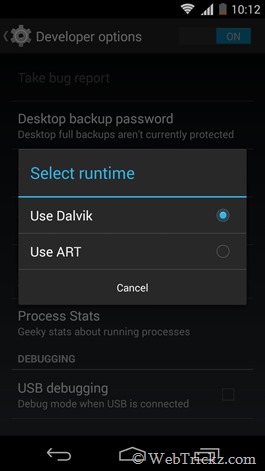
To switch or enable ART, your device must be running Android 4.4 KitKat and should be compatible with ART. You can easily turn on ART runtime from Settings > Developer options > Select runtime option. (Tip – If you can’t see Developer options in Settings, then go to About phone, scroll down and tap 7 times on the Build number to enable developer options.) The phone will reboot now and start optimizing the apps for ART, which can take time depending on the number of apps installed on your device.
Caution to be taken when using ART
As Dalvik is the default runtime on Android devices, there might be a change in behaviour of some apps that don’t work on ART. Though, most existing apps are now compatible with ART and should just work fine with the new runtime. But in case, you experience any bugs or app crashes with ART, then it’s wise to switch back and stay with ART.
Switching to ART on Xiaomi Mi 3 running MIUI v5 or MIUI v6
Mi 3 doesn’t offer the option to enable ART anymore in Developer options. Fortunately, there is a trick to enable ART runtime on MIUI ROM that is based on Android 4.4 KitKat.
Disclaimer: It’s advisable to take a backup of your data. We won’t be responsible in case your device gets bricked. Try it at your own risk!
– Requires Root
– Don’t try if you’ve WSM Tools installed as it doesn’t support ART.
P.S. We’ve tried this on Mi 3W (Indian variant) running MIUI v6 Developer ROM.
To Enable ART on Mi 3, carefully follow the steps below:
1. Make sure your Mi 3 is rooted. Refer post: How to Root Xiaomi Mi 3 (Those running MIUI 6 Developer ROM, refer to this guide.)
2. Install ‘ES File Explorer’ from the Play Store.
3. Open ES File Explorer, tap the menu icon from the top left corner, and select Tools. In tools, enable the ‘Root Explorer’ option and grand full root access to ES explorer when prompted.
4. In ES explorer, open the Device (/) directory from Menu > Local > Device. Go to /data/property folder. Open the “persist.sys.dalvik.vm.lib” file as Text and then select ES note editor.
5. Edit the file by selecting the edit option from the top right corner. Rename the line from libdvm.so to libart.so
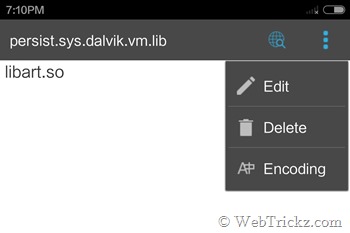
6. Go back and select ‘Yes’ to save the file. Then reboot the phone.
7. After reboot, your Mi 3 will stay at the Mi logo for around a minute. Don’t worry!
Then it will begin optimizing the applications for ART that can take around 15-20 minutes, depending on the number of apps installed on your phone. You will also notice an increase in the size of installed apps after enabling ART runtime on Mi 3.
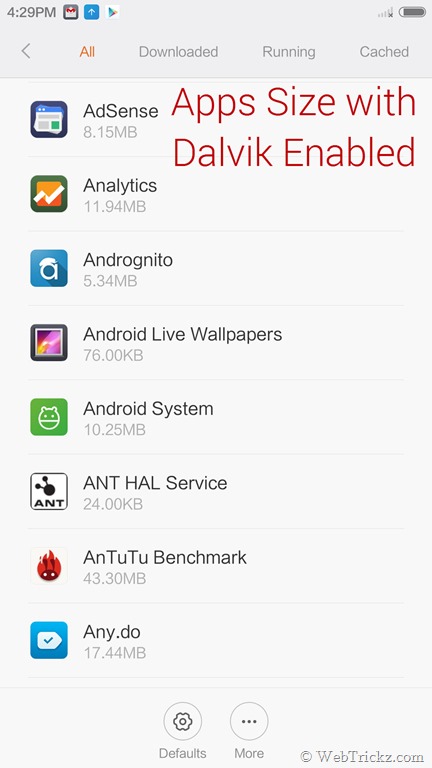
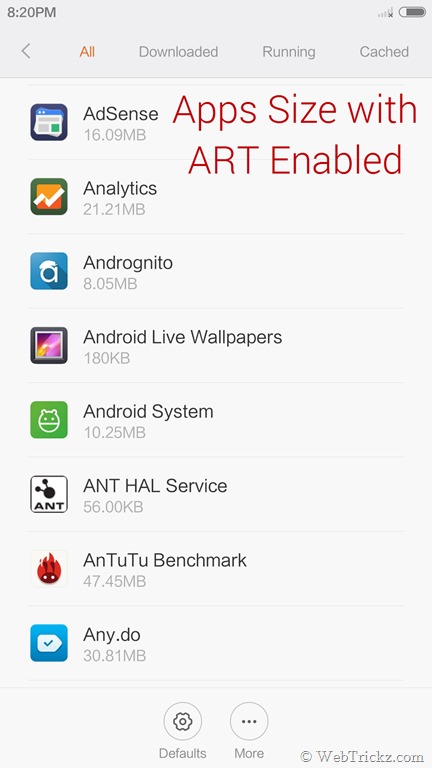
Note: After switching to ART, whenever you reboot your Mi 3 the next time, it will optimize all the apps once again; which is kind of annoying. But we noticed the same thing on Moto G 2014, so that doesn’t seem limited to Mi 3 or MIUI.
In case, you wish to revert back to Dalvik runtime, similarly, follow the above steps and rename the text in the “persist.sys.dalvik.vm.lib” file to libdvm.so
Do share your views if you try this functionality on your Mi 3. 🙂









Well it definitely works… The phone has become way more faster than before… but every reboot is like a 25 minutes long… That’s cuz I have lots of apps… It optimizes all the apps in every reboot… Its really annoying… Mi mi3 used to boot up in less than 2 minutes before but now it’s like almost half an hour… So I reverted it back and will wait for official release…
Yep, that’s the main downside. Very annoying actually. 🙂