

WebTrickz
TRENDING
  • Complete list of 1337x Proxy and Mirror Sites
No Result
View All Result
  • Reviews
  • Editorials
  • Social Media
    • Facebook
    • Twitter
    • YouTube
    • Messenger
    • Instagram
    • Snapchat
    • WhatsApp
    • TikTok
  • Apps
  • How To’s
  • Apple
  • iPhone
  • Google
  • Android
  • Mac
  • Security
  • About Us
    • About Us
    • Contact Us
    • Privacy Policy
  • Reviews
  • Editorials
  • Social Media
    • Facebook
    • Twitter
    • YouTube
    • Messenger
    • Instagram
    • Snapchat
    • WhatsApp
    • TikTok
  • Apps
  • How To’s
  • Apple
  • iPhone
  • Google
  • Android
  • Mac
  • Security
  • About Us
    • About Us
    • Contact Us
    • Privacy Policy
No Result
View All Result
WebTrickz
No Result
View All Result
Home Android

How to Bypass Factory Reset Protection (FRP) on Coolpad Note 3

Taigun by Taigun
June 17, 2019
in Android, How To's

The Factory Reset Protection (FRP) feature was introduced on Android with the release of Android 5.1 Lollipop, which is basically meant to protect your device and prevent unauthorized usage in case it’s lost or stolen. FRP is a useful feature present on devices running Lollipop, Marshmallow and even the latest Android N developer preview comes with it. In case you aren’t aware, know about FRP first.
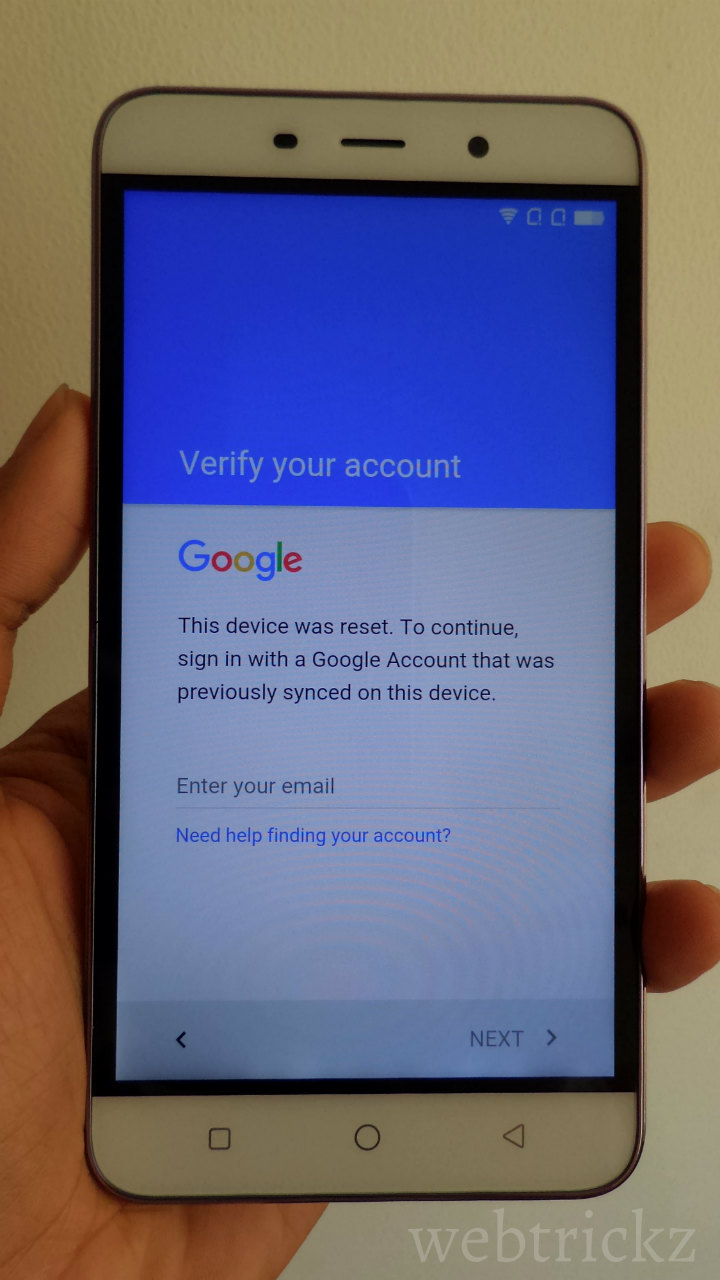
Bypass FRP on Coolpad Note 3

What is Factory Reset Protection (FRP)? FRP is a protection and safety feature to prevent thieves from using a stolen or lost device even if they try to hard reset the phone to factory settings or even flash it. FRP works only when you’re signed into your Google account and then if someone tries to hard reset your phone through recovery mode, they are required to enter the information for any Google account that has been earlier added to the device in order to regain access. This means the person won’t be able to use the device freely unless he enters the correct credentials. To utilize the FRP feature, one must have a Google account setup on their device and it’s recommended to use a secure screen lock so that the intruder doesn’t have the choice to factory reset the phone using the general ‘Backup and reset’ option in settings.

Being a Coolpad Note 3 user, if somehow you’ve forgot your Google account email or password and hence are stuck at Google account verification because of FRP then we’ve got you covered. I’ve figured out a simple workaround to bypass the factory reset protection on Coolpad Note 3 running Lollipop. The process should work for Coolpad Note 3 Lite as well. Watch the video tutorial below to see it in action.

This bypassing FRP trick is indeed useful but worrisome at the same time as it could potentially allow a thief to gain unauthorized access to your smartphone by following the stated steps. Considering how easily I was able to open to the locked device itself shows how poorly this function is implemented by the device manufacturer. Though, we’ve earlier seen that Google’s stock Android ROM are even vulnerable to such security issues.

Tags: AndroidSecurityTricks
ShareTweetSend
Previous Post

How to Disable App Drawer on Samsung Galaxy S7 & S7 edge

Next Post

iPhone SE : Still Expensive – 5 Reasons why it’s NOT worth buying

Taigun

Taigun

Mayur Agarwal, the founder and editor of WebTrickz, is a tech enthusiast with a Bachelor's degree in Computer Applications and over 15 years of experience in tech writing. His passion for technology and gadgets drives him to create insightful how-to articles and troubleshooting guides.

Next Post

iPhone SE : Still Expensive - 5 Reasons why it's NOT worth buying

Comments 8

  1. aakash says:
    10 years ago

    how i do this in coolpad note 3 lite

    Reply
  2. aakash says:
    10 years ago

    sir pls help me it does not work on note 3 lite ….after erasing when i skip step after connecting 2 wifi it again starts connecting to google.. Pls help me

    Reply
    • Bunty says:
      8 years ago

      Right.. Same problem bro

      Reply
  3. Prasanna says:
    10 years ago

    Even after doing the steps mentioned by you in video i am not able to bypass FRP in coolpad note 3 lite. Kindly assist me on this.

    Thank you

    Reply
  4. Steven says:
    9 years ago

    I have a Coolpad model 3622a and need past the Google account lock can someone please help me

    Reply
  5. Akila says:
    9 years ago

    Great thanks a lot

    Reply
  6. Rt Macaskill says:
    9 years ago

    THIS DOESNT WORK DUDE.
    GOD…..UPDATE OUR SELF DUDE
    ON CURRENT NEWS AND EVENTS.

    Reply
  7. Megan says:
    8 years ago

    I have a cool pad catalyst and have tried every thing I had lost it a while back and it came back to me surprisingly but its not me account any more can some one plz help me

    Reply

Leave a Reply Cancel reply

Your email address will not be published. Required fields are marked *

Latest Stories

1337x logo

1337x Proxy List 2026: Working Proxy & Mirror Sites

June 2, 2026

How to Find Saved Reels on Facebook App & Desktop (2026)

April 1, 2026
microsoft edge browser

How to Restore or Reopen Closed Tabs in Microsoft Edge

March 26, 2026
Facebook app on iPhone

How to See Recently Watched Reels on Facebook (2026 Guide)

April 3, 2026
microsoft edge new logo

Download Microsoft Edge Offline Installer [Latest Version]

March 16, 2026

How to Turn Off Bing SafeSearch in Microsoft Edge

March 12, 2026
google chrome logo

Download Google Chrome Offline Installer [Latest Version]

June 3, 2026

Trending Stories

  • microsoft family safety settings

    How to Turn Off Microsoft Family Safety on Windows 11 & 10

  • How to Turn Off Fn Lock or Fn Key on Windows 11/10 Laptop

  • How to Turn Off Microsoft Edge Game Assist in Windows 11

  • How to See Recently Watched Reels on Facebook (2026 Guide)

  • How to Restore or Reopen Closed Tabs in Microsoft Edge

  • About Us
  • Contact Us
  • Privacy Policy
  • Advertise

© 2026 WebTrickz. All Rights Reserved.

No Result
View All Result
  • Reviews
  • Apps
  • How To’s
  • Android
  • Google
  • iPhone
  • Mac
  • About Us
  • Contact Us
  • Privacy Policy

© 2026 WebTrickz. All Rights Reserved.






