WebTrickz
TRENDING
  • Claude vs ChatGPT: Which Is Better in 2026?
No Result
View All Result
  • Reviews
  • Editorials
  • Social Media
    • Facebook
    • Twitter
    • YouTube
    • Messenger
    • Instagram
    • Snapchat
    • WhatsApp
    • TikTok
  • Apps
  • How To’s
  • Apple
  • iPhone
  • Google
  • Android
  • Mac
  • Security
  • About Us
    • About Us
    • Contact Us
    • Privacy Policy
  • Reviews
  • Editorials
  • Social Media
    • Facebook
    • Twitter
    • YouTube
    • Messenger
    • Instagram
    • Snapchat
    • WhatsApp
    • TikTok
  • Apps
  • How To’s
  • Apple
  • iPhone
  • Google
  • Android
  • Mac
  • Security
  • About Us
    • About Us
    • Contact Us
    • Privacy Policy
No Result
View All Result
WebTrickz
No Result
View All Result
Home Facebook

How to See Recently Watched Reels on Facebook (2026 Guide)

Easily view, manage, and delete your recently watched Facebook Reels.

Mayur Agarwal by Mayur Agarwal
June 5, 2026
in Facebook, How To's

Did you recently watch an interesting Reel or video on Facebook, but can’t find it again? You’re not alone. For a long time, Facebook didn’t provide a way to view previously watched Reels, so users had to rely on workarounds like saving or liking a Reel if they wanted to watch it later.

Fortunately, Facebook has introduced a Watched feature that lets users revisit videos and Reels they’ve watched earlier.

In this guide, you’ll learn how to see recently watched Reels on Facebook for iPhone, Android, and desktop (PC).

Can I See My Watch History on Facebook?

Yes. Similar to Instagram, Facebook now allows users to check their Reels watch history directly within the app. The Watched Reels feature shows Reels you’ve viewed in the past 30 days.

However, there are a few limitations:

  • You can’t sort watched Reels (newest to oldest or vice-versa).
  • There’s no filter by date.
  • You can’t filter by the creator or author of the Reel.

Nevertheless, it still helps you find previously watched Reels on Facebook without saving them.

How to See Recently Viewed Reels on Facebook App

Want to view watched Reels on Facebook? Follow these steps to see your recently watched Facebook Reels on iPhone and Android:

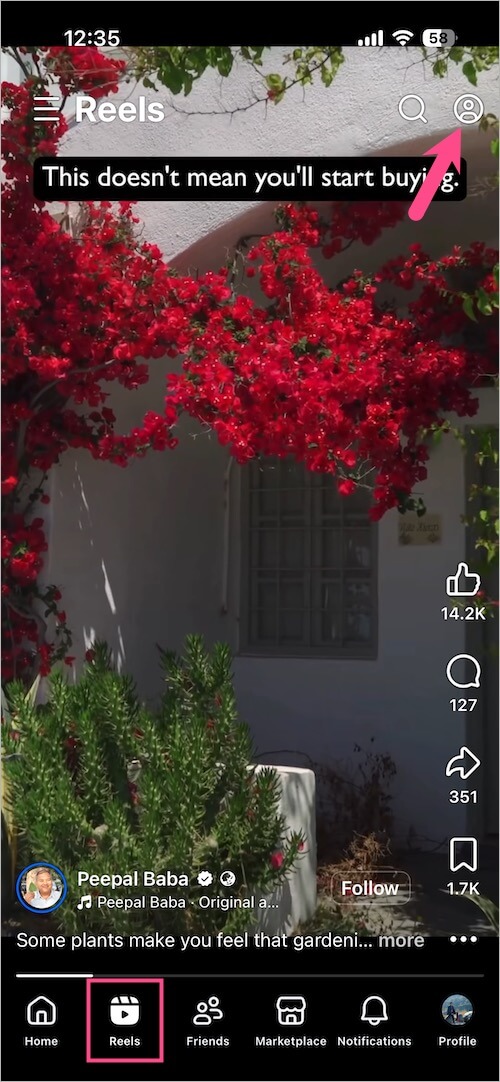
  1. Open the Facebook app and tap the Reels tab from the navigation bar at the bottom (iPhone) or top (Android). 
  2. Tap the profile icon in the top-right corner. how to find recently watched reels in facebook on iphone
  3. Tap History (newer version) or tap Watched reels (older version) to access your Facebook Reels viewing history. how to see recently viewed reels on Facebook app
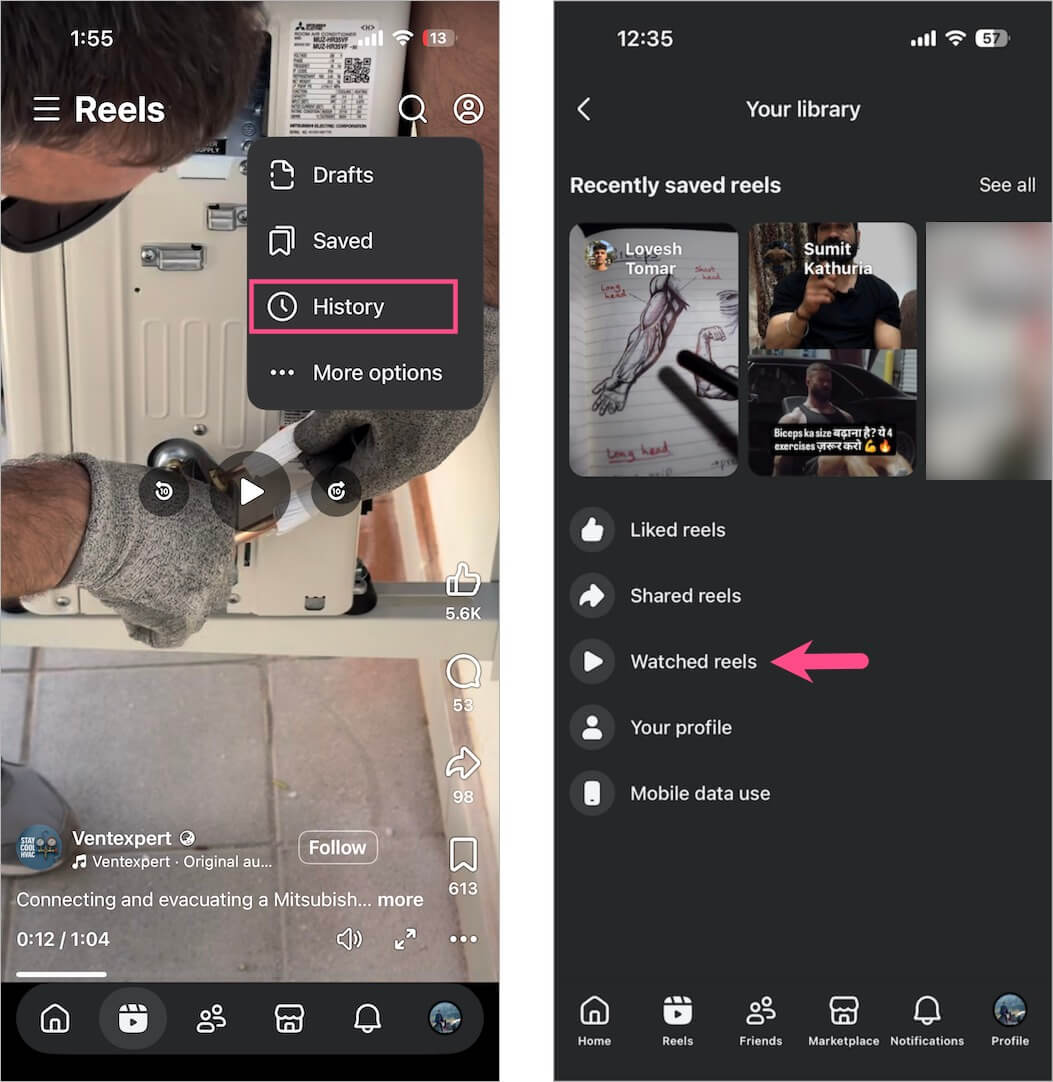
You’ll now see the list of Reels you watched recently.

how to check previously watched reels on facebook
Watched Reels History on Facebook

Alternate Way

Here’s another method to view your recently watched videos on the Facebook app.

  1. Open the Facebook app on your phone.
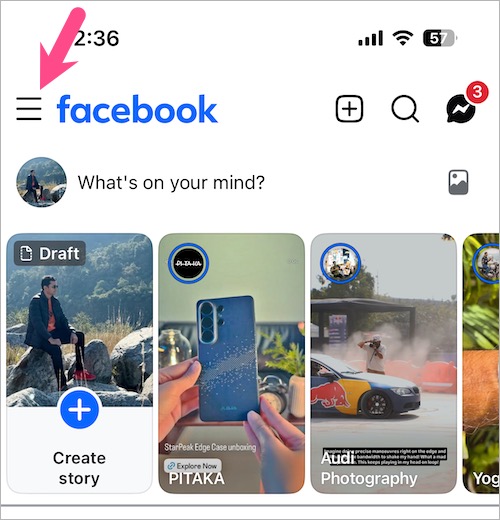
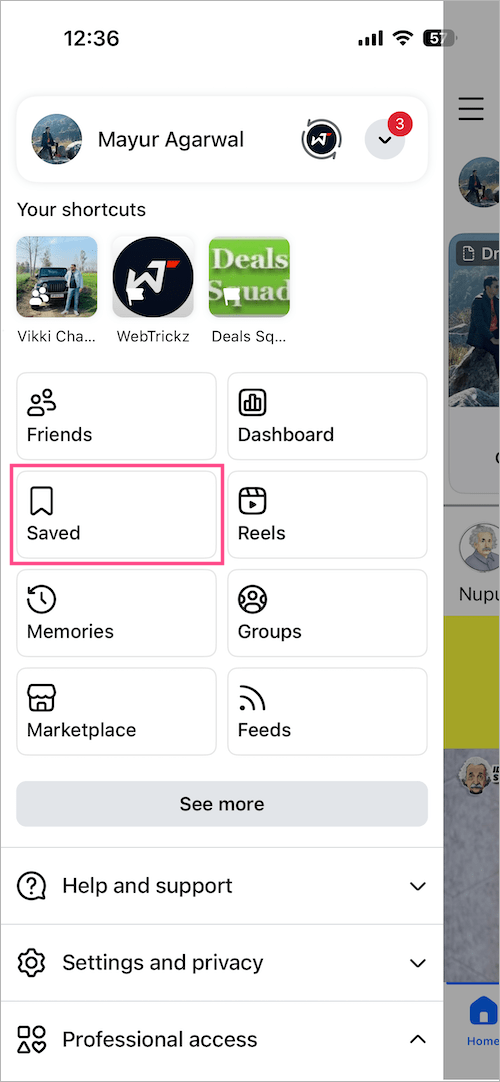
  2. Tap the Menu icon at the top-left corner.menu in facebook app for iphone
  3. Go to Saved. (Click ‘See more’ if you don’t see the Saved option.) view your recently watched reels on facebook app
  4. Tap the Reels tab, then select the Watched tab. how to check Facebook reels viewing history
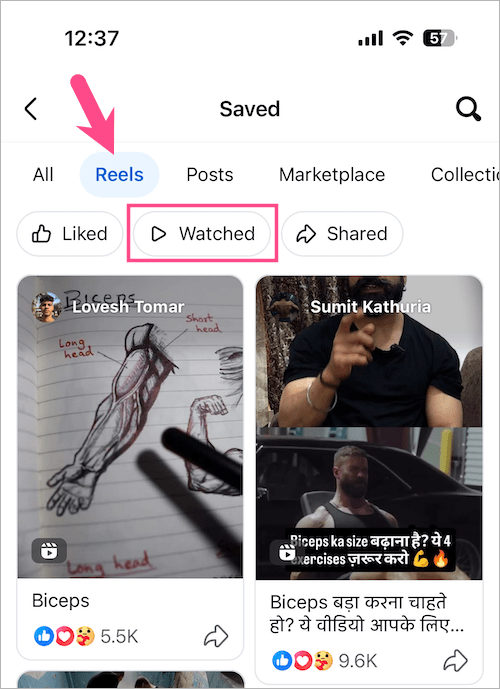
Here you can see your recently viewed Facebook Reels and videos in chronological order.

How to Find Videos You’ve Watched on Facebook on PC

You can also find reels you’ve watched on Facebook using the desktop website.

  1. Visit Facebook and log in to your account.
  2. Click your profile picture in the top-right corner.
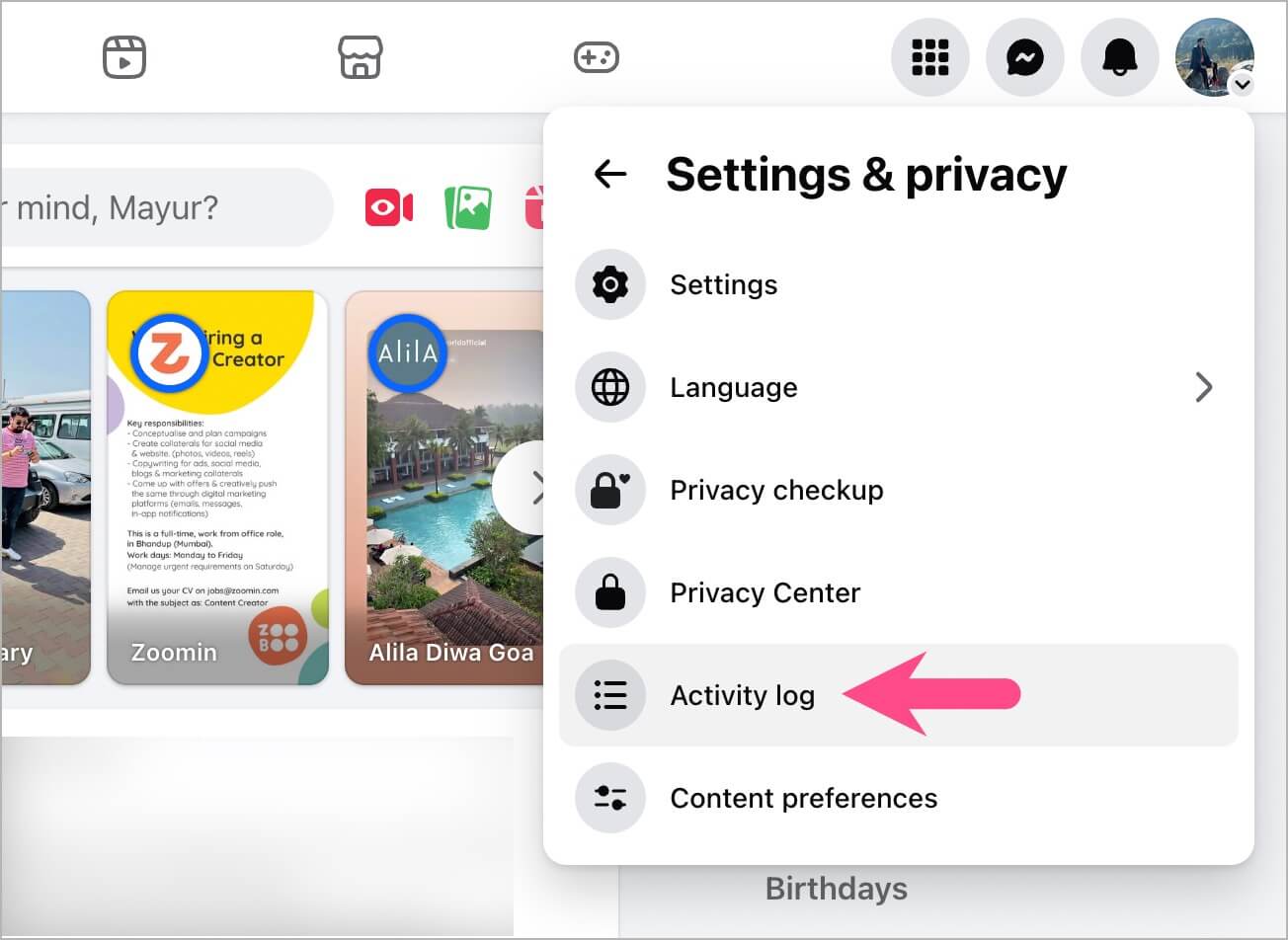
  3. Select Settings & privacy.
  4. Click Activity log. where is activity log on facebook
  5. From the right pane, select Videos you’ve watched. where are my recently watched videos on Facebook
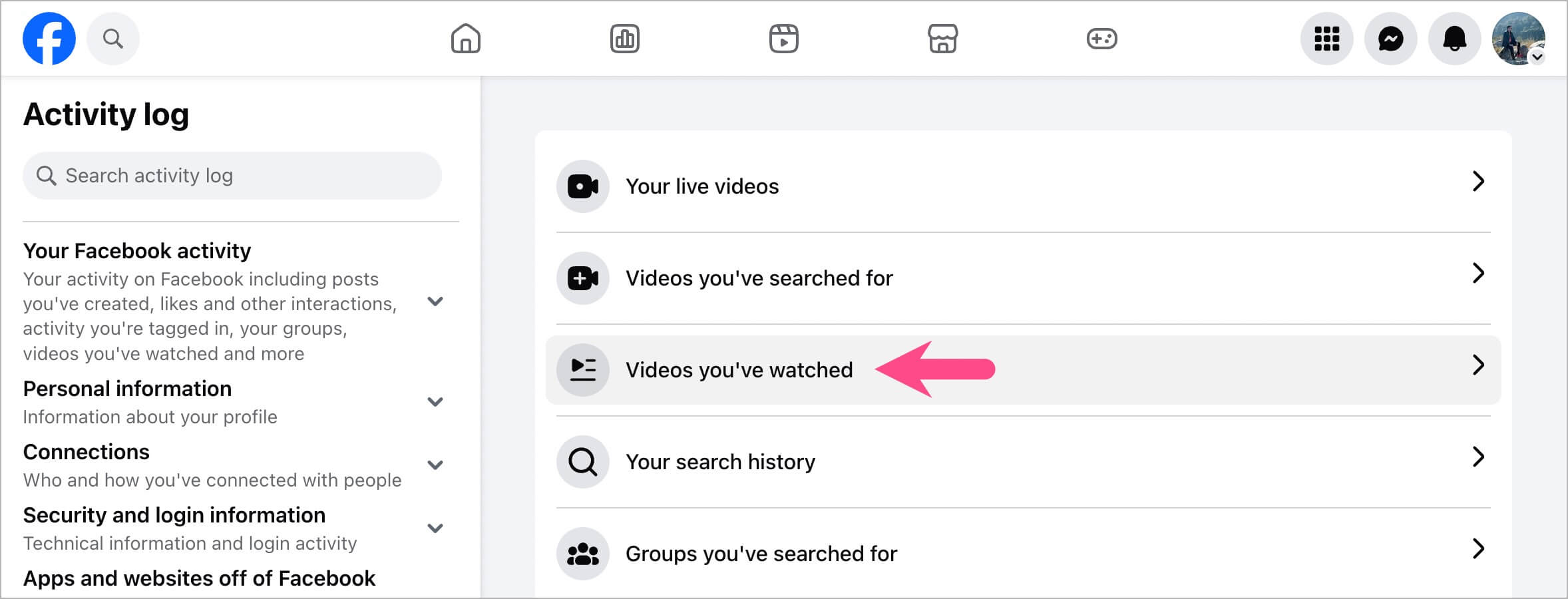
You’ll now see a list of all videos and Reels you’ve watched, along with the exact time and date.
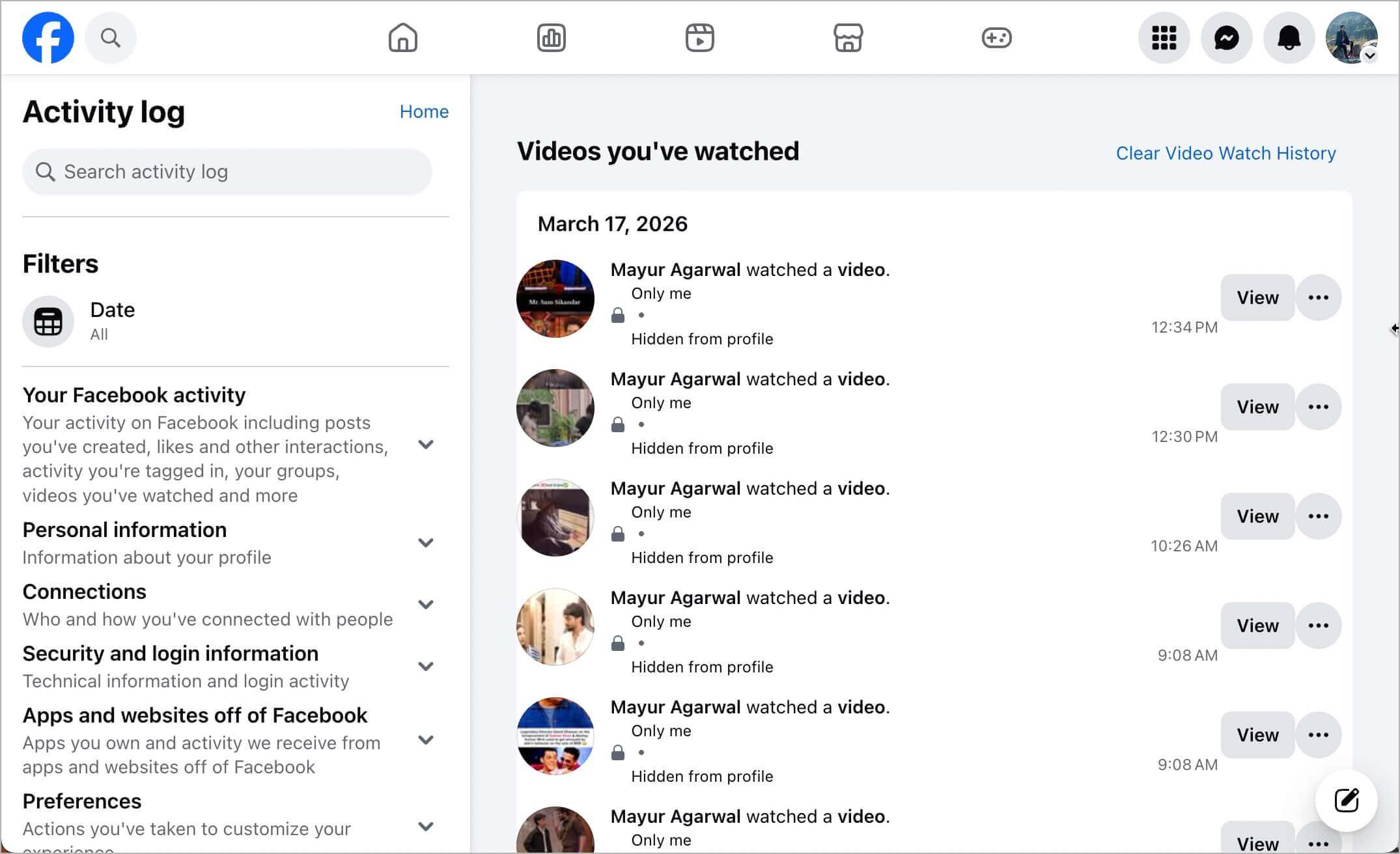
how to find reels or videos you've watched on facebook
Video Watch History on the Facebook Website

How to Delete Recently Watched Reels on Facebook

Unlike Instagram, the Facebook app does not allow you to remove individual Reels from your watch history.

However, you can delete specific videos or Reels from your Facebook viewing history using the Facebook website on a computer.

To remove Reels or videos from Watch History on Facebook:

  1. Go to the Facebook website and log in to your account.
  2. Click your profile picture at the top-right corner.
  3. Select Settings & privacy > Activity log.
  4. Go to Videos you’ve watched.
  5. Find the Reel or video you want to remove.
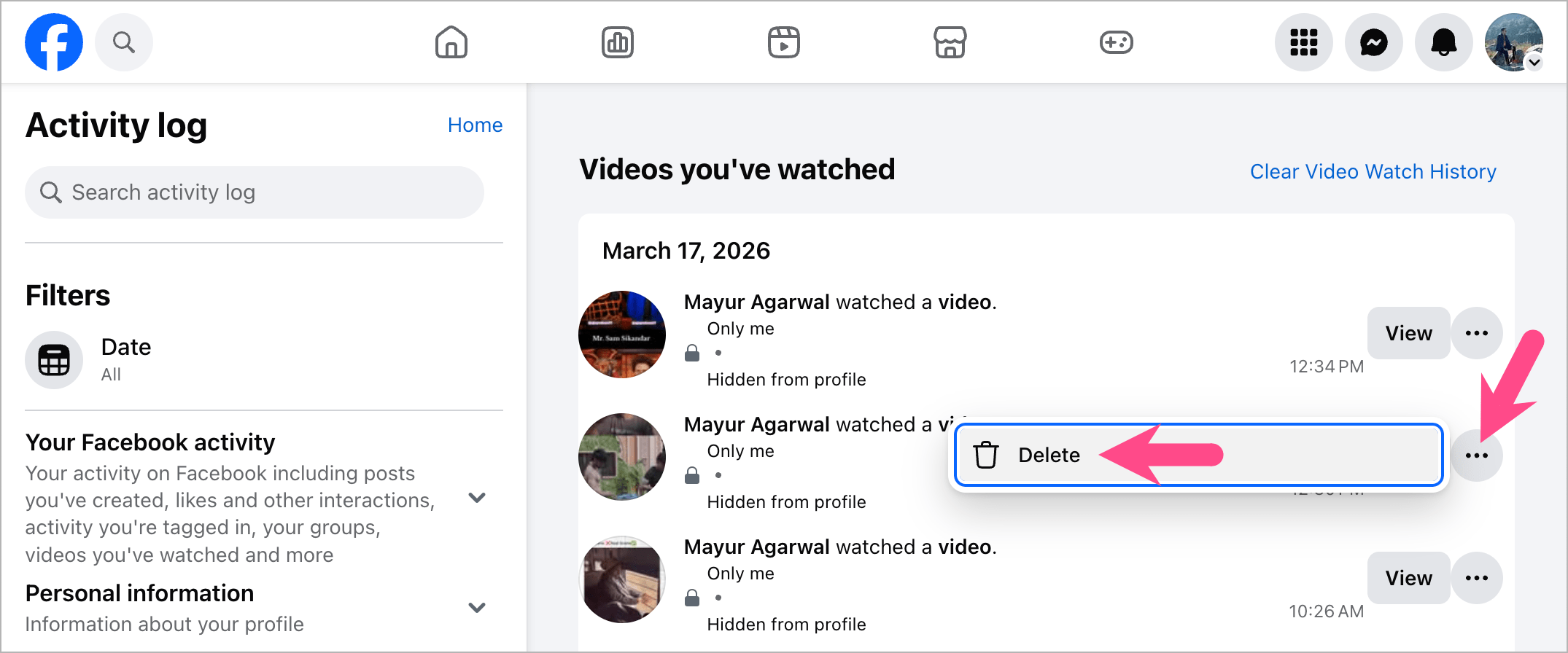
  6. Click the three-dot menu (ellipsis icon) next to it.
  7. Select Delete. how to delete recently watched reels on facebook

The selected Reel will be instantly removed from your Facebook watch history.

How to Delete Facebook Reels Watch History

Even though only you can see your watch history, you may want to clear it for privacy reasons. Luckily, Facebook offers a one-click option to clear your entire watch history.

To clear or delete Facebook Reels watch history at once:

  1. Visit the Facebook website on a computer.
  2. Click your profile icon.
  3. Select Settings & privacy > Activity log.
  4. Go to Videos you’ve watched.
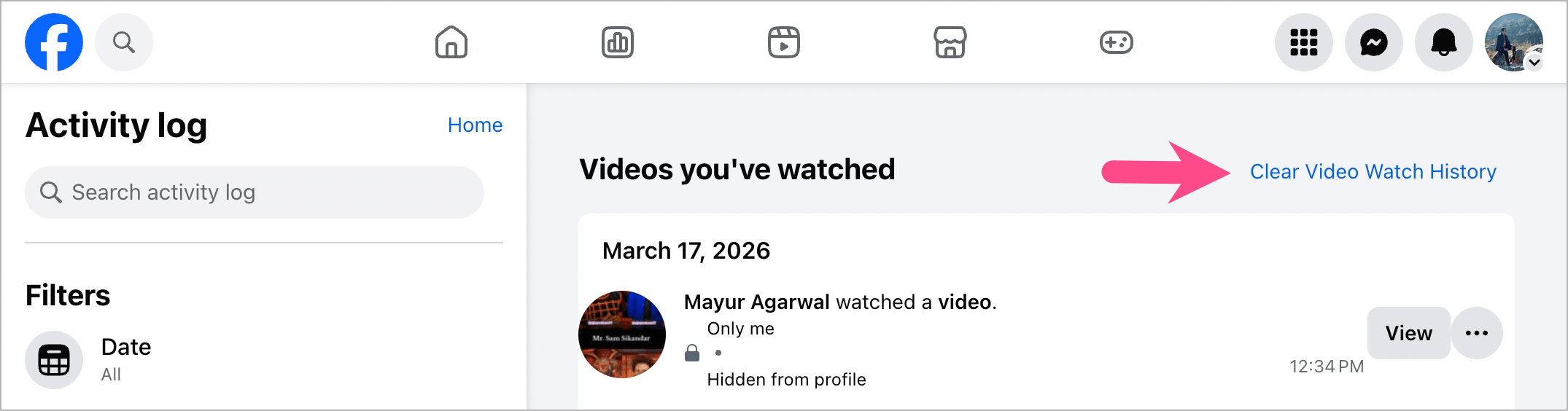
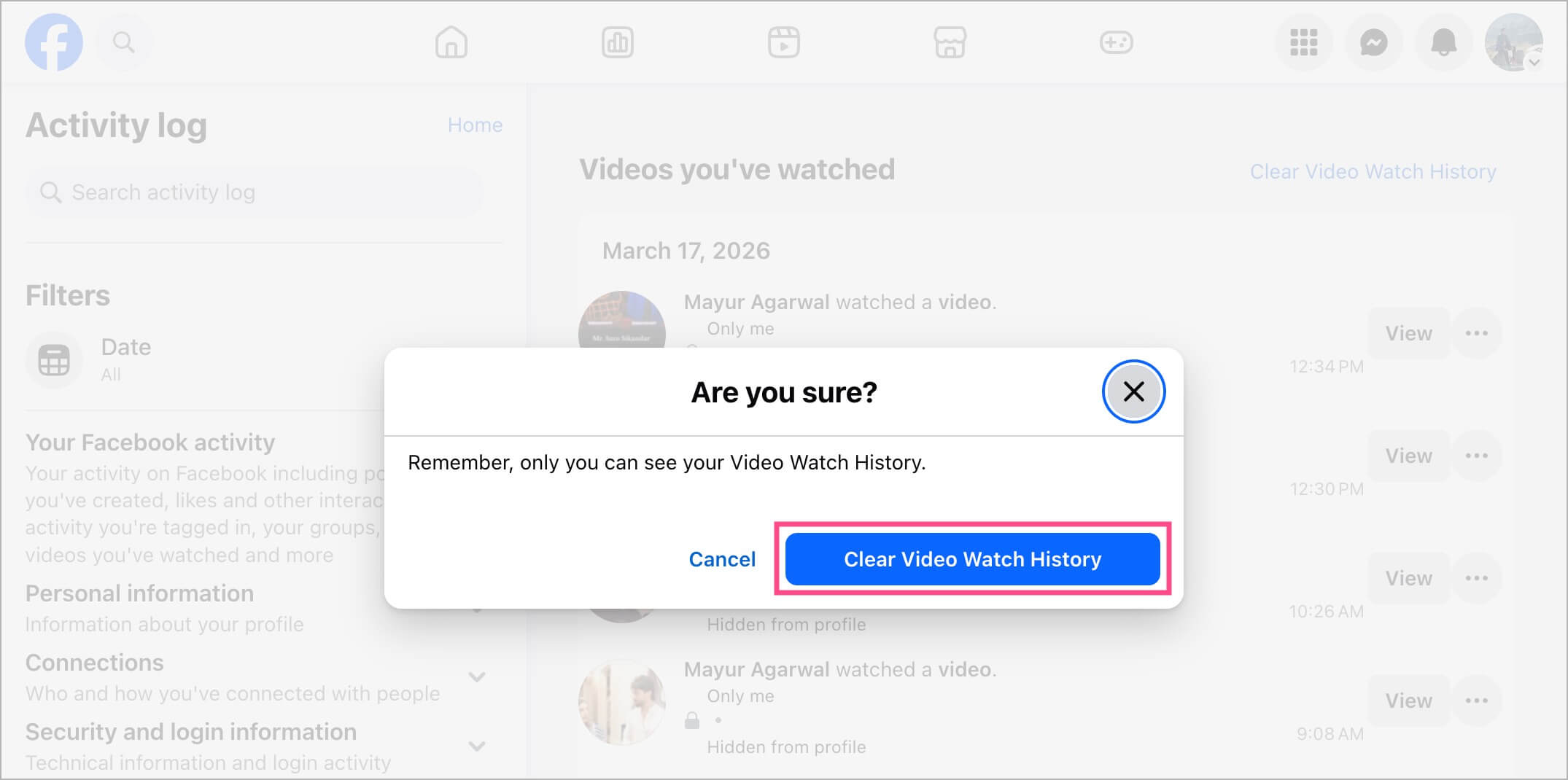
  5. Click Clear Video Watch History. how to delete entire video watch history on facebook
  6. Confirm by selecting Clear Video Watch History. how to remove reels from your facebook watch history
Hope you found this guide helpful.

RELATED:

  • How to Find Your Saved Reels on Facebook
  • How to See Recently Viewed Reels on Instagram
Tags: FacebookReelsSocial MediaTips
ShareTweetSend
Previous Post

Download Microsoft Edge Offline Installer [Latest Version]

Next Post

How to Restore or Reopen Closed Tabs in Microsoft Edge

Mayur Agarwal

Mayur Agarwal

Mayur Agarwal, the founder and editor of WebTrickz, is a tech enthusiast with a Bachelor's degree in Computer Applications and over 15 years of experience in tech writing. His passion for technology and gadgets drives him to create insightful how-to articles and troubleshooting guides.

Next Post
microsoft edge browser

How to Restore or Reopen Closed Tabs in Microsoft Edge

Leave a Reply Cancel reply

Your email address will not be published. Required fields are marked *

Latest Stories

difference between chatgpt and claude

Claude vs ChatGPT: Which AI Should You Use in 2026?

June 18, 2026
google chrome logo

Google Chrome Offline Installer: Direct Download Links

June 17, 2026
X logo

How to Remove All Bookmarks on X (Twitter) At Once in 2026

June 15, 2026
X logo

How to Find Bookmarks on X (Twitter) in 2026

June 15, 2026
copilot logo

How to Turn Off Copilot Search in Bing on Edge & Chrome

June 10, 2026
microsoft edge new logo

How to Turn Off Notifications in Microsoft Edge (2026 Guide)

June 8, 2026
chatgpt logo

How to Clear or Delete ChatGPT Memory on PC and Mobile

June 5, 2026

Trending Stories

  • microsoft family safety settings

    How to Turn Off Microsoft Family Safety on Windows 11 & 10

  • 1337x Proxy List 2026: Working Proxy & Mirror Sites

  • How to Turn Off Microsoft Edge Game Assist in Windows 11

  • How to See Recently Watched Reels on Facebook (2026 Guide)

  • How to Turn Off Fn Lock or Fn Key on Windows 11/10 Laptop

  • About Us
  • Contact Us
  • Privacy Policy
  • Advertise

© 2026 WebTrickz. All Rights Reserved.

No Result
View All Result
  • Reviews
  • Apps
  • How To’s
  • Android
  • Google
  • iPhone
  • Mac
  • About Us
  • Contact Us
  • Privacy Policy

© 2026 WebTrickz. All Rights Reserved.