WebTrickz
TRENDING
  • Complete list of 1337x Proxy and Mirror Sites
No Result
View All Result
  • Reviews
  • Editorials
  • Social Media
    • Facebook
    • Twitter
    • YouTube
    • Messenger
    • Instagram
    • Snapchat
    • WhatsApp
    • TikTok
  • Apps
  • How To’s
  • Apple
  • iPhone
  • Google
  • Android
  • Mac
  • Security
  • About Us
    • About Us
    • Contact Us
    • Privacy Policy
  • Reviews
  • Editorials
  • Social Media
    • Facebook
    • Twitter
    • YouTube
    • Messenger
    • Instagram
    • Snapchat
    • WhatsApp
    • TikTok
  • Apps
  • How To’s
  • Apple
  • iPhone
  • Google
  • Android
  • Mac
  • Security
  • About Us
    • About Us
    • Contact Us
    • Privacy Policy
No Result
View All Result
WebTrickz
No Result
View All Result
Home How To's

Fix your Bricked Nokia Lumia Phone with Nokia Software Updater for Retail

Taigun by Taigun
February 16, 2024
in How To's, Windows Phone

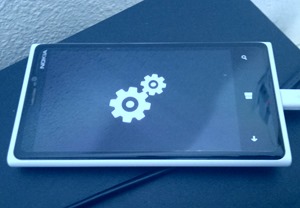
There is a known issue with some Nokia Lumia devices (like Lumia 920), such that after an OTA update or if you Reset your phone, the device gets stuck at spinning gears screen. Nokia is aware of this bug and has posted some simple workarounds too, like doing a force reboot or hard reset the device to bring it back in working condition. If your device is in a similar situation, then you should always try the below workarounds first, and if nothing works then try flashing the firmware using Nokia Software Updater for Retail.
cogs

Force Restart / Soft Reset Lumia phone: Press and hold the power and volume down key until the phone vibrates. After this, the phone should start up normally.

If the above trick doesn’t work, then you have to perform an OS reset aka hard reset:

Hard Reset Lumia phone:

Note: Resetting your phone will return it to the factory state and all your personal data in the phone storage will be erased.

Follow these steps to perform OS reset with the phone keys.

Step 1 – Press and hold the power and volume down key until the phone vibrates (release the keys). Then press and hold the volume down key, if succeed an exclamation mark (!) is shown on the screen (release the volume down key).

Step 2 – Then input the keys in the following order:

  1. Volume up
  2. Volume down
  3. Power
  4. Volume down

Step 3 – The phone will reset and boot up automatically. This may take several minutes.

Flash Stock ROM with Nokia Software Updater –

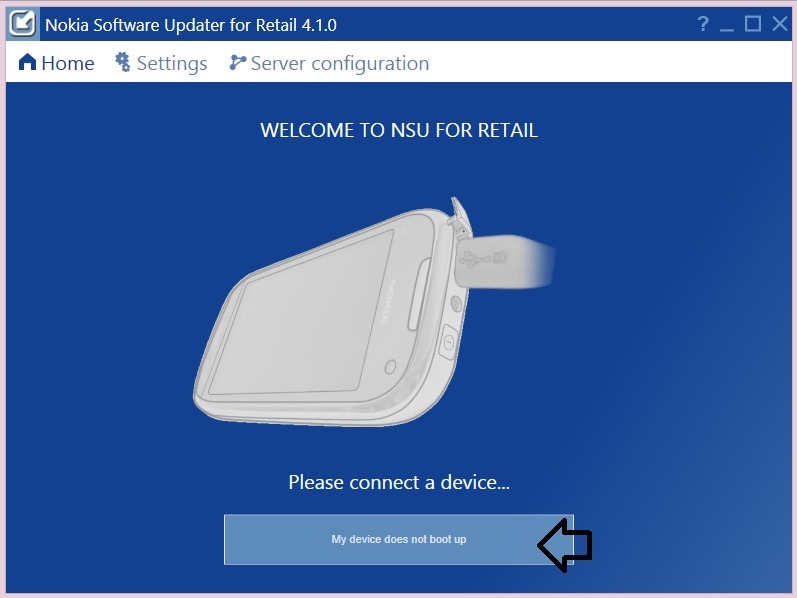
If the above workarounds don’t resolve your problem, then try using the “Nokia Software Updater for Retail 4.1.0?. This updated NSU with an added option “My device does not boot up.” allows you to easily flash the stock firmware on your smartphone and fix it. However, this is leaked software and Nokia hasn’t made it available to the general public.

Warning: This may void your warranty, so try at your OWN risk! The process will also factory reset your device.

>> Download Nokia Software Updater for Retail v4.1.0

Supports – Windows 7 and Windows 8

Unbricking Nokia Lumia Windows Phone 8 Device [Steps] –

1. Run NSU 4.1.0 and click on the ‘My device does not boot up’ option.
1

Make sure the phone is charged; use a low powered USB port (PC/ laptop port)

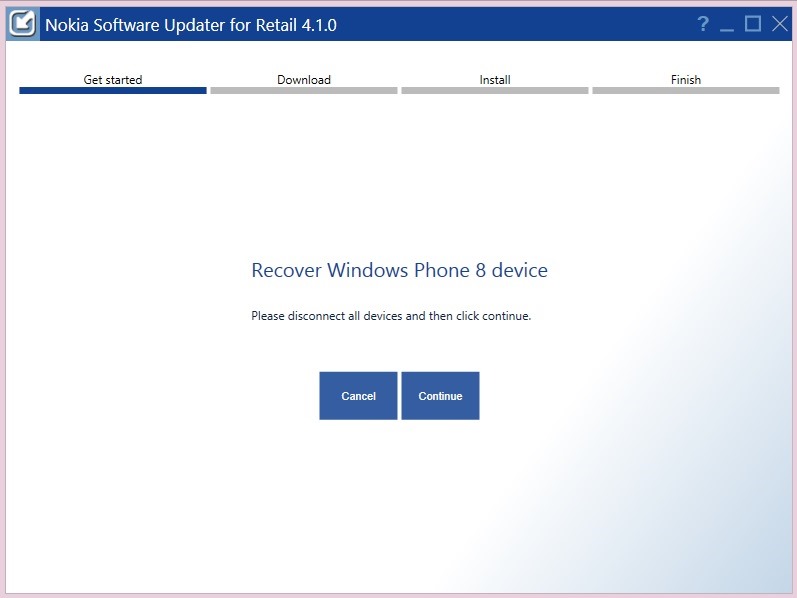
2. Now that your phone is stuck on spinning cogs, Connect the phone and click continue. (The suite says to disconnect, but it’s okay to connect it).
12

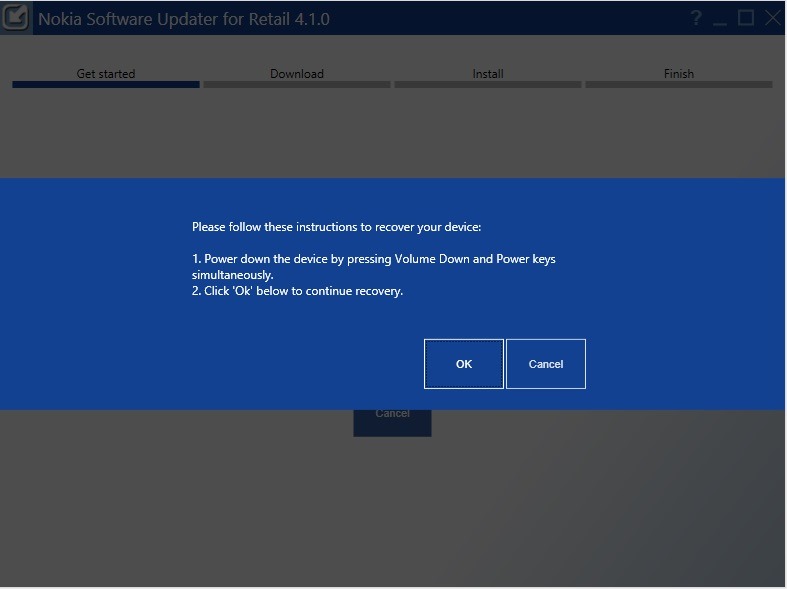
3. Wait for the device connection screen to appear.
nsu4

Now Press and hold the power and volume down key simultaneously until the phone vibrates and the PC detects new hardware. Click Ok and the installer should proceed to download and install the firmware, which should revive your device after flashing the ROM. 🙂

Source: MyNokiaBlog

Tags: Nokia
ShareTweetSend
Previous Post

Quickly Delete Pages from PDF with PDF Page Delete

Next Post

How to Free Up Internal Memory on Android [Get Rid of ‘Insufficient Storage Available’]

Taigun

Taigun

Mayur Agarwal, the founder and editor of WebTrickz, is a tech enthusiast with a Bachelor's degree in Computer Applications and over 15 years of experience in tech writing. His passion for technology and gadgets drives him to create insightful how-to articles and troubleshooting guides.

Next Post

How to Free Up Internal Memory on Android [Get Rid of ‘Insufficient Storage Available’]

Comments 1

  1. Brian says:
    12 years ago

    Thank you very much for the software. My Nokia 920 was stuck on spinning gears for two days and tried all other resets possible and nothing worked until I used this software and it worked perfectly.

    Reply

Leave a Reply Cancel reply

Your email address will not be published. Required fields are marked *

Latest Stories

1337x logo

1337x Proxy List 2026: Working Proxy & Mirror Sites

June 2, 2026

How to Find Saved Reels on Facebook App & Desktop (2026)

April 1, 2026
microsoft edge browser

How to Restore or Reopen Closed Tabs in Microsoft Edge

March 26, 2026
Facebook app on iPhone

How to See Recently Watched Reels on Facebook (2026 Guide)

April 3, 2026
microsoft edge new logo

Download Microsoft Edge Offline Installer [Latest Version]

March 16, 2026

How to Turn Off Bing SafeSearch in Microsoft Edge

March 12, 2026
google chrome logo

Download Google Chrome Offline Installer [Latest Version]

June 3, 2026

Trending Stories

  • microsoft family safety settings

    How to Turn Off Microsoft Family Safety on Windows 11 & 10

  • How to Turn Off Fn Lock or Fn Key on Windows 11/10 Laptop

  • How to Turn Off Microsoft Edge Game Assist in Windows 11

  • How to See Recently Watched Reels on Facebook (2026 Guide)

  • How to Restore or Reopen Closed Tabs in Microsoft Edge

  • About Us
  • Contact Us
  • Privacy Policy
  • Advertise

© 2026 WebTrickz. All Rights Reserved.

No Result
View All Result
  • Reviews
  • Apps
  • How To’s
  • Android
  • Google
  • iPhone
  • Mac
  • About Us
  • Contact Us
  • Privacy Policy

© 2026 WebTrickz. All Rights Reserved.