


WebTrickz
TRENDING
  • Turn Off Copilot Search in Bing (Official Extension)
No Result
View All Result
  • Reviews
  • Editorials
  • Social Media
    • Facebook
    • Twitter
    • YouTube
    • Messenger
    • Instagram
    • Snapchat
    • WhatsApp
    • TikTok
  • Apps
  • How To’s
  • Apple
  • iPhone
  • Google
  • Android
  • Mac
  • Security
  • About Us
    • About Us
    • Contact Us
    • Privacy Policy
  • Reviews
  • Editorials
  • Social Media
    • Facebook
    • Twitter
    • YouTube
    • Messenger
    • Instagram
    • Snapchat
    • WhatsApp
    • TikTok
  • Apps
  • How To’s
  • Apple
  • iPhone
  • Google
  • Android
  • Mac
  • Security
  • About Us
    • About Us
    • Contact Us
    • Privacy Policy
No Result
View All Result
WebTrickz
No Result
View All Result
Home Windows Vista / XP

Get Mac OS X like universal dictionary on Windows

Mayur Agarwal by Mayur Agarwal
May 31, 2020
in Windows Vista / XP

dictionaryI am a fan of e-books and that is one of the many reasons why I prefer Mac over Windows. One of the best features in Mac OS X is their universal dictionary. Just select a word anywhere and press command-control-D to get its meaning. In search of similar software for Windows, I found WordWeb.

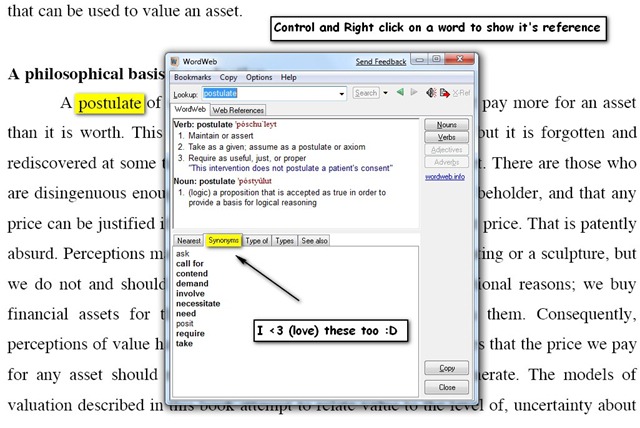
WordWeb is a powerful, lightweight (takes around 2MB RAM) and must-have tool for an (e)book-worm. The many of it’s best features are:

  • Shortcut – Just press control and right-click on any word to get the meaning and thesaurus (this can be customized too).
  • Universal Dictionary – You can use it with anything including Adobe Reader, web-pages, Media Player (for lyrics) etc.
  • Offline – It works offline also, just in case you require it on your office computer which does not have a net connection, or in classes during lectures.
  • Web Reference – It also provides the web-reference in case you prefer Wiki-Dictionary over others.
  • FREE – and above all, WordWeb is FREE :D.
2009-04-20_215226

So next time you are reading an e-book, don’t look for the handbook dictionary, just press Ctrl and Right Click on the word :D.

Download WordWeb

This article is written by our co-author Pratyush Mittal, who writes @ FuLLy-FaLtOo.com

Tags: AdobeMac
ShareTweetSend
Previous Post

Get status of your laptop charging with Free BatteryBar

Next Post

Adsense check delivery to India via Blue Dart confirmed

Mayur Agarwal

Mayur Agarwal

Mayur Agarwal, the founder and editor of WebTrickz, is a tech enthusiast with a Bachelor's degree in Computer Applications and over 15 years of experience in tech writing. His passion for technology and gadgets drives him to create insightful how-to articles and troubleshooting guides.

Next Post

Adsense check delivery to India via Blue Dart confirmed

Comments 7

  1. Sabhu says:
    17 years ago

    I really like it, thanks Mayur and Pratyush for sharing this.

    Reply
    • Pratyush says:
      17 years ago

      Thanks Sabhu, we like to share the new tricks with our readers and you keep us going :D.

      Reply
  2. Arpit Agrawal says:
    17 years ago

    Hey… Thanxs buddy for such a wonderful post !!!
    Never ever thought that such a software exists.
    Now the fun reading E-Books would just multiply.
    Gr8 post. Thanx…

    Reply
  3. lonelytomato says:
    17 years ago

    Thanks to you, I installed a lot of useful programs today.
    I have to say…. YOUR BLOG IS REALLY COOOOL!!!!

    Thanks 🙂

    Reply
  4. Pingback: Free Dictionary and Thesaurus App for BlackBerry
  5. Kartik says:
    15 years ago

    Hi pratyush,

    really nice link… thanks… 😀

    Reply
  6. Phox says:
    14 years ago

    Great post, I was looking for just this 🙂
    Too bad this cannot preserve the same good looks the apple dictionary has.. This one is very… windows like looking ^^’ I guess one of the major differences bewteen mac and windows users, windows users only need practicality not good looking stuff (generalisation, I know)

    Reply

Leave a Reply Cancel reply

Your email address will not be published. Required fields are marked *

Latest Stories

copilot logo

How to Turn Off Copilot Search in Bing on Edge & Chrome

June 10, 2026
microsoft edge new logo

How to Turn Off Notifications in Microsoft Edge (2026 Guide)

June 8, 2026
chatgpt logo

How to Clear or Delete ChatGPT Memory on PC and Mobile

June 5, 2026
1337x logo

1337x Proxy List 2026: Working Proxy & Mirror Sites

June 2, 2026

How to Find Saved Reels on Facebook App & Desktop (2026)

June 8, 2026
microsoft edge browser

How to Restore or Reopen Closed Tabs in Microsoft Edge

June 9, 2026
Facebook app on iPhone

How to See Recently Watched Reels on Facebook (2026 Guide)

June 5, 2026

Trending Stories

  • microsoft family safety settings

    How to Turn Off Microsoft Family Safety on Windows 11 & 10

  • How to Turn Off Microsoft Edge Game Assist in Windows 11

  • 1337x Proxy List 2026: Working Proxy & Mirror Sites

  • How to See Recently Watched Reels on Facebook (2026 Guide)

  • How to Turn Off Fn Lock or Fn Key on Windows 11/10 Laptop

  • About Us
  • Contact Us
  • Privacy Policy
  • Advertise

© 2026 WebTrickz. All Rights Reserved.

No Result
View All Result
  • Reviews
  • Apps
  • How To’s
  • Android
  • Google
  • iPhone
  • Mac
  • About Us
  • Contact Us
  • Privacy Policy

© 2026 WebTrickz. All Rights Reserved.






