


WebTrickz
TRENDING
  • Turn Off Copilot Search in Bing (Official Extension)
No Result
View All Result
  • Reviews
  • Editorials
  • Social Media
    • Facebook
    • Twitter
    • YouTube
    • Messenger
    • Instagram
    • Snapchat
    • WhatsApp
    • TikTok
  • Apps
  • How To’s
  • Apple
  • iPhone
  • Google
  • Android
  • Mac
  • Security
  • About Us
    • About Us
    • Contact Us
    • Privacy Policy
  • Reviews
  • Editorials
  • Social Media
    • Facebook
    • Twitter
    • YouTube
    • Messenger
    • Instagram
    • Snapchat
    • WhatsApp
    • TikTok
  • Apps
  • How To’s
  • Apple
  • iPhone
  • Google
  • Android
  • Mac
  • Security
  • About Us
    • About Us
    • Contact Us
    • Privacy Policy
No Result
View All Result
WebTrickz
No Result
View All Result
Home Windows 7

Get Classic Start Menu and Classic Explorer Toolbar in Windows 7 & Vista with Classic Shell

Mayur Agarwal by Mayur Agarwal
June 23, 2021
in Windows 7, Windows Vista / XP

Windows7 logo We recently shared CSMenu which provides you XP like Classic Start menu in Windows 7 & Vista. Here is another new tool that adds some missing features to Windows 7 & Vista like a classic start menu and a classic toolbar in Windows Explorer.

Classic Shell is a free utility that lets you get back the classic start menu and classic toolbar. It includes the option to install both Classic Start Menu and Classic Explorer.

Advanced features:

  • Drag and drop to let you organize your applications
  • It does not disable the original start menu in Windows. You can access it by Shift+Click on the start button
  • Translated in 35 languages, including Right-to-left support for Arabic and Hebrew
  • The tool has support for skins, including additional 3rd party skins.
  • Available for 32 and 64-bit OS

Classic Start Menu – Adds XP like classic start menu without disabling the original one.
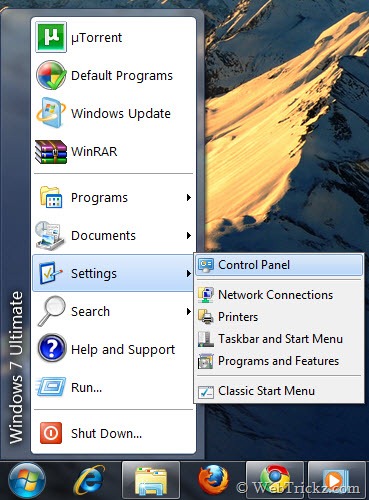
Classic Start Menu

Classic Explorer is included in the Classic Shell installer and comes in handy for most users. It adds a toolbar to Windows Explorer (similar to XP) for some common operations (Go to the parent folder, Cut, Copy, Paste, Delete, Properties).
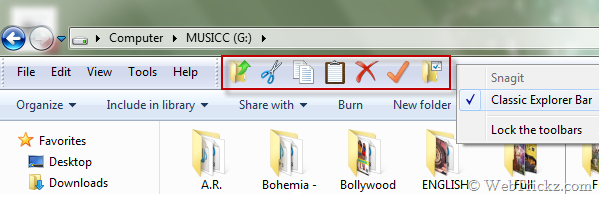
Classic Explorer Toolbar

It also has options for customizing the folder panel to look more like the Windows XP version or to not fade the expand buttons.
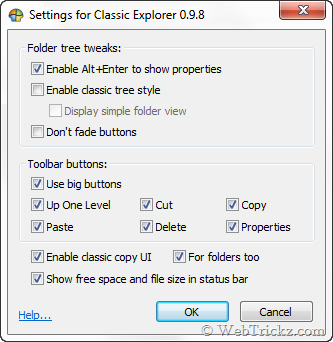
Classic Explorer Options

To enable the classic toolbar, open Windows Explorer. Click Organize > Layout and check the Menu Bar option. Now close explorer and reopen it. Right-click on the menu bar and select “Classic Explorer Bar” to show the toolbar.


Download Classic Shell  [Homepage]

Tags: TipsTricksWindows Vista
ShareTweetSend
Previous Post

View Suspicious files hidden inside USB/Pen drives

Next Post

Giveaway – Win FREE Licenses of SUPERAntiSpyware PRO worth $29.95

Mayur Agarwal

Mayur Agarwal

Mayur Agarwal, the founder and editor of WebTrickz, is a tech enthusiast with a Bachelor's degree in Computer Applications and over 15 years of experience in tech writing. His passion for technology and gadgets drives him to create insightful how-to articles and troubleshooting guides.

Next Post

Giveaway – Win FREE Licenses of SUPERAntiSpyware PRO worth $29.95

Comments 1

  1. Ed Maczko says:
    16 years ago

    Hi,

    Is there any way, via keystrokes or a tool bar item (as in XP), to toggle the navigation pane in explorer ?

    Thanks,
    Ed

    Reply

Leave a Reply Cancel reply

Your email address will not be published. Required fields are marked *

Latest Stories

copilot logo

How to Turn Off Copilot Search in Bing on Edge & Chrome

June 10, 2026
microsoft edge new logo

How to Turn Off Notifications in Microsoft Edge (2026 Guide)

June 8, 2026
chatgpt logo

How to Clear or Delete ChatGPT Memory on PC and Mobile

June 5, 2026
1337x logo

1337x Proxy List 2026: Working Proxy & Mirror Sites

June 2, 2026

How to Find Saved Reels on Facebook App & Desktop (2026)

June 8, 2026
microsoft edge browser

How to Restore or Reopen Closed Tabs in Microsoft Edge

June 9, 2026
Facebook app on iPhone

How to See Recently Watched Reels on Facebook (2026 Guide)

June 5, 2026

Trending Stories

  • microsoft family safety settings

    How to Turn Off Microsoft Family Safety on Windows 11 & 10

  • 1337x Proxy List 2026: Working Proxy & Mirror Sites

  • How to See Recently Watched Reels on Facebook (2026 Guide)

  • How to Turn Off Microsoft Edge Game Assist in Windows 11

  • How to Turn Off Fn Lock or Fn Key on Windows 11/10 Laptop

  • About Us
  • Contact Us
  • Privacy Policy
  • Advertise

© 2026 WebTrickz. All Rights Reserved.

No Result
View All Result
  • Reviews
  • Apps
  • How To’s
  • Android
  • Google
  • iPhone
  • Mac
  • About Us
  • Contact Us
  • Privacy Policy

© 2026 WebTrickz. All Rights Reserved.






