WebTrickz
TRENDING
  • Claude vs ChatGPT: Which Is Better in 2026?
No Result
View All Result
  • Reviews
  • Editorials
  • Social Media
    • Facebook
    • Twitter
    • YouTube
    • Messenger
    • Instagram
    • Snapchat
    • WhatsApp
    • TikTok
  • Apps
  • How To’s
  • Apple
  • iPhone
  • Google
  • Android
  • Mac
  • Security
  • About Us
    • About Us
    • Contact Us
    • Privacy Policy
  • Reviews
  • Editorials
  • Social Media
    • Facebook
    • Twitter
    • YouTube
    • Messenger
    • Instagram
    • Snapchat
    • WhatsApp
    • TikTok
  • Apps
  • How To’s
  • Apple
  • iPhone
  • Google
  • Android
  • Mac
  • Security
  • About Us
    • About Us
    • Contact Us
    • Privacy Policy
No Result
View All Result
WebTrickz
No Result
View All Result
Home USB

View Suspicious files hidden inside USB/Pen drives

Mayur Agarwal by Mayur Agarwal
May 16, 2020
in USB

pendrive Hidden Files Viewer is a small and portable tool which can show you hidden and dangerous files residing inside your Pen drives. This tool is intended for users visiting frequently to Internet cafes and have their thumb/flash drives riddled with viruses.
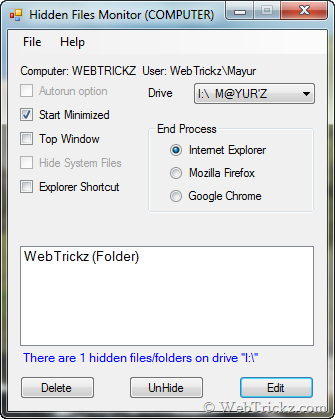
Hidden Files Viewer

This is mainly for installation on any USB drive but can also be run from the computer.
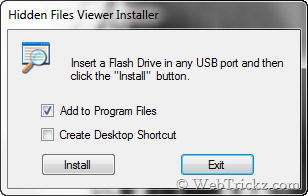
Hidden Files Viewer for USB

You can view the hidden files, unhide or delete them. It has the ability to close the current browser and keeps a permanent watch on USB drives for the arrival of the inevitable hidden viruses. Can be used on Windows Vista and 7.

Download Hidden Files Viewer

Tags: BrowserFlash DrivePen Drive
ShareTweetSend
Previous Post

How to Hide Notification Area and clock in Windows 7

Next Post

Get Classic Start Menu and Classic Explorer Toolbar in Windows 7 & Vista with Classic Shell

Mayur Agarwal

Mayur Agarwal

Mayur Agarwal, the founder and editor of WebTrickz, is a tech enthusiast with a Bachelor's degree in Computer Applications and over 15 years of experience in tech writing. His passion for technology and gadgets drives him to create insightful how-to articles and troubleshooting guides.

Next Post

Get Classic Start Menu and Classic Explorer Toolbar in Windows 7 & Vista with Classic Shell

Comments 3

  1. Murphy says:
    16 years ago

    Hi,
    Thanks….useful article .
    KIS do all the ,,job,, for me 🙂
    Best regards !

    Reply
  2. Pingback: Freeware Tool To Reveal Hidden And Suspicious Files On Pen Drive
  3. Pingback: Ver archivos ocultos de las memorias USB | View files hidden inside USB/Pen drives | El Maxi Geek...!!

Leave a Reply Cancel reply

Your email address will not be published. Required fields are marked *

Latest Stories

Google Gemini

How to Cancel Your Gemini Subscription (2026 Guide)

June 21, 2026
difference between chatgpt and claude

Claude vs ChatGPT: Which AI Should You Use in 2026?

June 18, 2026
google chrome logo

Google Chrome Offline Installer: Direct Download Links

June 17, 2026
X logo

How to Remove All Bookmarks on X (Twitter) At Once in 2026

June 15, 2026
X logo

How to Find Bookmarks on X (Twitter) in 2026

June 15, 2026
copilot logo

How to Turn Off Copilot Search in Bing on Edge & Chrome

June 10, 2026
microsoft edge new logo

How to Turn Off Notifications in Microsoft Edge (2026 Guide)

June 8, 2026

Trending Stories

  • 1337x logo

    1337x Proxy List 2026: Working Proxy & Mirror Sites

  • How to Turn Off Microsoft Family Safety on Windows 11 & 10

  • How to See Recently Watched Reels on Facebook (2026 Guide)

  • How to Turn Off Microsoft Edge Game Assist in Windows 11

  • How to Turn Off Fn Lock or Fn Key on Windows 11/10 Laptop

  • About Us
  • Contact Us
  • Privacy Policy
  • Advertise

© 2026 WebTrickz. All Rights Reserved.

No Result
View All Result
  • Reviews
  • Apps
  • How To’s
  • Android
  • Google
  • iPhone
  • Mac
  • About Us
  • Contact Us
  • Privacy Policy

© 2026 WebTrickz. All Rights Reserved.