

WebTrickz
TRENDING
  • Turn Off Copilot Search in Bing (Official Extension)
No Result
View All Result
  • Reviews
  • Editorials
  • Social Media
    • Facebook
    • Twitter
    • YouTube
    • Messenger
    • Instagram
    • Snapchat
    • WhatsApp
    • TikTok
  • Apps
  • How To’s
  • Apple
  • iPhone
  • Google
  • Android
  • Mac
  • Security
  • About Us
    • About Us
    • Contact Us
    • Privacy Policy
  • Reviews
  • Editorials
  • Social Media
    • Facebook
    • Twitter
    • YouTube
    • Messenger
    • Instagram
    • Snapchat
    • WhatsApp
    • TikTok
  • Apps
  • How To’s
  • Apple
  • iPhone
  • Google
  • Android
  • Mac
  • Security
  • About Us
    • About Us
    • Contact Us
    • Privacy Policy
No Result
View All Result
WebTrickz
No Result
View All Result
Home Blogging

How to check Page Speed of your Blog or Website

Mayur Agarwal by Mayur Agarwal
February 22, 2024
in Blogging, How To's

Google now considers site speed aka page loading time of a site or blog while listing results in its search engine rankings. If you’re a site owner or webmaster then you must find and evaluate the page speed of your website/site and take appropriate actions to improve it. Use the below tools to Find Page speed or Site speed:
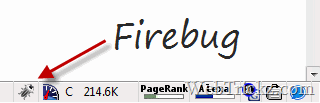
Firebug

Page Speed – To use it, you need to have Firefox with Firebug add-on installed. Then install the Page Speed add-on. After installing, just open the desired webpage in Firefox and click the firebug button from the status bar > open the Page Speed tab > and click the Analyze Performance button. You’ll then be shown a Page Speed Score of that specific page.

See WebTrickz got a Page speed score of 87/100 which is pretty good.
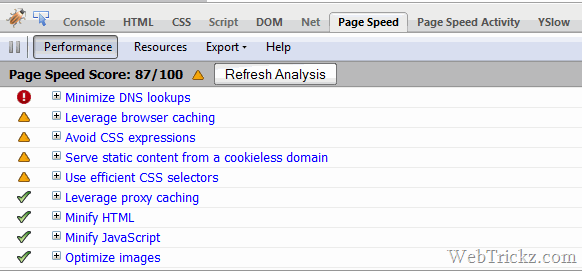
WebTrickz Page speed score

YSlow – YSlow is a similar free tool from Yahoo which Grades your web pages and suggests ways to improve website speed. To use it, you must have Firefox with Firebug and YSlow add-on installed. Open Firebug and tap the YSlow tab > Run test to use it.
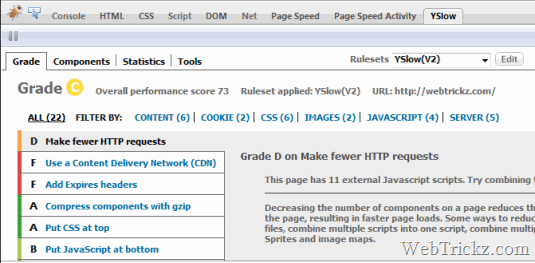
YSlow - WebTrickz grade

  • Grade based on the performance of the page (you can define your own rule set)
  • Summary of the page Components
  • Chart with statistics
  • Tools for analyzing performance, including Smush.it and JSLint

Webmaster Tools – You can also use Google webmaster tools to see how much time, pages on your site take to load on average. To analyze this, visit Webmaster Tools Labs > Site Performance and see the Performance Overview chart.
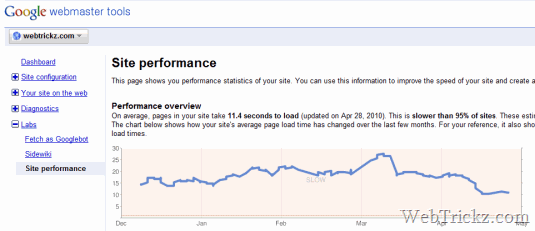
Webmaster Tools - Site Performance

>> Hope the above tools can help in improving the speed of your site and provide a faster web experience to your readers.


Tags: BloggingGoogle
ShareTweetSend
Previous Post

Kaspersky Internet Security & Antivirus 2011 Beta released!

Next Post

Register .COM domain Free for 1 year! Hurry

Mayur Agarwal

Mayur Agarwal

Mayur Agarwal, the founder and editor of WebTrickz, is a tech enthusiast with a Bachelor's degree in Computer Applications and over 15 years of experience in tech writing. His passion for technology and gadgets drives him to create insightful how-to articles and troubleshooting guides.

Next Post

Register .COM domain Free for 1 year! Hurry

Comments 4

  1. Ramakanth says:
    16 years ago

    Wow, mayur your main page has Grade C in y slow, my site Grade is C. I tried a lot of methods suggested by yslow,I think may be CDN is the last one to try to improve speed .

    PS: Nice info,I have been using Yslow for a longtime and I never thought to write an article on that one 🙂

    Reply
    • Mayur says:
      16 years ago

      Thanks Ramakanth for the appreciation. I’ve optimized this site a lot in order to get those good scores 😀 I just checked your site and YSlow showed E grade (52) while Page speed gave 76/100. You need to make it faster!!

      Reply
  2. Ramakanth says:
    16 years ago

    Sorry it’s my error, yeah my site Grade is E.

    Reply
  3. nabi says:
    16 years ago

    great post Mayur…….
    thanks 4 ur information…

    Reply

Leave a Reply Cancel reply

Your email address will not be published. Required fields are marked *

Latest Stories

X logo

How to Find Bookmarks on X (Twitter) in 2026

June 14, 2026
copilot logo

How to Turn Off Copilot Search in Bing on Edge & Chrome

June 10, 2026
microsoft edge new logo

How to Turn Off Notifications in Microsoft Edge (2026 Guide)

June 8, 2026
chatgpt logo

How to Clear or Delete ChatGPT Memory on PC and Mobile

June 5, 2026
1337x logo

1337x Proxy List 2026: Working Proxy & Mirror Sites

June 2, 2026

How to Find Saved Reels on Facebook App & Desktop (2026)

June 8, 2026
microsoft edge browser

How to Restore or Reopen Closed Tabs in Microsoft Edge

June 9, 2026

Trending Stories

  • 1337x logo

    1337x Proxy List 2026: Working Proxy & Mirror Sites

  • How to Turn Off Microsoft Family Safety on Windows 11 & 10

  • How to See Recently Watched Reels on Facebook (2026 Guide)

  • How to Turn Off Microsoft Edge Game Assist in Windows 11

  • How to Turn Off Fn Lock or Fn Key on Windows 11/10 Laptop

  • About Us
  • Contact Us
  • Privacy Policy
  • Advertise

© 2026 WebTrickz. All Rights Reserved.

No Result
View All Result
  • Reviews
  • Apps
  • How To’s
  • Android
  • Google
  • iPhone
  • Mac
  • About Us
  • Contact Us
  • Privacy Policy

© 2026 WebTrickz. All Rights Reserved.






