


How to Update LG Optimus One P500 to Gingerbread anywhere in the World –
Android 2.3 aka Gingerbread is the latest version of Android currently available for smartphones powered by Android. LG Optimus One P500 comes pre-installed with Android 2.2 and LG officially announced sometime back that the Gingerbread update for Optimus One will be available by May end in India but until now there are no signs of its launch. Thus, most users who got the device assuming it would get Android 2.3 aren’t very happy.

So, we’re here to share a detailed tutorial that describes “How to manually update LG P500 to a custom Gingerbread ROM (void. #forever)”. This ROM developed by XDA member ‘Noejn’ is based on CyanogenMod 7 (CM7) who earlier released Megatron, Prime, and Devoid Rom based on 2.2 which are the most stable and best ROMs on 2.2. The void. #forever ROM (latest ver. r1.6.15) released a week ago is amazing and stable too.
Why Use Custom ROM? – Certainly, it’s not easy for everyone to install a custom ROM because it’s a complex task and might break your device if not done properly. But using a custom ROM has several pros like you’re free to customize it, plus they don’t have any pre-loaded apps. Custom ROMs tend to increase the speed at least twice (check the benchmarks at XDA to compare with other devices after modding). Plus they’ve MANY other minor tweaks, which makes your smartphone really smart.
Disclaimer: Please try this guide at your own risk. We will not be responsible in case you brick the device or its warranty gets void.
Note: Don’t install this custom ROM if you’re running Official Gingerbread V20b ROM or you will see No Network. That’s because GB Stock ROM has a new baseband that is not supported by void ROM. To install void ROM, you first need to restore the Stock 2.2 ROM. To restore, download the official Android 2.2.2 V10e ROM. Then follow the steps given in this guide to downgrade the firmware using the KDZ updater.
Prerequisite: Optimus one (Charged), USB cable, a computer, and adequate time. Download the below files to your desktop.
- Download File 1: void-forever_0_2.zip (62.9MB)
- Download File 2: void-forever-addon.zip (4.76MB)
- Download File 3: voidAddonsPack.zip (16.2MB)
- Download File 4: stock.zip (2.09MB)
Before proceeding, make sure to BACKUP entire phone data like contacts, messages, photos, etc. Also, copy the full contents of your SD card to a folder on your PC because it will also be formatted. You may want to note the names of installed Apps as they will also be lost. This is similar to formatting Windows. 🙂
Step-by-Step Instructions to install Custom Gingerbread ROM on LG Optimus One P500
Modding involves 3 main processes:
1. Rooting
2. Setting Custom recovery
3. Flashing
>> Make sure that you follow every step very carefully to achieve success.
Step 1: ROOT Optimus One
Note: Make sure to kill all the running apps and processes using Taskiller before hitting the Root button. Furthermore, connect the phone to the computer via a USB cable and enable USB debugging mode (Settings > Applications > Development) before rooting. Upon successful rooting, you will notice a new app called “Superuser” in the menu.
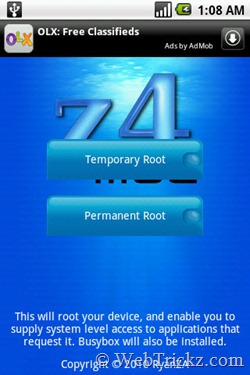
z4root offers an easy and quick way to root most devices. Download and install it, then select the “Permanent Root” button. The screen will go white, wait until the phone gets rebooted. Offers unroot option.
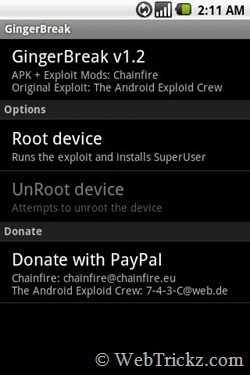
If you updated your Optimus to the latest firmware V10E as I did, then you have to use the other alternative “GingerBreak”. [Download Here, v1.2]
>> Check Step 2 on Page 2






Good work, very well explained.
That was a very insightful article. I appreciate your hard work and this lengthy systematic tutorial. It is easy to understand. Thanks!
Very Informative post.
Two of my Friends have LG Optimus1 P500 it will be beneficial for them.
Congrats !
@Bimal @JK @Abhishek Thanks a lot guys for appreciating our work. 🙂
doesn’t get better man.. best explanation and it worked perfectly for me. i owe you 🙂
Good work!
How about a guide to get the phone to original factory state if someone need to sent phone back to service ??
I think its the first post that I have seen till now in my blogging life having so many images 🙂
very well explained with images used at every step.
Tweeted it Love this work by you and faltoo 🙂
@Atul Thank You Atul. The post has been specially written in detail to let everyone (even noobs) flash their device without any fear. The screenshots may not be must in it but writing lengthy text itself doesn’t makes a ‘How To’ post look easier and attractive too. That’s what I feel! 🙂
GREAT JOB!!!! Works wonderfully!!!!
The bugs leaving they are me crazy!
And, how to back to previous rom?
{}
@Alex Would you plz care to list what bugs is your device experiencing?
Guys, I’ve updated the post with procedure to get back to previous ROM. 🙂
Hello.
Thank you for this article, I really appreciate it. My Optimus now runs better.
Sir, I have a question. can I use this tutorial to install CM7 to my optimus ME? i’ve been googling for the past few hours for a tutorial about installing CM7 in optimus me without success. 🙁
@Sgates I heard this phone name first time ever and really have no idea if this is going to work on it. Most probably it wont work coz your phone screen resolution is different.
the optimus ME or LGP350 is a budget android phone that seems to be a clone of the Optimus one with a smaller screen. Thanks for your quick response. 🙂 I hope someone will look into porting CM7 on Optimus ME.
@Sgates I hope so too, try searching on XDA Forum. You might get something there. 🙂
Thank you so much for this great tutorial.This was my first time ever trying a custom rom and it worked like a charm.The only thing i should mention is : after you format and partition the SD card Windows will NOT recognize it and thus you won’t be able to transfer the zip files. One quick reboot in Linux did the trick (as ext is a native file system).
I’m very thankful for your work on putting this tutorial together.
Best regards from Romania
@andrew You’re welcome Andrew, glad to hear that it worked smoothy for you. Did you selected ‘mount USB storage’ coz I was able to mount and transfer the files without any issue.
Soy de Mexico, pero tratare hablar un poquito de Ingles: Hey, look, when i do the USB mass storage i have the same trouble that andrew has, it doesnt recognize in my laptop the cellphone so i cant pass files, how can i resolve this? im very confused and i can have my android 2.3.4 🙁
Help me please anyone, i cant return, i erase everything, i hope you just can help me please:(
Was successful is flashing…
but there are bugs…
some are:
– Hangs and shuts down
– Touch stops working
@Gabriel Sad to hear that. It may be happening coz your didn’t have required USB drivers on your Windows. Please wait a bit, I’ll soon assist you on this issue.
@Ulhas Did you wipe cache partition and dalvik cache? Also, make sure to flash the 3 add-on files.
Hi Gabriel,
You just need to enable EXT partition reading in Windows. This should work: http://www.fs-driver.org/ .
After this, you will be able to see the card on windows.
Alternatively, you may arrange for another SD Card (512mb is enough) to transfer the files and install through it.
@Mayur I did as it is said in the tutorial…
also there is another problem…
the cell switch off then and now giving some error on the console…
(I was not able to read the error)
Thank you i will try again:)
Thank you for creating valuable post about the subject. I’m a fan of your site. Keep up the good work
Hi,
Thank you very much for this great tutorial.
However, I have one more question: How can I get Gmaps or Gmail? I tried this link: and downloaded the CM7 version but it didn’t work. I tried an other one: gapps-gb-20110120 but neither it works. Do you have any ideas?
Thank you, Laurent.
@Laurent If they didn’t appear after flashing the addons then simply download them from Android Market.
Hi,
My mistake, I thought those apps had to be flashed…
Thank you again
thank you very much
There’s no Thinkfree Office for 2.3? I transfer an apk file from my pc to sdcard, but i cant seem to find my apk file in my phone since there’s no Thinkfree Office apps in my phone. Can someone enlight me pls..
my phone is frozen at the ‘void’ boot screen. is there anyway of fixing this
Hi ty for this 2.3.4 wich is jst awesomee….. der is only one but a big problem that my camera is not working.. plzz help me out..
i fixed my phone now… to go back to ROM MANAGER while your phone is frozen just hold down, the volume down button, the home button, and the power button. GINGERBREAD IS GREAT!!!!!!!!!
Actually now my camera is working fine and even my phone is so fast and the credit goes to you Mayur but the only problem is that my battery is getting drained very quickly so plz plz plz……find a solution for that 🙂
@Afzal Did you Wipe Battery Stats as said? See Battery backup on my Optimus one: 🙂
yes i did that….. ok can i wipe it again???…
1 more question- will this work on motorola xt5???
thanxxxxxxxxxxxxxx…………… a loooooooooooooooooooootttttttttttttttt……
from bottem of my heart….
When selecting ext size i have 16gb card, there is no option to select this. what do i do.
Also when i try to mount the SD card to the phone to transfer over the 63mb file, it doesn’t work and cant transfer the file.
OK i got passed everything and the install went well. Now when i reboot it doesn’t go to the home screen it goes to the clockwork Mod recovery.
I’m stock on the “Slide keyboard open to continue.” no keypad would appears. Only emergency dial is the option. Pls help. Thanks.
Never mind, just figure it out.
Hi Mayur
After doin this does it expire warrenty???
If it goes wrong….
quien me puede ayudar segui los pasos pero no se si no me reconoce la sim o la red misma de claro
Thank you!!!!!
Can I ask you how I can update this version in the future? If I try to register in settings, I get “fail to register”…
Thanks Mayur and Pratyush. It is a very good write up.
Great guide. Definitely helped a lot especially with the screenshots. Thanks to you I am now on Gingerbread. Like.
Hi Mayur, aFter I flashed clockwork mod and clicked on backup current ROM, and after confirming the name, my phone restarted and got bricked. the screen said fastboot mode started, I was not able to to anything than going into emergency mode. I had to download the stock ROM from LG Indian version, and then had to flash it from kdz. I was so f**ked. took around some 6 hrs for the phone to get back to normal condition. What do you think went possibly wrong? why couldnt I do it? I just did what you said. now I am afraid to do it again. please give me some solution. Looking forward.
Greatt…Now my phone has done something wrong again. it’s been factory reset…I dont know whats going around
Finally done….. Hushhhh…Ma phone is now gingerbread…
HELP! I cant install z4root. everytime i try to install it, it says PARSE ERROR. Is it because mine is Android ver 2.2.1??
Thanks so much Mayur for this tutorial, now I have 2.3 in my Optimus ONE and works great with Telcel Mexico Network, only I have a doubt:
I tired to change the OS theme, I downloaded some themes and install them but I can’t see the installed themes on “Theme Chooser” app, still have the default three themes.
Please address me about how can I install new themes.
Thanks in advance and great job.
Regards.
hey friend, does the battery juice drains faster on gbread than froyo…my one seems drinking much of it. any fix for it? I had wiped the stats as u said, not once, but twice. what to do mayur?
@Shreyas I’m getting a very decent battery backup. Try Installing Battery Calibrator app from market to rewrite the battery stats. Follow the instructions given in the app to use it.
@Mayur , I hope you can help me with a little problem I’m having. When I finished this instructions, gingerbread was running fine. Once I started to go through the phone, I realized that andoid market was not there, and the internet conection didn’t work (the only way to connect the phone to the internet was through Wi-fi). I’m hoping you can help me with this problems.
@Diego Did you flashed the 3 add-ons packs as specified in the post?
Hi Mayur. Please help as my camera is not working properly after I upgraded to gingerbread. The pics are not as clear as they were in froyo and also face detection mode is not available now. Further even on 3mp it gives a quality like VGA. Please help to restore the problem.
I had an LGP500H … i think the ‘H’ model is for Aus / New Zealand… I couldnt figure out the differnece between the models LGP500H and LGP500 so was a bit worried to try this… i thought perhaps the radio / bands but who knows. Here’s my original set up:
ANDROID VERSION. 2.2.1
KERNAL VERSION 2.6.32.9
SOFTWARE VERSION. v10B-dEC-13-2010
My phone had major issues with random re-boots, freezez, unmounted SD card etc…
I went for this ROM anyway, and hey presto! ALL GOOD. The phone is obviously now configured as a LGP500 Model, but everything works. Phone is much faster, no random reboots or issues!! This really did the trick. And thanks for the awesome guide, it really is great. Without this page no doubt i’d still have a slow phone with its issues driving me crazy!!! Thanks!!!!!
Good Work…Very informative
Thanxx for the a such a good guide..
small issue though while doing it..
In step 2, after selecting “Backup Current ROM” and clicking Ok
the phone restarted and now written –
“Fast Boot started
udc_start() ”
however, no progress is taking place since a long time
what to now to get off the fastboot stuff??
I too agree with Saurabh Dutta about the picture quality.
It is not upto 3MP and looks like VGA.
Anyways Kudos to Mayur for this post for helping lot of LG Optimus One owners upgrading to Android 2.3.
Thank you Mayur
@Saurabh and @Mahendra I’m not getting picture quality like before either with this default camera app and the Zoom doesn’t works too. I’ll see if it’s possible to get LG’s Stock Camera app on this custom ROM.
Installed today everything went nice and smooth. For some reason my data wasn’t showing up on the top like the wifi does which was very annoying. Also couldn’t shut it off easy like i could in 2.2. I’m restoring now.
help me pls.when transferring the 63mb file, it shows not responding at my windows explorer. i decided to click unmount. it now stuck at the page, it says ” partitioning SD card…. please wait… Done!”
Once you update ‘zeam launcher’ in the app market your optimus will run even more smoothly 😀
Please do not try this, as i m also getting this error
“Fast Boot started
udc_start() ”
Better try other methods from android forms.
Hi did I do this right
I already did everything you said and my phone now is much better but still I want to go back to my old ROM, so I kept a backup of my Stock Rom,
so my question is, is the process of backing up the stock ROM(froyo 2.2) the same process I can use to backup the new ROM as written in step 2?
@Mj buno I think you want to revert back to the OLD Stock ROM. Just check the last page of post to see how to restore original Android 2.2 firmware.
This procedure is smooth as silk.. work wonders for my LG P500.
Just had a query on overclocking P500.. will there be any problem? if no to what extent can I overclock my P500
@Mayur – Did you happen to find a solution to the camera problem? I’m not really liking the kind of photos I get with this rom. Can you please patch the original LG cam app on this rom or rather the camera drivers?
Thanks
@Saurabh I searched a lot over at XDA but it seems LG’s Froyo stock camera doesn’t works with CM7. Lot of people are asking for it at XDA forum but no luck as it cant be ported. You can try Camera 360 or Little Photo.
Hi Mayur
After doin this does it expire warrenty???
If it goes wrong….
Hey,
I had a problem while trying to mount the phone into storage mode in recovery mode, so I had to shut it down and remove sd card and put the rom file on it, then insert back and load into recovery mode (voldown+home+power button), but it all worked (so alternative way maybe). Unfortunately I didn’t read the whole thing about installing add-ons and installed all at once without rebooting, any chance to fix this or more specificaly, what problems does it cause? Thanks
@gilthix It is recommended to reboot between flashes though I don’t know what problem occurs if you don’t do so. I’ve to highlight that point in the post.
Well it seems working all right, only one thing: I used Sprite backup to backup my contacts and pictures and everything, it loaded well, but I see my contacts only in “favorites” tab and not in basic contact tab. any idea how to fix that?
but my mobile was fully dead wat can i do …..?
i try for android gingerbread 2.x.x sum version…..!
my work was done with failure …..!
it can’t charge nd display was fully dead …..!
wat i do fr dis 1.giv me sum solutions for me ……………!
Hi Mayur,
THanks for your valuable info. I rooted my phone successfully and enjoying the features of CM7. But in the process of flashing the phone i forgot to backup my Orginial Rom, the version of the ROM was V10E as you mentioned it earlier. So from where can I get that stock ROM? Kindly guide me.
Thanks for your input.
@Viswanathan I’m sorry, If you forgot to backup the original ROM then there is no way to get it as you formatted the sdcard to install custom ROM. However, you can download original 2.2 Stock ROM from XDA Developers forum (http://forum.xda-developers.com/showthread.php?t=944881).
I m going test it,,but realy great workk,,hats of you guss,did a briliant job,,keep it up guysss..
thankyu very much boss……i customised my phone to 2.3.4…..explained clearly to lay man like me……..
after using this ROM……..i cant send or recieve files through bluetooth……help me
awesome this nice guide 🙂
working great on my lg optimus one ^^
Mayur won’t u update the battery drain and the disturbance caused while playing songs through headphones
@Afzal The battery backup seems great to me, may be you need to install and run the Battery Calibration app ). I didn’t tried listening music through headphones so cant say about that.
so if i want a usable camera i shouldn’t make the upgrade ?
Hi Mayur,
Can you help me out for the above mentioned problem by me in this thread?
Please.
thanx dude!!!
it had really helped me
i dont have words to thank u…
u r great
HATS OFF!!
Can install this after following your tutorial? sorry for the noob question 🙂
devoid. #froyo-final
http://forum.xda-developers.com/showthread.php?t=887281
i cant apply widgets on my home screen….wat to do now?
Thanx a lot for providing step by step I successfully installed gb in my phone.
hi
I get a screen of which i see VOID. and in the bottom of the screen it says boot animations are for poofs….. and its just stuck on this screen, help?
Thanks for GB update. Installation was easy. I would like to report that along with camera problem as others have noticed my Accerelometer is also not functional.
you should write a guide about how to write guides 😀 that is just how good this guide is , i’ve updated to 2.3 without any problems thank you 🙂
I flashed! Francisco`s 2.6.35.14 kernel obtained from xda forum yesterday . He said camera problem was corrected. Evevthough I can capture photos, screen goes white in camera interface. I have lost the original 2.6.32.39 kernel. Could you plea upload it as I want to flash it. Thank you in advance.
so mayur i have a question it seems the gingerbread in this guide is mik_os’s beta 6.5 , if i want to install the latest stable version ( 6.5.7) i just retrace your steps and use the archive of 6.5.7 instead of void-forever_0_2.zip right ?
Thanks a lot for the time that u have devoted to it.
I had given 0M as swap …. did I do anything wrong …..
Hi, does anyone know if i already updated to official LG 2.3.3 do i have do change my baseband before i can install this custom ROM or do i just follow the normal steps?
Flashed Franco’s 2.6.32.44 v19.2 kernel yesterday. Haven’t had any glitches. Battery life seems to have improved by 20%. Also scores 63fps in neocore with sound. You guys should try it.
hey Mayur , GR8 job man …………….
THANKS for that explanation
Ginger Bread ROCKS!!!!!!!!!!!!
Dude,
can we get a flash movie played on optimus one????????with some zip program on ROM.
Great rom, but had issue with the original kernel’s battery life, flashed the franco’s v18.1 and modified the governor preset “ondemand” from CyanogenMod settings and played games all day long and still have 35%, I guess if i use it just for txtin and browsing will last for at least 2 days.
I need feedback from people in regards to the battery drain using the last kernel v19.2. Cheers
Hey Mate Nice tut,
I’m gonna try this on my phone.
I am a member of XDA, and no-one explains it like you.
Great work
ty
@A_J Glad to hear that, Thanks. 🙂
anyone knows where to get the stock optimus one weather widget? tried the ones on market and the time gets behind like 1 hour…
Mike you can search around in xda forum for weather widget. Regarding franco19.2 kernel its working like magic. Its most stablest Ginger bread. Try it.
hi there buddy.. great job with this post. jus wanna kno if u found a solution to the cam clarity problem… also the video rec is in a mess. rootd my p500 2 months back. love the smooth interface
This is the penultimate guide. Thank you. You guys make android wonderful. I really appreciate that the guide has been broken down in parts and written with “noob” in mind.
Sincere Thanks.
It is stuck on,,,,,, Void start up screen writen….
VOID
(boot animations are for poofs)
for like an hour now 🙁 what to do?
Going for two hours round about now’
WOW GingerBread 🙂 im a happy man…. thanks guys
Thx a lot great rom , i have a problem in connecting the phone with my car kit (Skoda-bt) it connect but i can’t hear any thing , i can dial a number , answer and hang up but i can’t hear any thing , please help
Dear Mayur , i also connect it with my nokia blue-tooth head set and i don’t hear any thing also , please help.
a very detailed and comprehensive tutorial for flashing a custom rom onto O1.. awesome! thanks a ton for the post 😀
@Mayur
Can you please upload the STOCK ROM which you might have backed up during the Conversion from STOCK to CUSTOM ROM? Because my volume is not working properly and i need to take it to LG SERVICE CENTER, that’s the reason I’m begging for STOCK ROM which you guys must have backed up while formatting your phone.
@Viswanathan To restore the stock ROM, first download the official Android 2.2.2 V10e ROM from here:
Then follow the steps given in this guide to downgrade the firmware using KDZ updater. http://webtrickz.com/install-official-v20b-gingerbread-update-on-lg-optimus-one-using-kdz-updater-guide/
Hi, thank you very much for highly informative write up, it made life real easy while installing custom rom!
However; post installation, having a constant problem of not able to get connected to the mobile network. the place has excellent coverage area.
what can be the reason and solution for the same??
Shall highly appreciate a quick help!
Thanks!
Ward regards,
Chirag
@Chirag I think you installed stock gingerbread ROM prior to installing this custom ROM. Actually, that network issue occurs coz official GB has a new baseband and void #forever ROM doesn’t supports new baseband yet. So, you need to switch back to Stock Froyo and then flash this custom ROM to get the network issue resolved. 🙂
please help.Modem not found when I connect my mobile to PC.
Hi Mayur/Pratyush,
Thanks for a fantastic write-up. I am trying to follow the set of instructions you have provided here and got stuckup at the step 2 after the backup is done –
Your device will now boot into custom recovery…..
My device does not boot automatically to the recovery mode. Does that mean I need to use “Reboot into Recovery” option available on the ROM manager?
Thanks
Sam
Nice work. Tried, back to stock rom.
PROS:
Nice interface, a little bit faster, user friendly if you know what your doing.
CONS:
Can’t put application widget on screen (like ACCUWEATHER widget), after updating launcher very unstable, draining battery, GPS needs time to locate satellite (seconds on stock rom).
@Sam Make sure you’ve granted ROM Manager super user access. Yes, you can choose the “Reboot into Recovery” option from ROM manager and manually backup the current ROM from ClockworkMod Recovery.
Thanks for your information Mayur. But KDZ Updater is getting FORCLOSED whenever I tries to downgrade it. Donno Why? But Thanks for your solution man. Really a great help.
Good job Mayur..well explained and now its too simple to root and flash roms..I have few doubts regarding this rom
1, Link2sd is not working for me, if I choose ext2 partition, an error showing mount script cannot be created
2. How to manage more than one rom at the same time ie void forever, Lg stock rom, CM7 etc
3. Can u share some themes for this custom rom..
Thanks Jo. Link2sd works, just select the ext3 file system and then grant the super user permission. Then it will accept and ask you to reboot.
I don’t think it’s possible to install multiple ROMs at the same time, you can search XDA forum for themes.
i am facing difficulty on changing wallpapers also..need to reboot every time for changes to take effect..
@Jo There doesn’t seems any issue like that. Try updating Zeam launcher to the latest version.
Great guide! Thank you so much.
For those who got stuck at “boot animations are for poofs” loop: it happened to me too. Just take the battery out, boot into recovery mode, wipe data, wipe cache, wipe dalvik cache, reflash, then reboot.
Good luck!
the language can be changed?
you can change the language in Italian?
dude , my phone is stuck as i m trying to restore the original froyo………;
i restored it as comfortably but when i restarted the phone it just stuck on LG Logo for whole one day ………………………..
please help me out
my phone doesnt start at all
since i restored original froyo which i backed up
Dude please help me out as i need it badly
it never started as i did ‘reboot system now’
just stucked on LG LOGO for whole one day……………………………………
@Nilesh Do one thing, follow this guide to upgrade to Official V20b Gingerbread ROM. http://webtrickz.com/install-official-v20b-gingerbread-update-on-lg-optimus-one-using-kdz-updater-guide/
i follow all the instruction and successfully have 2.3.4 but the problem is, my phone has no signal.. please help solve this problem.. thanks in advance
I think you installed this custom ROM on GB Stock ROM which has a new baseband that is not supported by void ROM. Just restore the Stock 2.2 and then install this custom ROM.
@mayur can you give me the link on how to restore the stock 2.2?
Just check the comment above referring @Viswanathan. I’ve also added a Note now on the first page. You can check that too!
Hey can i apply all these steps on my officially upgraded 2.3.3 optimus one??
Friend, I am very tensed, i am stuck at one step.
After you format and partition the SD card Windows will NOT recognize it and thus you won’t be able to transfer the zip files.
I did each step very carefully.
I selected the ‘mount USB storage’ option, still my computer shows no responce.
I tried various ways like restarting my PC,changing USB drive, and pluging and unpluging the data cable many times.
(My USB Drive works perfectly fine for rest USB’s).
Plz. help me out.
@Utkarsh Check the tip given in this comment above: http://goo.gl/jsf2u
BRo, i got it, i get one thing wrong due to which i faced the problem, i did SWAP size as 256 instead of 0…
My phone is looking very very cooll….!!
all thanks to you….!!
can u tell me how to install new version of Android Maket into it… 😛
@Mayur… I installed the 2.3 ROM 2-3 weeks ago, but now, i am facing a problem… I have internet pack activated, but all the applications that oprate with net (facebook, Times Of India) are not working, they say o internet connection..
But the main thing is that when i open my browser, the net works fine.. I am facing this problem from last 3-4 days…I rebooted, shut down the moblie many times, same problem is there, i hope u have a solution… do u ?
OMG, you’re a god. I’m completely amazed by this. Thank you so much.
please tell of how to update LGP 350 optimus me to 2.3
@mayur, after installing android 2.3 on gingerbread on my lg optimus p500 and using it for few days, if i click the “Factory Reset” button, would my phone revert back to android 2.2 or will 2.3 stay on it ?? And if 2.3 stays, would i be required to extract all the add-ons that i did before.. plz. reply fast, it’s urgent…
@Utkarsh No, phone wont revert to Android 2.2 on doing a Factory Reset nor it’d effect any of the add-ons flashed.
@mayur, So,if I click. “Factory Reset”, will my phone look like a new 2.3 android phone….??
I have an issue! When android 2.3 is all installed I go to the preferences of the screen, then to Applications grid and it’s missing an option (Type) I don’t know why happened, I have install the 4 required files rebooting the system each install… could please help me with this?? Thanks. Bernardo.
@Bernardo I can see that option in Preferences and it’s working fine. Just install the latest update of Zeam launcher from the market.
@Mayur, Yaar i dunno why, but i have a major problem…
In one of your steps you wrote-
“Choose the Ext Size, this is the internal memory size allocated on SD card as internal memory. This is pretty useful because internal phone memory is usually very limited which results in low storage space when several apps are installed to it. Thus, your total internal memory would be default memory plus space specified in Ext Size.”
I choose mine as 512mb…
but now when my phone is installed with 2.3.4,
my sd card total space is 1.44gb,
but the main problem of concern is that than 512mb that went from sd card hasn’t been added to my internal memory, due to which now i am running very low on space, is there any way i can get that 512mb added back to my sd card…??
plz tell..
@Utkarsh That 512MB is virtually allocated on SD card as internal memory and doesn’t adds to internal phone storage. Just install Link2SD and then link the app to SDcard, then click manage and move the desired apps to Card to free up internal storage.
@Mayur – But how we benefit by making some part of the SD card memory as a virtual sd card memory…??
(When i connect my mobile to my pc, it shows total space as 1.44gb, is there any possible way of converting that virtual sd card memory to simple sd card memory, so that my sd card’s total space becomes 1.96gb)……??
Plz answer both questions..
@Mayur – I just installed the Link2sd application..As i open it, it’s asking me “Select the file system of your SD card’s second partition” and the option are-
“ex2”
“ex3”
“ex4”
“FAT32/FAT16”
Which one should i choose..??
Please guide me step by step…
Please..
Mayur, just plz reply to my above question about which “file system of my SD card’s second partition”… which option to choose-
“ex2?
“ex3?
“ex4?
“FAT32/FAT16?
@Utkarsh Choose ext 3.
Hi! I have two questions: can I use these instructions to flash mik_os 2.3.7 (beta6.5.8) cyanogenmod ROM? It*s required to make the external partition of the card, or just who wants to move apps to SD is obliged to do that? Please respond to my question. It*s very important for me. Thanks in advance! Congratulations!
Oh! I forgot! After root with GingerBreak (I have stock Android 2.2.2), can I unroot the phone with this app if i haven*t a custom ROM? (just in case, for warranty, if I have a normal problem). Thank you very, very much and congratulations again for you and for all people who help us!
@Mayur,
After using 2.3 android for 2-3 months, i did factory reset to my mobile… i have a second sd card partition of 512mb… my previously installed application used approx 300mb of that partition.. before factory reset, i thought that the applications in that second partition will remain as it is… after factory reset, i installed link2sd on my mobile again, but my all applications on that 2nd partition are gone, the main problem is that in link2sd – storage info, it’s showing that 301ms is occupied in 2nd partition, and only 210mb (approx.) is free… but it is not showing me the apps that are occupying that 300mb space.. i want that 300mb free again, what should i do…??
@Utkarsh Just backup all the data stored on sd card to your computer and then format the sd card to retain entire space. Format the card using a card reader and PC if possible. In future, use Titanium Backup to backup all your apps to SD card.
@Mayur,
First i tried formatting using card creader, it showed a error that rights/permit not available or somthing like that..
then when i formatted using data cable, then after restarting the phone, it again shows that 300 mb occupied.. 🙁
Hello, I intalles 2.3 on my lg p500 today, but for some reason my data plan isn’t working…. just wifi… do you know what can I do?
@Mayur. This is pure awesomeness. Gotta be the most comprehensive rooting tutorial I’ve seen being a royal n00b.
They have next to no rooting information for the Optimus T, good thing it’s part of Optimus One series (or so I think) & couple people reported success w/ Gingerbreak and one linked to your guide.
So everything went great in the 1st hour of rooting so far.
One of the biggest expectations I had with rooting was the ability to use a Bluetooth Keyboard.
With the original ROM it’s always “paired but not connected”
Now, after rooting it just won’t even see my keyboard anymore.
KB connects fine with other devices.
So sad….You got any clues ? : /
Reply to my above post plz..
@Mayur,
First i tried formatting using card creader, it showed a error that rights/permit not available or somthing like that..
then when i formatted using data cable, then after restarting the phone, it again shows that 300 mb occupied..
@Utkarsh Sorry, I’ve no idea about it. Try searching for your issue on XDA Developers forum or start a new thread there stating your query.
How long should it take to partition sd…it has been about 5 min. What size should I set my ext to? I picked 512mb. If it is froze how do I fix it?
tutorial it’s great. I managed very easy to upgrade my phone. There is one bug that I noticed. In android 2.3.4, my wireless card doesn’t see all the wireless networks. Before instalation my phone would see about 5 or 6 wireless, but now I can see only one, and it’s not mine :(.
I’ve managed to figure it out. In wi-fi settings, advanced, regulatory domain you can change the number of channels. After I’ve changed it, my phone started to see all the networks.
Thanks again for the tutorial!
errr….everything is great juz that why is my camera goes white screen??and cannot take picture???
Hello!
When I try to flash the first archieve called void-forever-addon.zip it appears a error message like this:
E:No signature (36 files)
E:Verification failed
Instalation aborted
How do I resolve this error message?
why i can’t go to clockworkmod recovery, my phone just go to home screen
HELLO SIR,
I WANT TO INSTALL ANDROID 2.3.4 UPDATE BUT I CANNOT DOWNGRADE MY ANDROID 2.3 OFFICIAL UPDATE V20B … PLEASE HELP ME ….PLZ..
I NEED IT SO MUCH…..
PLZ. REPLY
THANK YOU!!!!1
Step 2 installing CWM recovery via rom manager doesn’t work. It spinns its wheel forever. How to get and alternatively install the G&L version(my guess is 5.0.2.0) of CWM recovery for Optimus one?
Awesome guys, it’s working great except lg pc suit doesn’t recognize the device .
any solution…..?
thanks a lot…
keep rocking…… 🙂
Brilliant guide Mayur. I owe you one.
I faced three problems and I’m posting what I did. Incase anyone else has the same problems.
1. I wasn’t able to transfer the 64mb zip file directly from the recovery menu as instructed. Solution – Reboot the phone. It’ll go back to your stock 2.2.1 without any data. (You would’ve erased everything by that point). Connect to the comp, enable USB Mass storage and transfer all zip files. Install ROM manager again and go back to recovery menu and continue the guide.
2. After everything, my phone hung at the ‘Void. Bootscreen is for poofs’ screen. Solution – Remove the battery and put it back. Hold Home+Volume Down+Power button to go to recovery menu. Clear a) Data b) Cache c) Dalvik Cache. (As instructed earlier) Then reboot the phone.
3. After everything, if you click on Sign In to the initial Google Sync thingy, it’ll say ‘Slide Keyboard to start’. I couldn’t do anything at that screen. Solution – Just do it later! Go back to the previous step and click on Skip (Or Do later or something like that) It’ll let you enter your home screen. Add Accounts later.
Cheers guys! Brilliant guide!
THANKS,
IT WORKS EVERYTHING FINE,
BUT I INSTALLED CUSTOM ROM FORM GB V20C
SO NOW NO IMEI AND NO NETWORK
WHAT TO DO ?
Nice and very informative guide for flashing CM7 on optimus one !!
wow i update my LG P500 2.3.4 its awesome…..you re all steps is so brilliant.. thanks to webtricz…thank u so much..
At the start great tutorial 🙂 Great work I very appreciate that 🙂
Have a guestion
I followed the instruction and flashed the rom and the updates. Everything OK.
But after final rebooting the phone don’t asked me for the SIM card PIN although the SIM is locked. The phone has no signal. It looks like the SIM is not in the phone.I would like to ask what is wrong? When I put the SIM in other phone it works – full signal.
Thank you for your repply
Best regards Mac
@Mac It seems you flashed this ROM on official stock Android 2.3 ROM (which has a new baseband). To fix this, flash the old baseband and then try installing void ROM. You shouldn’t encounter this problem anymore.
hay i was wondering how do i install 2.3.4 i have the lg optimus one rom v20a not sure if its a rooted phone or not but when i got it it was rom 2.2.2 from koodo mobile i have upgraded to the 2.3.3 from the lg site and when i hold the home key/vol and power button to get to the root menu it shows the android box with a prograss bar then restarts an then every thing is reset as if i just got the phone so to me it seems as if its not, im in canada on the koodo network that uses telus’s hspa+ network so not sure if a cutom rom will still work or not. any help would be great thanks please replay back with files that i will need an steps to do it, and will i have full access to the web and stuff, i have done moddng with other phones like motorola and after i tried the cutom rom i had no web, so i just want to see if it worth modding an lg, so im no newbie to phone modding but never tried lg. and if need be say i have to send it back to lg can i revert back to 2.2.2 or 2.3.3. thanks again, an happy modding 🙂 r_n_r at live dot ca
I had synced and taken a back up of contacts from mail sync and application back up from astra file manager.
Now i rooted with gingerbreak,flashed as explained. even i added flash of 19.3.
Later i flashed v20a golden leaf gbs.
Now…
1. No market application present
2. cant connect to android market or log in. It says webpage not available.
3. Cant connect to account exchanger so that i can sync contacts.
Also i want to restore all programs i had befrore rooting and updating. Can i do with astro file manager.
I messed up some where. Kindly help
It is asking me server setting in account exchanger and when i enter,it is telling me ‘unable to open connection to server’. What should i do now?
HI someone help me i have update.All is working fine , but my Network is not working .can anyone give me solution.
Hello All, after flashed my device my battery drained too fast (about 10-12 hours) with normal usage when in Froyo used to run for about 30 hours under same conditions. The problem was that after flash my device the CPU Gobernor was set to “smartass” mode by default. I’ve changed to normal “ondemand” (under: Settings> CGModSettings> Performance> CPUSettings> AVGovernors) and the battery drain was gone. Don’t forget to check “Set on boot” (4th option) to persist the change and use Battery Calibrator app as Mayur recommended in previous post. Enjoy.
I just want to say a BIG THANKS!!! I installed on my LG Optimus T (LGP509) and this works great!
Used Gingerbreak+ I also want to add that on the latest clockworkmod it gives you the option of (old base band- Old BB).
Worked without a hitch!!!!!!!!!!!!!!!!!!!!
Some tips for p509;
1-install LG usb drivers on your computer FIRST. mine was acting weird.
2-you can transfer your recovery from “mount usb” mode.
the rest is butter
enjoy xorox!
i installed stock rom using kdz updater after i failed to installed custom rom using rom manager
but the phone is stuck at screen which looks like this
Android system recovery
android system recovery utility
reboot now
apply sdcard:update.zip
wipe data/factory reset
wipe cache partition
—————————
finding update package…
opening update package…
verifying update package…
E:failed to read footer from /ca
che/ (is a directory)
E:signature verification failed
installation aborted.
i had lg p500 v20c
Hey, thanks a lot for the tutorial! Everything worked 100% fine. (Claro Argentina LG Optimus P500 owners, fear not!)
Just for clarification purposes, the first zip file to be downloaded is named void-forever_0.zip, not void-forever_0_2.zip as you mention, worked like a charm though.
Also, I’ve got Win XP and needed to install Ext2IFS in order for my SD card to be read by the computer 🙂
Great rom, if only it came with a keyboard so I could actually set up my phone, any idea where I can flash on a keyboard since I don’t have a slideout?
HELP!!
I tried this and after the stage “Now select the option “Reboot into Recovery” from ROM Manager” the screen got dark, only says “fastboot mode started” with nothing I can do.
Please help, It’s urgent
Hi,
I am having problems with download links 1 and 2, are they still working? If not, does anybody have any alternative download locations?
Thanks